Passing Context Parameters to Guided Journeys on Candidate Details and Job Application Details Pages
Recruiters and hiring teams can launch guided journeys from the candidate details page and job application details page with context from the candidate or job application currently being viewed. Report-based tasks can use this context to present relevant BI Publisher output, links, and task content without requiring users to re-enter identifiers.
Context parameters
| Page | Parameters needed for the context | Token for the prompt |
|---|---|---|
| Candidate details page |
|
|
| Job application details page |
|
|
Use this feature to:
- Pass candidate number, person number, offer ID, and assignment ID to report-based Guided Journey tasks.
- Filter BI Publisher report output, links, or task content to the current candidate, job application, or offer.
- Provide recruiters and hiring teams with more relevant guidance while reducing repeated identifier entry.
- Use offer ID context only in a Job Application Details page-level Guided Journey when an offer exists.
- Use candidate, person, and assignment context in supported report-based tasks.
Try it out
- Open a candidate details page or job application details page for the candidate or application being reviewed.
- Launch the associated guided journey and select a report-based task to view context-specific information.
Business benefit: Streamline recruiting activities by providing context-specific Guided Journey content for the candidate or job application being viewed, reducing repeated data entry and making relevant information easier to access.
Steps to enable and configure
You first configure a guided journey and associated tasks using the Guided Journey quick action in the Journeys Setup area. Ensure you add the exact token for prompt value (see table in the feature description section) in the Report Path field, for example CandidateNumber. For details, see Enable a Guided Journey for Redwood Pages.
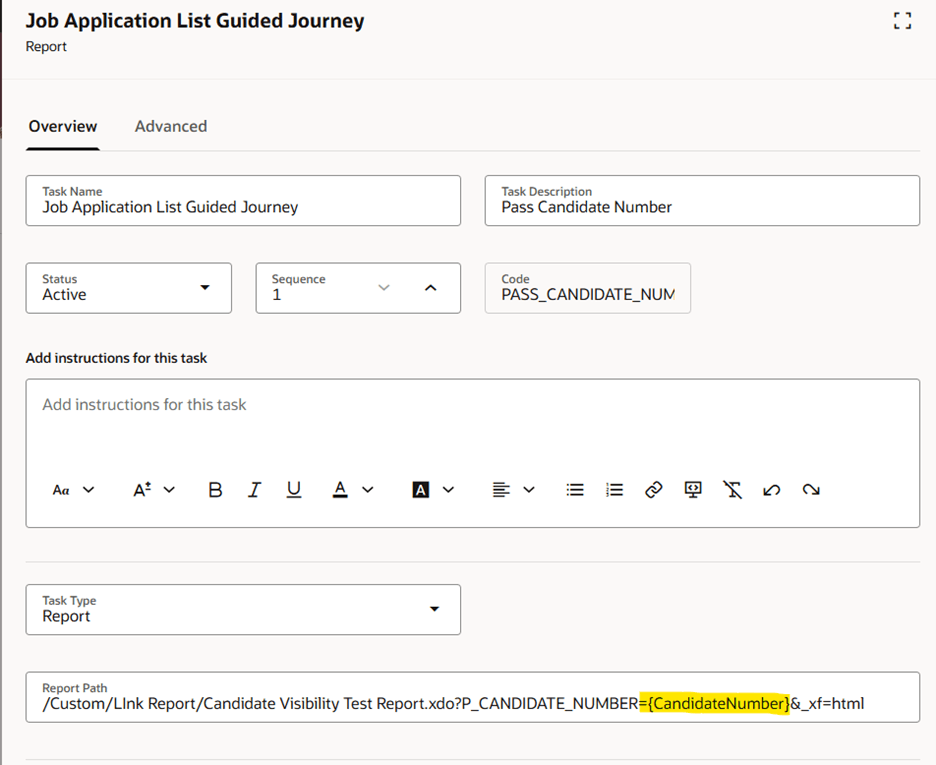
Report path for a guided journey
You then need to enable a guided journey on the Redwood job applications details page.
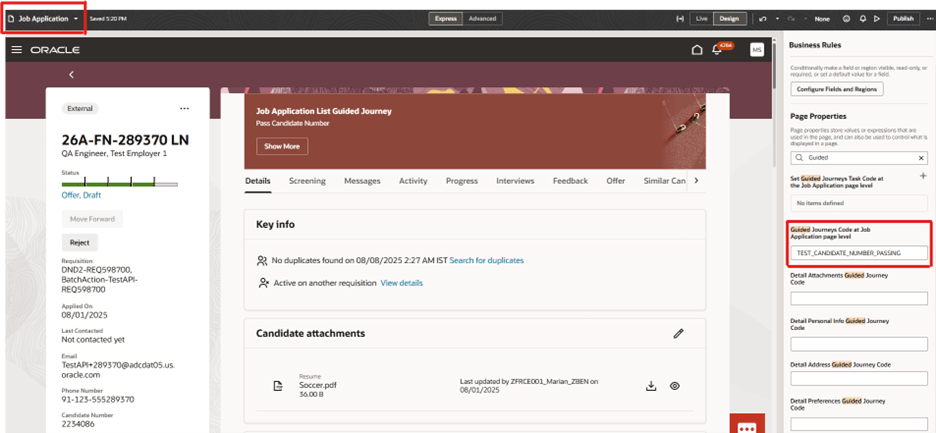
Guided journey page property