Facilitators Add Rating Comments During Talent Review
Facilitators can add a justification comment for each rating in the Table view while conducting a Talent Review meeting. They can edit or remove the comment until the meeting is submitted.
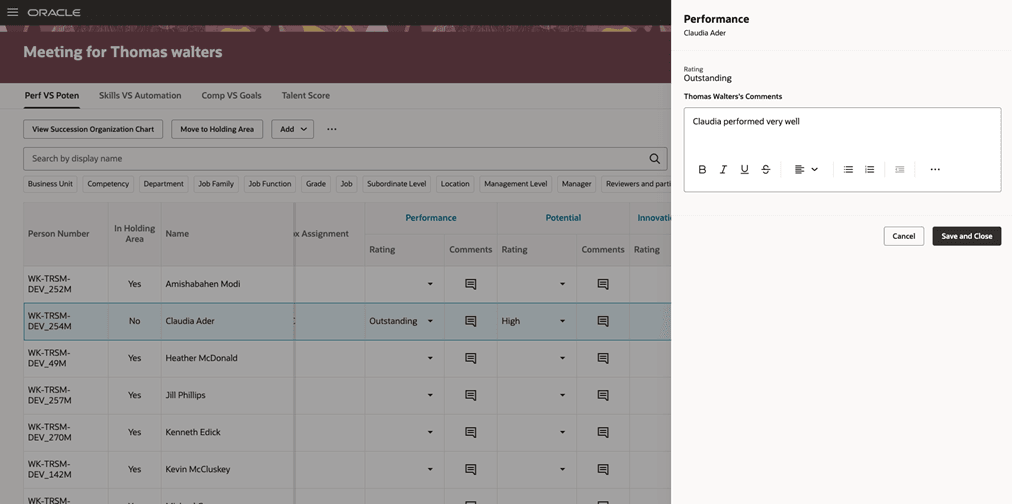
Facilitator comments panel for a rating
Manager comments remain separate from facilitator comments. When the meeting is submitted, facilitator comments are retained in Talent Profiles with a different source from manager comments.
This enhancement helps facilitators to capture the rationale for rating changes during the meeting while preserving separate manager and facilitator perspectives.
Steps to enable and configure
Edit the Talent Review meeting dashboard page in Visual Builder Studio and set the Show Facilitator Comments page property to true. For more information on how to do this, see How do I control the display of a UI element in Visual Builder Studio?.
Tips and considerations
- A facilitator can add only one comment for each rating; multiple facilitator comments for a single rating isn’t supported.
- Manager comments remain read-only when shown with facilitator comments.
Key resources
For more information on extending Redwood pages in HCM, refer to this guide on the Oracle Help Center: