Labor Hour Standard Staffing Grid Calculations
Use the Labor Hour Standard calculation type when staffing demand varies with workload volume. The calculation multiplies each volume point by its configured Labor Hour Standard to determine staffing hours, then converts those hours into worker requirements for the staffing grid’s time intervals.
Staffing Grid Configuration
On Staffing Grid Configuration, select Labor Hour Standard as the calculation type for a job or job qualification. Enter a positive decimal Labor Hour Standard value and a minimum staffing level. These values establish how the application calculates staffing requirements when you prepare the grid.
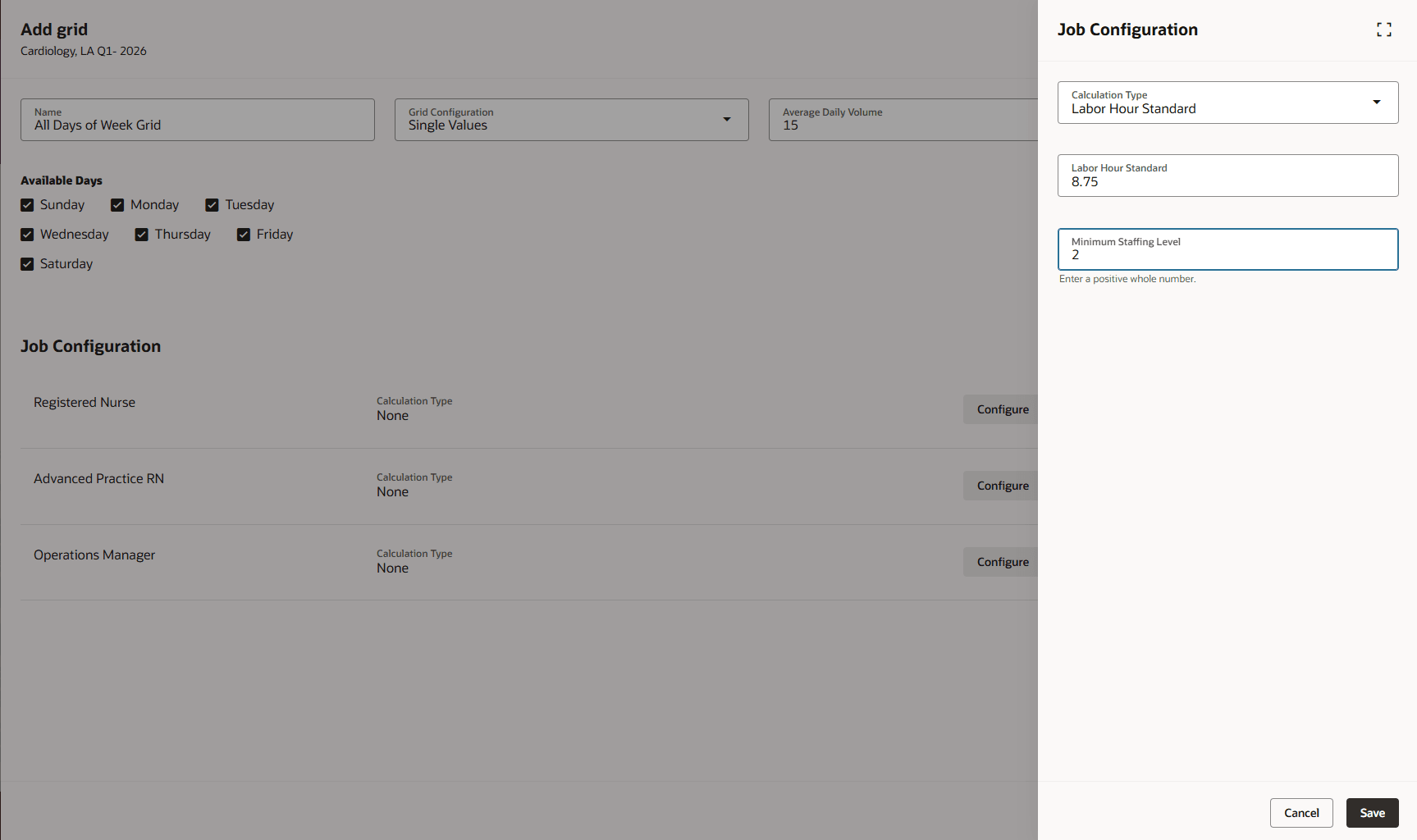
Staffing Grid Configuration
Staffing Grid Details
On Staffing Grid Details, review the calculated worker requirements for each volume point and time interval. Labor Hour Standard values default from the job configuration, but you can override them for a specific grid when the staffing plan requires a different value. The page identifies overrides, displays a warning when the entered requirement differs from the calculated value, and lets you use Reset to restore the job-level configuration.
Additional grid controls
- Override Labor Hour Standard values at the grid level and use Reset to restore the job-level configuration.
- Configure decimal volume display ranges that remain contiguous from 0 through the maximum capacity.
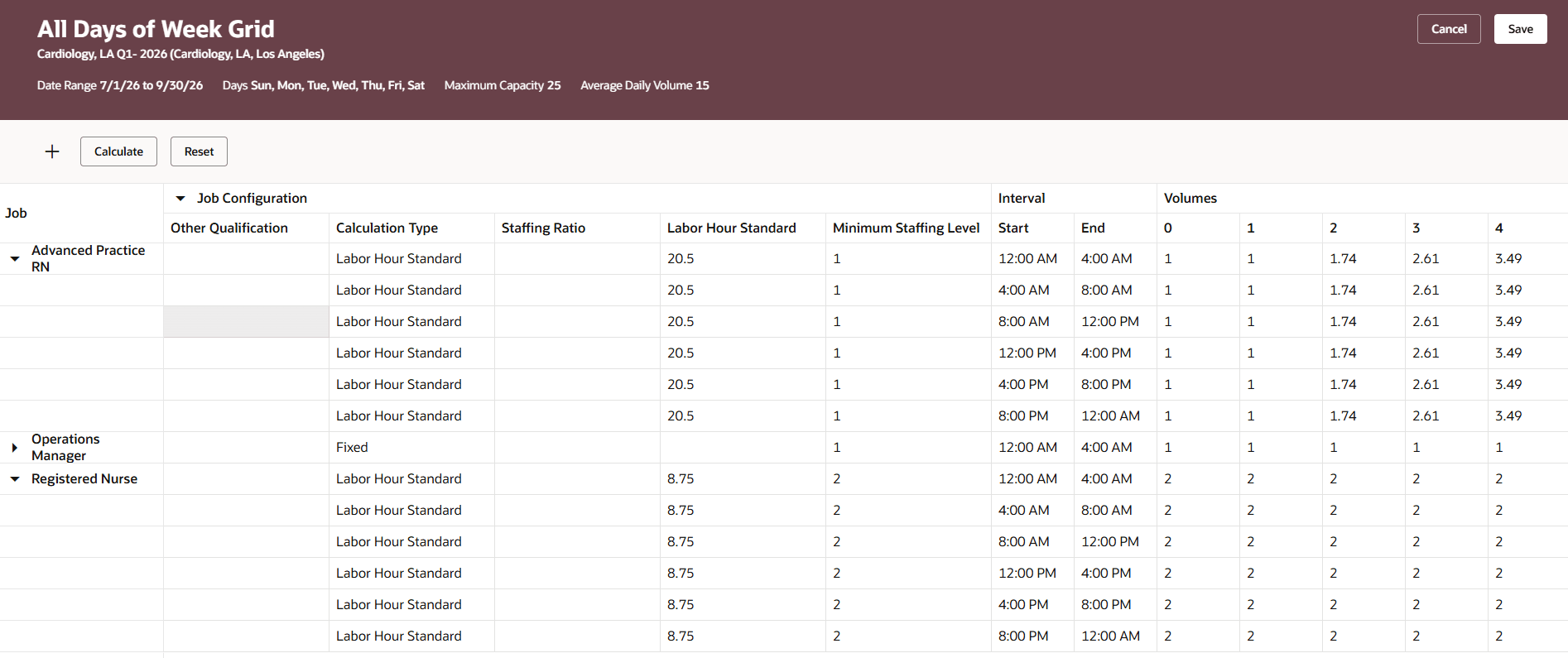
Staffing Grid Configuration
Example 1: One interval
A healthcare organization uses patient visits to plan staffing coverage. For a volume point of 10 patient visits and a Labor Hour Standard of 8.75 staffing hours per visit, the application calculates 87.5 staffing hours. If the workday contains one 24-hour interval, the requirement for that interval is 3.65 workers.
Staffing Grid 24-hour Example
| Calculation step | Input or formula | Result |
|---|---|---|
| Volume Type | Patient Visits | - |
| Volume point | 10 | - |
| Labor Hour Standard | 8.75 staffing hours per volume point | - |
| Staffing-hours | 10 x 8.75 | 87.50 hours |
| Workday interval | 24 hours | 100% of the workday |
| Worker requirement | 87.50 / 24 | 3.65 workers |
Example 2: Multiple intervals
For multiple intervals, the application allocates staffing hours based on each interval’s duration relative to the total workday, then calculates the worker requirement for each interval. In this example, the same 87.5 staffing hours are allocated across three intervals in a 24-hour workday. Longer intervals receive a larger share of staffing hours. In this example, the worker requirement remains consistent because hours are allocated in proportion to interval duration.
Staffing Grid Multiple Intervals Example
| Calculation step | Input or Formula | Result |
|---|---|---|
| Total staffing-hours requirement | 10 * 8.75 | 87.50 hours |
| 7:00 AM-3:00PM allocation | 8 hours / 24 x 87.50 | 29.17 hours / 3.65 workers |
| 3:00 PM–7:00 PM allocation | 4 hours ÷ 24 × 87.50 | 14.58 hours / 3.65 workers |
| 7:00 PM–7:00 AM allocation | 12 hours ÷ 24 × 87.50 | 43.75 hours / 3.65 workers |
| Total | 24-hour workday | 87.50 hours |
Help organizations model staffing demand from workload volumes and distribute requirements across working time intervals. This supports staffing plans, labor cost forecasting, and budgeting with consistent calculations.
Steps to enable and configure
- On Staffing Grid Configuration, select Labor Hour Standard as the calculation type for the job or job qualification.
- Enter a positive decimal Labor Hour Standard value and the minimum staffing level.
- Prepare or calculate the staffing grid to calculate staffing requirements for configured volume points and time intervals.
- When a Labor Hour Standard time interval is added or deleted, click Calculate before saving the grid.
- Optional: Enter a decimal range increment when configuring volume display headers.
Tips and considerations
- Labor Hour Standard and Staffing Ratio values are mutually exclusive.
- All applicable time intervals for a job or job qualification use the same Labor Hour Standard calculation type.
- For volume ranges, the application uses the maximum range value as the Labor Hour Standard multiplier.
- Minimum staffing remains independent of calculation-type changes.
Key resources
Staffing Plans and Grids Feature Introduction
Access requirements
No additional security is needed for the Labor Hour Standard calculation type.