Inventory Reservation Available for Trade Incentive Programs
This feature allows you to pre-allocate a quantity of goods for a specific purpose, ensuring inventory is available for future use. When you run the Reserve Inventory action, GTM identifies and reserves the necessary items. The reserved quantity is reflected in the Trade Incentive Program Inventories, and a new Trade Incentive Program Inventory Movement is created with a Usage Type of RESERVED. When you are ready to reconcile the inventory, you can run the Perform Entry/Exit Recording action to adjust the balances.
The following enhancements are available:
- Reserve Inventory action on Declaration and Declaration Line
- New fields on the Trade Incentive Program Inventory and Trade Incentive Program Inventory Movement to support inventory reservation
- New Status Types/Values on Declaration Line
- Reverse Reservation using the Revert Entry/Exit Recording action on Declaration or Declaration Line
Reserve Inventory action on Declaration
A new Reserve Inventory action is now available on the Declaration and Declaration Line, allowing you to reserve inventory quantities for goods. At a later stage, these reserved quantities can be released for consumption and appropriately reconciled.
When this action is executed, GTM identifies the relevant inventory, matches it to the declaration, and reserves the specified quantity of goods. The Trade Incentive Program Inventories are updated to reflect the reservation, and a corresponding Trade Incentive Program Inventory Movement is created with a Usage Type of RESERVED.
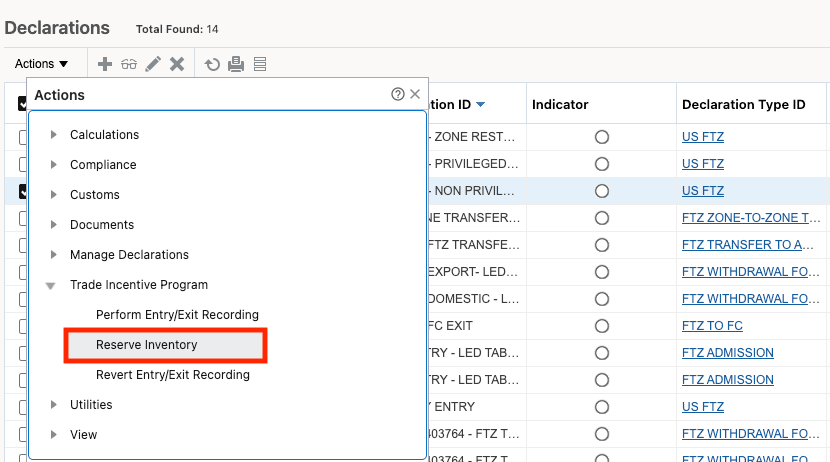
Declaration Actions - Reserve Inventory
New Fields on Trade Incentive Program Inventory and Trade Incentive Program Inventory Movement
New fields have been introduced on the Trade Incentive Program Inventory and Trade Incentive Program Inventory Movement to display reservation details. Specifically, the Trade Incentive Program Inventory now includes Reserved Quantity and UOM fields, which are available on the finder, finder result, view, and edit pages.
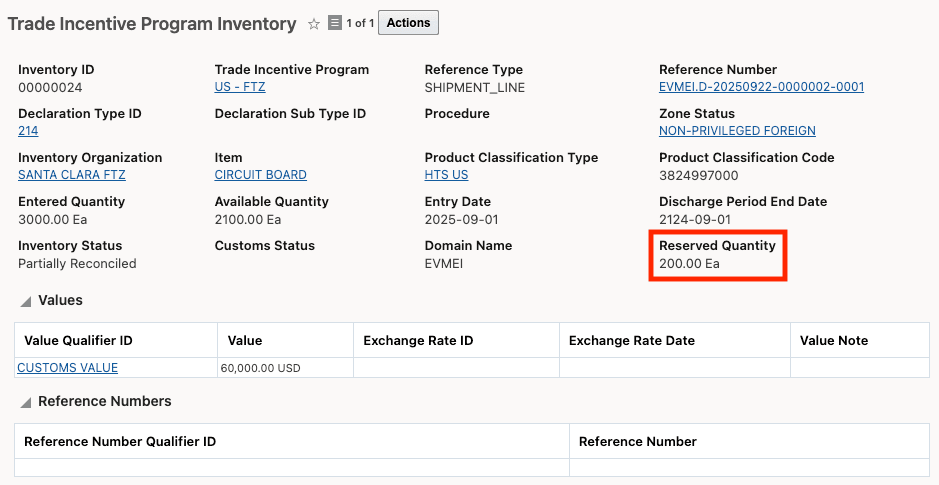
Trade Incentive Program Inventory
The Trade Incentive Program Inventory Movements now include a Usage Type field, which is available on the finder, finder result, and view pages.
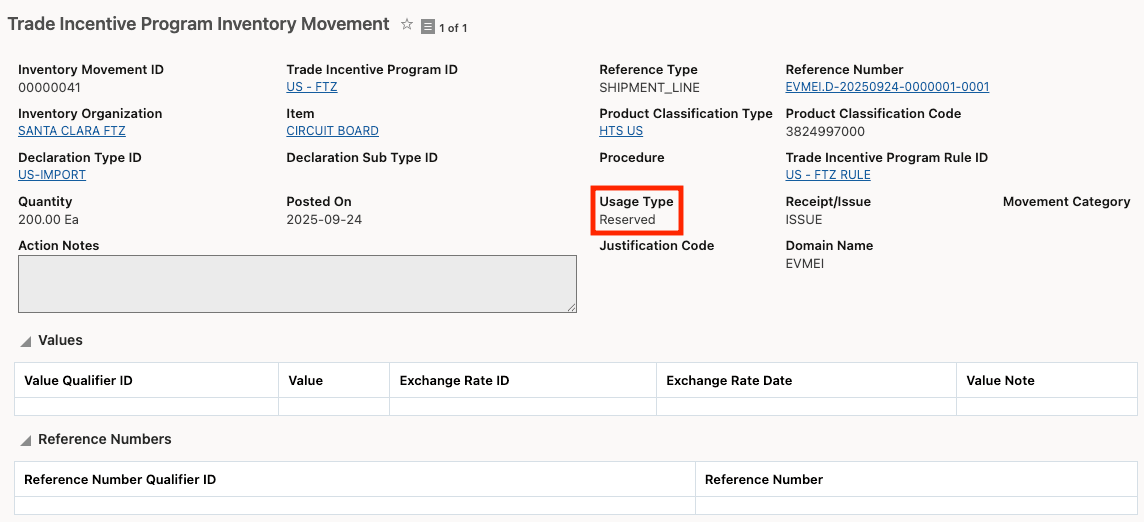
Trade Incentive Program Inventory Movement
New Status Types/Values on Declaration Line
A new Status Type, TL_TIP_RESERVATION, has been added to the declaration line to support inventory reservation. When the Reserve Inventory action is executed, the status on the declaration line is set to one of the following Status Values:
- TL_TIP_RESERVATION_NOT_STARTED
- TL_TIP_RESERVATION_IN_PROGRESS
- TL_TIP_RESERVATION_COMPLETED
- TL_TIP_RESERVATION_COMPLETED_NO_RESERVATION
- TL_TIP_RESERVATION_FAILED
- TL_TIP_RESERVATION_PARTIAL_PROCESSED
Reverse Reservation using Revert Entry / Exit Recording action on Declaration
After you have reserved inventory, you can reverse the reservation using the Revert Entry/Exit Recording action on the same declaration or declaration line. When this action is executed, GTM returns the reserved quantity to the available inventory balance.
Business Benefit: This feature enhances control over inventory allocation by allowing users to reserve inventory for specific trade incentive programs and reconcile movements as needed. It minimizes the risk of stock shortages, improves accuracy in inventory reporting, and enables better planning and compliance with program requirements.
Steps to enable and configure
You don't need to do anything to enable this feature.