Support for an Internal Business Unit as a Supplier in Trade Agreements
This feature introduces enhancements that improve support for business units supplying components to other business units for use in manufacturing finished goods. For instance, a large company may utilize a single GTM domain to centrally store data for all its business units and associated inventory organizations.
Consider the example of BICO Bicycle, which operates multiple business units—including one in Mumbai and another in Gurugram. Each business unit can have several inventory organizations. The Mumbai business unit supplies handlebars to the Gurugram business unit for use in assembling finished bicycles. Accordingly, two items representing the handlebars are maintained in the GTM domain: one for the Mumbai business unit (the supplier), and one for Gurugram (the manufacturer).
Because both business units belong to the same company, there is no need to request certificates of origin for the handlebars from the internal supplier. Additionally, it is preferable to reference the qualification details on the supplier item (from Mumbai) when qualifying the finished good, since that is where such information resides.
To enable this scenario, multiple business objects must be configured appropriately within the system.
Party Configuration
Multiple parties are configured in GTM, including all business units and their associated inventory organizations. To indicate relationships between parties, you can add a remark to the Party record with a Remark Qualifier ID = INTERNAL PARTY and Remark Text = YES. This designation is used during supplier solicitation and qualification processes to determine whether a supplier is internal or external.
For example, in this scenario, the business unit and inventory organization supplying the component are based in Mumbai. Specifically, you have the business unit BICO BU MUMBAI and its related inventory organization BICO INV ORG MUMBAI. Both are identified as internal parties by marking them with the INTERNAL PARTY remark qualifier.

Party Finder Results - Supplier Organization
You also have a business unit and inventory organization responsible for receiving the component and manufacturing the finished good. In this example, the business unit, BICO BU GURUGRAM, and its associated inventory organization, BICO INV ORG GURUGRAM, are both designated as internal parties by applying the INTERNAL PARTY remark qualifier.

Party Finder Results - Receiving Organization
Party Site
You also have party sites, which establish the linkage between each business unit and its associated inventory organizations. In this example, there are two party sites: one for Mumbai and one for Gurugram. Here, the party represents the business unit, while the location corresponds to the site of the related inventory organization. The Location ID, together with the Partner Item (as discussed below), provides the necessary linkage and enables the system logic to identify that a component is sourced from a related party.

Party Site Finder Results
Trading Partner Item
The Trading Partner Item details establish the linkage between the business unit and the trading partner item, informing GTM which partner is supplying a given item. For this configuration:
- Trading Partner Type = Supplier
- Trading Partner = the business unit of the supplier which is BICO BU MUMBAI
- Trading Partner Item Identifier = GID of the item for the supplier component which includes the domain name and the XID of BICO BIKE HANDLE BAR 54T56 MUMBAI.
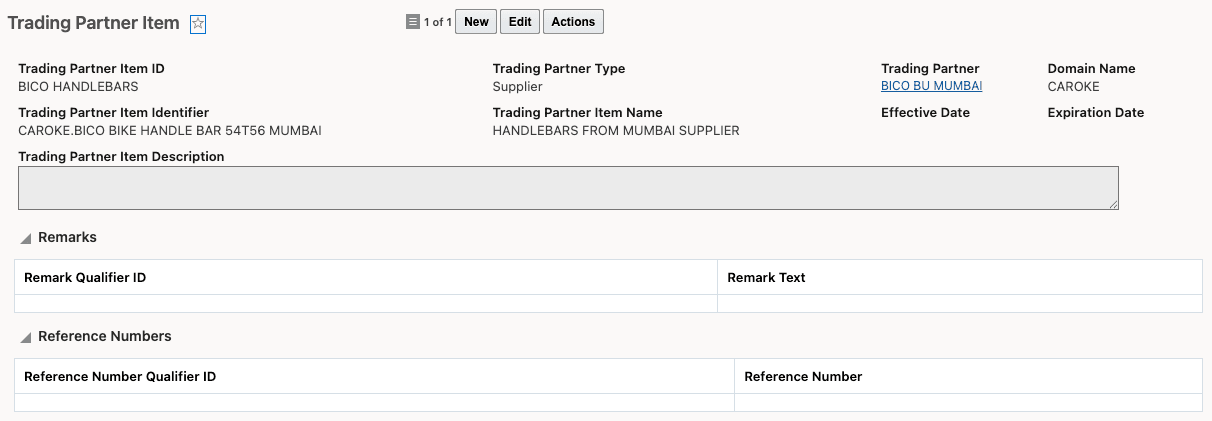
Trading Partner Item
Supplier Item Component Configuration
The supplier component item must have defined item origin and item qualification details. In this example, the supplier component—sourced from BICO INV ORG MUMBAI—is qualified under the SG-IN trade agreement.
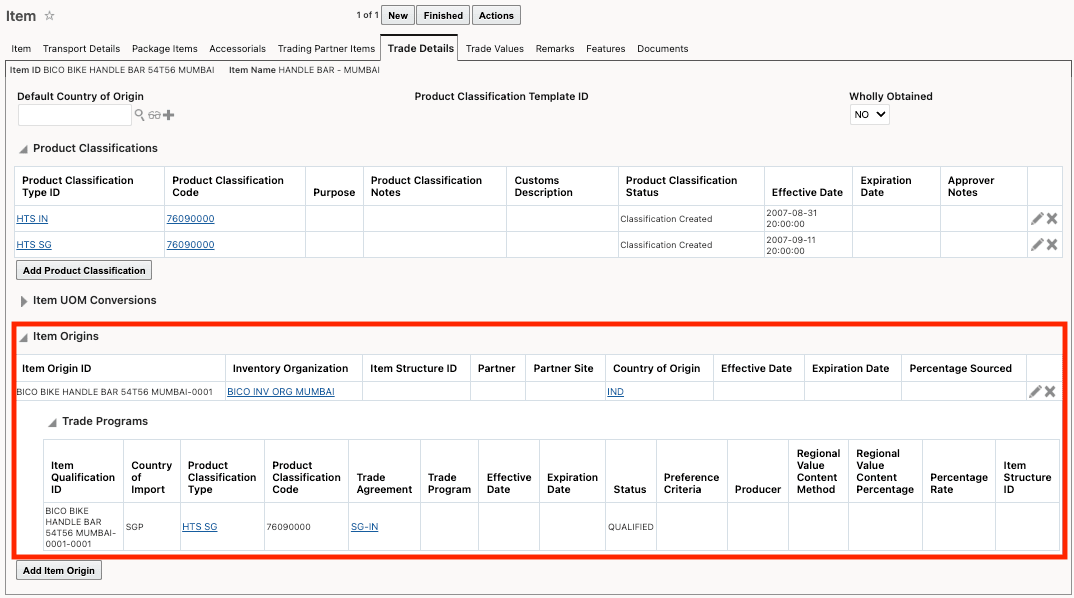
Supplier Item - Trade Details Tab
Manufactured Item Component Configuration
The item defined by the business unit receiving the component for the finished good provides the linkage to the supplier’s trading partner item. On the Item > Trading Partner Items tab, specify that the Mumbai business unit is the supplier of the component. In this scenario, the item being configured is the handlebars used in the bicycle manufactured in Gurugram, while the trading partner item details reference the component supplied from Mumbai. For this configuration:
- Trading Partner Item previously created is specified. In this example, the Trading Partner Item is BICO HANDLEBARS.
- Party Site previously created is specified. In this example, the Party Site is BICO INV ORG MUMBAI, the supplier of the handlebars.
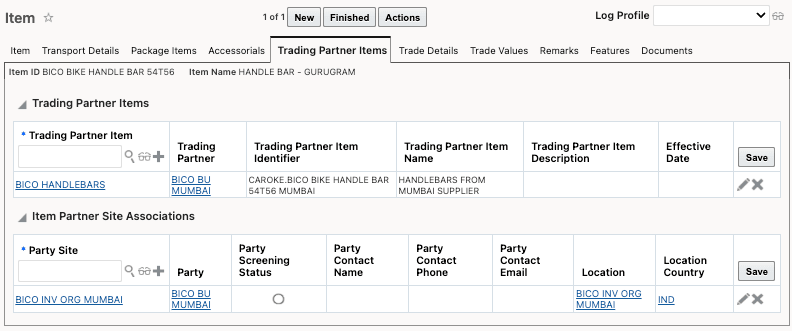
Item - Trading Partner Items Tab
On the Item > Trade Details tab, link the Inventory Organization for the finished good with the Partner and Partner Site for the component. Notice that in the Item Origins grid, the:
- Inventory Organization is the business unit where the finished good is manufactured. In this example, it is BICO BU GURUGRAM.
- Partner is the business unit of the supplier of the component. In this example, it is BICO BU MUMBAI.
- Partner Site is the supplier of the component. In this example, it is BICO INV ORG MUMBAI.
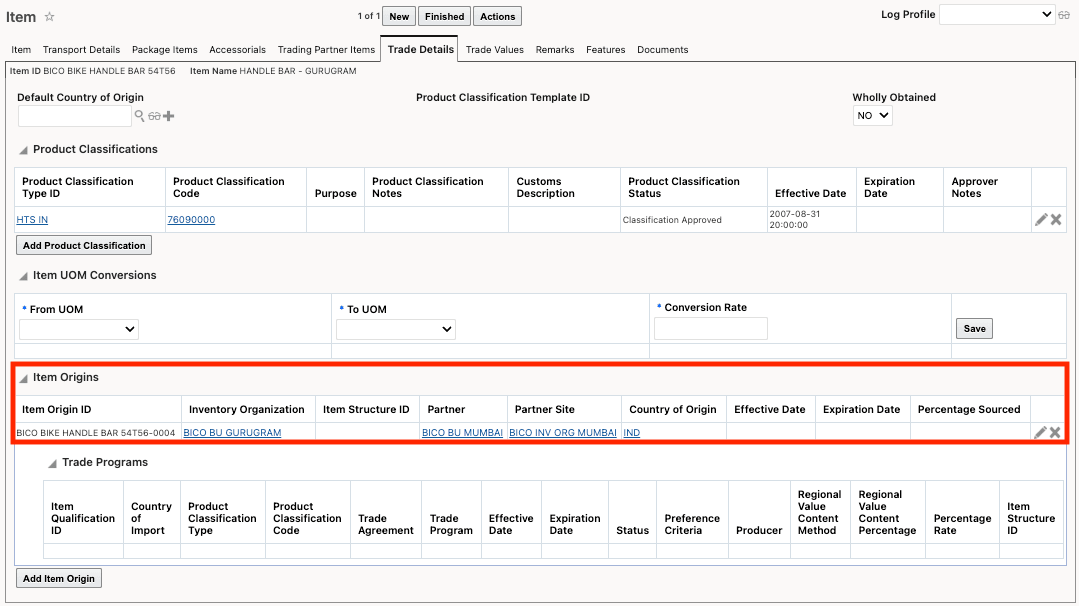
Item - Trade Details Tab
Trade Item Structure
In the trade item structure for the finished good being manufactured, include the component supplied by the internal business organization. When configuring the component in the trade item structure, the Partner and Partner Site should reference the supplier of the component. These values should match those specified in the Item Origin on the Trade Details tab of the component item for the finished good. In this example, the Partner is BICO BU MUMBAI, and the Partner Site is BICO INV ORG MUMBAI.
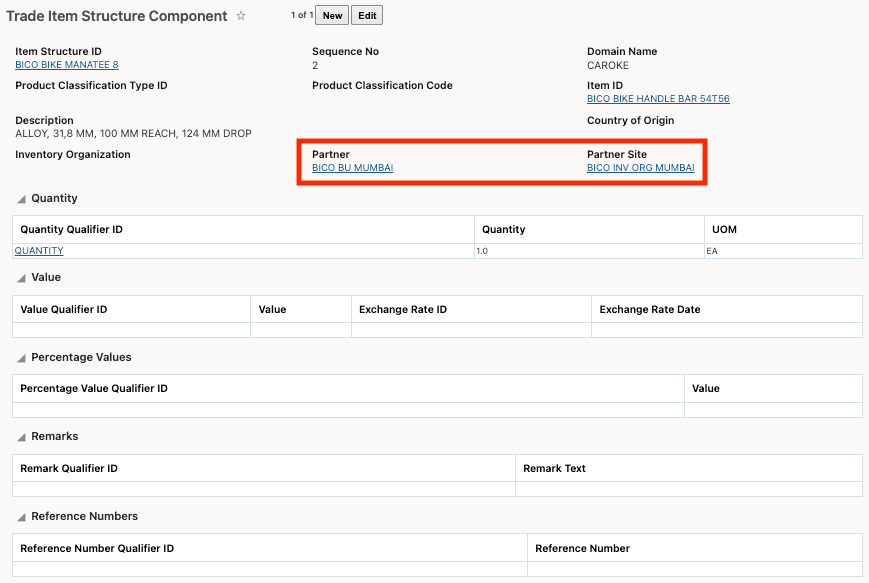
Trade Item Structure Component
Logic Configuration
New parameters are available in logic configuration to guide how GTM handles supplier solicitation and qualification for related business units within the same company. For supplier solicitation, the parameter SKIP CAMPAIGN FOR INTERNAL PARTY is now available under Logic Configuration Type = GTM CAMPAIGN CONFIGURATION.
- When this parameter is set to Yes and the partner has a Remark Qualifier ID = INTERNAL PARTY with Remark Text = YES, supplier solicitation is not performed for the corresponding partner items.
- When the parameter is set to No, or if the partner has a Remark Qualifier ID = INTERNAL PARTY with Remark Text = NO, supplier solicitation is performed for the corresponding partner items. (This is the default setting.)
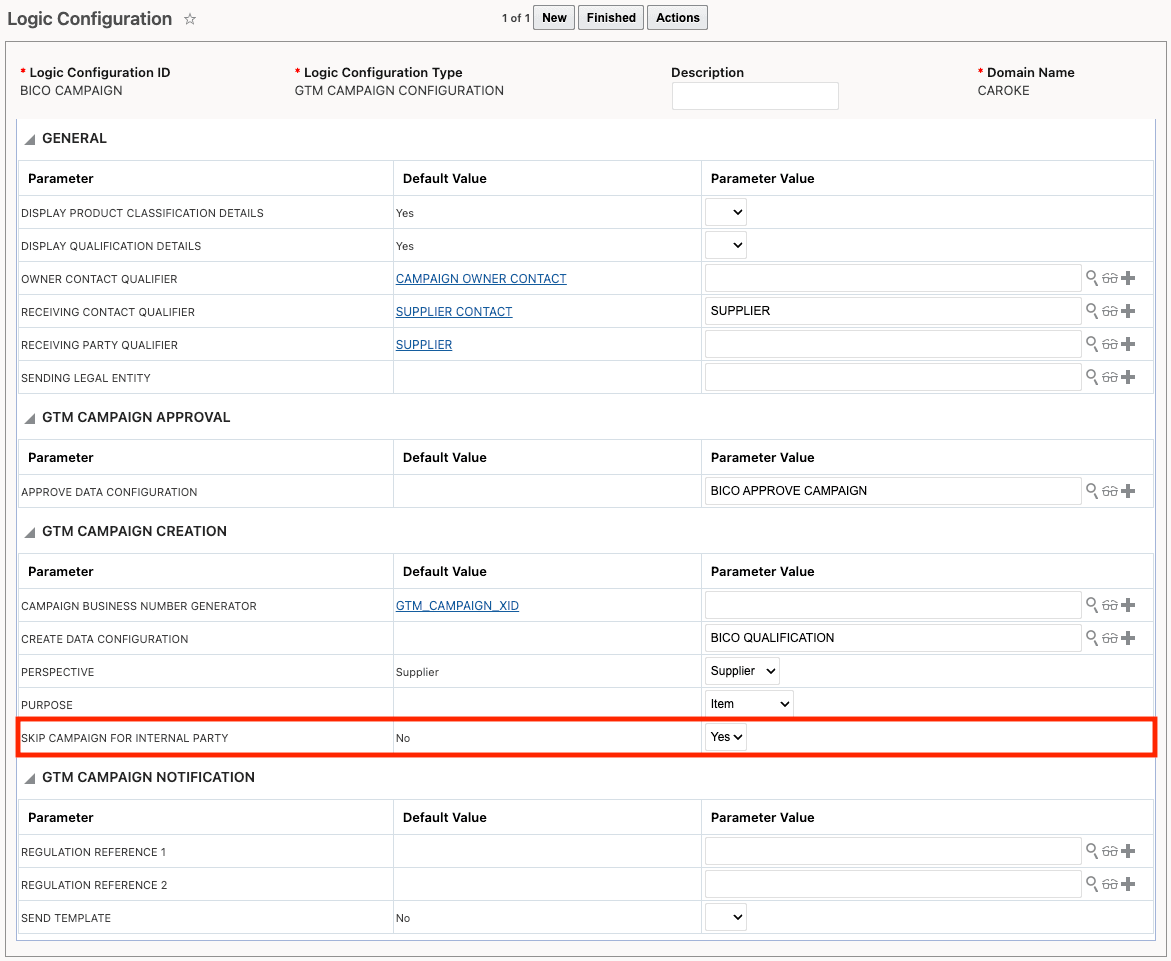
Logic Configuration for Supplier Solicitation
For qualification, a new parameter called LOOKUP QUALIFICATION FOR INTERNAL PARTY is available under both Logic Configuration Type = GTM LOGIC CONFIGURATION and GTM TRANSACTION CONFIGURATION. When qualification is performed for a finished good:
- If the parameter is set to Yes and the partner has a Remark Qualifier ID = INTERNAL PARTY with Remark Text = YES, GTM first checks the leaf component of the finished good for qualification details. If no qualification details are found, GTM then refers to the Trading Partner Item tab, links to the internal supplier, and uses the qualification details from the associated supplier item.
- If the parameter is set to No, or if the partner has a Remark Qualifier ID = INTERNAL PARTY with Remark Text = NO, GTM checks the leaf component for qualification details. If none exist, the component is considered non-originating. (This is the default value.)
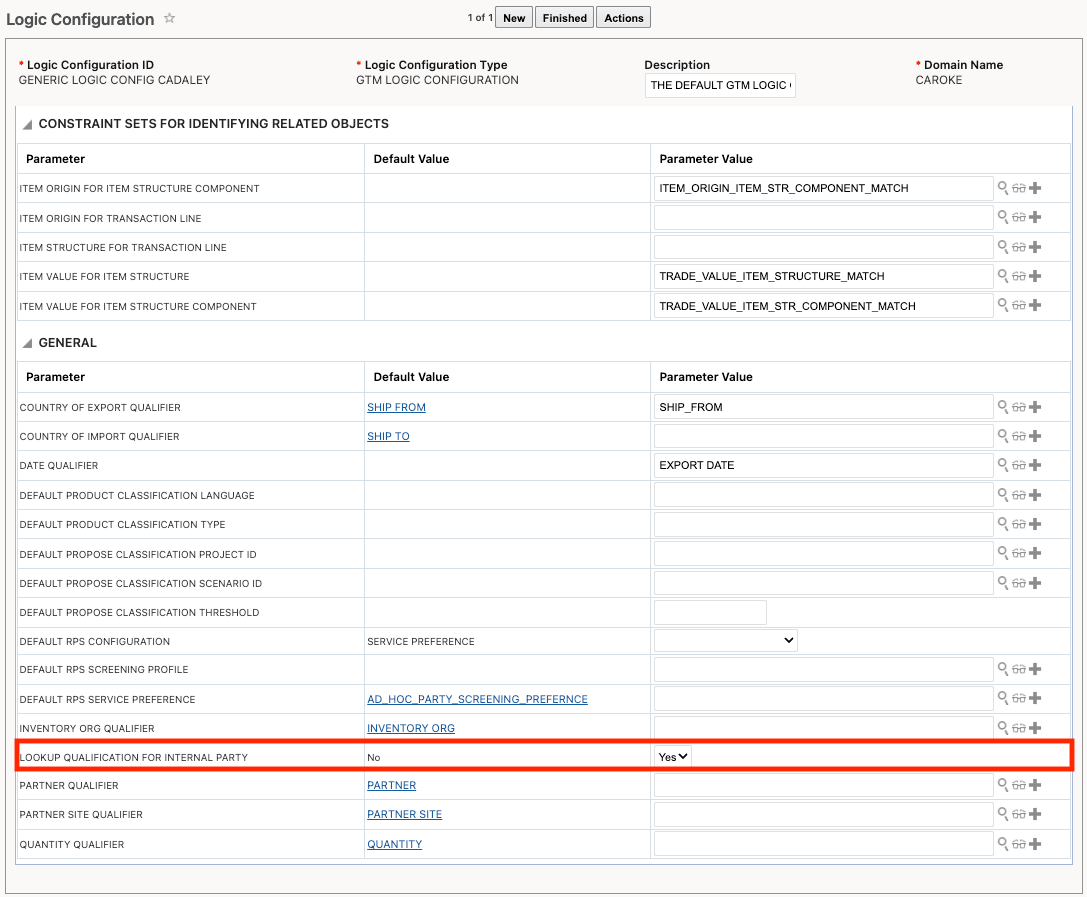
Logic Configuration for Qualification
Business Logic
Once supplier solicitation is configured, GTM uses the logic configuration parameter SKIP CAMPAIGN FOR INTERNAL PARTY to determine whether supplier solicitation should be performed for an internal supplier. If this parameter is set to Yes and the party is marked as an internal party in the remarks, a campaign line is not created for that supplier.
For qualification, GTM relies on the logic configuration parameter LOOKUP QUALIFICATION FOR INTERNAL PARTY to decide if the qualification should be retrieved from the supplier item. If this parameter is set to Yes and the party is marked as an internal party in the remarks, GTM first checks if the component item associated with the finished good is qualified and uses those details. If not, GTM references the Trading Partner Item tab to link to the internal supplier and uses the qualification details from the associated supplier item.
Business Benefit: This feature enables compliance with regulatory requirements by allowing you to accurately report import duties for steel, aluminum, and other specified articles. By splitting declaration lines according to the percentage of steel or non-steel content, you can ensure precise reporting to US Customs and Border Protection (CBP). The capability to select applicable penalties, specify content percentages, and automatically calculate line values simplifies the process and helps reduce errors
Steps to enable and configure
You don't need to do anything to enable this feature.