Perform Duty and Tax Calculation for Privileged Foreign or Non-privileged Foreign Zone Status
This feature enables you to calculate duties and taxes for goods processed through a Foreign Trade Zone (FTZ) based on zone status: privileged foreign (PF) and non-privileged foreign (NPF).
For goods in privileged foreign status, duties and taxes are based on the duty rates in effect at the time of admission into the FTZ. For goods in non-privileged foreign status, duties and taxes are based on the duty rates in effect at the time of exit from the FTZ.
GTM can accurately calculate duties and taxes for both PF and NPF goods when entering and exiting the FTZ, including goods manufactured within the FTZ.
-
At the time of admission to the FTZ, GTM uses the existing Estimate Duty and Tax action on the declaration to calculate duties and taxes.
- For privileged foreign status, the duties and taxes calculated at admission are the basis for the amount paid to customs.
- For non-privileged foreign status, the duties and taxes calculated at admission are an estimate.
-
When goods exit the FTZ, GTM uses the zone status to determine the appropriate duty and tax treatment:
- For privileged foreign status, the duties and taxes calculated for the inventory associated with the FTZ entry are used as the basis for the amount paid to customs.
- For non-privileged foreign status, because the admission calculation was only an estimate, GTM re-calculates duties and taxes at exit. The updated amount is used as the basis for the amount paid to customs.
To support this enhancement, a Duty Tax Configuration section is available on the Declaration Type. In this section, you configure:
- Zone status (privileged foreign, non-privileged foreign)
- Source of duty/tax information
- Qualifiers to apply
Enabling this configuration on the declaration type helps ensure duties and taxes are calculated correctly for FTZ admissions and exits.
Declaration Type for Admission to FTZ
When configuring the declaration type for FTZ admission, you can set up Duty Tax Configuration details for both privileged foreign and non-privileged foreign zone status. In this example, there are two rows for PRIVILEGED FOREIGN where the source is an external system (for example, Descartes) using its source value qualifiers to calculate DUTY and HMF; when the values are returned to GTM, they are stored on the declaration line under the target value qualifiers DUTY DEFERRED and HMF DEFERRED. There are also two rows for NON-PRIVILEGED FOREIGN using the same external source and qualifiers to calculate DUTY and HMF, but the returned values are stored on the declaration line under DUTY ESTIMATE and HMF ESTIMATE.
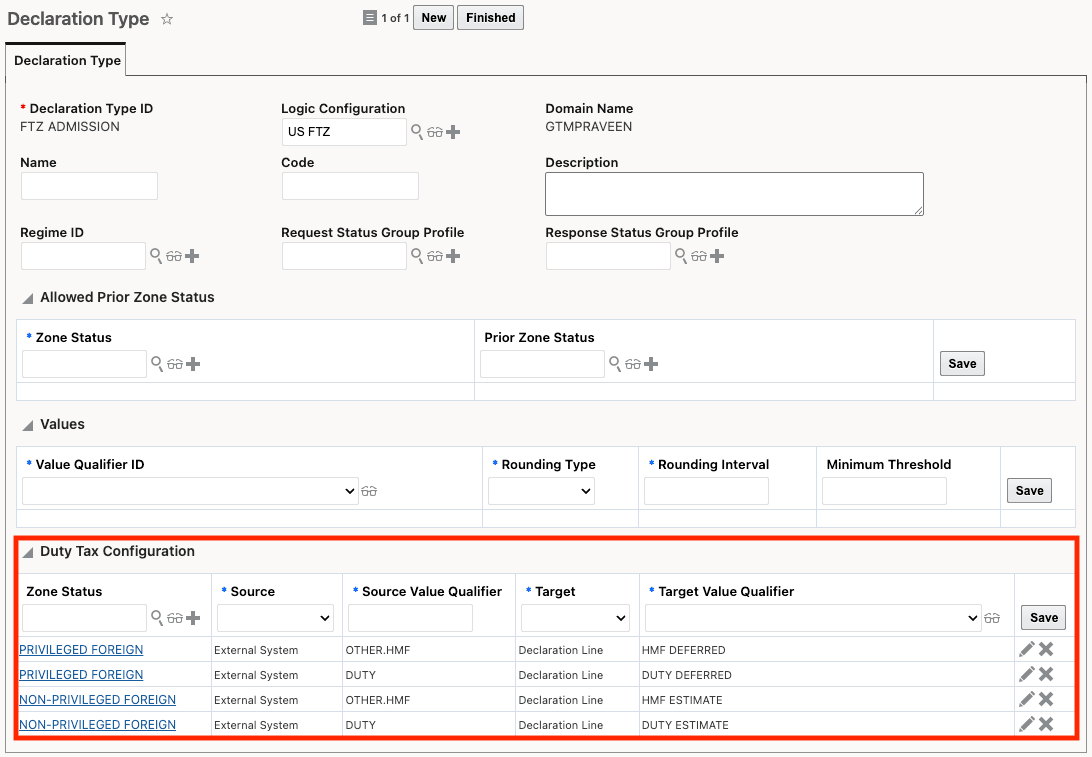
Declaration Type for FTZ Admission
Declaration Type for Exit from FTZ
When configuring the declaration type for FTZ exit, you can define Duty Tax Configuration details for both privileged foreign and non-privileged foreign zone status. In this example, two rows are configured for PRIVILEGED FOREIGN where the source is Custom Inventory in GTM; because the inventory created at FTZ admission includes duty and tax details, GTM uses the inventory’s source value qualifiers (in this case HMF DEFERRED and DUTY DEFERRED) and stores the calculated results on the declaration line using the target value qualifiers HMF and DUTY. For NON-PRIVILEGED FOREIGN, GTM relies on the standard duty/tax calculation configuration (for example, via an external system), so you do not need to configure non-privileged details on the declaration type if you are using the standard setup.
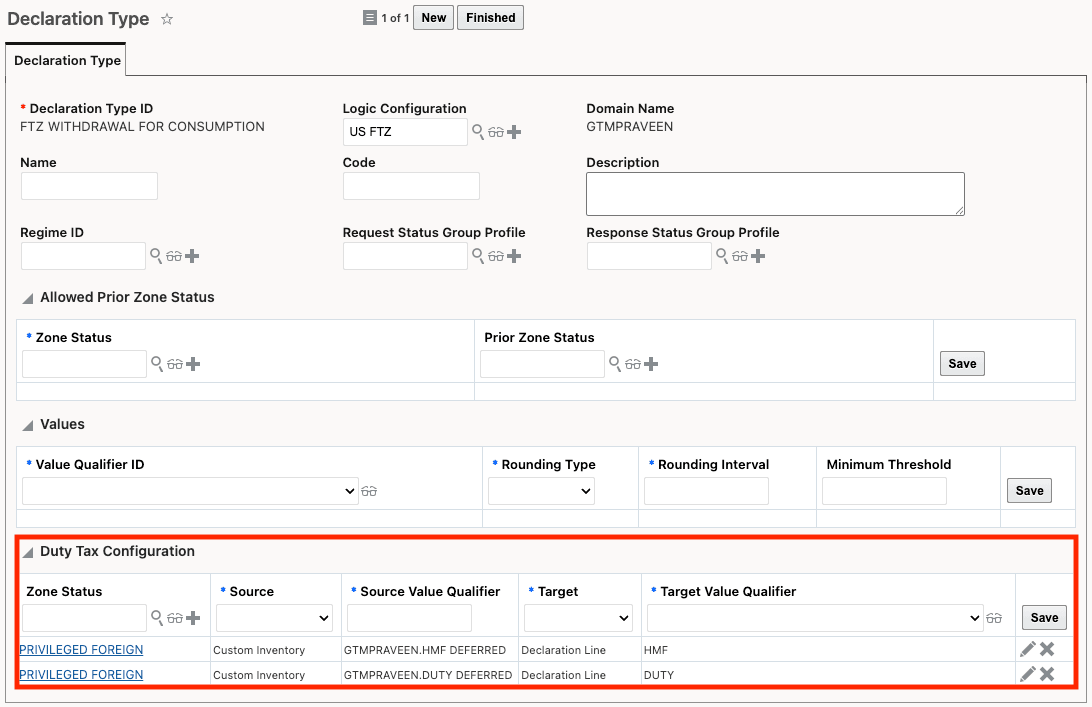
Declaration Type for FTZ Exit
Note: If the Source Value Qualifier is in a domain other than PUBLIC, you must include the domain name as part of the qualifier.
Process for Goods Entering the FTZ
The declaration and declaration lines are used to model goods entering an FTZ. First, run the Estimate Duties & Taxes action to calculate duties and taxes for each declaration line.
-
For privileged foreign zone status, the duties are stored in the configured Value Qualifier on the declaration line based on the Declaration Type setup. When you run Perform Entry/Exit Recording, the duties and taxes are copied to inventory and will ultimately be copied to the exit declaration lines to be paid when the goods exit the FTZ.
-
For non-privileged foreign zone status, the estimated duties are stored in the configured Value Qualifier on the entry inventory based on the Declaration Type setup. Because these duties and taxes are estimates only, GTM re-calculates duties and taxes when the goods exit the FTZ.
In this example, you are importing an engine, chassis, and tires to build a car in the FTZ: the engine and chassis are privileged foreign zone status, and the tires are non-privileged foreign zone status.

Declaration Lines for Entry to FTZ
Once duties and taxes are calculated on the entry declaration lines, you can run the Perform Entry/Exit Recording action to create the inventory for the FTZ admission. Each declaration line generates a corresponding inventory record, and the calculated duty and tax amounts are stored on that inventory using the Value Qualifier defined on the declaration type.
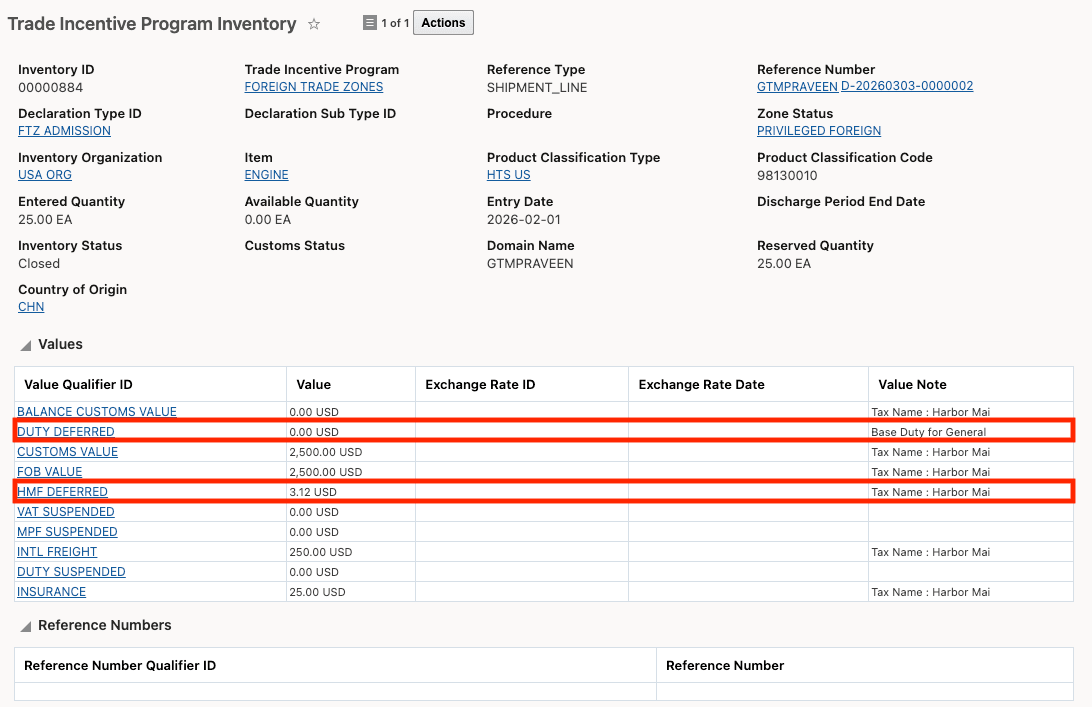
Trade Incentive Program Inventory
Process for Goods Exiting the FTZ
A declaration and its declaration lines are used to model goods exiting an FTZ. When you are ready to process the exit, run the Reserve Inventory action; GTM determines the zone status for each declaration line and, for manufacturing scenarios, may create separate exit declaration lines by zone status and update each line accordingly.
- For privileged foreign zone status, GTM uses the duty and tax values from the entry inventory because they were calculated when the goods entered the FTZ. For manufactured goods, the duty/tax for privileged components is included in the finished-good declaration line.
- For non-privileged foreign zone status, GTM re-calculates duties and taxes at exit. These items are split from the finished-good line so they can be calculated and reported separately, and GTM ensures the non-privileged value is correctly allocated to the split declaration lines.
After reserving inventory for the exit, run Estimate Duty and Taxes to obtain updated duty and tax details for the non-privileged declaration lines; GTM receives the updated values and stores them on the declaration and declaration lines. In this example, the imported goods have been manufactured into a car: the engine and chassis (privileged foreign) are split into separate reporting lines, while the car includes the duty and tax for the tires.

Declaration Lines for Exiting a FTZ
Business Benefit: This enhancement improves compliance and accuracy by calculating FTZ duties and taxes according to privileged or non-privileged zone status, using admission rates for privileged goods and exit rates for non-privileged goods. It reduces manual effort and the risk of over/underpayment by calculating duty rates at admission and, when required, recalculating at exit, including FTZ manufacturing scenarios.
Steps to enable and configure
Declaration types must be created for both entry into the FTZ and exit from the FTZ. For both declaration types, configure the Duty Tax Configuration to tell GTM the source of the duty/tax data, where the duty/tax information should be stored, and the required value-qualifier mappings.
Note: For the entry into the FTZ, the Source is usually set to External System since you do not have an inventory.
Tips and considerations
When configuring Declaration Type > Duty Tax Configuration with Source = External System, use the existing Estimate Duty and Tax action on the declaration to retrieve duties and taxes from Descartes based on the configuration you’ve defined. The Source Value Qualifier must use the same qualifiers as those defined in the gtm.dutyTax properties.
Key resources
For more information on calculating duties and taxes using the Estimate Duty and Tax action on transaction, refer to the following topics in help:
- GTM How To/Configuration Topic called Duty and Tax Calculation on Trade Transaction or Declaration
- gtm.dutyTax Properties including the Request and Response Properties for the Value Qualifiers