Copy Country of Origin and Values during Exit from a Foreign Trade Zone
This feature enables you to copy the country of origin and the values from an inventory to a declaration when exiting a foreign trade zone. When a good enters a foreign trade zone, the country of origin, values, reference numbers, and flex fields can be copied to the inventory. When that inventory is exiting a foreign trade zone, the same data can be copied from the inventory to the exit declaration. The existing data configuration for copying data from an inventory to exit line has been enhanced to copy country of origin and values in addition to other data.
Data Configuration
You can use a data configuration to define what data is copied from the inventory to an exit declaration (or declaration line). Select the Type Inventory – Exit Line. For the Inventory-Line association, Country of Origin and Values are available to copy. On the Attributes Details tab, no additional attributes are required for Country of Origin. For Values, you must specify the Source Value Qualifier (on the inventory), the Target Value Qualifier (on the declaration line), and the Copy Option.
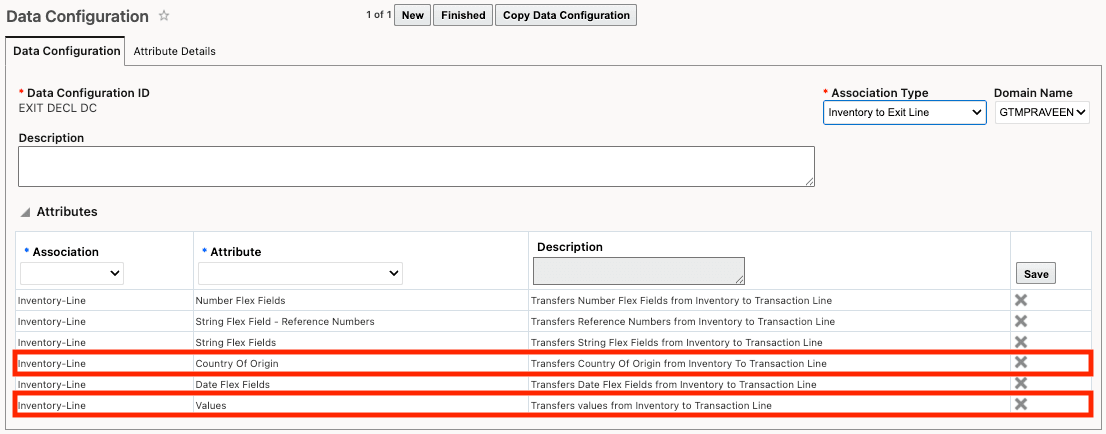
Data Configuration with Association Type Inventory to Exit Line
Trade Incentive Program
After you configure the data configuration, assign it to your Trade Incentive Program in the Exit Declaration Data Configuration ID field. Once it’s defined on the program, GTM uses the specified data configuration to determine the rules for copying data to the exit declaration.
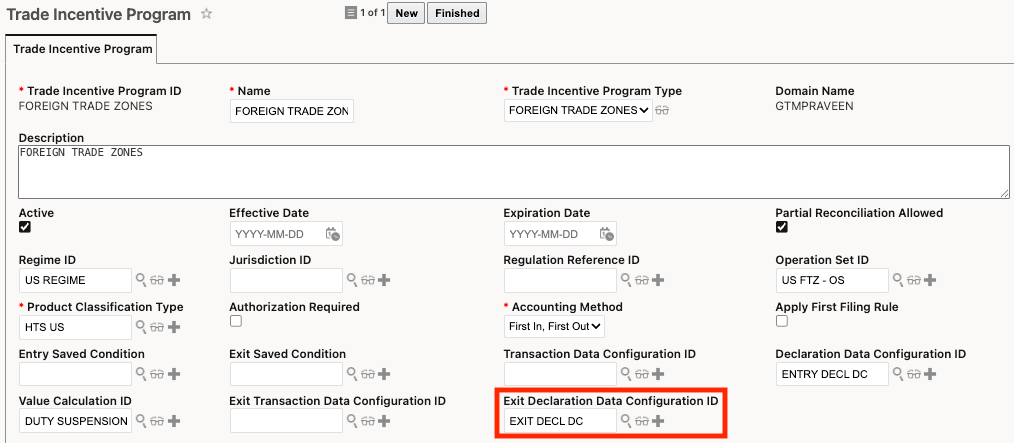
Trade Incentive Program
Perform Entry/Exit Recording Action
Once you have a declaration representing the foreign trade zone exit, run the Perform Entry/Exit Recording action. When it runs, GTM copies data from the inventory to the exit declaration and declaration lines according to the rules defined in your data configuration.
Business Benefit: Enhancing the copy-from-inventory configuration to include country of origin and values speeds up foreign trade zone exit declarations, improves data accuracy and compliance, strengthens traceability between entry and exit records, and reduces manual effort and rework.
Steps to enable and configure
- Create a data configuration with a Type of Inventory – Exit Line, specifying the data you want to copy from inventory to the exit declaration and declaration lines.
- Assign the data configuration to the Trade Incentive Program using the Exit Declaration Data Configuration ID field.
Tips and considerations
If you want to revert an exit from a foreign trade zone at a future point in time, you can use the Revert Entry/Exit Recording action on the declaration. When you run this action, any data that was copied from the inventory to the exit line is removed.
Key resources
- For more information on trade incentive programs, refer to the GTM How To/Configuration Topic called "Trade Incentive Programs".
- For more information on reverting an exit from a foreign trade zone, refer to the Enhancements to Revert Entry/Exit topic in this document.