Enhancements to Tracking and Reporting of Penalty Content
This feature delivers enhancements to the tracking and reporting of penalty content to customs, building on the functionality introduced in 26A. GTM helps you meet regulatory requirements for reporting import duties based on the content of material including steel, aluminum, copper, etc. You can now split declaration lines based on the percentage of material content, enabling accurate reporting of both steel and non-steel content to US CBP, as well as other materials such as aluminum and copper.
The following enhancements are available, allowing you to:
- Receive additional penalty data on the trade program from third-party content providers.
- Define code mappings to associate penalty types with the percentage content of steel, aluminum, copper, etc.
- Set up data configurations to specify the data to be copied from the original declaration line to the split declaration line.
- Define logic configurations to determine the rules used when splitting a declaration line.
- Specify details on the declaration line to be used for splitting purposes.
- Automatically split a declaration line based on percentage content using an automation agent.
Trade Program Enhancements
New fields are now available on the trade program to help identify whether a trade program pertains to a penalty. This enhancement enables GTM to split material such as steel, aluminum, copper, etc. into separate declaration lines for customs reporting. The following fields have been added to support this process:
- Penalty Type: Specifies the type of penalty applicable (e.g., steel, aluminum, copper, etc).
- Split Allowed: Indicates whether the declaration line can be split for reporting purposes.
Note: If you receive classification and tariff data from Descartes, the Penalty Type and Split Allowed fields are automatically populated during the data download process.
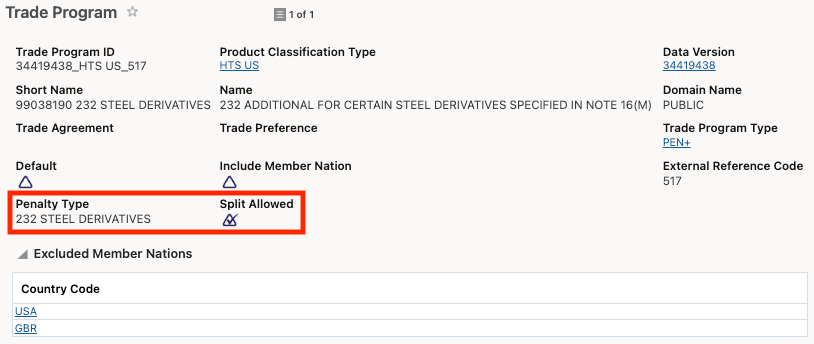
Trade Program - Penalty Fields
New Code Mapping Type
A new Code Mapping Type, SPLIT LINE CONFIGURATION MAPPING, is now available. This enhancement enables mapping from the new penalty fields on the trade program to the qualifier used for defining the percentage of material content—such as steel, aluminum, or copper. For example, if you are shipping a steel derivative and the trade program’s Penalty Type is set to 232 STEEL DERIVATIVES, you must specify the percentage of steel content in the Percentage Values section on the declaration line.
GTM includes a default code mapping called SPLIT LINE CONFIGURATION MAPPING DEFAULT. You can use this default or override it as needed using the Override External Code field. The mapping structure includes:
- Code: The Penalty Type as defined on the trade program.
- Default External Code: The default qualifier used in the Percentage Values section on the declaration line.
- Override External Code: Allows you to specify an alternative Percentage Value Qualifier ID if you do not want to use the default.
For example, in the default mapping provided with GTM, the Penalty Type 232 STEEL DERIVATIVES is mapped to the Percentage Value Qualifier ID STEEL CONTENT on the declaration line.
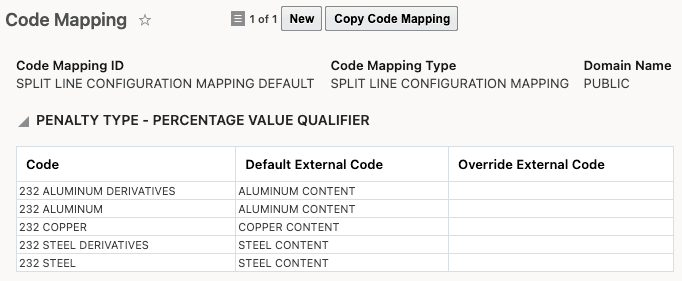
Code Mapping for Split Line Configuration
New Data Configuration Type
A new data configuration type called Base Line to New Line is now available. This data configuration allows you to specify the data to be copied from the original declaration line to the new declaration line containing material such as steel, aluminum, copper, etc. When you select an association of Line-Line, the Attributes drop-down list displays all available data elements that can be copied, including Controls, Country of Origin, Dates, Involved Parties, Quantities, Values, Reference Numbers, Remarks, flex fields, and more.
Note: All Value Qualifiers specified in the data configuration are prorated across the lines when the Split Line for Penalty Reporting action is executed.
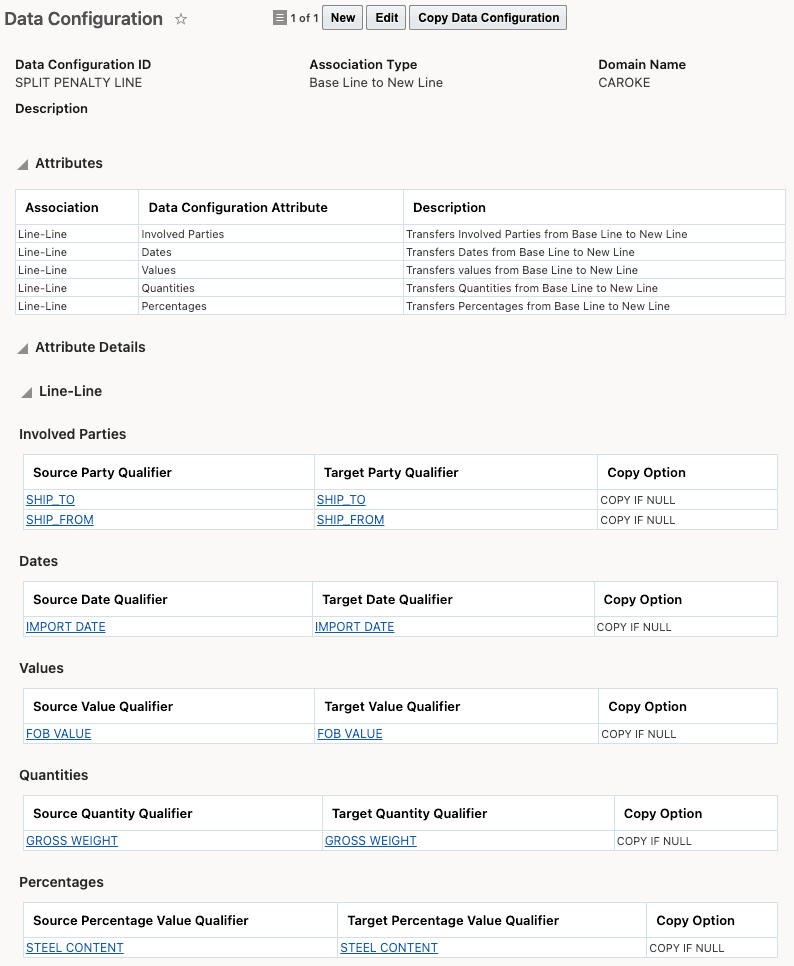
Data Configuration
Logic Configuration Enhancements
Within the existing logic configuration of type GTM DECLARATION CONFIGURATION, the following parameters must be configured in the SPLIT LINE CONFIGURATION section:
- SPLIT LINE CONFIGURATION MAPPING: Specify the code mapping to use for linking the penalty type from the trade program to the percentage value qualifier that indicates the percentage of content.
- SPLIT LINE DATA CONFIGURATION: Define the data configuration to determine which data should be copied from the original declaration line to the new declaration line containing steel, aluminum, copper, etc.
- SPLIT LINE CLASSIFICATION TYPE: Specify the product classification type applicable for the importing country.
The logic configuration is then associated with the declaration type on the declaration you are using for reporting to customs.
Note: In the logic configuration, you must have all three parameters—SPLIT LINE CONFIGURATION MAPPING, SPLIT LINE DATA CONFIGURATION, and SPLIT LINE CLASSIFICATION TYPE—defined in the SPLIT LINE CONFIGURATION section for the Split Line for Penalty Reporting action to run. Without these, the action cannot determine the details needed to split the original line.
Declaration Line Configuration
The declaration line you are splitting must include the chapter 1–97 classification code, the chapter 99 classification code representing the penalty, the values to be prorated, and the percentage value qualifier indicating the material content (steel, aluminum, copper, etc.). When you perform the Split Line for Penalty Reporting action on a declaration line, GTM splits the original declaration line into multiple lines based on the percentage of material content, creating a separate line for each penalty. Data from the original declaration line is copied to the split lines according to the data configuration you have defined. All values specified in the data configuration are prorated across the split declaration lines.
Note: Declaration lines will be split only for classification codes where the Split Allowed checkbox is selected in the trade program.
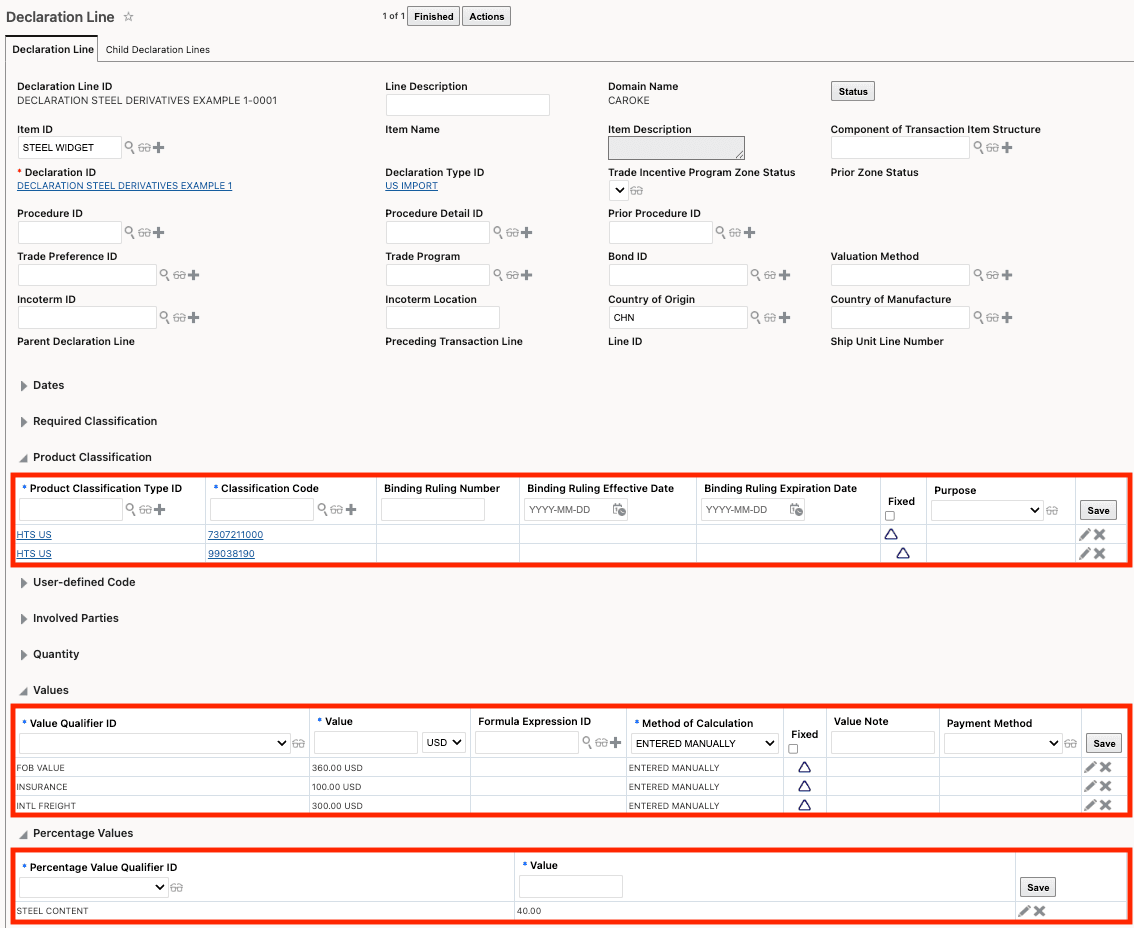
Declaration Line
In addition to being available as a manual action on the declaration line, a new agent action is available to automatically split declaration lines for penalty reporting.
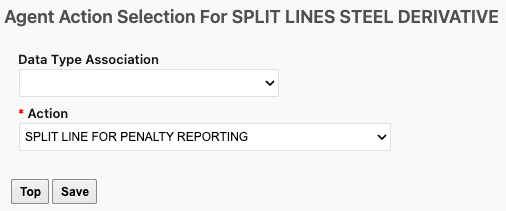
Declaration Line Agent Action - Split Line for Penalty Reporting
Note: To enable entry of the chapter 99 penalty classification code directly on the Split Line for Penalty Reporting action—rather than storing it on the declaration line—set the GTM property
gtm.splitLine.penaltyCode.actionInput
to true.
Business Benefit: By enabling declaration lines to be split by percentage of content, GTM supports more accurate reporting to US CBP (and other authorities) for both regulated and non-regulated portions, reducing compliance risk and rework. This enhancement improves compliance and reporting accuracy for customs "penalty content" requirements (e.g., Section 232/penalty duties) by enabling more precise material-content declaration.
Steps to enable and configure
To use this feature:
- The Penalty Type and Split Allowed fields must be populated on the trade program. If you receive classification and tariff data from Descartes, these fields are automatically populated as part of the data download process.
- Define a data configuration with a data configuration type of Base Line to New Line.
- In a logic configuration with a Logic Configuration Type of GTM DECLARATION CONFIGURATION, ensure that all three parameters have a Default Value or Parameter Value defined.
- Ensure that the declaration line includes the Chapter 1–97 classification code, the Chapter 99 classification code representing the penalty, the values you are splitting, and the percentage value qualifier containing the material content.
Note: If you have set the GTM property gtm.splitLine.penaltyCode.actionInput to true, the declaration line should include the Chapter 1–97 classification code, the percentage of material content and the values you are splitting. The Chapter 99 classification code is specified on the Split Line for Penalty Reporting action.
Key resources
For more information on the new fields on the trade program, refer to the New Penalty Fields Available on Trade Program available in this document.