 Mobile - Custom Sort-By Fields for Date and Number
This feature enables sorting on attribute date and number fields. It is configurable so that you can add your required sort-by fields in addition to the default provided ones.
The "sortList" array has been added to the mobile layout to define the custom attribute date and attribute number fields.
"shipmentList": {

                       "defaultSortCriteria": "startDate",

                       "sortList":[

                            {

                            "label":"",

                            "value":"",

                            "type":""

                            }

                        ]

               }
Each item in "sortList" has three fields:
- label: the label displayed in the mobile UI sort dropdown
- value: the sort-by field
- type: either "date" or "number" depending on attributeDate or attributeNumber field
For example, to sort by "attributeDate1" on a shipment, the mobile layout can be configured as follows:
"shipmentList": {

                       "defaultSortCriteria": "attributeDate1",

                       "sortList":[

                           {

                           "label":"Custom Date",

                           "value":"attributeDate1",

                           "type":"date"

                           }

                   ]

               }
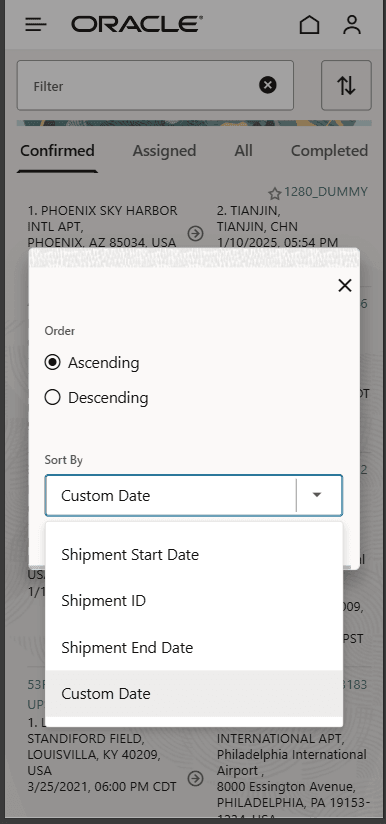
Custom Sort-By Field
Business Benefit:
You will now be able to sort by custom defined attribute date and number fields in addition to the default sort options.
Steps to enable and configure
You don't need to do anything to enable this feature.