Enhanced Support for Penalty Codes and Penalty Exemption Codes
This feature introduces enhancements to penalty codes and penalty exemption codes. As additional penalty tariffs are implemented, multiple overlapping penalty tariffs may apply to an imported product. To prevent multiple penalty tariffs from being charged simultaneously, governments may apply only the highest tariff or a specific combination of tariffs. GTM has been enhanced to better support the stacking and unstacking of penalty tariffs and exemptions. The following enhancements are available:
- Two new Redwood power data screens, Penalty Exemption Mapping and Penalty Unstack Rule, are introduced to map penalties to their corresponding exemptions and define tariff unstacking rules. In addition, the data download process has been updated to support downloading this data from third-party content providers.
- A new Redwood Product Classification Code UI is available and includes the Penalty Exemption Mapping and Penalty Unstack Rule information for a specific product classification code.
- A new Apply Tariff Unstacking Rules action is introduced on the Declaration Line.
Note: To receive this data, contact the Descartes Service Desk to ensure your account is up to date.
Let’s look at a specific example. Currently, the HTS US general classification code 7614101000 is subject to multiple tariffs, including:
- Section 122 tariffs, which model a temporary global import surcharge applicable to goods originating from all countries. The tariff rate is an additional 10%.
- Section 232 tariffs, which apply to certain metals, including steel, aluminum, and copper. The tariff rates range from 25% to 50%.
- Section 301 tariffs, which apply to goods originating from China. The tariff rate depends on the product being shipped and the HTS classification code.
Depending on the product being shipped and the country of origin, the applicable tariffs may vary. In addition, exemptions may apply based on your business, the nature of the goods, and their origin. In this example, the goods being shipped contain 10% metal content. As a result:
- Section 122 tariffs are superseded, or unstacked, by the Section 232 tariffs.
- Section 301 tariffs still apply because the goods originate in China and based on the type of product being shipped.
Penalty Exemption Mapping
A new Product Classification Penalty Exemption Mapping power data screen is introduced to provide a linkage between the general classification code, applicable penalty classification codes, and related exemption classification codes. This gives you better visibility into the penalties and exemptions that may apply when classifying goods using a general rate classification code.
Navigate to Master Data > Power Data > Product Classification > Penalty Exemption Mappings.
The following fields are available:
- Product Classification Code ID – The GID of the general classification code that may have associated penalty classification codes and exemption classification codes.
- Penalty Classification Code – The penalty classification code that may apply to the general classification code, depending on your specific use case.
- Multiple Exemption Classification Codes – Any applicable exemption classification codes that may be used to exempt the penalty classification code.
In this example, the HTS US classification code 7614101000 is associated with multiple penalty classification codes and exemption classification codes that may apply. Take note of the following penalty and penalty exemption codes:
- Penalty Classification Code 99030301 represents the Section 122 tariff. If a Section 232 tariff applies, this tariff is unstacked and the Exemption Classification Code 99030306 is reported to customs instead (highlighted in red).
- Penalty Classification Code 99038202 represents the Section 232 tariff. If the product being shipped contains metal content and this penalty applies, Penalty Classification Code 99038202 is reported to customs. If no metal content is present, the Exemption Classification Code 99038201 is reported instead (highlighted in blue).
- Penalty Classification Code 99038802 represents the Section 301 tariff. Because the product originates in China and is subject to this penalty, the tariff applies and is reported to customs. No exemptions are available (highlighted in green).
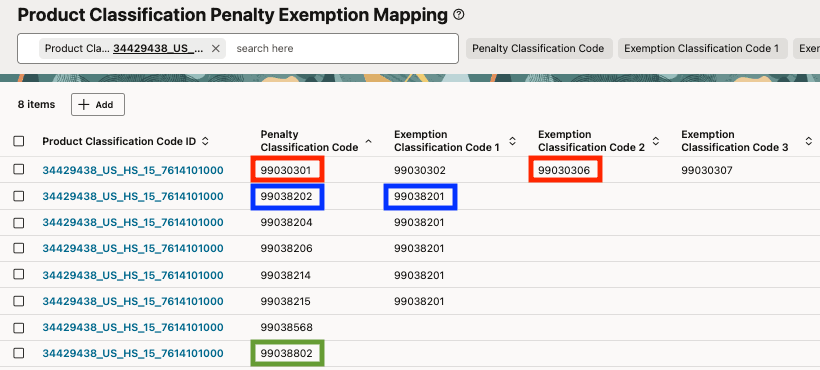
Penalty Exemption Mappings
Product Classification Penalty Unstack Rule
A new Product Classification Penalty Unstack Rule power data screen is available that enables GTM to identify the relationship between penalty codes, the related penalty codes used for unstacking, and the code that should be reported to customs.
To access this screen, navigate to Master Data > Power Data > Product Classification > Penalty Unstack Rules.
The following fields are available:
- Product Classification Code ID – The GID of the penalty classification code that may be superseded or unstacked.
- Exempted by Code – The penalty code that unstackes the code defined in the Product Classification Code ID field.
- Code to be Reported – For the code associated with the Product Classification Code ID, this is the classification code reported to customs when unstacking occurs.
- Split Allowed – Indicates whether regulations allow a declaration line to be split into multiple lines based on applicable penalties.
In this example, Penalty Classification Code 99030301, which represents the Section 122 tariff, can be exempted, or unstacked, by Penalty Classification Code 99038202. As a result:
- Exemption Classification Code 99030306 is reported to customs for the Section 122 tariff.
- Penalty Classification Code 99038202 is also reported to customs for the Section 232 tariff.
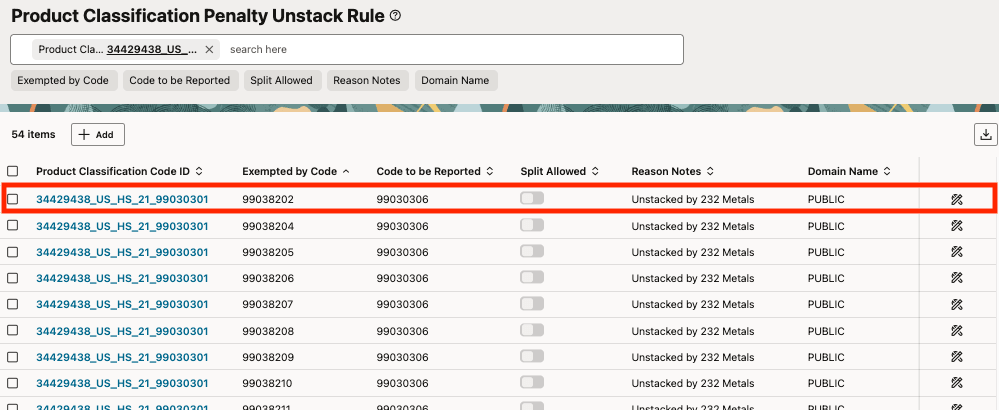
Penalty Unstacking Rules
Product Classification Code UI in Redwood
The Redwood version of the Product Classification Code UI includes two new tabs: Penalty Exemption Mapping and Penalty Unstack Rules. Adding this information directly to the Product Classification Code provides a single interface for viewing all related penalty and exemption data.
To access the Redwood version of the Product Classification Code UI, click your user name in the upper-right corner to open Settings and Actions, then select Try the Redwood Experience > Start Exploring.
Note: The Penalty Exemption Mapping and Penalty Unstack Rules tabs are available only in the Redwood version of the Product Classification Code UI and are not included in the legacy UI.
For the HTS US general classification code 7614101000, you can view the associated Penalty Exemption Mapping information directly from the Product Classification Code UI. In this example, the same data available in the Penalty Exemption Mapping power data screen is displayed directly within the product classification code:
- Penalty Classification Code 99030301 represents the Section 122 tariff. If a Section 232 tariff applies, this tariff is unstacked and the Exemption Classification Code 99030306 is reported to customs instead (highlighted in red).
- Penalty Classification Code 99038202 represents the Section 232 tariff. If the product being shipped contains metal content and this penalty applies, Penalty Classification Code 99038202 is reported to customs. If no metal content is present, the Exemption Classification Code 99038201 is reported instead (highlighted in blue).
- Penalty Classification Code 99038802 represents the Section 301 tariff. Because the product originates in China and is subject to this penalty, the tariff applies and is reported to customs. No exemptions are available (highlighted in green).
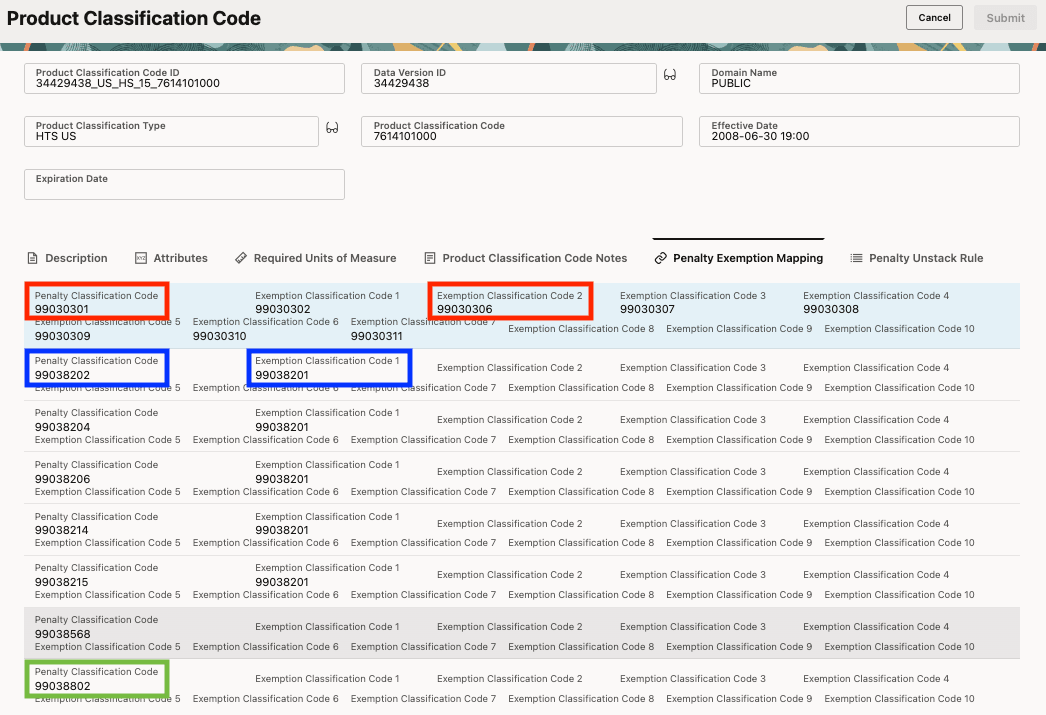
Product Classification Code > Penalty Exemption Mapping tab
For Penalty Classification Code 99030301, you can view the associated Penalty Unstack Rules directly from the Product Classification Code UI. In this example, the same data available in the Penalty Unstack Rules power data screen is displayed directly within the product classification code.
You can see that Penalty Classification Code 99030301, which represents the Section 122 tariff, can be exempted, or unstacked, by Penalty Classification Code 99038202. As a result:
- Exemption Classification Code 99030306 is reported to customs for the Section 122 tariff.
- Penalty Classification Code 99038202 is also reported to customs for the Section 232 tariff.
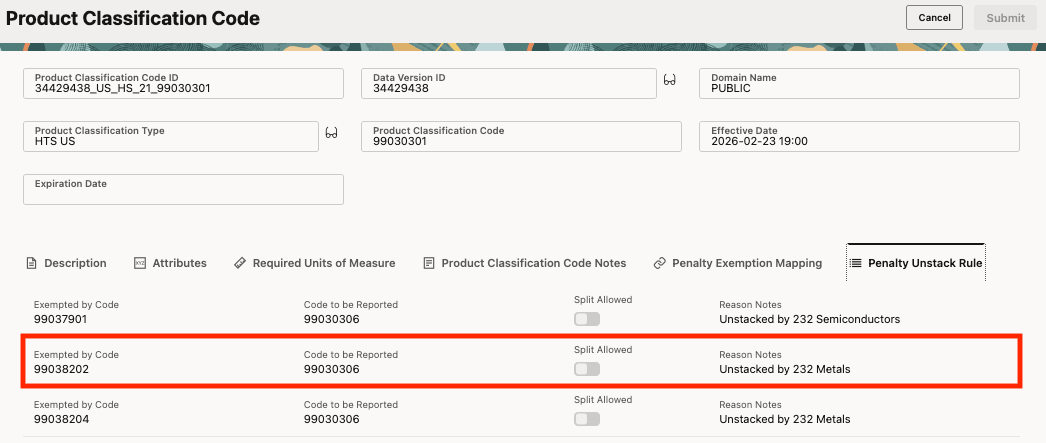
Product Classification Code > Penalty Unstack Rule
Apply Tariff Unstacking Rules Action
The new Apply Tariff Unstacking Rules manual action and agent action on the declaration line use the Penalty Exemption Mapping and Penalty Unstack Rules data to determine which tariffs should be paid and reported to customs. If the Split Allowed flag on the Penalty Unstack Rule is set to true, and split line functionality is configured, GTM splits penalty tariffs into separate declaration lines. In this example, the Split Allowed flag is set to false, so the existing declaration line is updated instead.
Before running the action, ensure that the declaration line includes the following information:
- Product Classification – The classification codes include the general rate classification code along with any applicable penalty classification codes. In this example, the declaration line includes:
- General HTS US classification code = 7614101000
- Penalty Classification Code = 99030301, representing the Section 122 tariff
- Penalty Classification Code = 99038202, representing the Section 232 tariff
- Penalty Classification Code = 99038802, representing the Section 301 tariff
- Values – Based on your configuration, the value is used together with the metal content percentage to determine the applicable duty amount. In this example, FOB VALUE is used.
- Percentage Values – Enter the percentage of metal content to be used in tariff calculations.
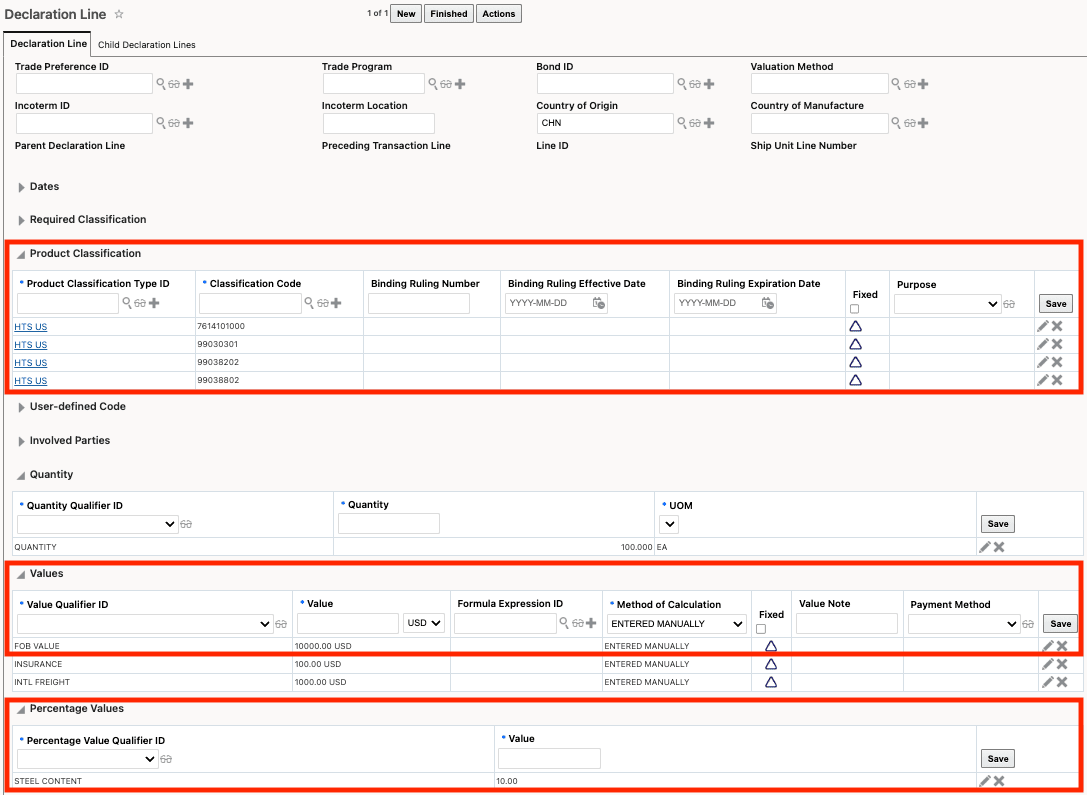
Declaration Line - Prior to Running Action
Once you run the Apply Tariff Unstacking Rules action, GTM updates the declaration line based on the configured exemption mappings and unstacking rules. In this example, the declaration line is updated rather than split because the Split Allowed flag is set to false, so the declaration line did not split into multiple lines.
After the action is run, you can see the following updates:
- Some product classification codes are updated based on the configured unstacking rules:
- General HTS US classification code = 7614101000 remains unchanged.
- Penalty Classification Code = 99030301, representing the Section 122 tariff, is superseded by 99030306, which is the exemption classification code reported to customs as a result of unstacking.
- Penalty Classification Code = 99038202, representing the Section 232 tariff, remains because it applies based on the metal content. It is also the tariff responsible for unstacking the Section 122 tariff.
- Penalty Classification Code = 99038802, representing the Section 301 tariff, also remains because it applies based on the product’s origin in China and the nature of the goods being shipped.
- A new row is added to the Declaration History each time the Apply Tariff Unstacking Rules action is run, including details explaining why a penalty classification code was unstacked.
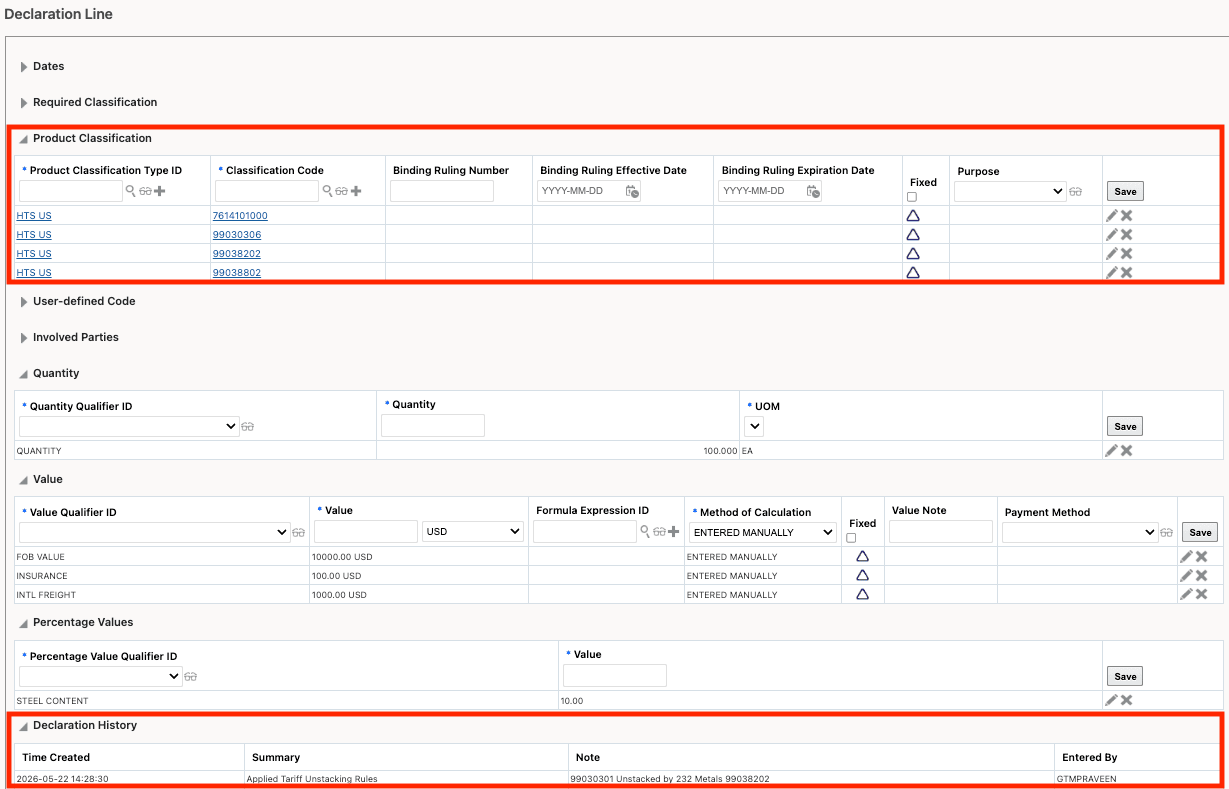
Declaration Line - After the Action is Run
Note: After running the Apply Tariff Unstacking Rules action, you can run the Estimate Duties and Taxes action to calculate and assign duties to the declaration line.
Business Benefit: These enhancements help ensure accurate application of penalty tariffs by supporting tariff stacking and unstacking rules, reducing the risk of overcharging during import declarations. The new Redwood UIs and automated data integration streamline tariff management and simplify maintenance of penalty exemption mappings and unstacking rules.
Steps to enable and configure
If you want to receive this data, or any additional data introduced through recent data download enhancements, contact the Descartes Service Desk to ensure your account is up to date.
Tips and considerations
-
Since split-line functionality is now available as part of the Apply Tariff Unstacking Rules action, the existing Split Line for Penalty Reporting action is deprecated through the optional feature Deprecate Split Line for Penalty Reporting. It is recommended that you use the Apply Tariff Unstacking Rules action instead.
-
The Redwood Product Classification Code UI is available through Try the New Redwood Experience in Settings and Actions. On the Redwood UI, the View Duties and Taxes and View Section and Chapter Notes buttons are not currently available and will be added in a future release.
-
The Product Classification Exemption Mappings and Penalty Unstack Rules UIs are also available through Try the New Redwood Experience in Settings and Actions.
Key resources
For more information about the optional feature that deprecates the split-line functionality, refer to the "Deprecate Split Line for Penalty Reporting" topic in this document.
For more information about splitting penalty lines, refer to the "Enhancements to Tracking and Reporting of Penalty Content" topic in the 26B What’s New document.