AI Agent: Dock Scheduling Assistant
This feature introduces an AI-powered assistant that helps you manage dock scheduling activities more efficiently using simple, conversational requests. Coordinating dock appointments can be time-consuming, especially when you must manually search for availability, handle constraints, and update appointments across many shipment stop locations.
With this capability, you can describe what needs to be accomplished - request appointment options, schedule new appointments, reschedule/modify an existing appointment, get appointment details or cancel appointments - in natural language. The assistant interprets your request, identifies the relevant shipment and constraints, and initiates the appropriate scheduling action..
You can use this feature within the dock scheduling workflow to quickly evaluate available time slots based on shipment details, location capacity, and operational constraints. The assistant prioritizes feasible and optimal appointment options and can automatically confirm bookings when sufficient information is provided.
By embedding this intelligence into the scheduling workflow, the feature reduces the need to navigate multiple screens or manually interpret scheduling data, helping you manage dock operations more effectively.
Example Conversations - Inputs and Agent Response
Get Appointment Options
- Get up to 10 available appointments for shipment DEMO100 at location BOULDER DC
- If multiple stops at this location, agent will ask which stop to use, use stop 1 or 2
- Get the first available appointments for shipment ID DEMO100 at BOULDER DC
- If multiple stops at this location, agent should ask which stop to use, use stop 1 or 2
- What are my appointment options for DEMO100 at BOULDER DC?
- If multiple stops at this location, agent should ask which stop to use
- Show me 5 available appointments for shipment DEMO100 at the first stop
- Get 4 available appointments for shipment DEMO100 at the second stop
- Show me my appointments options for DEMO200
- This agent should ask which stop. Reply with first stop.
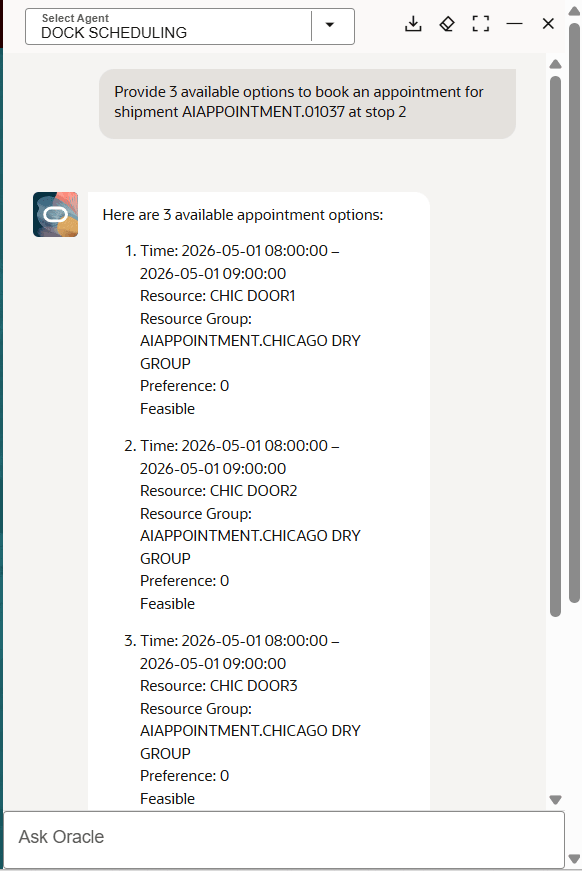
Get Appointment Options
Schedule An Appointment
- Schedule a dock appointment for shipment DEMO100 at BOULDER DC
- If multiple stops at this location, agent will ask which stop to use, should use stop 1 or stop 2.
- Schedule a dock appointment for shipment DEMO200
- The agent should ask which stop. Reply with first stop.
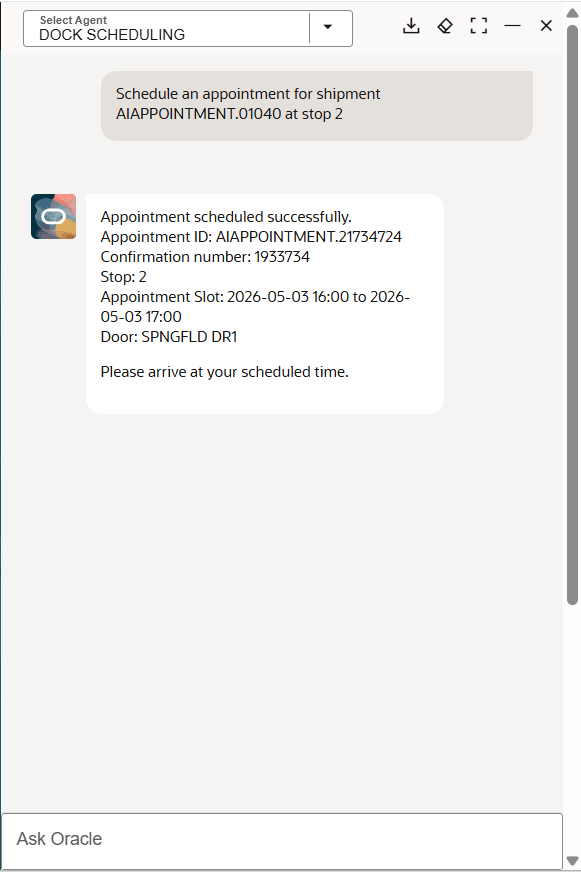
Schedule Appointment
Get Appointment Details
- What are the details for the shipment DEMO200?
- This agent should ask which stop.
- Show me the appointment for DEMO100 at stop 1
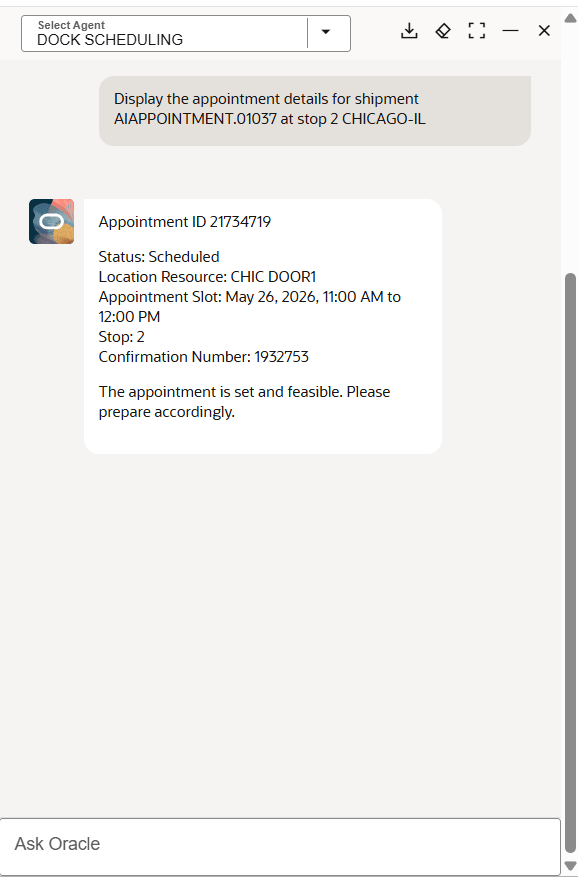
Get Appointment Details
Reschedule An Appointment
- Reschedule the dock appointment for shipment DEMO100 at BOULDER DC for April 14th, 2026 at 12:30am to 1:45pm
- Agent will ask which stop to use, use stop 1 or 2
In this example the current appointment details are provided - below.
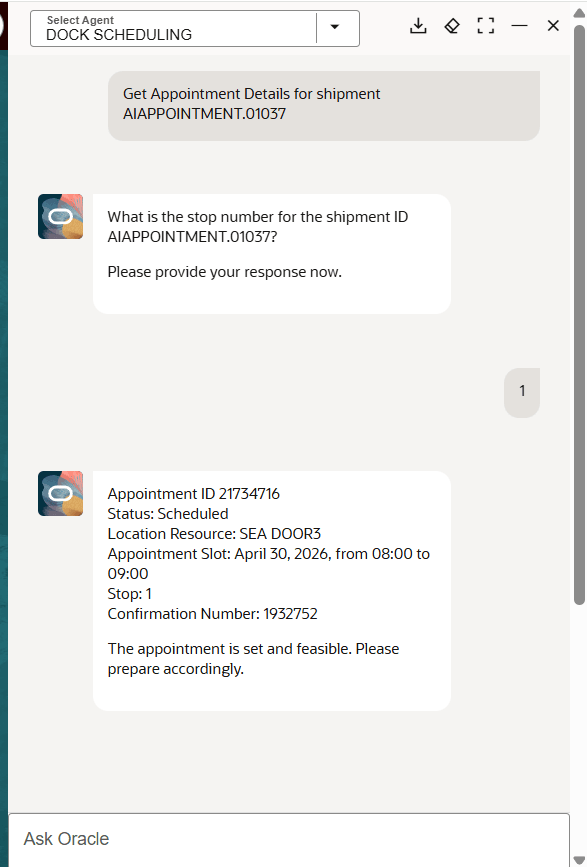
Reschedule Appointment - Current Details
Then the appointment is rescheduled - below.
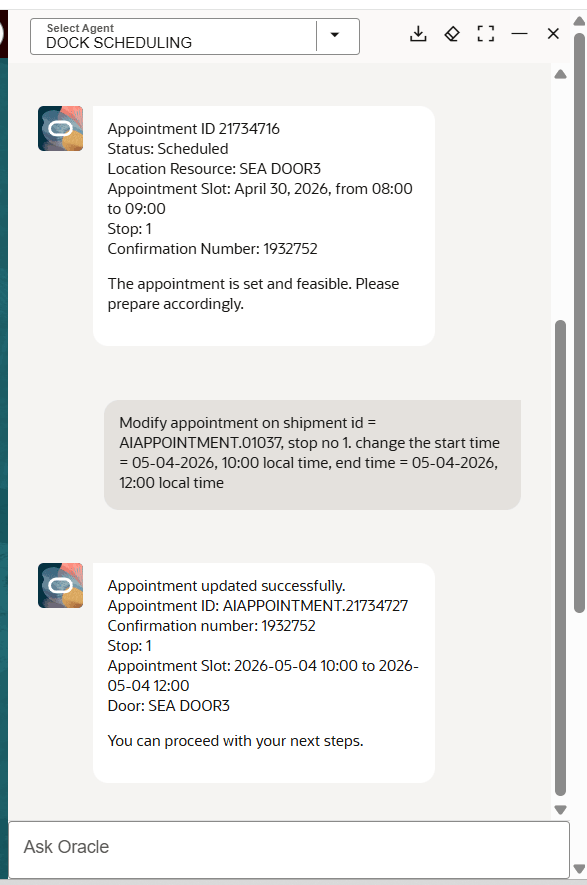
Reschedule Appointment - New Date And Time Range
Cancel An Appointment
-
Cancel the appointment for shipment DEMO100 at BOULDER DC
- If multiple stops at this location, agent will ask which stop to use
- Cancel the appointment for shipment DEMO100 at the first stop
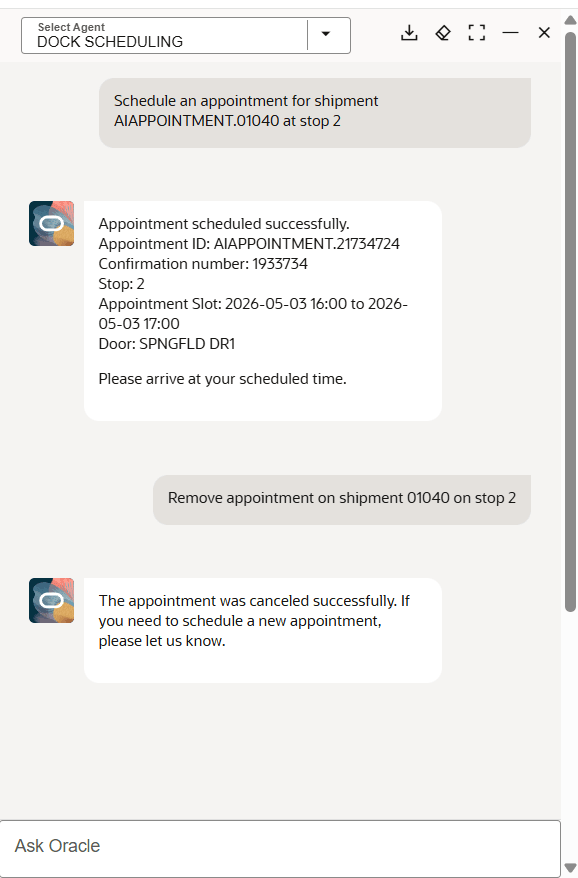
Cancel Appointment
Business Benefit: This feature helps you streamline dock scheduling by simplifying the process from an action-based scheduling task to a natural language conversation. This feature reduce time and manual effort by:
- Minimizing time spent searching for available appointment slots
- Reducing errors from manual data entry and interpretation of options
Steps to enable and configure
Standard AI Agent Studio setup for using Agents is required. Refer to the Oracle Transportation and Global Trade Management Cloud AI Guide for information about configuring OTM and Fusion AI Agent Studio.
You will also need to setup the following Access Control List items added to your user:
- REST - Appointment - View
- REST - Location - View
- REST - Shipment Actions
- REST - Shipment - View
Tips and considerations
- Provide clear details such as shipment ID, stop, or location to improve accuracy and avoid follow-up prompts.
- If required information is missing, the assistant will prompt you with one clarification request; if insufficient details are provided an error message will be provided.
- Appointment modifications require specific start and end times.
- When rescheduling, the system cancels the existing appointment and creates a new one, which may result in a different appointment identifier.
- If multiple stops share the same location, scheduling actions are applied to the first applicable stop.
- Use explicit time ranges when possible, as vague time expressions may not always result in a confirmed booking.
- Review recommended appointment options before confirming, especially for high-priority or constrained shipments.
- Partial/open-ended appointments are not supported.
- Current agent works for scheduling with resource group and primary resource, but will not include these filters if seeking to modify, view appointment details, or view appointment options.
- If you provide the time but not the date, the agent will pick the nearest date possible.