 Preferred Routing - Order Routing Rule
This feature enhances the Order Routing Rule functionality extending the the order routing rules and results to include the Itinerary ID and Routing Constraint ID as well as providing the option to include the Order Routing Rule results/constraints in your Rate and Route and/or your Network Rate and Route Rate Inquiries.
Enhancements:
- The Order Routing Rule Detail screen now includes the option to specify an Itinerary ID and/or a Routing Constraint ID.
- Rate Inquiry (RIQ) now includes the Assign Routing Rule option - allowing you to consider Routing Rules as part of the input for your Rate and Route or your Network Rate and Route Rate Inquiries. In addition, the Payment Method Code has been added to Rate Inquiry Request UI as a potential match criteria for the desired Order Routing Rule.
- The Ask Oracle About Routing Rules Results has been enhanced to include the Itinerary ID and/or a Routing Constraint ID.
- The REST RIQ API Request has been enhanced to include the Assign Routing Rule element.
- assignRoutingRule: boolean - Accepted values are true or false, with a default of false. When set to true, OTM evaluates and assigns a routing rule to the RIQ request.
Order Routing Rule Detail
The Order Routing Rule Detail UI has been enhanced to include the addition of the Itinerary ID and the Routing Constraint ID, as shown below. Your Order Routing Rules/Order Routing Rule Details can now include these additional constraints when an Order Routing Rule matches the criteria provided.
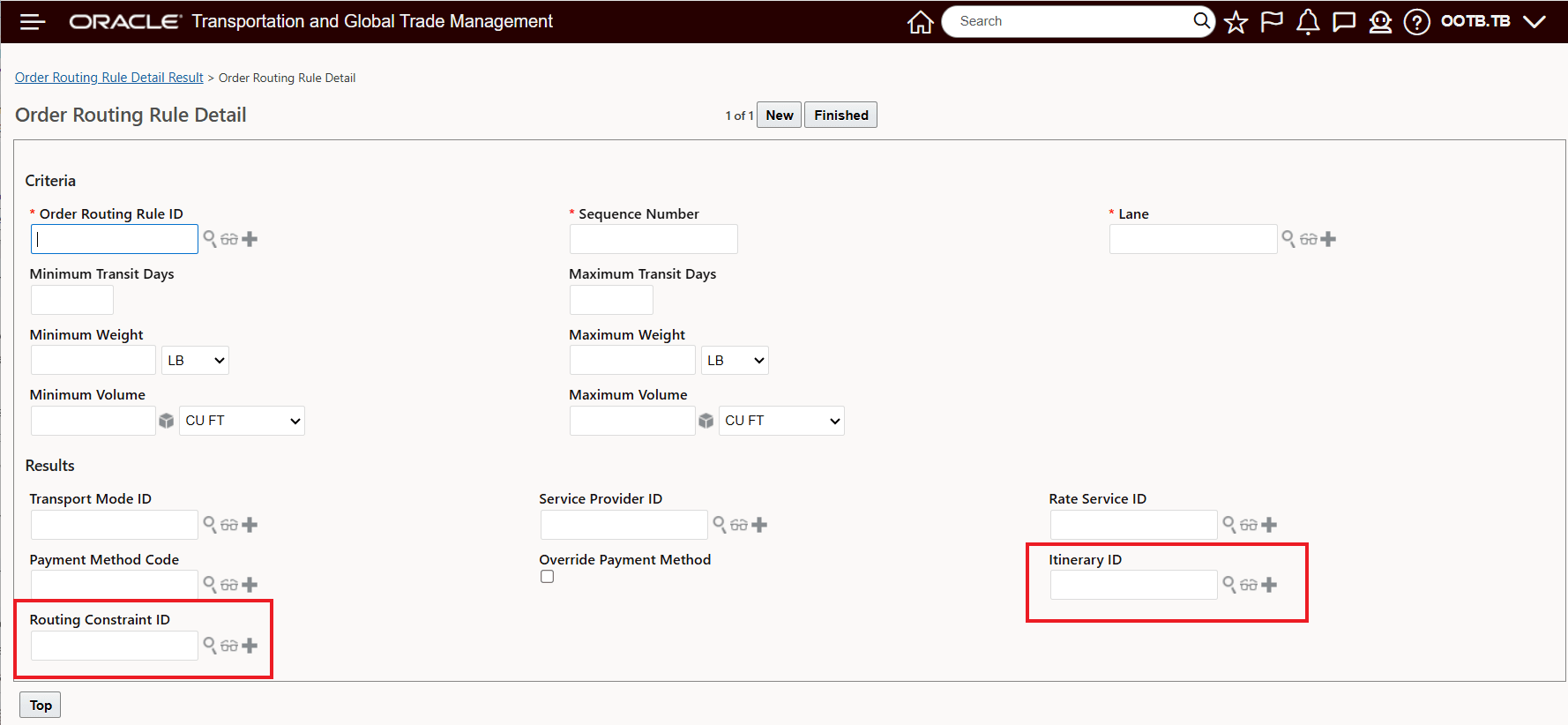
Order Routing Rule Detail UI - Itinerary ID and Routing Constraint ID
In the example below, the configured Order Routing Rule and Order Routing Rule have been configured to provide routing constraints for Service Provider, Itinerary ID and Routing Constraint ID. The Order Routing Rule match criteria is limited to the Location 90210_LOS ANGELES and Payment Method Code MIXED, as defined below.
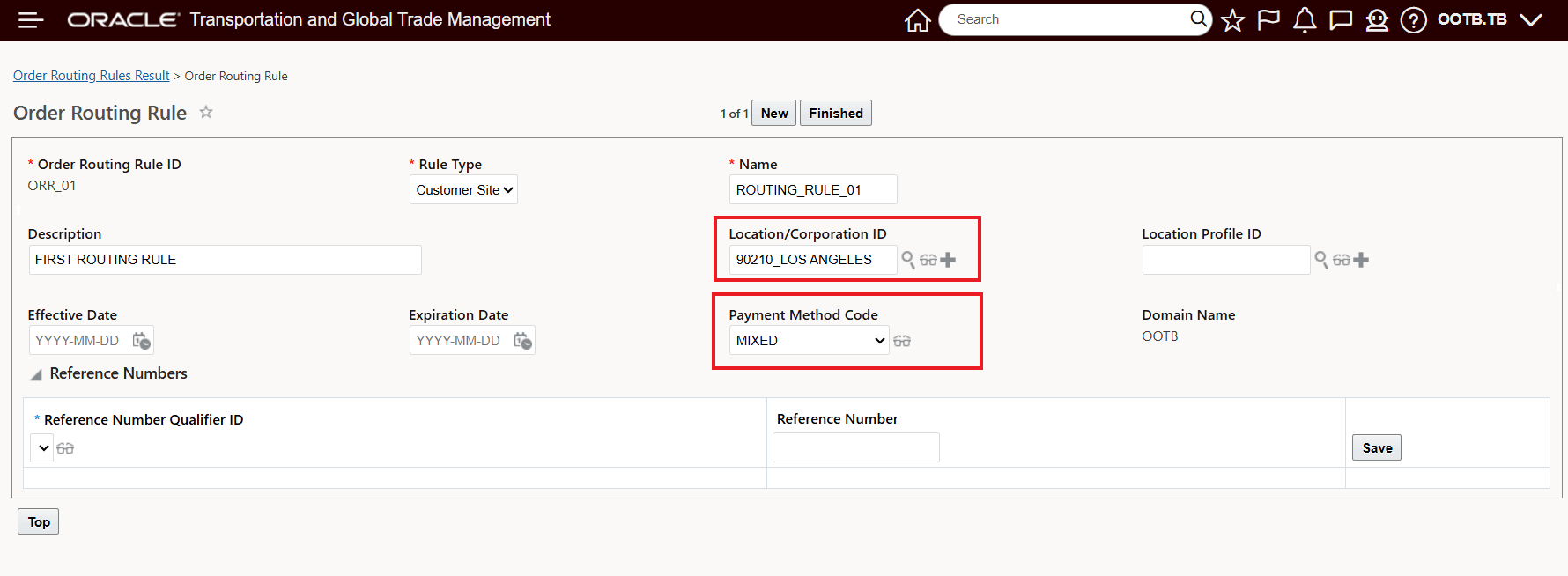
Order Routing Rule - Match Criteria
.The configured Order Routing Rule Detail (for the Order Route Rule above) and for the CA_TO_CA Lane, will assign the following constraints when the Order Route Rule matches - Transport Mode - TL, Service Provider = CARRIER01, Itinerary ID = CATOCA and Routing Constraint ID = SHIP_DIRECT.
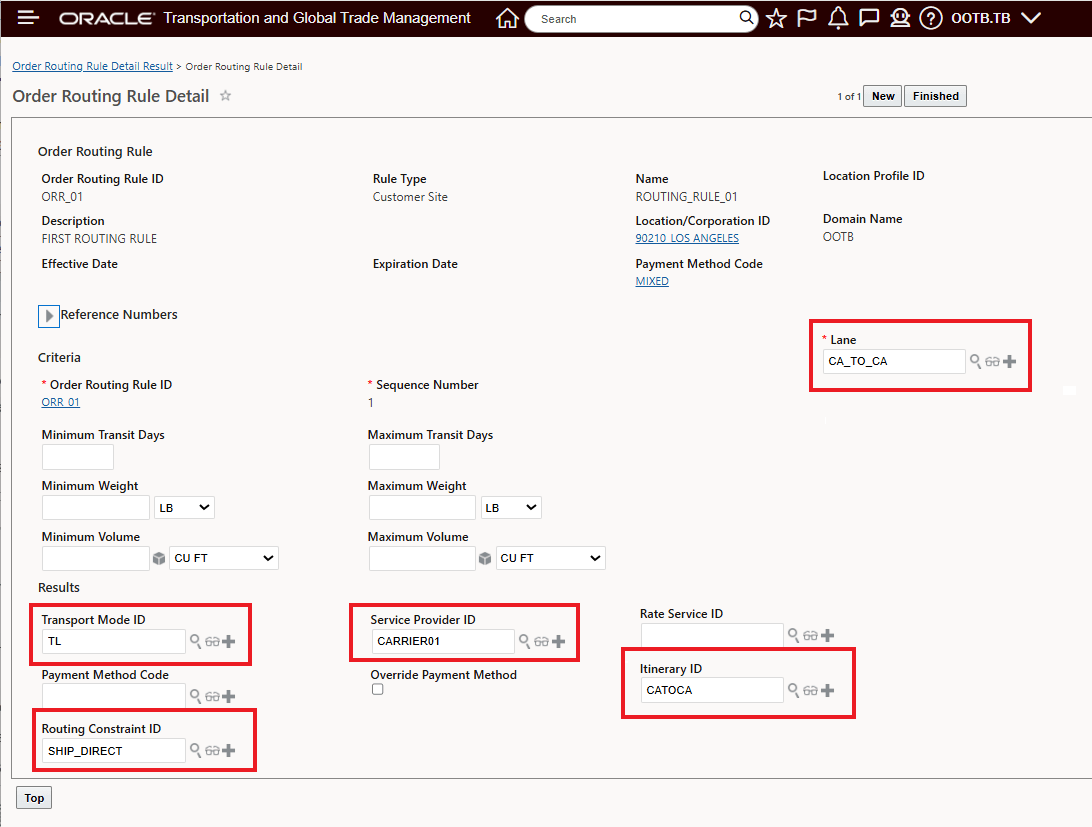
Configured Order Routing Rule Detail
When the configured Order Routing Rule above is applied to an Order Release - using an Automation Agent configured with the Assign Order Route Rule action - the constraints below will be added to the Order Release.
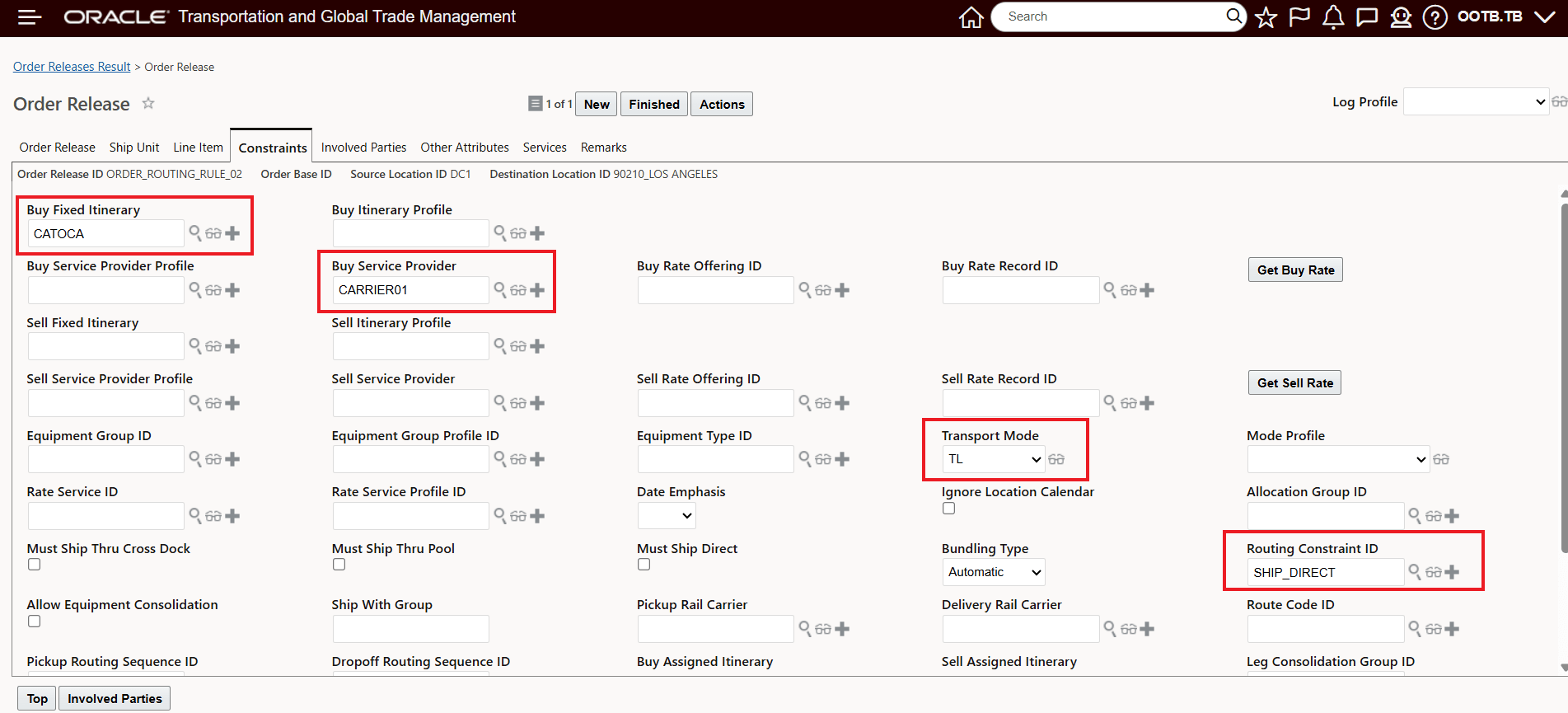
Order Routing Rule Applied to Order Release - Including Itinerary and Routing Constraint
Rate Inquiry (RIQ) Improvements
The Rate Inquiry (RIQ) UI now includes the Assign Routing Rule option - shown below - this provides you with the option to apply Routing Rules and the applicable constraints to your Rate and Route or your Network Rate and Route Rate Inquiries. For Order Routing Rule match purposes, the Payment Method Code has also been added to Rate Inquiry Request UI.
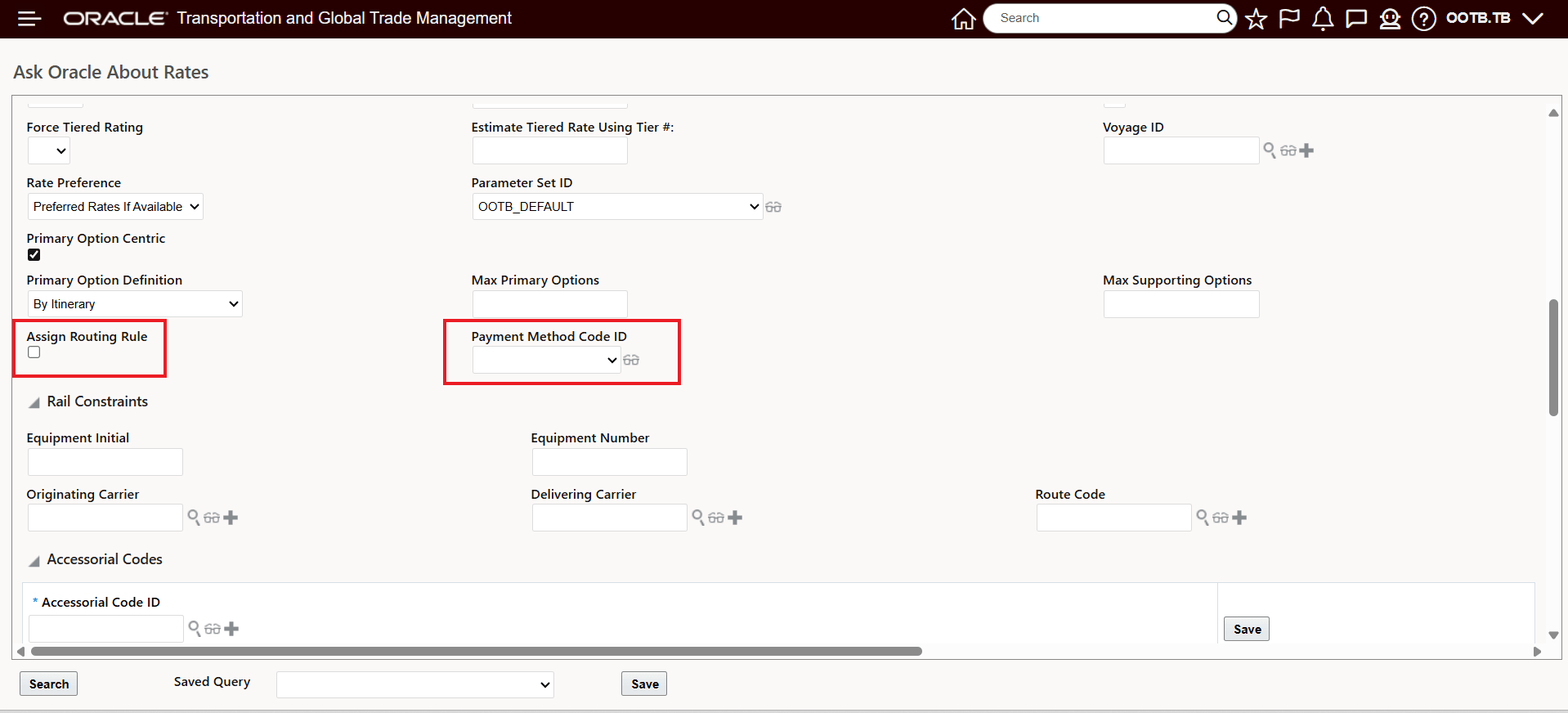
Rate Inquiry UI Changes
In the example below, the Rate Inquiry Request has been configured to provide a Network Rate and Route response with the Assign Routing Rule option set to true, and the Payment Method Code set to MIXED. The lane, and other criteria match to the criteria specified for the Order Routing Rule configured above - Lane, Location and Payment Method Code.
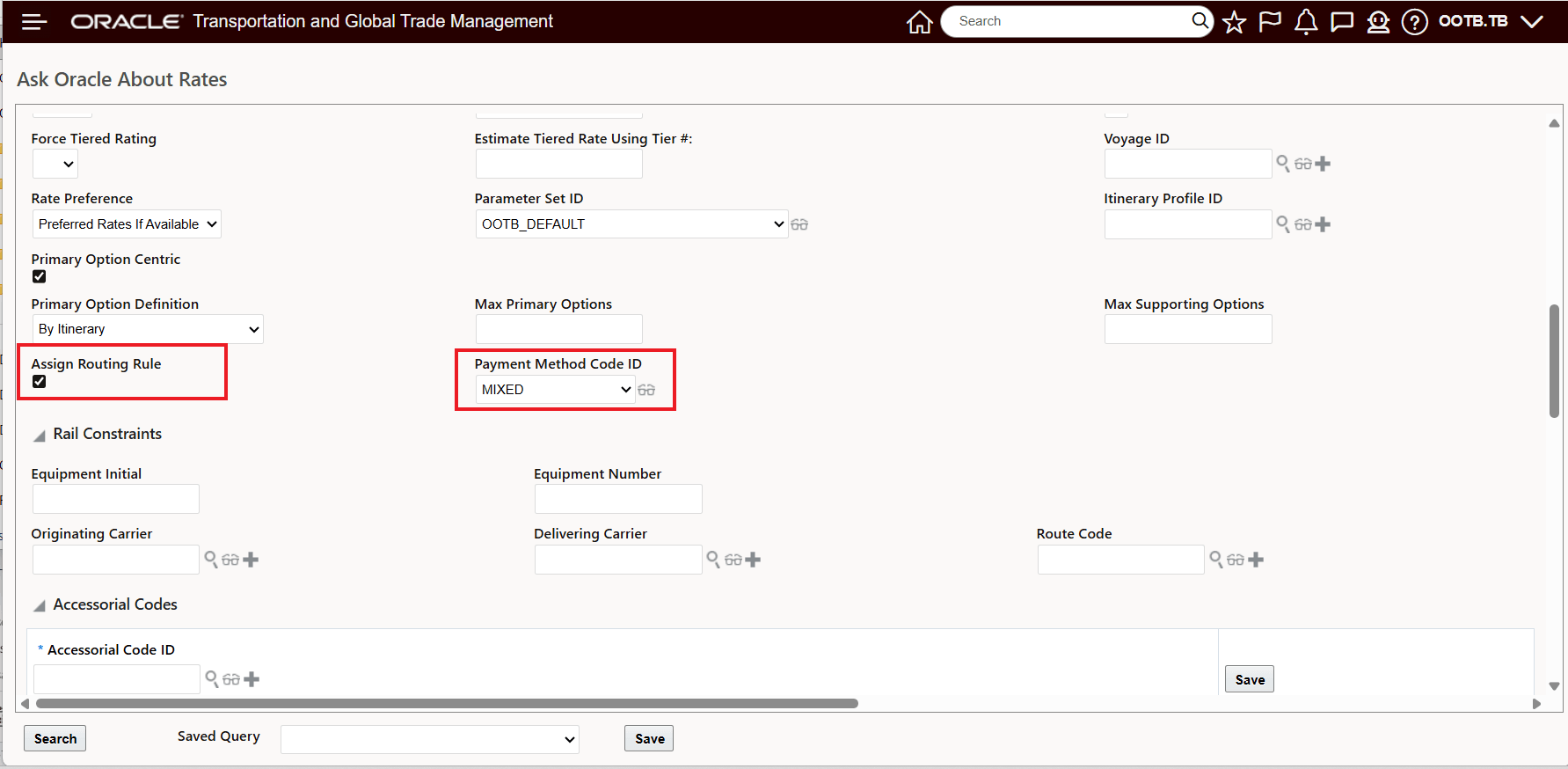
RIQ - Assign Routing Rule = True - and Payment Method Code = MIXED
The Network Rate and Route RIQ response is below - the results have been limited to the constraints provided by the Order Routing Rule assigned - Transport Mode - TL, Service Provider = CARRIER01, Itinerary ID = CATOCA and Routing Constraint ID = SHIP_DIRECT.
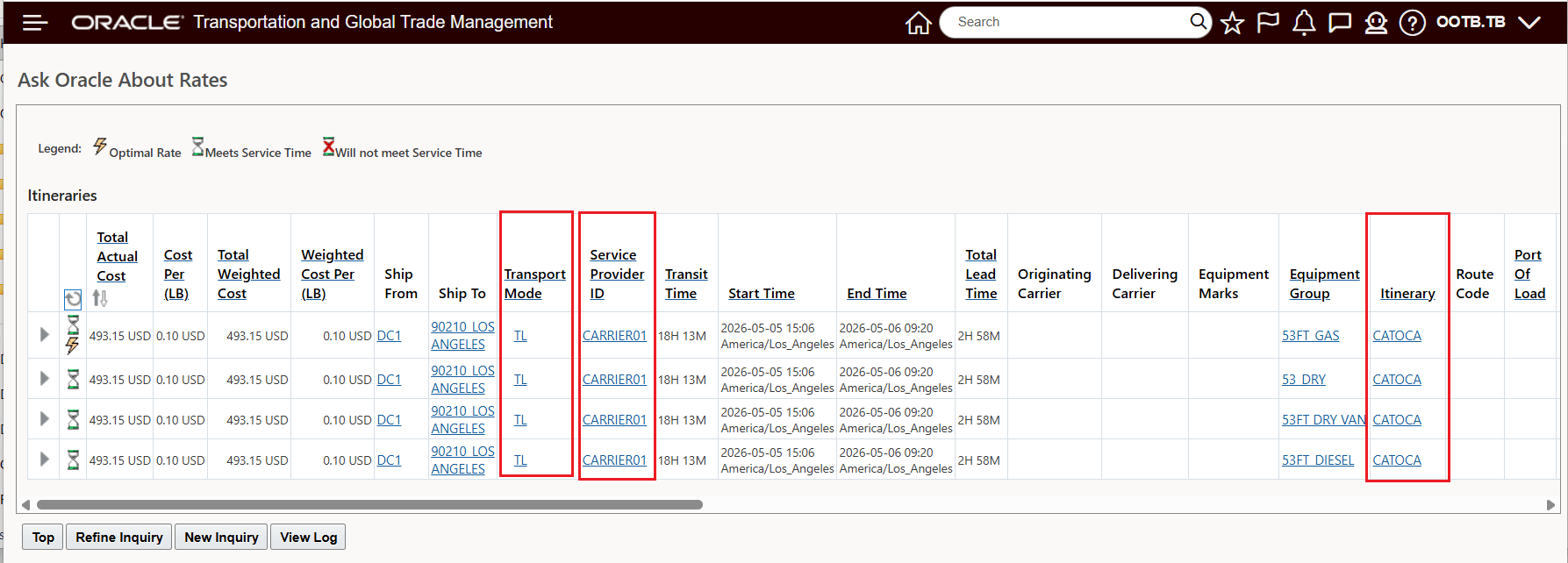
Order Routing Rule Applied to Network Rate and Route RIQ Request Result
The same Network Rate and Route request, without the Assign Routing Rule option selected provides the following unconstrained results.
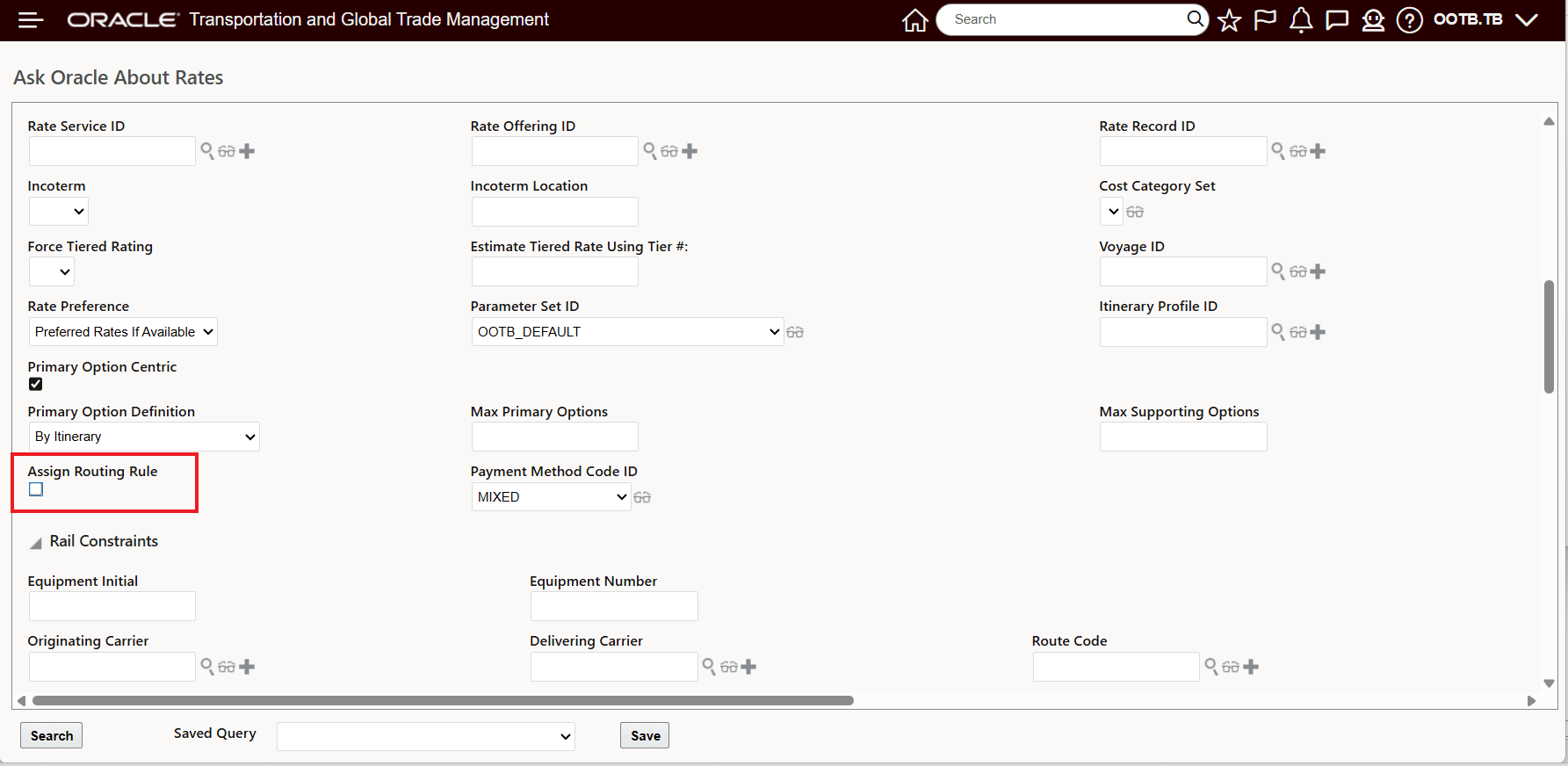
Network Rate and Route Inquiry without the Assign Routing Rule option selected
The Network Rate and Route results without the Routing Rule are below.
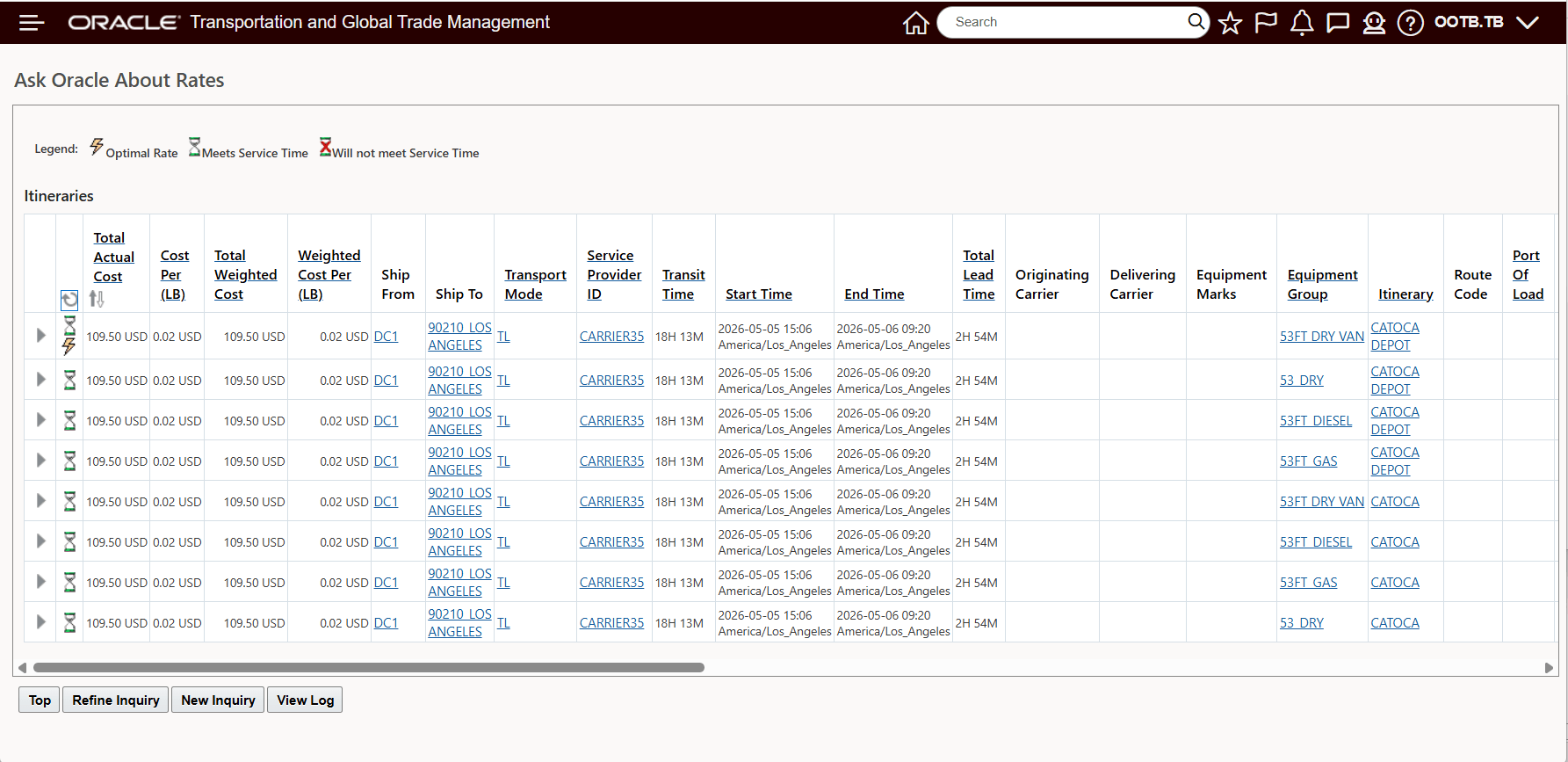
Assign Routing Rule not selected
Ask Oracle About Routing Rules .
The Ask Oracle About Routing Rules Results has been enhanced to include the Itinerary ID and/or a Routing Constraint ID.
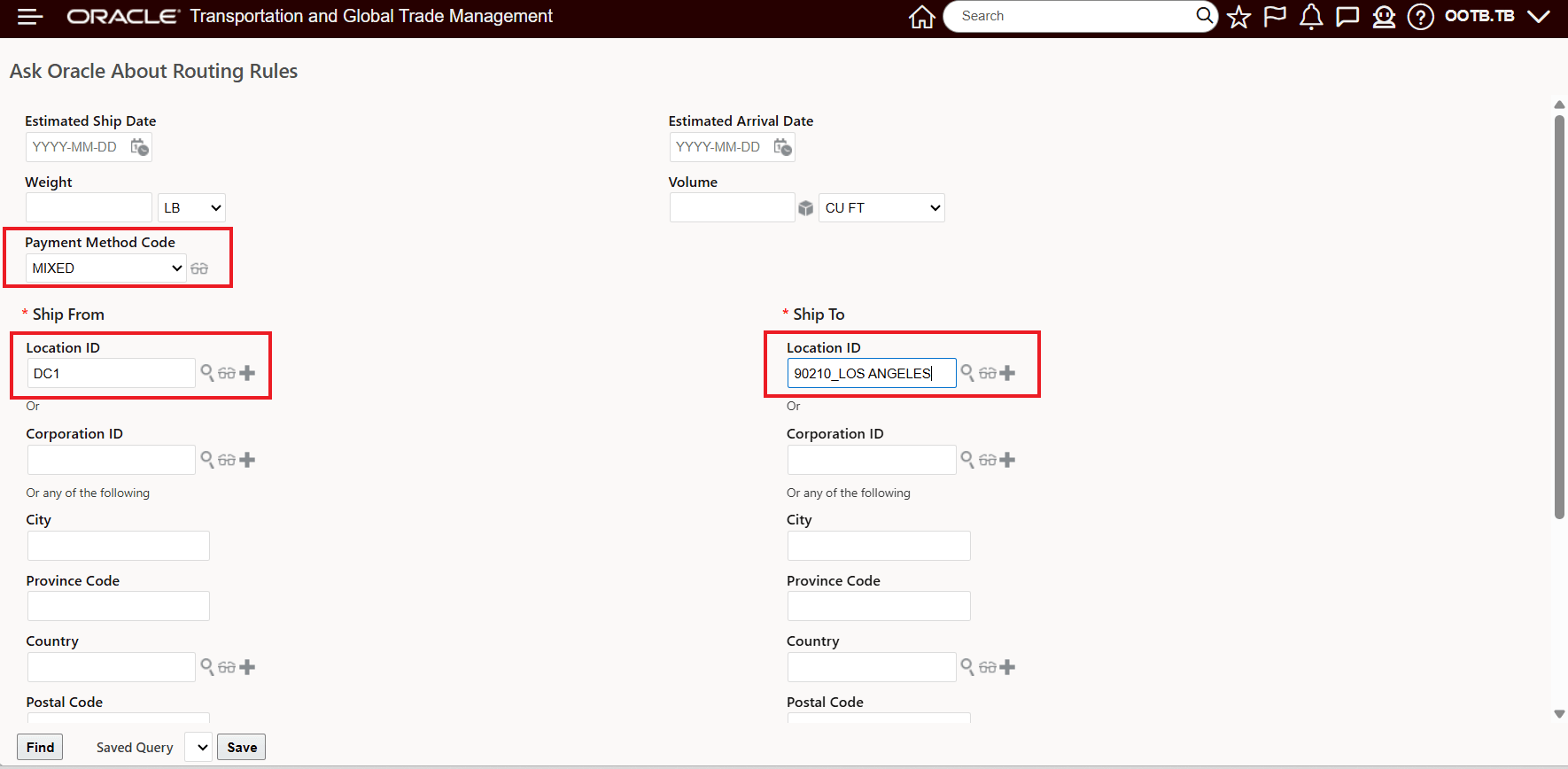
Ask Oracle About Routing Rules - Request
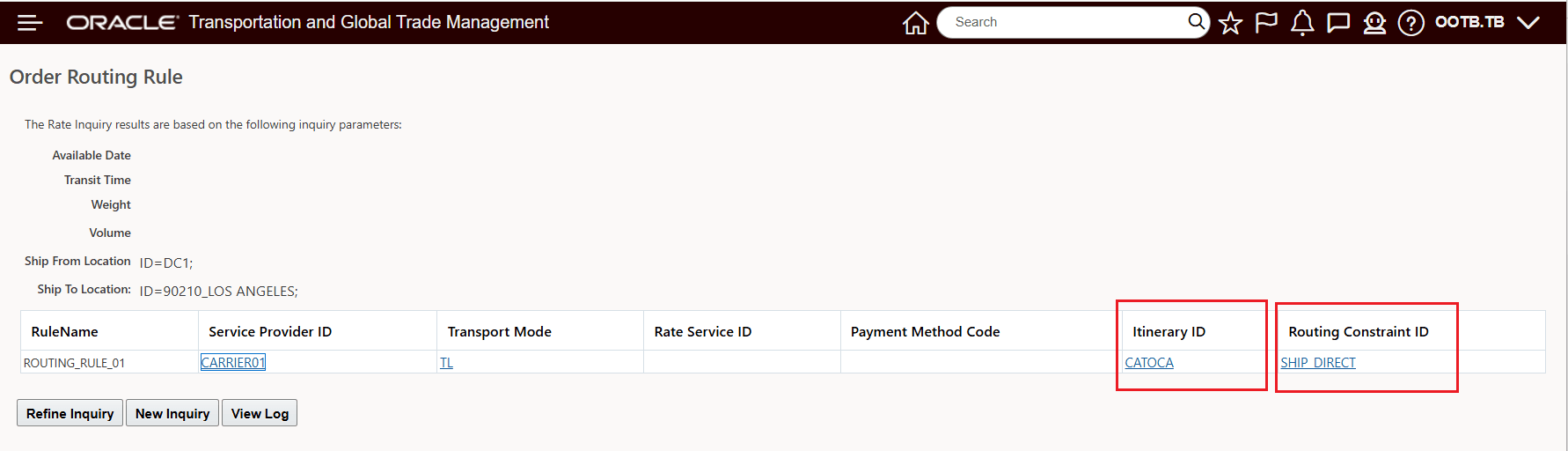
Ask Oracle About Routing Rules - Results
REST Business Queries Perform network rate and route inquiry and Perform rate and route inquiry
The REST Business Queries Perform network rate and route inquiry and Perform rate and route inquiry have been enhanced to include the new Assign Routing Rule element.
- assignRoutingRule: boolean - Accepted values are true or false, with a default of false. When set to true, OTM evaluates and assigns a routing rule to the RIQ request.
Business Benefit: This feature helps you standardize and automate routing decisions and provides the following business benefits:
- Automatically applies desired itineraries and constraints
- Improves consistency between Rate Inquiry results and Order planning scenarios
Steps to enable and configure
Configure Routing Rules with Preferred Routing
- Navigate to Order Management > Routing Rules.
- Create a new routing rule or edit an existing one.
- In the Routing Rule Detail section:
- Select an Itinerary ID to define the preferred route.
- Select a Routing Constraint ID to enforce specific conditions.
- Save the routing rule.
Apply Routing Rules to Orders
- Ensure you have an agent configured with the action Assign Order Routing Rule.
- When the agent action Assign Order Routing Rule is triggered the system will assign the itinerary and routing constraint from the selected routing rule to the order release.
Tips and considerations
- Routing rule results take precedence over manually entered inputs during rate inquiry when the feature is enabled.
- Ensure that the selected itinerary and routing constraint are valid for the shipment’s lane, service, and operational requirements.
- Review existing routing rules to avoid conflicts or unintended overrides when multiple rules apply.
- If you already use automatic routing constraint assignment elsewhere, verify how this feature interacts to prevent duplicate or conflicting constraints.
- Payment method can influence routing rule selection, so ensure it is populated where relevant.
- Test routing rules in a controlled environment before broad rollout to confirm expected behavior across scenarios.
Key resources
- Order Routing Rules Configuration Guide
- Agent Actions: Assign Order Routing Rule
- Rate Inquiry (RIQ) User Guide
- Routing Constraint Setup and Usage Documentation
- Itinerary Configuration and Management Guide