Create Reliable Buttons with Ease
This release introduces a new Button component in Eloqua to simplify creating consistent, reliable email buttons without requiring users to hand-code HTML. The component is designed to improve cross-client rendering by using patterns optimized for broad inbox client support—helping teams avoid common issues where buttons appear inconsistently across Outlook and other email clients.
The Button component supports a more consistent design implementation whether users are building full emails or reusable modular assets, and is supported across the following editors:
- HTML Email Editor (Code and Design)
- Dynamic Content
- Shared Content
- Signature Layouts
- Email Header and Footer
Additionally, this release adds a Format Code button in Code view to automatically clean up and organize HTML. The goal is to make HTML easier to read, troubleshoot, and maintain—especially helpful when working with complex templates, debugging rendering issues, or standardizing markup before sharing assets across teams.
- Automatically formats and organizes your HTML
- Improves readability and consistency
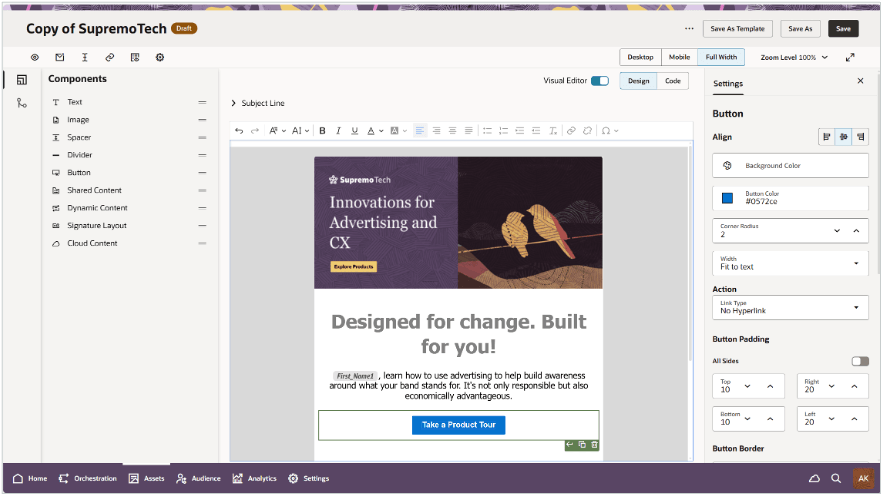
Configuring Button
Business Benefit:
- More consistent rendering across inboxes: Reduces variability and rendering defects that can impact click performance and brand presentation.
Steps to enable and configure
- Note: Redwood Editors are currently available through Controlled Availability. Thus, if you've not already opted in for Controlled Availability access for editors, you will need to submit a service request(SR) through Oracle Support.
- Once enabled, there are no additional steps to start using the new button component across any of the available editors.
Tips and considerations
- Adopt the Button component as the default for CTAs to reduce one-off HTML patterns and improve maintainability.
- Align button styling (text, color, padding, radius) with your approved design system to keep templates consistent across teams.