Delete Custom Object Record Upload
This release introduces a new, guided option to delete Custom Object records in bulk. A new toolbar menu item—“Delete Custom Object Records”—is now available within the Custom Object area. It enables admins and operations teams to upload a deletion file containing any unique identifier for the target records, then complete the process through a 5-step Custom Object Record Upload Wizard.
It is intended for scenarios such as cleanup of outdated event registrations, consent/retention-driven purges, or operational removal of erroneous records at scale.
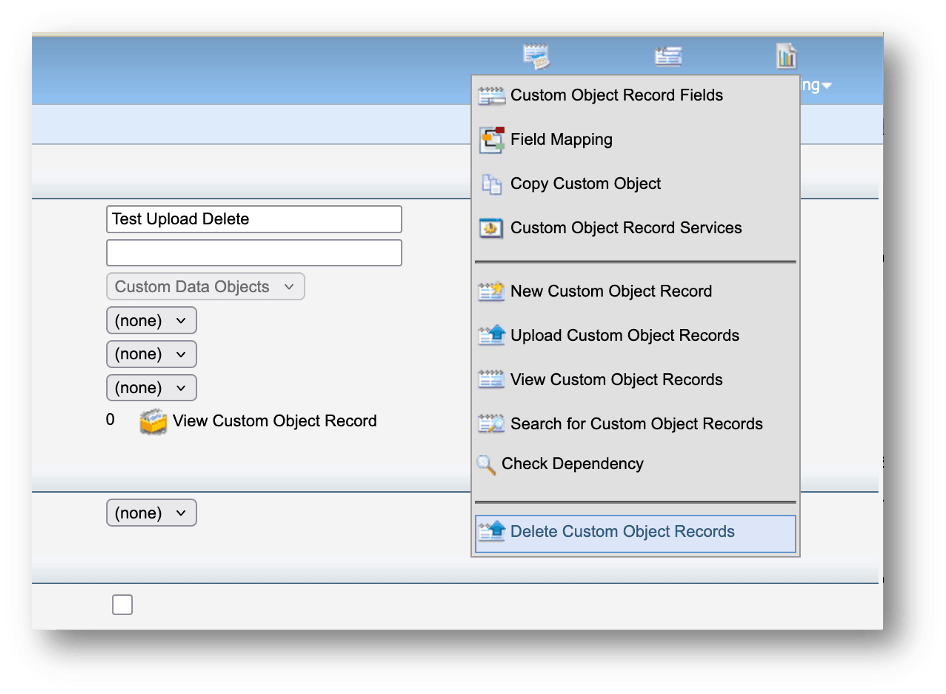
Locating Menu Option
Business Benefits:
- Efficient large-scale cleanup: Enables bulk deletion without needing manual record-by-record actions.
- Flexibility in matching records: Supports deletion based on any unique identifier, making it easier to align with how your data is keyed.
- Operational visibility: An email notification is sent when the deletion completes, helping teams track completion without constant monitoring.
Steps to enable and configure
You don't need to do anything to enable this feature.
Tips and considerations
- Recommended upload limit: Up to 20,000,000 records per upload (recommended limit). For larger purges, split files into multiple uploads and schedule appropriately.
- Validate identifiers before deletion: Confirm the uploaded identifier is truly unique and correctly populated to avoid unintended deletions. Consider testing with a small sample file first.
- Plan for downstream impact: Deleting Custom Object records can affect segmentation, program logic, reporting, and integrations that reference those records—coordinate with dependent teams before running large deletes.