Zoom Events Platform Support for Oracle's Zoom App for Eloqua
This release extends App Services in Eloqua Programs and Campaigns to support the Zoom Events platform in addition to existing Zoom offering types. Zoom Events is positioned as a full event platform (multi-session registration, networking, and virtual-conference-style experiences), and this enhancement brings those event journeys into Eloqua’s orchestration layer so marketers can automate registration flows, track participation, and react to engagement signals.
The update expands the Zoom App Service connector capabilities used by Program Canvas and Campaign Canvas steps. It adds new supported actions (registration) and event signals (attendance/registration) so teams can build end-to-end lifecycle automation—register contacts, listen for their participation outcomes, and branch campaigns/programs based on whether they attended or registered.
What’s available with 26B:
- Register Action: Register for single or multiple sessions.
- Feeders (signals):
- Registered
- Attended
- On-Demand Recordings
- Decision steps:
- Registered
- Attended
Multi-session event handling:
- Manage multi-session events (beyond single webinars).
- Track engagement across sessions within one event.
- Segment based on session-level behavior (advanced use case).
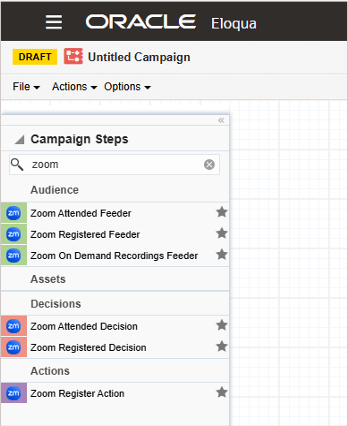
Zoom options
Business value
- Supports broader virtual event scenarios: Enables Eloqua automation for multi-session Zoom Events, not just single-session webinar-style experiences.
- Improved engagement-driven orchestration: Use registration and attendance signals to trigger follow-ups, reminders, nurture streams, and post-event journeys.
- More granular targeting for advanced teams: Multi-session handling allows segmentation and measurement at the session level for richer personalization and scoring strategies.
Steps to enable and configure
You don't need to do anything to enable this feature.
Tips and considerations
- Licensing: Zoom Events requires its own license.
- Webinars Plus guidance: If you are using a Zoom Webinars Plus license, select “Webinars” as the offering type in the app.
- Required configuration: Event ID and Ticket Type ID are required in the App configuration—ensure these are captured as part of your event setup checklist.
- Design for granularity: For multi-session events, decide upfront whether you’ll drive journeys off overall event engagement or session-level engagement (session-level branching can increase complexity but enables more precise follow-up).
- Operational best practice: Standardize naming and documentation for Event IDs/Ticket Type IDs so campaign operators can reliably configure steps and support teams can troubleshoot quickly.
- Currently excluded:
- Content service
- On-Demand Recordings Decision
Key resources
- Learn more about Oracle's Zoom App for Eloqua