Eloqua Salesforce Integration App - Salesforce External Client App
Introducing support for the Salesforce External Client App connection type for the Eloqua Salesforce Integration App which provides a more streamlined, secure, and admin-friendly approach to managing the Eloqua–Salesforce integration.
This capability is intended to modernize how the integration is authenticated and administered in Salesforce, and it replaces the legacy Salesforce Connected Apps approach over time.
Salesforce currently supports both connection types, and this update is designed to be non-disruptive: existing Eloqua Salesforce connections continue to operate without interruption. The new approach fits into the platform’s broader integration administration model by simplifying connection management while maintaining continuity for existing integration assets and workflows.
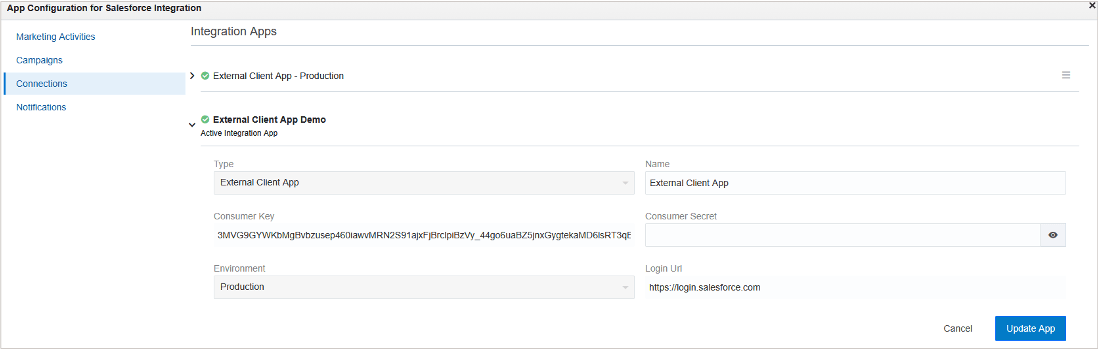
App Configuration preview
-Type: Connected App or External Client App
- Name
- Consumer Key / Consumer Secret
- Environment: Production | Sandbox | Custom (Login URL is updated accordingly)
Business Benefit:
- Reduced operational friction: Designed to be more admin-friendly, supporting easier ongoing management of the integration.
Steps to enable and configure
You don't need to do anything to enable this feature.
Tips and considerations
- For new connections: Use the External Client App connection type.
- For existing connections: Plan and complete migration at your earliest convenience to align with the newer connection model.
- How migration works: Migration is performed by creating a new Integration App within the existing connection and setting it as active.
- Asset continuity: No changes are required to existing integration assets (e.g., mappings, sync configurations, or dependent objects) per the provided notes
Key resources
Access requirements
NOTE: This functionality is expected to be included in the CX Apps 26.04 (April 17, 2026) release.