Intelligent Attributes Composer Interface
The Intelligent Attributes Composer introduces a modern, UI-driven experience for creating and managing custom views, intelligent attributes, and bucket attributes directly within the platform. This enhancement replaces traditionally complex or code-dependent workflows with a guided, visual interface that enables users to define, build, and deploy attributes end-to-end.
The composer provides a structured, step-by-step workflow—from defining attribute metadata to configuring calculation logic on an interactive visual canvas. Users can construct sophisticated attributes using governed data sources, aggregations, and functions without requiring technical expertise. Additionally, the Data Workbench landing page centralizes visibility across all attributes, surfacing key metadata such as status, master entity alignment, lookback windows, and modification history to support governance and operational transparency.
This release represents a significant step toward self-service data modeling, accelerating the delivery of business logic while expanding accessibility to a broader set of users across marketing and data teams.
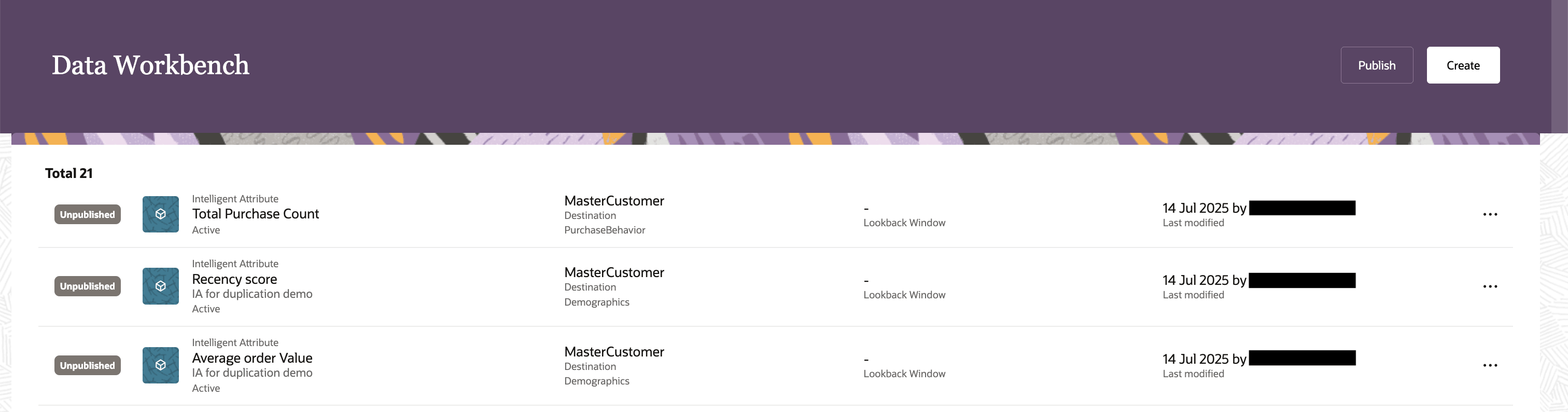
Data Workbench
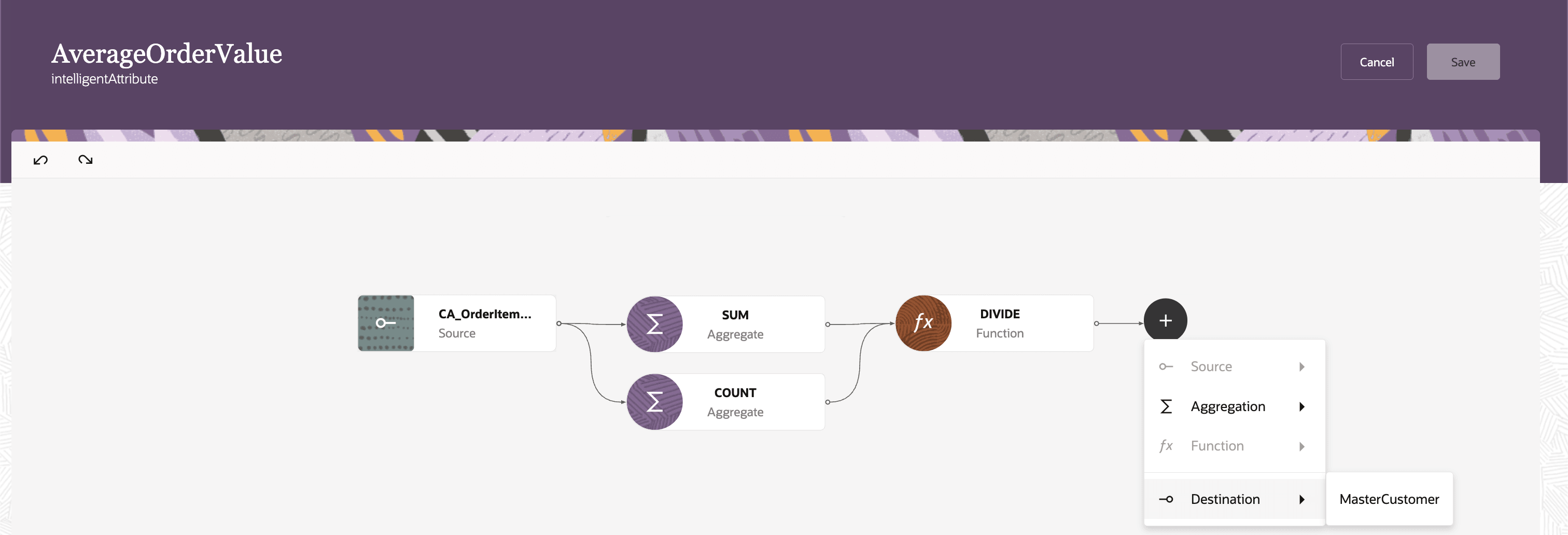
Preview of Intelligent Attributes Composer
Business Benefits:
- Accelerates attribute creation through guided workflows and visual logic configuration
- Reduces errors with controlled input structures and governed function/operator usage
- Improves transparency with centralized attribute inventory and lifecycle tracking
- Enables faster activation of insights through seamless integration with segmentation and downstream workflows
- Empowers business users to independently create and manage attributes without engineering dependency
Steps to enable and configure
No setup is needed if creating through Data workbench. Please note, if there are existing attributes created through expertConfig they should still be managed through Expertconfig.
Tips and considerations
How to Start Using
How to Create Custom Intelligent Attribute based on Out of the box Data source views:
- Navigate to Ask Oracle > Data Workbench
- Click Create and select Custom Intelligent Attribute
- Define basic details (name, data type, master entity, optional category, time window)
- Build logic using the visual canvas:
- Select data sources
- Apply aggregations and functions
- Map to a destination (master entity)
- Save and Publish the attribute
- Run the Identity Resolution Pipeline Job via Data Feeds to generate attribute values
- Use the attribute in segmentation and downstream workflows
How to Create Custom Intelligent Attribute based on Custom Data source views:
- Navigate to Ask Oracle > Data Workbench
- Click create and select View for intelligent attributes
- Define details
- Build query logic using visual canvas : Select and configure source tables, Join conditions and filters as necessary
- Save and Publish the Data source view
- The created Data source view can be used as a source to create Intelligent attribute
How to Create Bucket attribute:
Navigate to Ask Oracle > Data Workbench
- Click create and select Bucket attribute
- Define basic details and select Master entity
- Build logic using visual canvas. Select an attribute from the chosen Master entity and define the bucketing logic.
- Save and Publish the attribute
Tips and Considerations
- Review pre-built intelligent attributes before creating new ones to avoid duplication and ensure consistency
- Clearly define the intended calculation and underlying data inputs before building attributes to ensure accuracy
- Use descriptions and categories to improve discoverability and governance
- Leverage the visual canvas to validate logic step-by-step using date source views, aggregations, and functions
- Be aware of post-publish restrictions: only limited fields (e.g., name, description) remain editable
Known Limitations & Notes
- Maximum of 100 active intelligent attributes per environment; deactivate unused attributes to create new ones
- Attribute logic is constrained to:
- Up to 3 aggregations and 3 functions per attribute
- The output from the previous step becomes the input for the current step, and this pattern applies throughout the entire flow.
- Changes to attributes require republishing before taking effect
- After publishing:
- Only limited edits allowed (e.g., name, description; restricted logic changes)
- Attributes must be published and pipeline jobs executed before values are available in segmentation
- Attributes created via expertConfig cannot be managed in Data Workbench (and vice versa)
Access requirements
- Ensure users have appropriate roles:
- Customer Data Platform Administrator: Full control over configuration, publishing, and governance
- Customer Data Platform Manager: Create and manage attributes aligned to business strategy
- Customer Data Platform Specialist / Analyst: Build and maintain attributes for analytics and activation