Electronic Plan Review Comment Sync
This enhancement automates the transfer of review comments from Bluebeam to Oracle Permitting and Licensing, eliminating manual copy and paste by plan reviewers during the plan review cycle. The sync process ensures consistency between electronic document reviews and system-recorded feedback.
When a Bluebeam review session is finalized, the system extracts supported comment types—including text, notes, and callouts—and copies them into the corresponding Plan Review Comments section within the application details.
Business Benefit: This automates the comments entry avoiding the need for manual copy and paste from Bluebeam.
Steps to enable and configure
To enable this feature, you must integrate with Bluebeam, a third-party electronic document review provider. Oracle Permitting and Licensing integrates with Bluebeam through an API.
To enable this feature:
- Navigate to Setup and Maintenance of Offerings > Offering: Permits > Functional Area: Agency Profile > Manage Agencies.
- Select the Features tab.
- Click on Review Options for Permits.
- Scroll to the Plan Review Section and enable Copy Plan Review Comments.
- The switch is disabled by default.
- The switch will only be available if the "Enable Electronic Plan Review" switch is enabled.
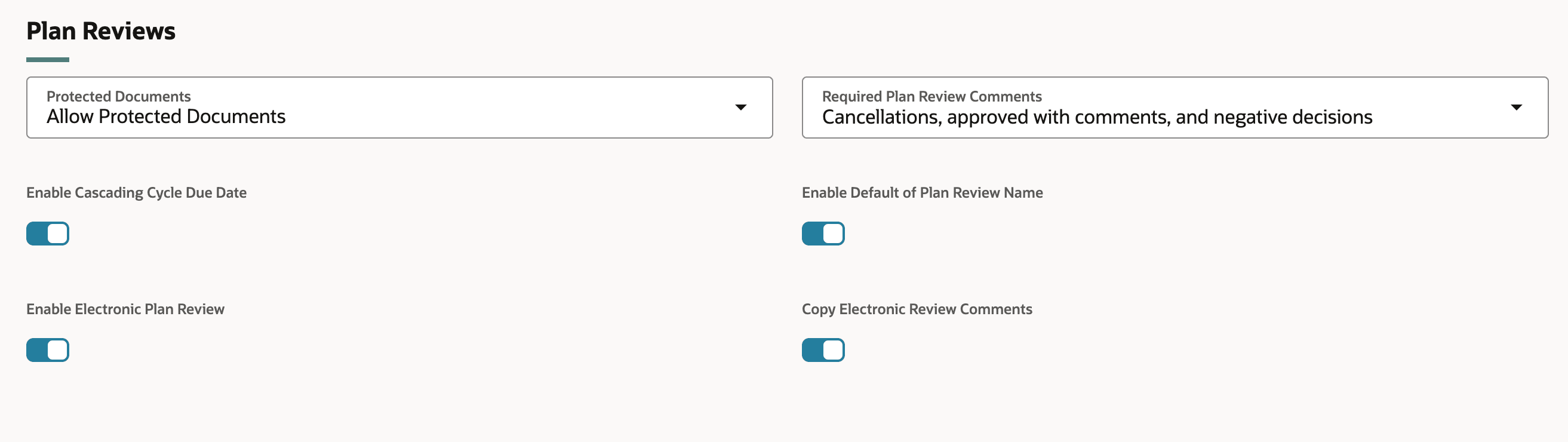
Copy Electronic Review Comments switch
- Click Save.
- Click on Review Options for Planning and Zoning.
- Repeat the steps above in the Plan Reviews section.
Tips and considerations
Electronic Plan Review must be enabled to use this feature.
Key resources
-
See Implementing Permitting and Licensing, "Setting Up Plan Reviews," Setting Up Electronic Plan Review on the Oracle Help Center.
-
See Using Community Development Permits and Using Community Development Planning and Zoning, "Managing Plan Reviews," Working with Electronic Plan Reviews and Managing Plan Review Comments on the Oracle Help Center.