Standard Comments Enhancements
Agency users now has category and subcategory filters to the Standard comments picker. By default, only the Category filter is displayed when an agency user opens the standard comments picker. After the user selects one or more categories, the comments list is filtered and the Subcategory filter becomes available, allowing the agency user to narrow results further. If the selected category changes, any selected subcategories are cleared so only valid filter combinations are used. The agency users can find and insert the correct standard comments faster, reduce manual searching, improve consistency in comment entry.
This example illustrates the Add comment drawer for a case, displaying the Category and Subcategory filters available for Standard comments.
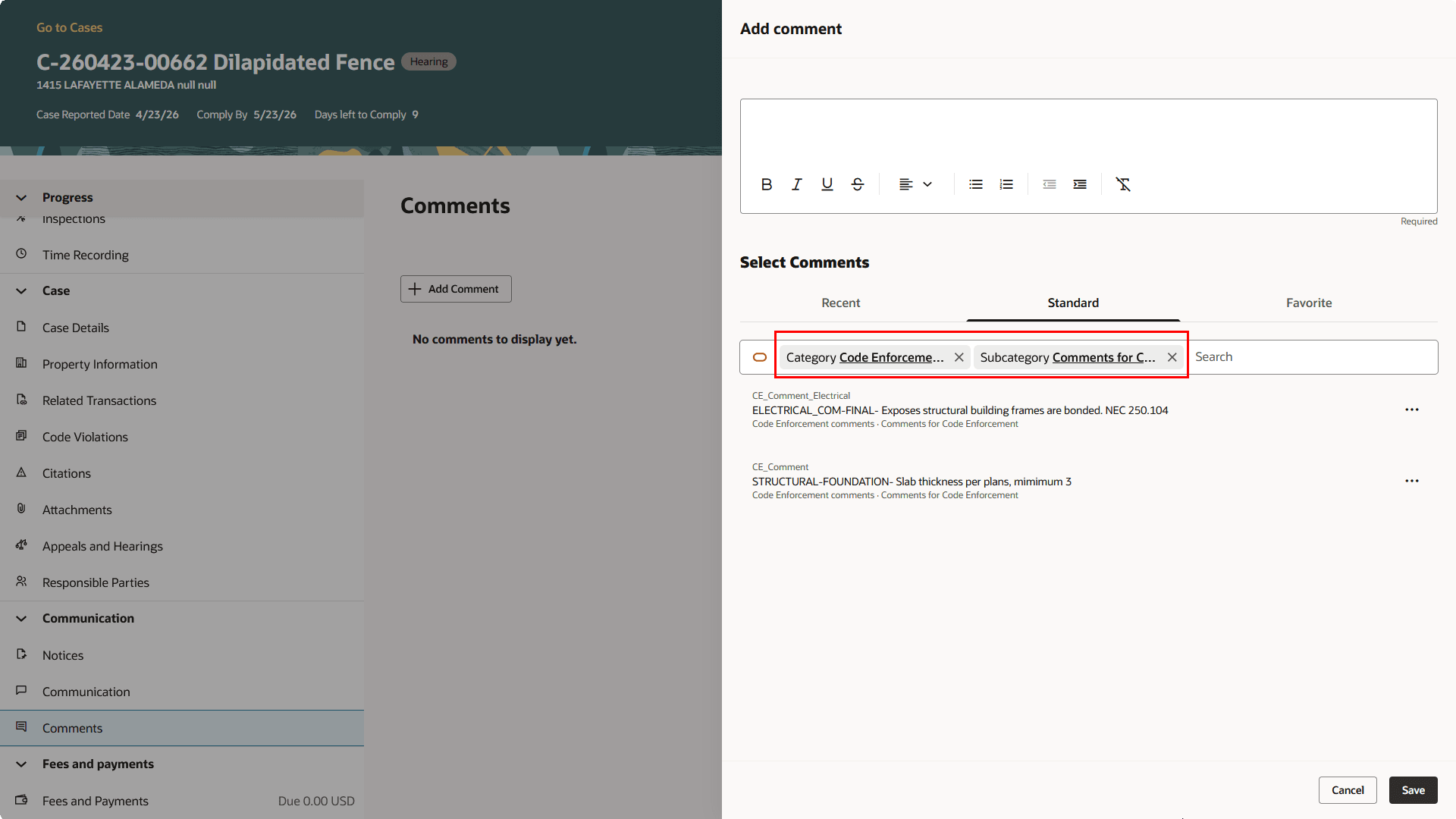
Add Comment Drawer
This feature also removes the Public/Private badge and switch from all comments screens for registered public users. It is intended only for agency staff and inspectors who add, review, or manage comments in cases, inspections, incidents, inspector app flows, and result inspection flows.
Business Benefit: This allows work in a simpler, cleaner comments interface across multiple areas that uses the common comments framework.
Steps to enable and configure
You don't need to do anything to enable this feature.
Key resources
- See Using Community Development Permits, "Managing Permit Applications", Working with Comments on the Oracle Help Center.