 Alternate Tier Quantity
Prior to Oracle CPQ 26A, Oracle CPQ Pricing Engine provided productized support for tier, volume, and block pricing for a line or across a transaction based on the standard line or usage charge quantity field. Beginning in Oracle CPQ 26A, product administrators can select different, custom quantity field when defining pricing and discounts. The custom quantity field is then automatically used to calculate pricing when editing a quote, order, agreement, or configuration.
Beginning in Oracle CPQ 26A, product administrators can select an alternate decimal or integer type pricing attribute to use as the price quantity. The attribute can be a header of line level pricing attribute. The line level Quantity attribute is the default attribute. The designated Price Quantity attribute is used to calculate the extended amount. The unit price is calculated by dividing the extended price by the quantity.
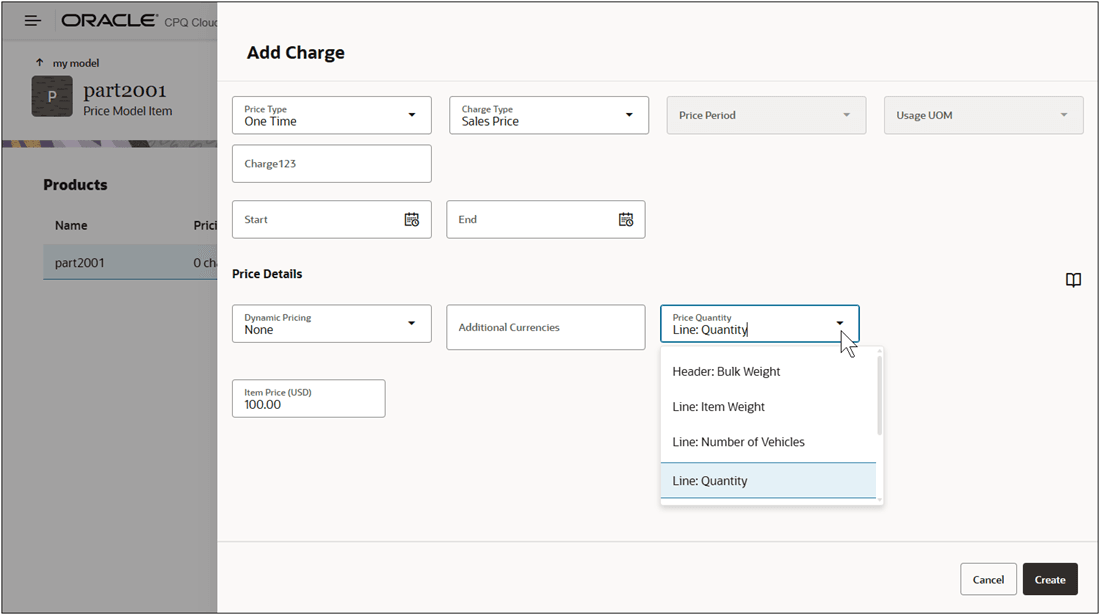
For example, a customer wants to use static pricing price a product by weight.
- Line Level Pricing Attribute example - Pricing Quantity = Line: Item Weight, Item Price = $100
When a sales user adds the following line items to a quote:- Line 1: Item Weight = 10 lbs, Quantity = 5
The extended amount is $1000 = 10 x $100, and the unit price is $200 = $1000 / 5 - Line 2: Item Weight = 4 lbs, Quantity = 5
The extended amount is $400 = 4 x $100, and the unit price will be $80 = $400 / 5
- Line 1: Item Weight = 10 lbs, Quantity = 5
- Header Level Pricing Attribute example - Price Quantity = Header: Bulk Weight, Item Price = $100
When a sales user adds the following line items to a quote and the bulk weight is 14 lbs:- Line 1: Quantity = 5
The extended amount is $1400 = 14 x $100, and the unit price is $280 = $1400 / 5 - Line 2: Quantity = 5
The extended amount is $1400 = 14 x $100, and the unit price is $280 = $1400 / 5
- Line 1: Quantity = 5
Alternate Pricing Quantity attributes are supported for Volume Pricing, Tier Pricing, Block Pricing, and Price Model / Product / Charge Attribute-based Matrix Pricing.
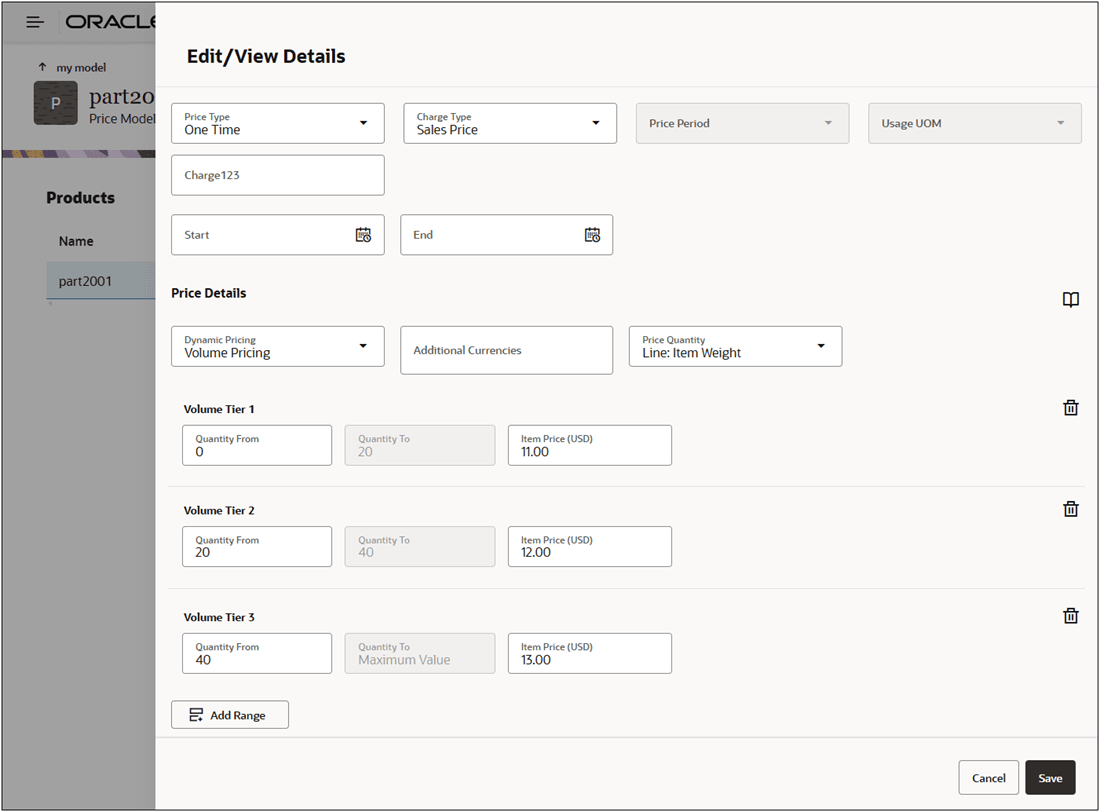
For example, a customer wants to use volume pricing to price a product by weight. For this example Pricing Quantity = Line: Item Weight, Quantity Aggregation is enabled, and the following tiers are defined:
| Tier | Quantity From | Quantity To | Item Price |
|---|---|---|---|
| Volume Tier 1 | 0 | 20 | $11 |
| Volume Tier 2 | 20 | 40 | $12 |
| Volume Tier 3 | 40 | Maximum Value | $13 |
- Example 1 – Volume Tier 1 prices are applied, because the total item weight is 14 (10 + 4):
When a sales user adds the following line items to a quote:- Line 1: Item Weight = 10 lbs, Quantity = 5
The extended amount is $110 = 10 x $11, and the unit price is $22 = $110 / 5 - Line 2: Item Weight = 4 lbs, Quantity = 5
The extended amount is $400 = 4 x $100, and the unit price will be $80 = $400 / 5
- Line 1: Item Weight = 10 lbs, Quantity = 5
- Example 2 – Volume Tier 2 prices are applied, because the total item weight is 32 (20 + 12):
When a sales user adds the following line items to a quote:- Line 1: Item Weight = 20 lbs, Quantity = 5
The extended amount is $240 = 20 x $12, and the unit price is $48 = $240 / 5 - Line 2: Item Weight = 12 lbs, Quantity = 5
The extended amount is $144 = 12 x $12, and the unit price will be $28.80 = $144 / 5
- Line 1: Item Weight = 20 lbs, Quantity = 5
This feature provides the following business benefits:
- Enables greater flexibility to define pricing based on other metrics than the line or usage quantity such as product weight, or service duration
- Easier, productized setup of tier-related pricing based on custom attributes
- Reduces the need for technical resources when implementing alternate pricing UOMs
Steps to enable and configure
Refer to the Oracle CPQ Administration Online Help > Prices > Pricing Portal > Pricing Attributes - Add a Custom Pricing Attribute to add header of line level Pricing Attributes for custom Price Quantity options.
Note: Custom price quantities must be decimal or integer data type Pricing Attributes.