Message Only Rules
Oracle CPQ now includes a Message Only rule type for Configuration Rules. Administrators can define page-level error or informational messages at All Product Family, Product Family, Product Line, and Model levels.
At runtime, Message Rules execute after Recommendation and Constraint processing and before BOM Mapping Rules. When an Error message is triggered, similar to a Constraint Rule, Save and Update actions remain available, but invocation actions such as Create Quote and Add to Transaction are blocked. When an informational message is triggered, all actions remain available.
This feature provides the following benefits:
- Improves guidance quality during configuration by allowing targeted, contextual messages.
- Reduces invalid configurations from advancing to quoting and downstream fulfillment flows.
- Preserves user productivity by allowing non-blocking informational guidance when strict blocking is not required.
Steps to enable and configure
You must be an CPQ administrator with permission to manage Configuration Rules to create and maintain Message Only rules.
- Navigate to the CPQ Configurator from CPQ Admin Home and selecting the desired product family.
- Open Configuration Rules in CPQ admin.
- Create a rule with Rule Type set to Message Only at the required hierarchy level.
- Define the condition logic.
- In Then actions, set the message type to Error or Info/Message and provide the message text.
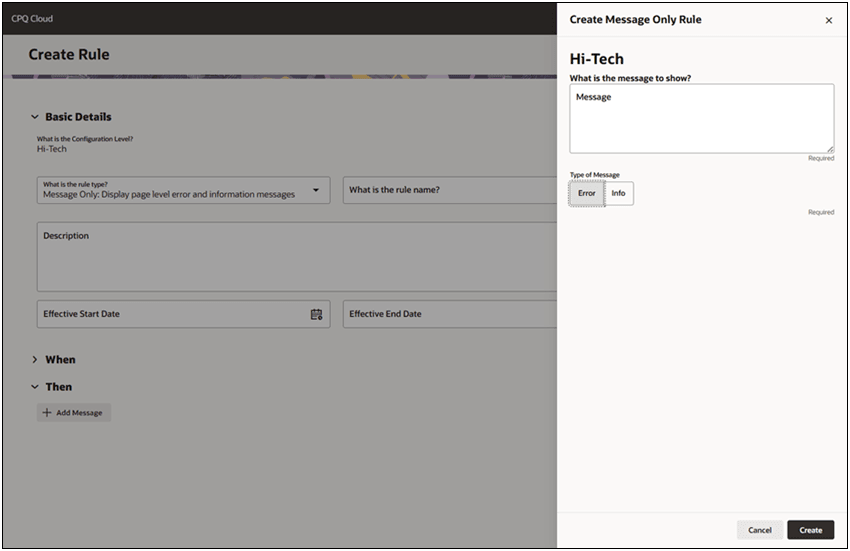
- Activate the rule.
- Validate the new behavior in model configuration runtime.
Tips and considerations
- Use message only configuration rules to provide deliver contextual warnings or critical errors to prevent invalid data from reaching the quote or manufacturing stages.
- A message rule with an Error message blocks actions, such as Add to Quote or Save.
- A message rule with an Informational message is non-blocking and allows additional guidance and contextual information.