Redwood: Use the Enhanced Manufacturer User Interface
This Redwood feature enhances manufacturer functionality with the following updates:
- New tabs in the New Manufacturer drawer panel: Company Profile Attributes, Location, and Additional Attributes.
- Removed section-level edits in the Edit Manufacturer page, allowing all edits to be saved at once.
- New image attachment category for manufacturer objects to organize image files.
New tabs introduced on New Manufacturer side panel
The New Manufacturer side panel has been re-designed to support three tabs: Company Profile Attributes, Location and Additional Attributes.
NOTE: Only mandatory Extensible Flexfields are displayed in the Additional Attributes tab. This tab is hidden if there are no mandatory extensible flexfields. The Company Profile Attributes and the Country attribute within Location can be auto-populated using AI Assist feature as was the case in the previous release.
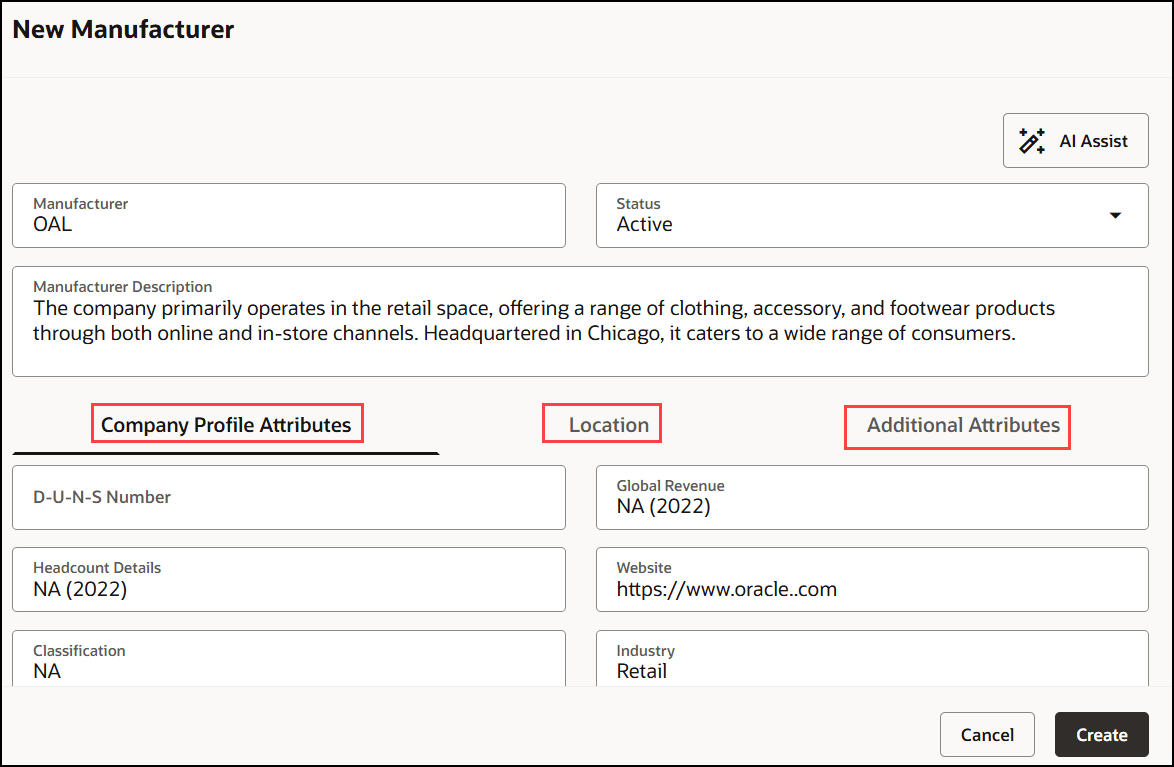
Create Manufacturer with Company Profile Attributes, Location and Additional Attributes tabs.
Section-level edits are not available when editing a manufacturer
You can no longer edit individual sections on the Edit Manufacturer page. Instead, make all your edits across sections and save them together, reducing the need for multiple saves.
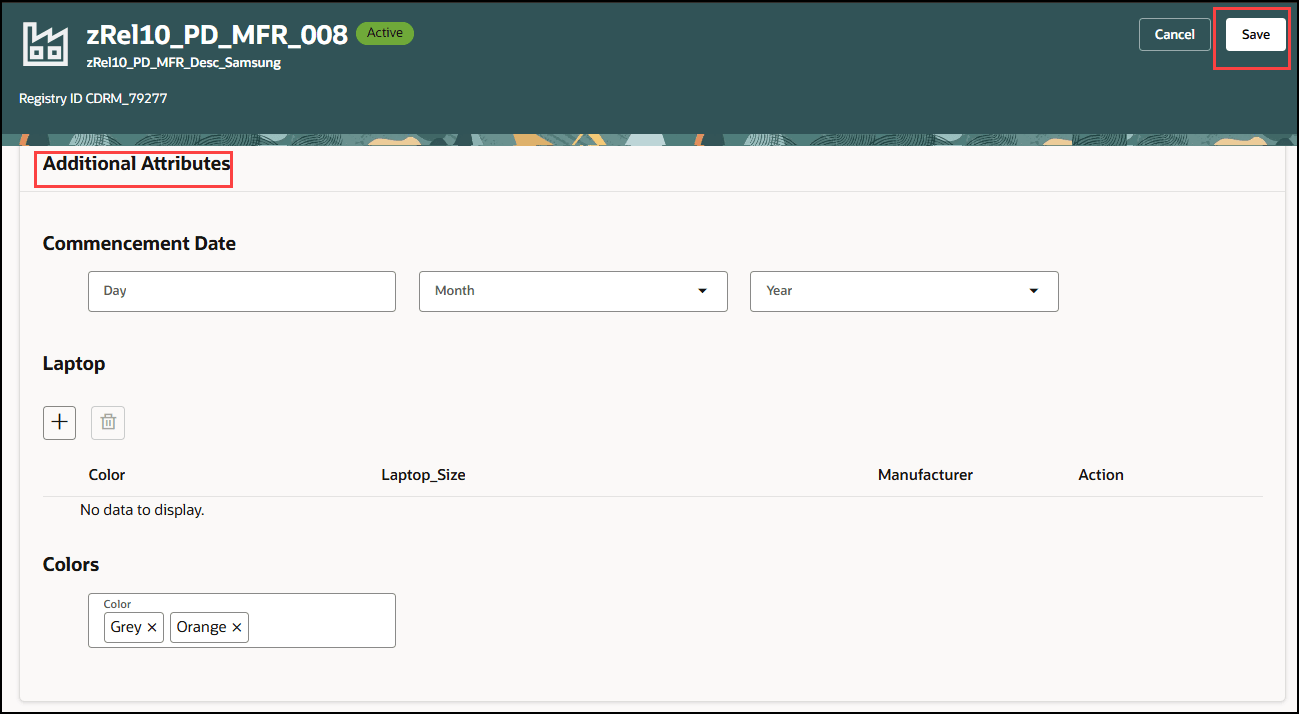
Manufacturer Additional Attributes Section Without Section-Level Save
New image attachment category support for manufacturer objects
You can now create an image category for manufacturer objects to categorize image files added to them.
- Enhances usability with a streamlined multi-tab layout that simplifies data entry and improves visual clarity of manufacturer information.
- Increases user efficiency by consolidating multiple section saves into a single, top-level save, speeding up the editing process.
- Maintains focus by displaying only mandatory extensible flexfields when applicable.
- Introduced support for image categories to organize manufacturer images.
Steps to enable and configure
Migrating Manufacturer from ADF to Redwood:
You must run upgrade job to migrate Manufacturer to Redwood.
- Use Enterprise Scheduler Service job: Upgrade Product Management Data to run on-demand manufacturer upgrade and presence indicator scripts:
- Upgrade Process = Execution
- Functional Area = Manufacturers
- Feature = Update Manufacturer Management and then Update all presence indicators.
To secure your Manufacturer object, you must create a data security policy as per the steps below:
- Sign into Security Console.
- Search for the configured role on which you want to configure the data security policy. Click Actions > Edit Role.
- On the Edit Role page, click Data Security Policies.
- Click Create Data Security Policy (plus icon). On the Create Data Security Policy dialog box, enter the following:
- Policy Name: <unique name>
- Data Resource: Search for and add the resource named HZ_PARTIES (Trading Community Party).
- Data Set: Select All values.
- Actions: Select all the actions.
- Click OK and click Next.
- Save your changes.
You must enable Search Items Using the New User Interface feature to access this feature.
Note: This would enable Items Search in Redwood.
Additionally, you must perform the following steps:
Configure the Profile Value
- In the Setup and Maintenance work area, search for and select the Manage Profile Options task.
- On the Manage Profile Options page, click New to create the Profile Option as follows:
- Profile Option Code = EGP_MANUFACTURER_REDWOOD_ENABLED
- Profile Display Name = EGP_MANUFACTURER_REDWOOD_ENABLED
- Application = Product Development
- Module = Manufacturer
- Then search for and open the Manage Administrator Profile Values task.
- On the Manage Administrator Profile Values page, search for and select the profile option code EGP_MANUFACTURER_REDWOOD_ENABLED.
- In the Profile Values section, add the user for whom you want to enable this feature. You must ensure that the profile value is set to Y for the user.
- Click Save and Close. Changes in the profile value will affect users the next time they sign in.
Also added the following data security for accessing MPN:
Create Data Security for public TPI:
Data Resource: FND_OBJECT
Data Setup: Select by instance set

Condition Name
Parameter1: EGP_TRADING_PARTNER_ITEMS
Actions: All
Create Data Security for private TPI:
Data Resource: FND_OBJECT
Data Setup: Select by instance set

Condition Name
Parameter1: EGP_PRIVATE_TRADING_PARTNERS
Actions: All
Notes: Please run the LDAP sync job after you add the above roles + conditions.
Additionally, if you want to configure Extended Flex Fields on Manufacturer please refer to the what’s new. If you have already configured location DFF’s they will show up in the Redwood.
Tips and considerations
Use business rules to hide one or more of the new tabs: Company Profile Attributes, Location and Additional Attributes.
Key resources
- Oracle Fusion Cloud SCM Implementing Product Management guide available on the Oracle Help Center.
Access requirements
- To search for manufacturers using a Redwood page:
- Get Search View REST(EGP_GET_SEARCH_VIEW_REST_PRIV)
- Access Manufacturer Search (EGP_VIEW_MANUFACTURER_SEARCH_PRIV)
- Access Product Management Landing Page (EGP_ACCESS_LANDING_PAGE_PRIV)
- Manage Product Management Data Security (EGO_MGT_PRODUCT_MGT_DATA_SECURITY_PRIV)
- To view only manufacturers:
- View Manufacturer (EGP_VIEW_MANUFACTURER_PRIV)
- View Feature States Value by Web Service (RCS_VIEW_FEATURE_STATES_WEB_SERVICE_PRIV)
- To edit manufacturers:
- Manage Manufacturer (EGP_MANAGE_MANUFACTURER_PRIV)
- Manage Item Manufacturer (EGP_MANAGE_ITEM_MANUFACTURER_PRIV)
- Manage Trading Partner Item Rest (EGI_MANAGE_TPI_REST_PRIV)
- View Feature States Value by Web Service (RCS_VIEW_FEATURE_STATES_WEB_SERVICE_PRIV)
- Use REST Service - HCM Countries List of Values (ORA_PER_REST_SERVICE_ACCESS_HCM_COUNTRIES_LOV)
- View Trading Community Common Setup (HZ_VIEW_TRADING_COMMUNITY_COMMON_SETUP_PRIV)
- View Geography Information (HZ_VIEW_GEOGRAPHY_INFORMATION_PRIV)
- To create manufacturers:
- Create Manufacturer (EGP_CREATE_MANUFACTURER_PRIV)
- Manage Manufacturer (EGP_MANAGE_MANUFACTURER_PRIV)
- View Feature States Value by Web Service (RCS_VIEW_FEATURE_STATES_WEB_SERVICE_PRIV)
- Use REST Service - HCM Countries List of Values (ORA_PER_REST_SERVICE_ACCESS_HCM_COUNTRIES_LOV)
- View Trading Community Common Setup (HZ_VIEW_TRADING_COMMUNITY_COMMON_SETUP_PRIV)
- View Geography Information (HZ_VIEW_GEOGRAPHY_INFORMATION_PRIV)
To set up this feature, you'll need a configured job role that contains these privileges.
- To configure the index:
- Manage Product Management Index (EGP_MANAGE_PM_INDEXES_PRIV)
- Manage Scheduled Job Definition (FND_MANAGE_SCHEDULED_JOB_DEFINITION_PRIV)
- Grant Search Framework Manager Permissions (FND_SEARCH_FWK_MGR_PRIV)
- Access Manufacturer Attributes for Indexing Using REST (EGP_GET_MANUFACTURER_AVAIL_ATRS_REST_PRIV)
- To rebuild the index:
- Rebuild Product Management Indexes (EGO_REBUILD_PRODUCT_MGT_INDEXES_PRIV)
- To create search views:
- Manage Product Management View (EGP_MANAGE_PM_VIEWS_PRIV)
- Manage Scheduled Job Definition (FND_MANAGE_SCHEDULED_JOB_DEFINITION_PRIV)
- Grant Search Framework Manager Permissions (FND_SEARCH_FWK_MGR_PRIV)
- Access Product Development Configurations Using a REST Service (ACA_GET_PD_CONFIGURATIONS_REST_PRIV)
- Manage Search View REST (EGP_MANAGE_SEARCH_VIEW_REST_PRIV)
- Get View Available Attribute REST (EGP_VIEW_AVAIL_ATTR_REST_PRIV)
- To manage extensible flexfields
- Manage Application Extensible Flexfield (FND_APP_MANAGE_EXTENSIBLE_FLEXFIELD_PRIV)
- NOTE: Users who are assigned configured roles will also need a data security policy.