Redwood: Purge Cycle Count Schedules for a Specific Cycle Count
In large organizations with frequent cycle counting, outdated or inaccurate schedules can accumulate rapidly, causing discrepancies and adding unnecessary workload. Additionally, certain events may impact item availability or require changes in count frequency or configuration. In these cases, purging old schedules enables you to quickly reset and update cycle count plans, helping to maintain the effectiveness of your counting activities and ensuring ongoing inventory accuracy. Now you have the ability to purge cycle count schedules for a specific cycle count so that you can ensure counting accuracy without disrupting any cycle counts that don't require changes. This feature enhances the cycle count scheduling process by giving you full control over which schedules need to be purged. You can now purge any existing schedules associated with a cycle count and recreate new ones based on updated criteria or timing. This ensures that only the most relevant and accurate schedules are maintained, reducing manual adjustments and improving system and operational efficiency.
Use this feature to:
- Removed outdated or incorrect schedules to ensure only the most relevant cycle count plans are active.
- Choose when to purge and regenerate schedules without impacting other cycle counts that remain valid.
- Eliminate the need for manual cleanup of obsolete schedules, saving time and minimizing potential errors.
With this feature, a new parameter has been introduced for the Purge Cycle Count scheduled process.
Using the Purge Cycle Count scheduled process, you can now select Schedules Only as the Purge Count Setup parameter to remove existing schedules associated with a particular cycle count.
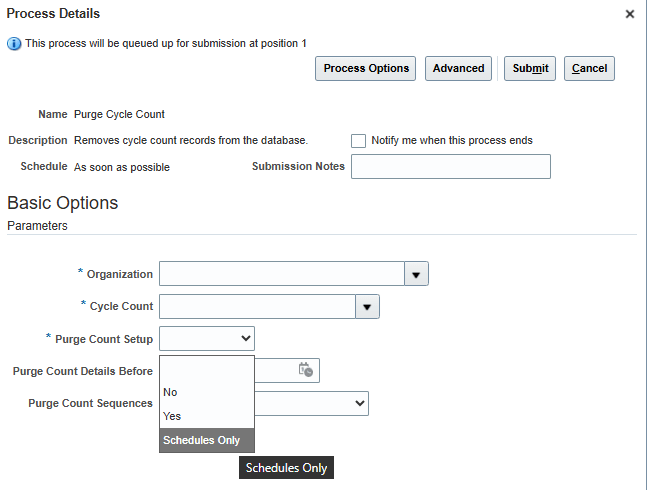
Purge Cycle Count Process with Schedules Only Option
Additionally, on the Redwood Cycle Count page, you can now use the Purge Cycle Count action to purge schedules for a selected cycle count.
Select Schedules Only from the Include Count Definition parameter to remove only the associated schedules while retaining the count definition.
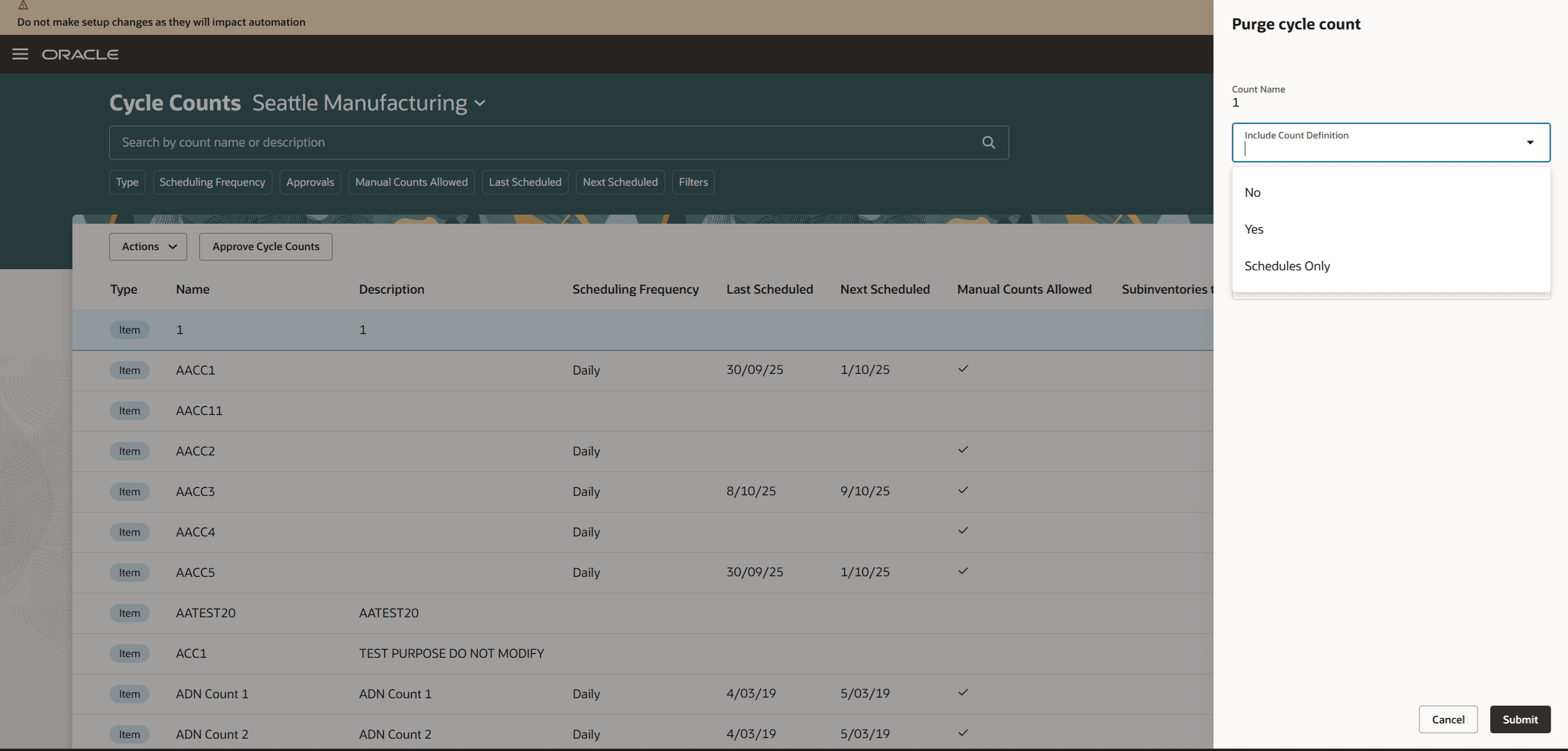
Redwood Cycle Counts Page
NOTE: This change is only applicable to the Redwood version of the Cycle Counts page.
This feature provides you more control and efficiency when generating schedules for a cycle count by allowing you to purge the existing schedules and create the future schedule from scratch.
Steps to enable and configure
You don't need to do anything to enable this feature.
Key resources
- Oracle Fusion Cloud SCM: Using Inventory Management guide, available on the Oracle Help Center.
- Oracle Fusion Cloud SCM: Implementing Manufacturing and Supply Chain Materials Management guide, available on the Oracle Help Center.
- Oracle Fusion Cloud SCM: Redwood: Create Cycle Counts Using a Redwood Page available on the Oracle Help Center.
Access requirements
For the Purge Cycle Count scheduled process, users who are assigned a configured job role that contains these privileges can access this feature:
- Purge Cycle Count (INV_PURGE_CYCLE_COUNT_PRIV)
This privilege was available prior to this update.
For the Purge Cycle Count action from the Redwood Cycle Counts page, users who are assigned a configured job role that contains these privileges can access this feature:
- Manage Cycle Count (INV_MANAGE_CYCLE_COUNT_PRIV)
- Create Cycle Count (INV_CREATE_CYCLE_COUNT_PRIV)
These privileges were available prior to this update.