AI Agent: Stock Location Advisor
Inventory inaccuracies are a common challenge in warehouses and stockrooms. When inventory records are incorrect, warehouse operators spend additional time and effort locating stock in alternate locations. This often means they have to stop what they're doing and start investigating where to find the goods they need. Meanwhile, other operators may continue to be directed to the discrepant location, leading to repeated inefficiencies, wasted effort, and operational slowdowns. Now your operators can use the Stock Location Advisor AI agent to quickly identify potential locations where they can find the goods they require and simultaneously submit a cycle count for the discrepancy they discovered.
Here are the tasks that this agent can perform:
- Assist warehouse operators in identifying alternative locations for picking materials when items aren't found in their originally allocated locations.
- Adjust inventory records in the suggested location by creating a cycle count schedule. This prevents further allocations from that location.
- Alternatively, create a miscellaneous transaction to update the on-hand balance of the item.
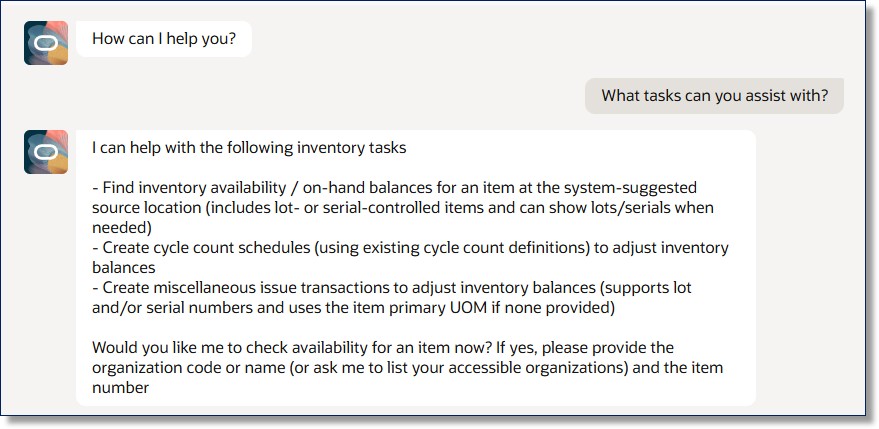
Agent Task Summary
If you have access to only one inventory organization, the agent will automatically use that as the context for all your inquiries. If you have access to multiple organizations, the agent will list them and prompt you to confirm which inventory organization to use for performing the requested tasks. If you're a picker and can't find the item or there is insufficient quantity at the suggested picking location, you can ask the agent to display item availability details. This will help you identify alternative locations from which to pick the item.
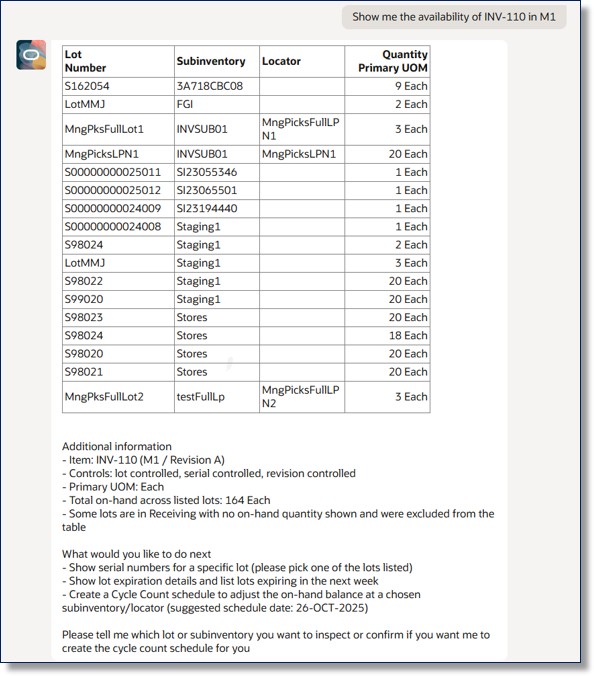
Item Availability
For a serial-controlled item, serial number details aren't displayed in the availability inquiry. If you need to view serial numbers for a specific lot (for lot-controlled items) or subinventory when performing a miscellaneous transaction, you can ask the agent to show the serial numbers.
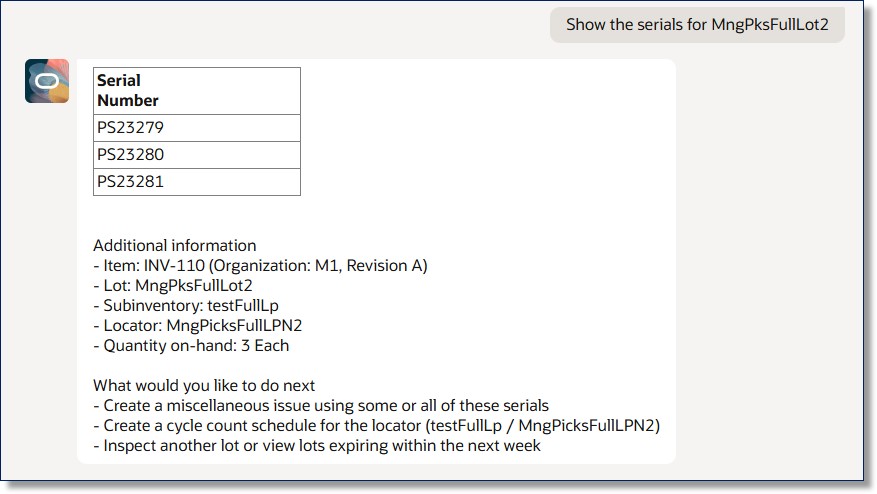
Serial Number Details
For serial-controlled items, you can specify one or more serial numbers. For non-serial-controlled items, you can specify the quantity to ask the agent to create a miscellaneous issue transaction. A human-in-the-loop process is implemented, so the agent will request your confirmation before proceeding with the miscellaneous issue transaction.
If the transaction creation fails, the agent informs you of the reason for the failure. Upon successful completion, the agent provides a deep link for you to view the completed transactions.
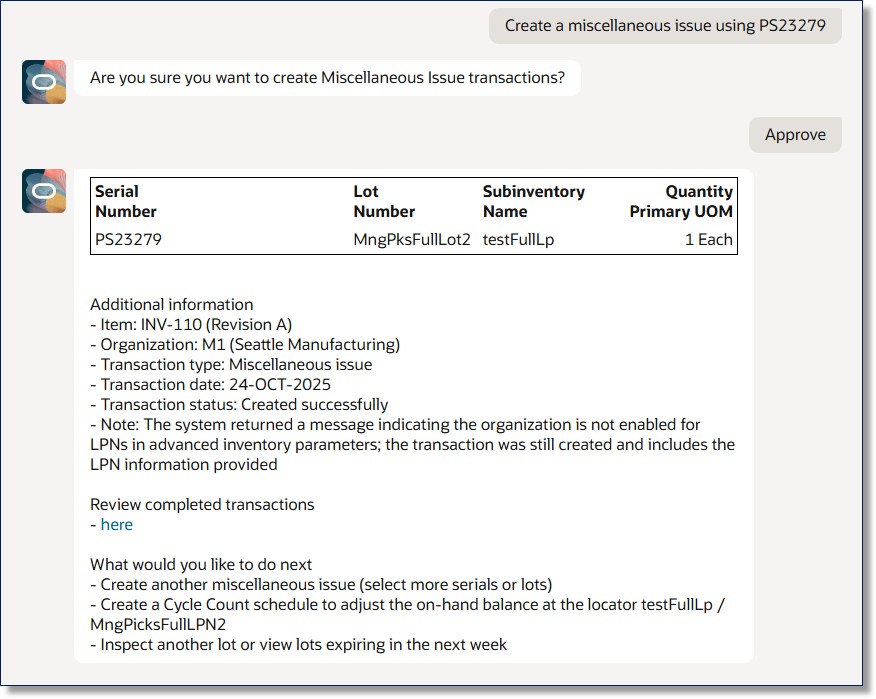
Miscellaneous Transaction
If you don't find the item at the suggested location or there's insufficient quantity to pick, you can ask the agent to create a cycle count schedule for a future date. After the cycle count transaction is executed, this helps adjust the on-hand balance of the item to prevent further allocations from that location.
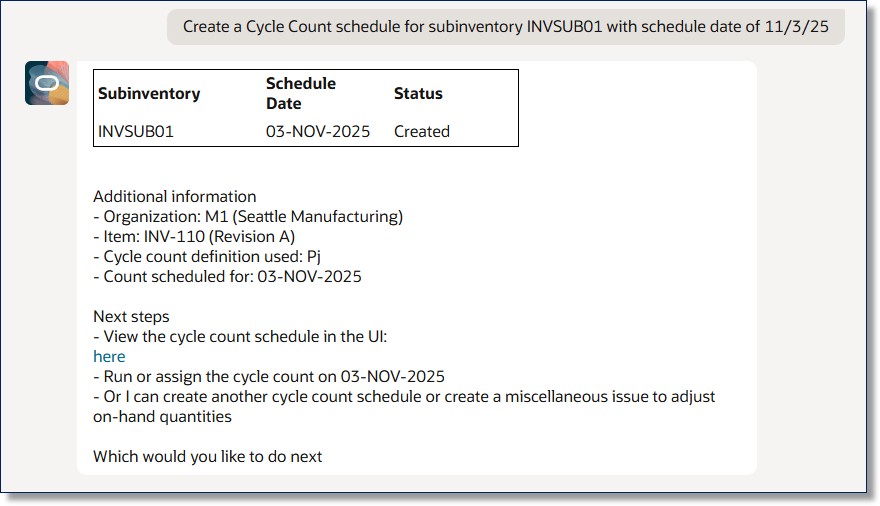
Cycle Count Schedule Transaction
This feature increases operational efficiency and reduces costs by decreasing the time your operators spend locating alternate stocking locations and creating cycle counts when they find a discrepancy in the on-hand quantity of a location.
Here's the demo of these capabilities:
Steps to enable and configure
To enable permission groups for roles, take these steps:
- In the Setup and Maintenance work area, search for the Manage Administrator Profile Values task using the search link in the Tasks panel tab.
- Search for the Enable Security Console External Application Integration (ORA_ASE_SAS_INTEGRATION_ENABLED) profile option and set the Site profile level to Yes.
You can use AI Agent Studio to use or copy a preconfigured agent template to create agents for your business processes. To automatically add a suffix to all artifacts in your agent team, you can use the Copy Template instead of Use Template button. When you copy a template, you're taken directly to the agent team canvas where you can edit the agent team settings, agents, tools, and topics. The Use Template option takes you through a step-by-step process for configuring each artifact in the agent team.
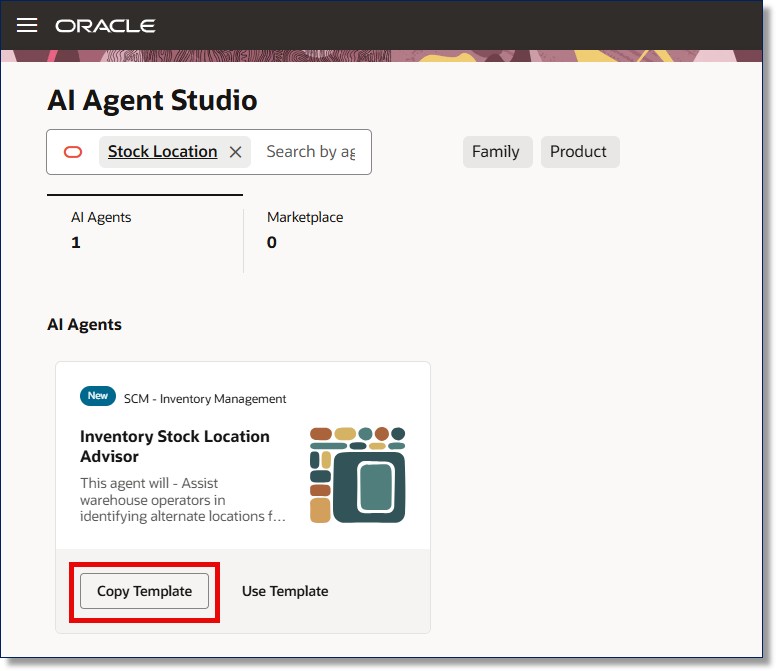
Inventory Stock Location Advisor Template
For information on using AI Agent Studio, see How do I use AI Agent Studio?
Tips and considerations
- After publishing your agent, you can add it to a page such as the Confirm Pick Slips page by including it in the guided journey of that page. To do this, create an Agent task of type Workflow Agent for the agent, and add it to the guided journey.
- If certain details—such as Inventory Organization or Item—are already established in the context of previous prompts, you don't need to repeat these details in subsequent prompts.
Key resources
- Oracle Fusion Cloud SCM: Using Receiving guide, available on the Oracle Help Center.
- Oracle Fusion Cloud SCM: Implementing Manufacturing and Supply Chain Materials Management guide, available on the Oracle Help Center.
- Oracle Fusion Cloud SCM: Security Reference for Manufacturing and Supply Chain Materials Management on the Oracle Help Center.
- Access Requirements for AI Agent Studio
- How can I give users access to AI agents?
- Create AI Agents
Access requirements
To access the Oracle AI Agent Studio for Fusion Applications and manage SCM AI agents, users must be assigned a configured job role that contains these duty roles:
- SCM Intelligent Agent Management Duty (ORA_RCS_SCM_AI_AGENT_MANAGEMENT_DUTY)
- SCM Intelligent Agent Management Duty (ORA_RCS_SCM_AI_AGENT_MANAGEMENT_DUTY_HCM)
- Fai Genai Agent SCM Administrator Duty (ORA_DR_FAI_GENERATIVE_AI_AGENT_SCM_ADMINISTRATOR_DUTY)
To interact with AI agents in product pages, users must be assigned a configured job role that contains this duty role:
- Fai Genai Agent Runtime Duty (ORA_DR_FAI_GENERATIVE_AI_AGENT_RUNTIME_DUTY)
To allow users to interact with agents, you must also enable permission groups in the Security Console on those users' configured job roles that contain the Fai Genai Agent Runtime Duty role. You can enable permission groups when you manage the basic information of your configured job roles.
Users' configured job roles must also contain privileges that allow access to the pages where AI agents are enabled.
- Confirm Pick Using Responsive Inventory (INV_CONFIRM_PICK_PWA_PRIV)
See Access Requirements for AI Agent Studio (for administrators) and How can I give users access to AI agents (for end-users) for more information.