AI Agent: Cycle Count Analysis Advisor
Cycle counts serve as a key way to ensure that your physical on-hand quantity matches the on-hand quantity reflected in Oracle Fusion Cloud Inventory Management. They provide insight into whether transactions are being recorded accurately, there are occurrences of theft, or your experiencing some other problem with on-hand accuracy. If a specific item consistently has variances over a period of time, it signals that a systemic issue needs to be rectified. However, you first need to know what items have this issue. Reviewing an item's variance records over a period can be a painstaking process and something you might start only after there's an obvious pattern and you've already lost a lot of money. Now you can use the Cycle Count Analysis Advisor AI agent to analyze cycle count variances and summarize the problematic items that require corrective action.
Key Capabilities:
- Variance Analysis Over Time: Detects items and locations that frequently show discrepancies in cycle counts.
- Operational Insights: Analyzes closed, approved, and adjusted cycle counts to highlight trends and problem areas.
- Data-Driven Recommendations: Provides actionable insights to help users focus corrective actions where they have the greatest impact.
Insight Categories:
- Top Missed Items: Identifies items frequently outside tolerance thresholds.
- Top Missed Locations: Highlights subinventories or locators consistently showing variances.
- Top Shrinkage Items by Cost: Surfaces high-value items contributing most to inventory loss.
Agent Behavior:
- Analyzes historical data from completed cycle counts, including closed, approved, and adjusted records.
- Doesn't create, modify, or trigger new cycle counts; its role is limited to providing analytical insights.
- Functions as a decision-support tool, enabling strategic analysis rather than performing direct transactional actions.
Here are the tasks that this agent can analyze:
- By Item: Detect items frequently missing tolerance thresholds or frequently adjusted.
- By Location: Highlight subinventories or locators with frequent variances (adjustments).
- By Cost Impact: Identify items or categories contributing most to shrinkage value.
- By Class: Focus on specific classes (for example, Class A or B) to emphasize high-value items.
Frequency of Misses in Cycle Counts Over a Given Period
Identify items that are consistently outside miss tolerance thresholds and take targeted corrective actions to improve inventory accuracy.
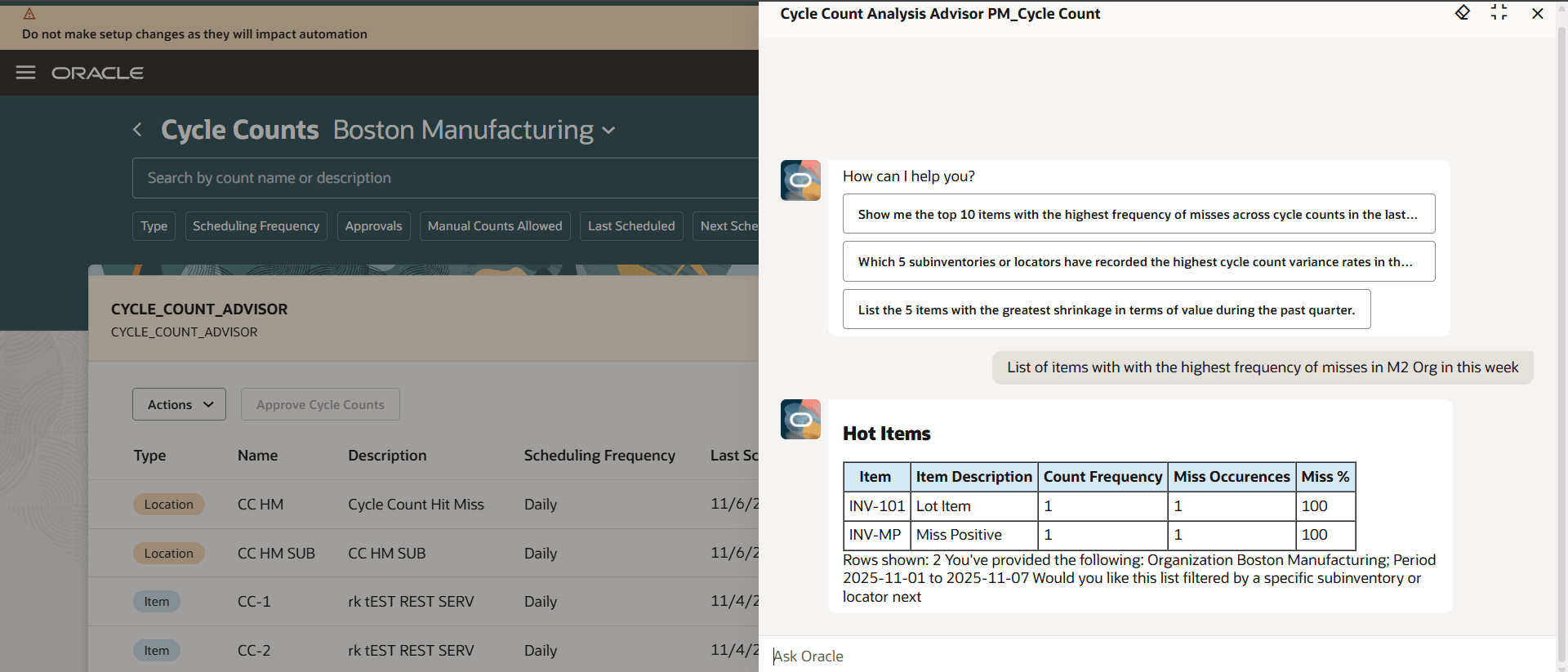
Miss Frequency
Subinventories or Locators That Consistently Show Variances
Investigate operational issues and implement corrective measures at locations that repeatedly exhibit discrepancies.
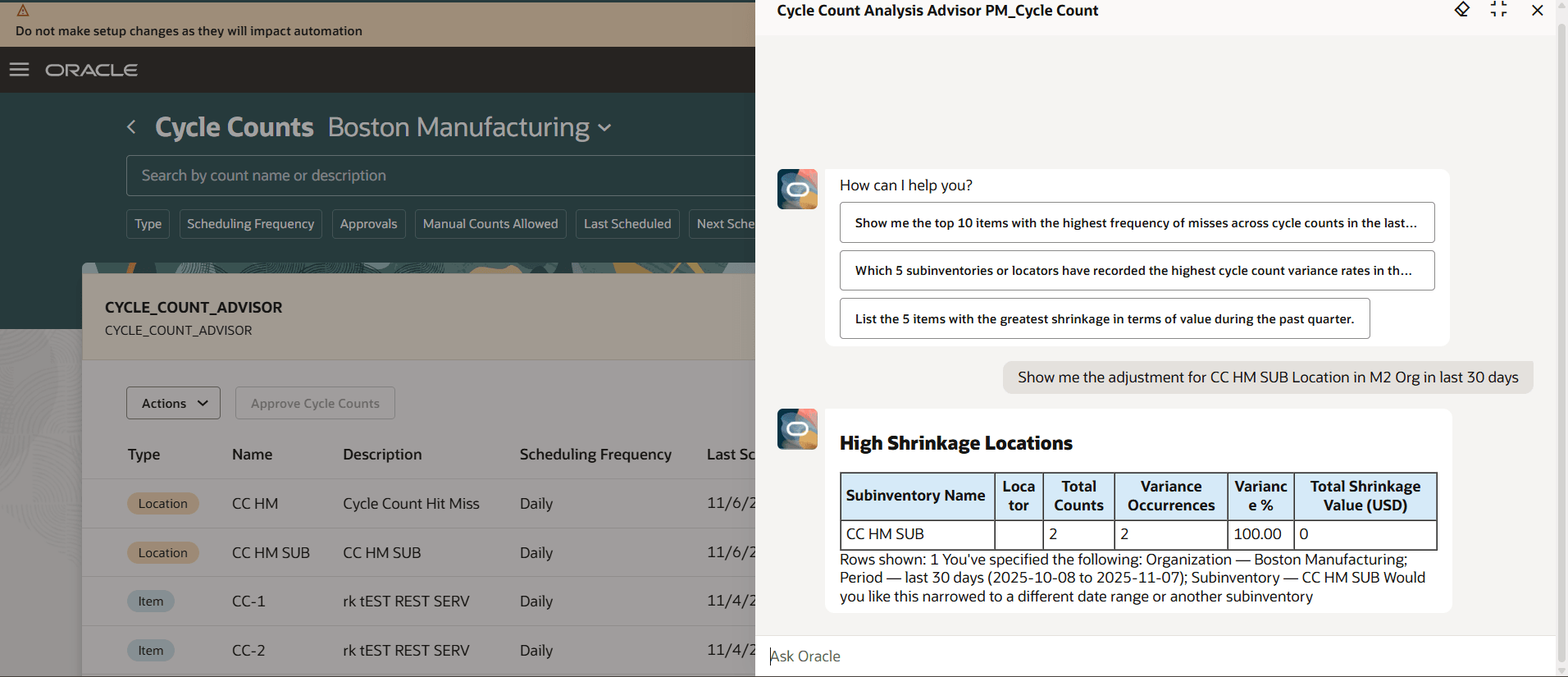
Location Variance
Shrinkage in Terms of Financial Value
Assess and mitigate high-cost inventory risks by analyzing shrinkage based on the financial impact of quantity variances.
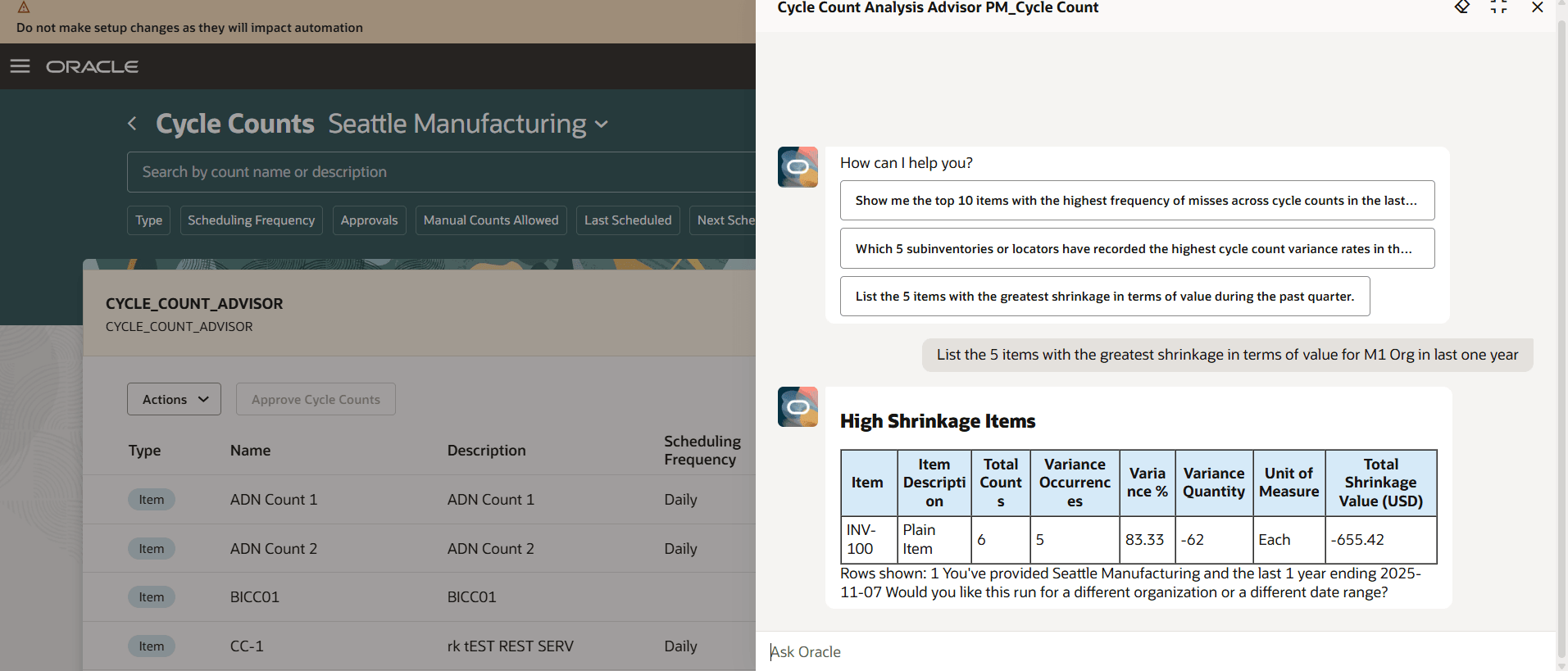
Shrinkage
Class-Based Variance
Focus attention on high-value or high-priority item classes that have a greater operational or financial impact.
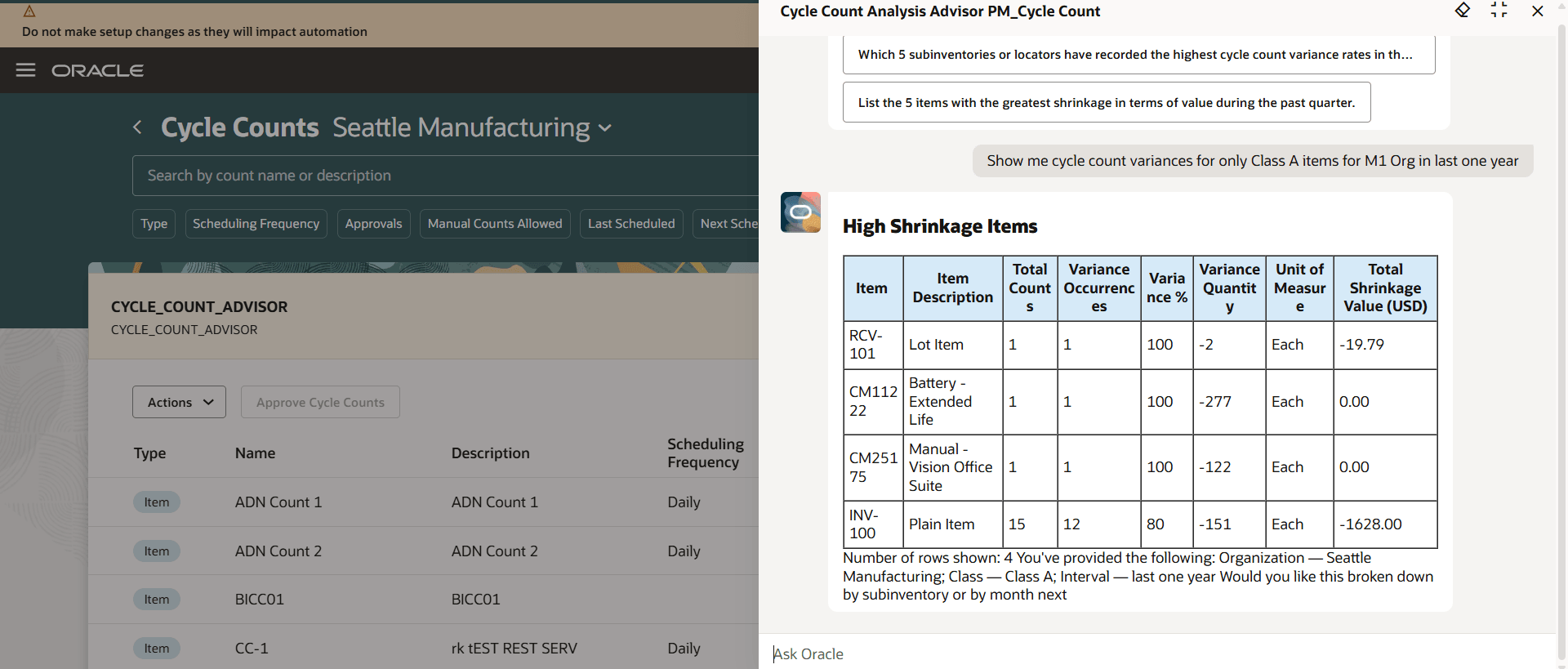
Class Based Variances
Overall, this feature:
- Improves inventory accuracy across the organization.
- Reduces shrinkage and financial exposure.
- Identifies root causes of recurring issues.
- Prioritizes corrective actions for maximum operational impact.
This feature saves time and reduces costs by quickly analyzing problematic items so you can quickly develop correct actions to reduce count variances.
Steps to enable and configure
To enable permission groups for roles, take these steps:
- In the Setup and Maintenance work area, search for the Manage Administrator Profile Values task using the search link in the Tasks panel tab.
- Search for the Enable Security Console External Application Integration (ORA_ASE_SAS_INTEGRATION_ENABLED) profile option and set the Site profile level to Yes.
You can use AI Agent Studio to use or copy a preconfigured agent template to create agents for your business processes. To automatically add a suffix to all artifacts in your agent team, you can use the Copy Template instead of Use Template button. When you copy a template, you're taken directly to the agent team canvas where you can edit the agent team settings, agents, tools, and topics. The Use Template option takes you through a step-by-step process for configuring each artifact in the agent team.
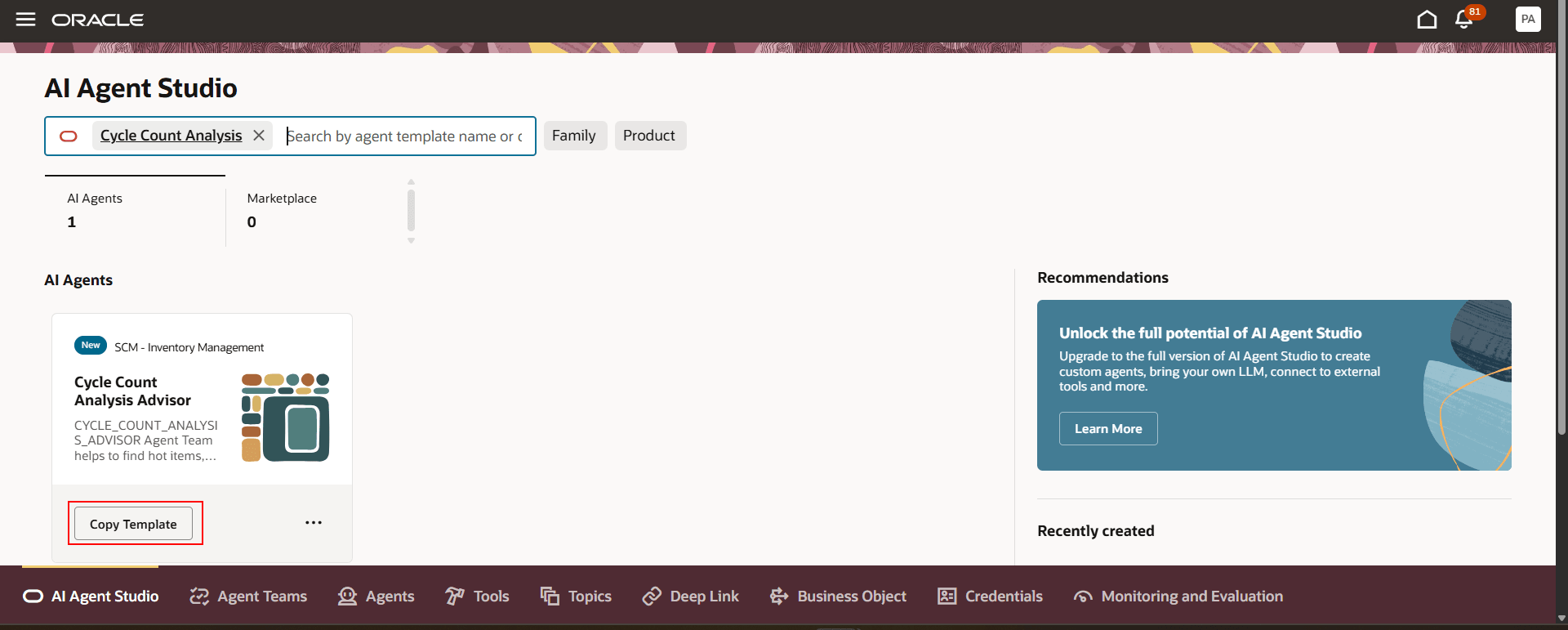
Cycle Count Analysis Advisor
For information on using AI Agent Studio, see How do I use AI Agent Studio?
Tips and considerations
After publishing your agent, you can add it to a page by including it in the guided journey of that page. To do this, create an Agent task of type Workflow Agent for the agent, and add it to the guided journey.
Key resources
- Oracle Fusion Cloud SCM: Using Inventory Management guide, available on the Oracle Help Center.
- Oracle Fusion Cloud SCM: Implementing Manufacturing and Supply Chain Materials Management guide, available on the Oracle Help Center.
- Oracle Fusion Cloud SCM: Security Reference for Manufacturing and Supply Chain Materials Management guide, available on the Oracle Help Center.
- Access Requirements for AI Agent Studio
- How can I give users access to AI agents?
- Create AI Agents
Access requirements
To access the Oracle AI Agent Studio for Fusion Applications and manage SCM AI agents, users must be assigned a configured job role that contains these duty roles:
- SCM Intelligent Agent Management Duty (ORA_RCS_SCM_AI_AGENT_MANAGEMENT_DUTY)
- SCM Intelligent Agent Management Duty (ORA_RCS_SCM_AI_AGENT_MANAGEMENT_DUTY_HCM)
- Fai Genai Agent SCM Administrator Duty (ORA_DR_FAI_GENERATIVE_AI_AGENT_SCM_ADMINISTRATOR_DUTY)
To interact with AI agents in product pages, users must be assigned a configured job role that contains this duty role:
- Fai Genai Agent Runtime Duty (ORA_DR_FAI_GENERATIVE_AI_AGENT_RUNTIME_DUTY)
To allow users to interact with agents, you must also enable permission groups in the Security Console on those users' configured job roles that contain the Fai Genai Agent Runtime Duty role. You can enable permission groups when you manage the basic information of your configured job roles.
Users' configured job roles must also contain privileges that allow access to the pages where AI agents are enabled.
- INV_MANAGE_CYCLE_COUNT_PRIV (Manage Cycle Count)
- INV_MANAGE_ABC_CLASSIFICATION_PRIV (Manage ABC Classification)
- RCS_VIEW_INV_ORG_LOV_WEB_SERVICE_PRIV (View Inventory Organizations List of Values by Web Service)
See Access Requirements for AI Agent Studio (for administrators) and How can I give users access to AI agents (for end-users) for more information.