 Redwood: View Item Description on the Item Quantities Page
If your business or industry has a large or frequently changing product catalog, leveraging automatic item numbering, while using the item description to clearly identify each product, is one of the most efficient ways to manage item definitions. In these cases, it's essential to display the item description wherever the item number appears, so users can easily recognize the items they're working with. The Redwood Item Quantities page now provides this capability by showing item descriptions alongside item numbers.
The item description can be viewed alongside the item number for these views on the Item Quantities page:
- Organization
- Subinventory
- Locator
- Project
- Task
- Detailed
The item description for an item can be viewed on these Item Quantities pages:
- Items
- Lots
- Serial Numbers
- LPN
The item description is hidden by default. Select the Item Description field in the list of hidden columns to make it visible.
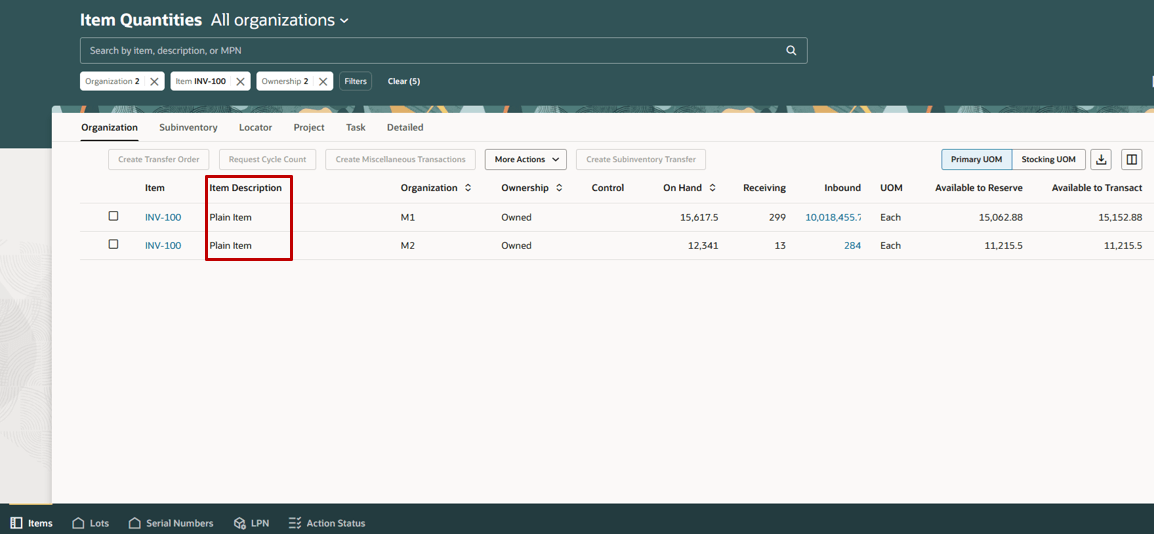
Display Item Description
This feature reduces errors and increases operational efficiency by allowing users to clearly identify exactly which items they're reviewing and about to transact.
Steps to enable and configure
You don't need to do anything to enable this feature.
Tips and considerations
Select the Item Description field in the list of hidden columns to make the field visible.
Key resources
- Oracle Fusion Cloud SCM: Using Inventory Management guide, available on the Oracle Help Center.
Access requirements
Users who are assigned a configured job role that contains these duty roles can access this feature:
- Inventory Balances Management Duty (ORA_INV_INVENTORY_BALANCES_MANAGEMENT_DUTY)
- Warehouse Transaction Maintenance Duty (ORA_INV_WAREHOUSE_TRANSACTION_MAINTENANCE_DUTY)
These duty roles were available prior to this update.