Redwood: Use Alternate Language Translations for Subinventories and Zones
If your organization operates globally with multilingual teams and diverse user bases, it's critical that users can view information within the application in their native language. Now you can enable language translations for your subinventory and zone names, so they're displayed in a user’s preferred language throughout the application to improve clarity, reduce errors, and streamline warehouse operations.
Users can now translate subinventory and zone names and their descriptions directly using the Redwood Translation Editor, providing a unified, multilingual experience across warehouse operations. This enhancement allows warehouse managers and operators to manage translations inline without switching sessions or languages, improving translation efficiency and compliance with regional language requirements. The feature provides real-time, language-aware editing, ensuring multilingual accuracy across all warehouse transactions and related processes, which in turn is also reflected on the corresponding transaction pages within Inventory Management and across other modules such as Procurement, Manufacturing, Maintenance, Supply Chain Planning, and Order Management.
Subinventory Name Multi-Language Support
Once users enable the Opt In, a new Subinventory field is introduced on the Subinventories page. The existing Subinventory Name field becomes editable and is enhanced to support up to 30 characters with multi-language support capability, while the new Subinventory field (storing the earlier Subinventory Code) supports up to 10 characters. Starting from Update 26A, all pages that previously displayed the Subinventory Code in the Subinventory field will now reflect the multi-language supported Subinventory Name, providing a more descriptive and user-friendly experience. This enhancement enables organizations to define and display subinventory names and descriptions in multiple languages, ensuring better localization, clarity, and consistency across global operations.
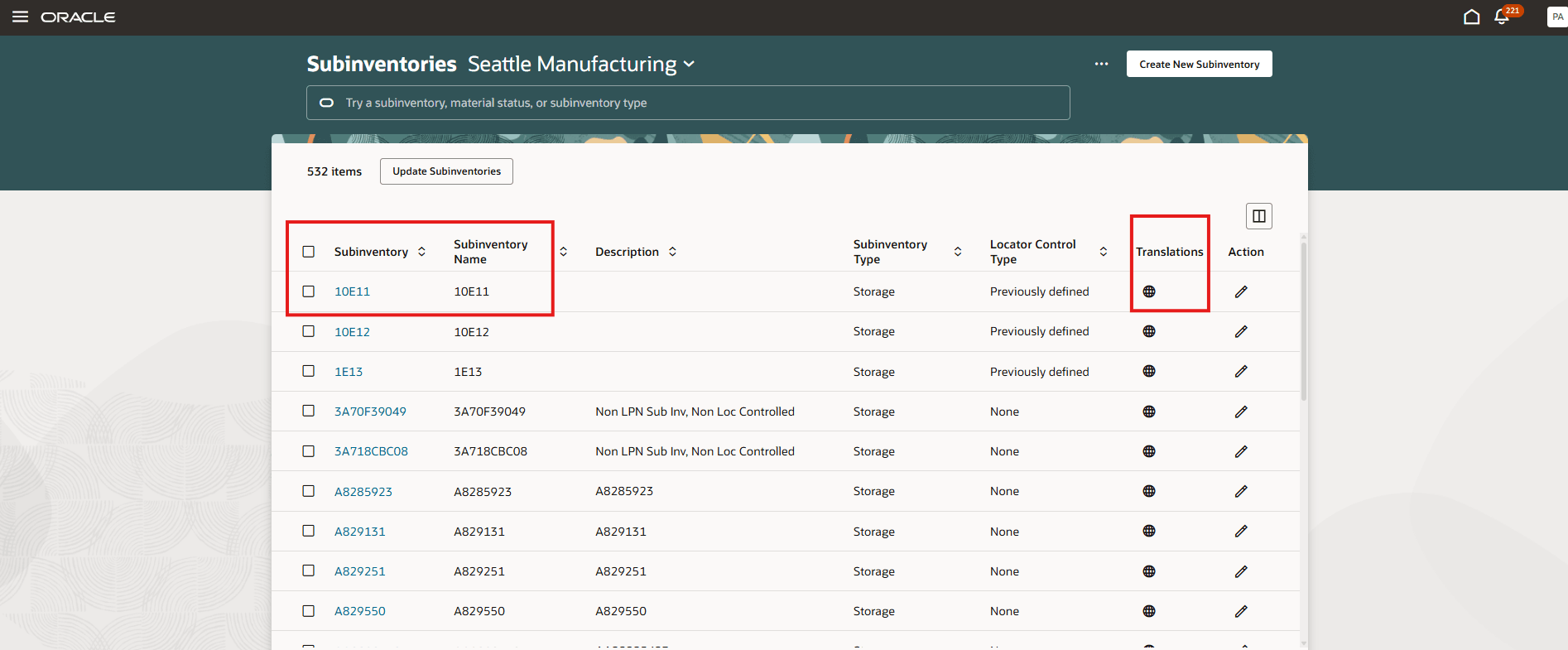
Subinventories
You can use the Translation Editor page to enter your Subinventory Name and Description fields in different languages.
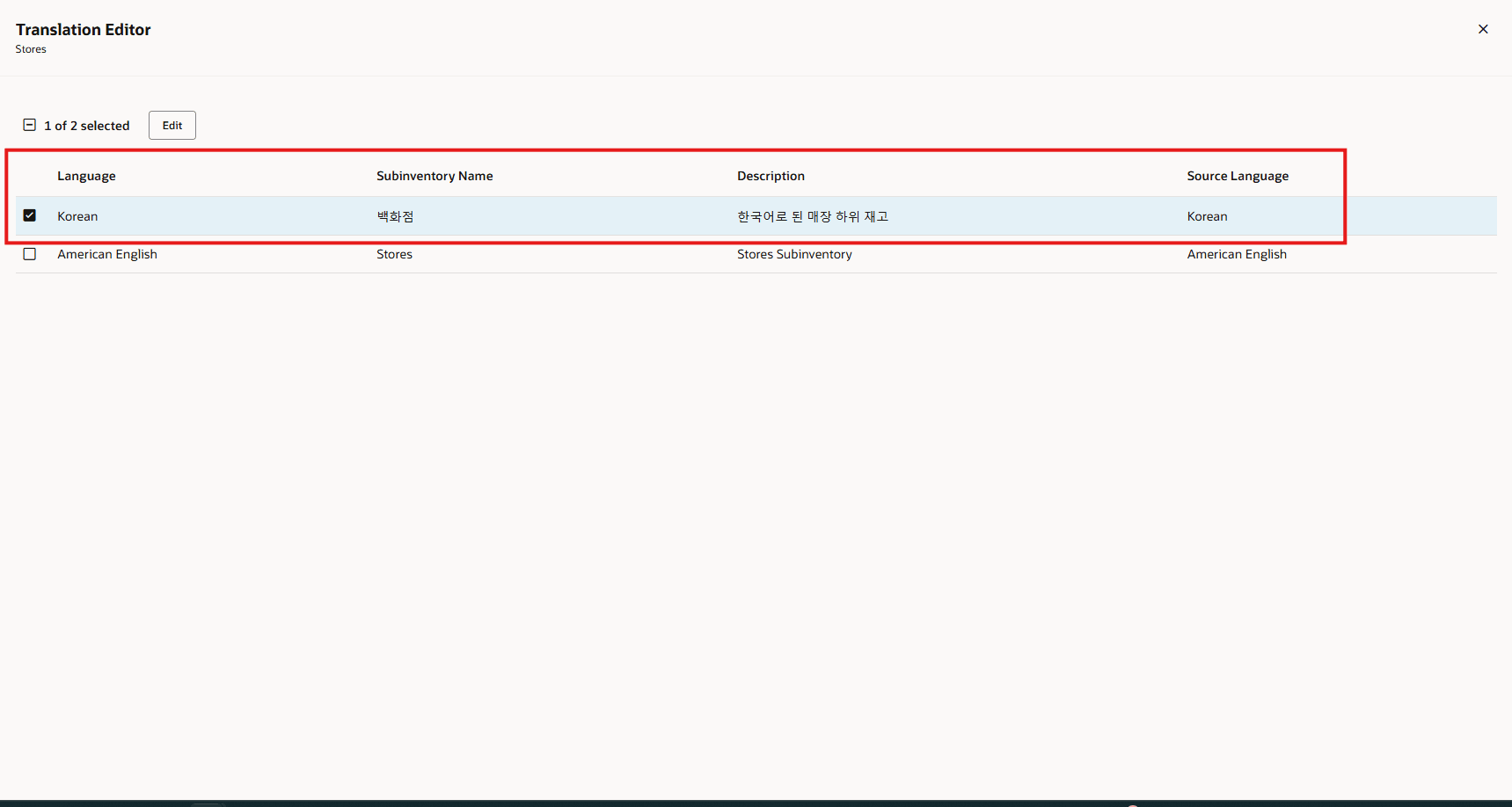
Translation Editor
For mass maintenance or updates through CSV with Create Subinventory from Existing or Update Subinventories, after the Opt In is enabled, a new Subinventory field is introduced, and the existing Subinventory Name field is enhanced to support 30 characters.

CSV Template
NOTE: A new CSV has also been introduced in the FSM Import Export Zip file named INV_INVENTORY_SUBINVENTORY_TRANSLATION.csv, which stores the translation record details of the subinventory.
Post Update 26A, these templates have been enhanced to rename the existing Subinventory Name column to Subinventory while continuing to accept only the 10-chracter Subinventory Code: Item Subinventory Associations, Item Locator Associations, Create Locators from Existing, Update Locators, Update Item Subinventory Associations, and Create Locators. Upload processing for these templates now correctly supports either the Subinventory Name or Subinventory, regardless of whether the feature is Opt In and whether an old or new template is used, ensuring backward compatibility while aligning with the updated subinventory structure.
Further, to support backward compatibility, even after enabling the Opt In, customers can still use the old template for mass maintenance. In that scenario, the system will copy the 10-character Subinventory Name to the 30-character Subinventory Name to create translation records.
NOTE: If Opt In is disabled, the existing pages will continue to work as before. The new field will appear on the Configure Subinventory page only when the Opt In is enabled. However, the Mass Maintenance templates (CSV) for FSM or Mass Maintenance will include the new fields regardless of the opt-in setting.
Zone Name Multi-Language Support
Starting with Update 26A, inventory zones now support multi-language zone names. Once users enable the Opt In, the existing Zone Name field on the Inventory Zones page is enhanced with multi-language capabilities. All pages that previously displayed the Zone Name will now show the translated, multi-language version, providing a more descriptive and user-friendly experience. This enhancement enables organizations to define and view zone names and descriptions in multiple languages, ensuring better localization, clarity, and consistency across global operations.
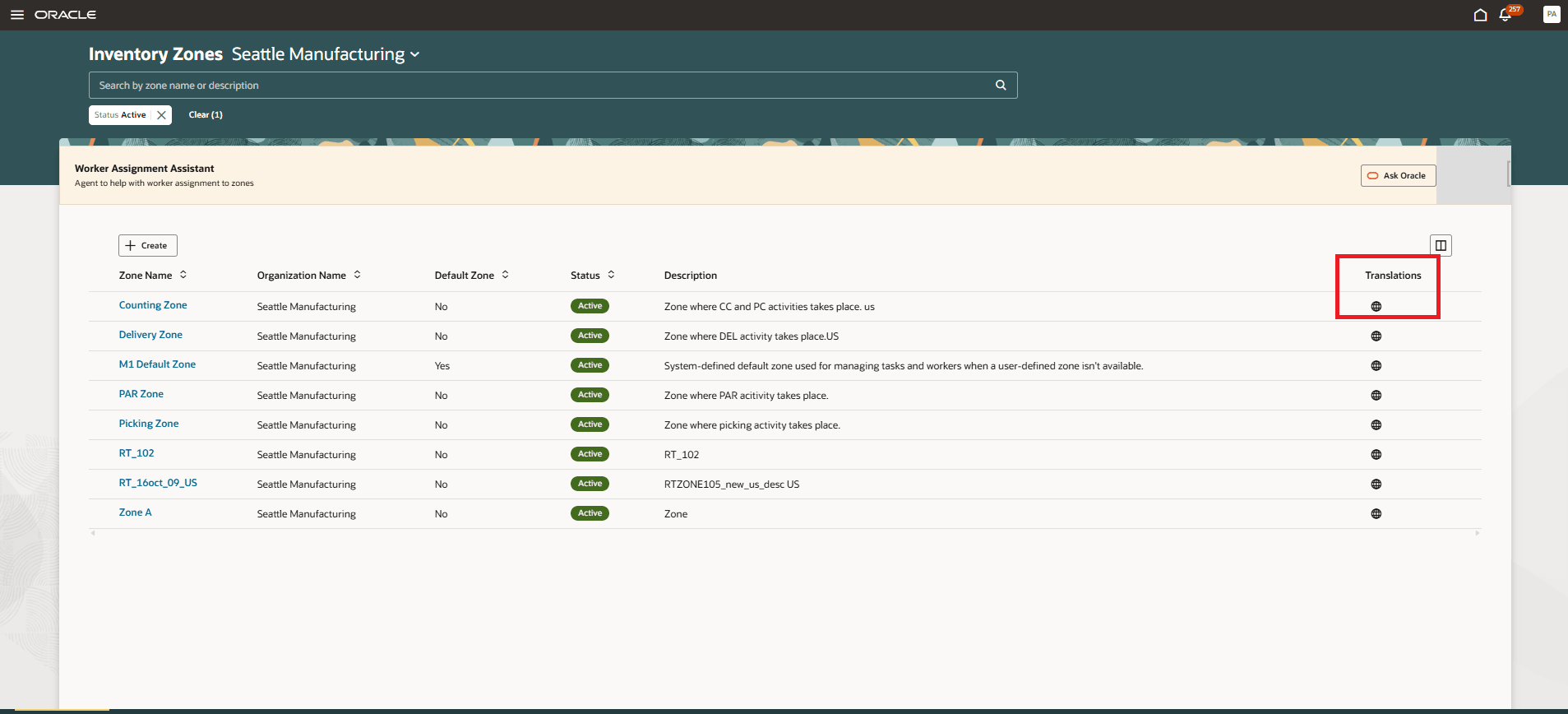
Inventory Zones
You can use the Translation Editor page to enter your Zone Name and Description fields in different languages.
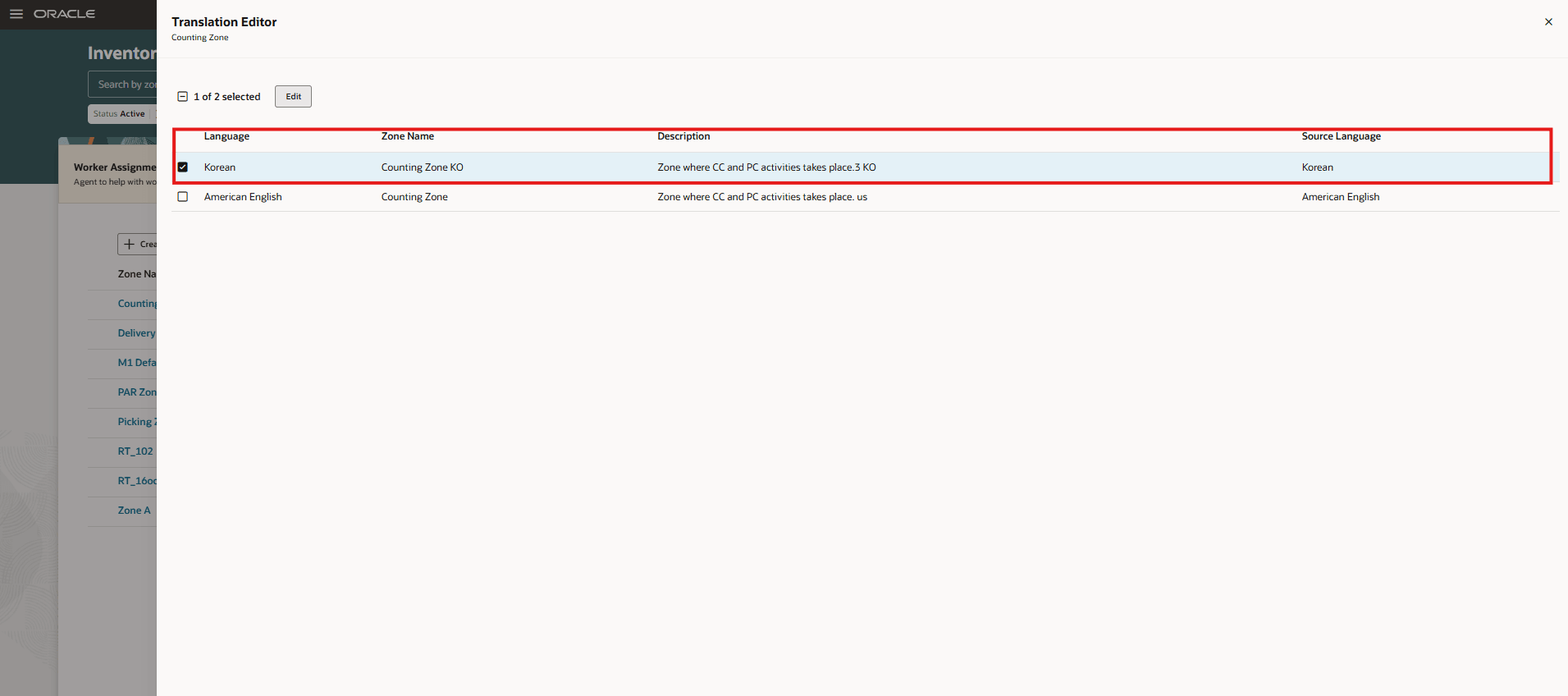
Translation Editor
NOTE: A new CSV file named ORA_INVENTORY_ZONE_TRANSLATION.csv has been introduced in the FSM Import Export ZIP package. This file stores the translation record details for inventory zones.
To maintain backward compatibility, customers can continue using the existing CSV template for mass maintenance even after enabling the Opt In.
This feature supports efficient communication, promotes better user experience, and ensures that inventory information is accessible and understandable for users around the world.
Steps to enable and configure
Use the Opt In UI to enable this feature. For instructions, refer to the Optional Uptake of New Features section of this document.
Offering: Manufacturing and Supply Chain Materials Management
For more information, see this topic: How do I translate attributes on the Redwood Document Types page?
Tips and considerations
- This feature is available only on the Redwood Configure Subinventories page and Inventory Zones page.
- Only those text attributes that have a value will appear in the Translation panel drawer.
- If you no longer require the translated values, you can reset the translated text by updating it with the base language text.
- If Opt In is disabled, the system will automatically populate the Subinventory Code into the Subinventory Name.
- If Opt In is turned off after activation, you must manually verify and ensure that all Subinventory Codes are properly updated to Subinventory Names.
Key resources
- Oracle Fusion Cloud SCM: Implementing Manufacturing and Supply Chain Materials Management, available on the Oracle Help Center.
Access requirements
Users who are assigned a configured job role that contains these privileges can access this feature:
- Get Item Rest (EGP_GET_ITEM_REST_PRIV)
- Manage Inventory Status (INV_MANAGE_INVENTORY_STATUS_PRIV)
- Manage Subinventory and Locator (INV_MANAGE_SUBINVENTORY_AND_LOCATOR_PRIV)
- Manage Unit of Measure Usage (INV_MANAGE_UNIT_OF_MEASURE_USAGE_PRIV)
- View Inventory On-Hand Balance Web Service (INV_VIEW_INVENTORY_ONHAND_BALANCE_WEB_SERVICE_PRIV)
- View Subinventory and Locator List of Values by Web Service (INV_VIEW_SUBINVENTORY_LOCATOR_LOV_WEB_SERVICE_PRIV)
- View Inventory Organizations List of Values by Web Service (RCS_VIEW_INV_ORG_LOV_WEB_SERVICE_PRIV)
- View Units of Measure List of Values by Web Service (RCS_VIEW_UNITS_OF_MEASURE_LOV_WEB_SERVICE_PRIV)
In addition, users must have the following duty roles assigned to their configured job role to access and configure inventory zones with multi-language support:
- Configure Subinventory Using Responsive Inventory (ORA_INV_CONFIGURE_SUBINVENTORY_PWA_DUTY)
- Advanced Inventory Management Duty (ORA_INV_ADVANCED_INVENTORY_MANAGEMENT_DUTY) – New in this update
- Advanced Inventory Management Administration Duty (ORA_INV_ADVANCED_INVENTORY_MANAGEMENT_ADMINISTRATION_DUTY) – New in this update
Users who are assigned a configured job role that contains these privileges can perform related actions using Responsive Inventory:
- Configure Inventory Zones Using Responsive Inventory (INV_CONFIGURE_INVENTORY_ZONES_USING_RESPONSIVE_INVENTORY_PWA_PRIV)
- Perform Actions on Inventory Tasks (INV_PERFORM_ACTIONS_ON_INVENTORY_TASKS_PRIV)
- Perform Inventory Tasks Using Responsive Inventory (INV_PERFORM_INVENTORY_TASKS_USING_RESPONSIVE_INVENTORY_PWA_PRIV)
Most of these privileges and duty roles were available prior to this update. The new duty roles are specified.