 Redwood: Use Lot-Specific Unit of Measure Conversions
In industries such as pharmaceuticals, food and beverage, or chemicals, product attributes can vary significantly from one lot to another, impacting how items are packaged, handled, or shipped. For example, raw materials may have slight variations in weight, potency, or volume depending on the lot, making item-specific unit of measure (UOM) conversions insufficient for precise inventory management. With lot-specific unit of measure conversions, businesses can accurately track, convert, and manage inventory based on the unique characteristics of each lot. Now you have the ability to define a unique UOM conversion rate for each individual lot, and the application will use this conversion for transactions instead of the item-specific conversion rate.
Inventory Management Changes
You can manage lot-specific UOM conversions by navigating to the new Lot Unit of Measure Conversion page from any of these three ways:
- Inventory Management landing page, Actions menu
- Item Quantities page: Navigate to the Lots tab
- Lots and Serials page: Navigate to the Lots tab
You can create or update lot-specific UOM conversions using the Lot Unit of Measure Conversions page. If the Auto-create UOM conversions for new lots option is enabled for an inventory organization, a lot-specific conversion rate is automatically created when an item is first received into a lot. If the conversion rate is subsequently modified, you have the option to apply the updated conversion rate to existing on-hand quantities by selecting the Save and Update On-Hand Quantities action.
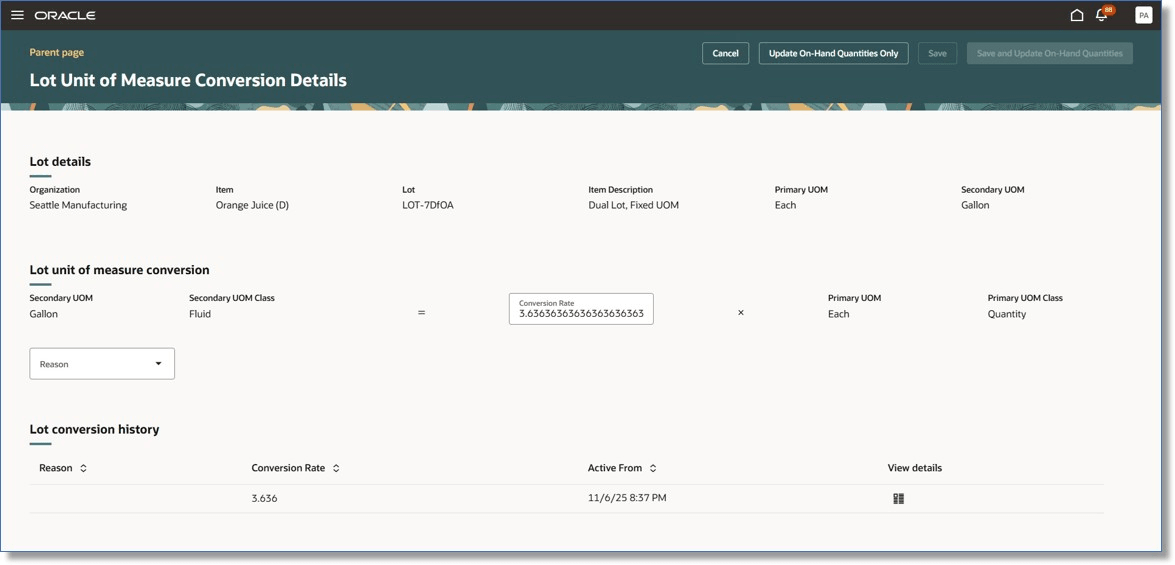
Lot Unit of Measure Conversion Page
You can select an update type from the following options:
- Recalculate on-hand primary quantity: The secondary quantity remains unchanged, and a new primary quantity is calculated based on the updated conversion rate.
- Recalculate on-hand secondary quantity: The primary quantity remains unchanged, and a new secondary quantity is calculated using the updated conversion rate.
- Update on-hand balances: You can manually enter a new primary or secondary quantity, and the other value is derived automatically based on the conversion rate.
You can choose to apply the updates using the new conversion rate for specific subinventories or for all subinventories.
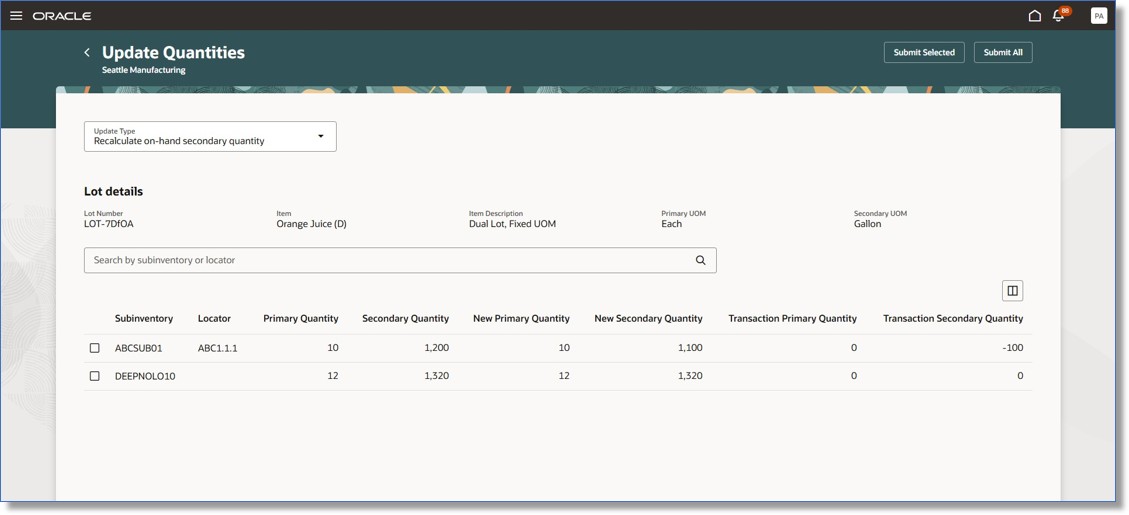
Update Quantities Page
You can review the history of conversion rate updates on the Lot Unit of Measure Conversion Details page, drill down to the details for the related on-hand quantity update, and further access the Material Transactions page for more information.
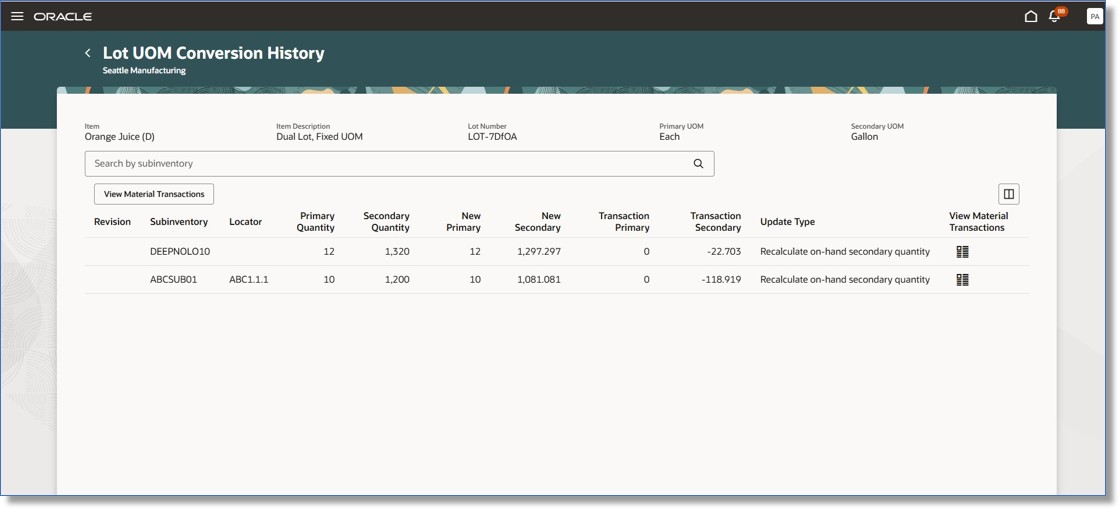
Lot UOM Conversion History
These Inventory, Receiving, and Shipping transactional pages have been updated to support lot-specific unit of measure conversion. A new Lot Secondary Quantity field is now available when recording a single lot on these pages:
- Confirm Pick Slips (Desktop and Mobile)
- Expected Shipment Lines
- Receipts Awaiting Inspection
- Receipts Awaiting Put Away
- Receipt Corrections
- Quick Ship (Ship Confirm drawer)
- Quick Ship (Stage drawer)
- Shipment Line Details (Mobile)
When recording more than one lot using a panel drawer or new page, the Secondary Lot Quantity field is already available. When updating the lot primary or secondary quantity on the transactional pages, item deviation factors and default controls (Fixed, Default, No Default) are honored.
Manufacturing Changes
These transactions and modes are supported for lot-based dual unit of measure conversions for items in Manufacturing:
- Redwood Pages (Smart Operations for Production Supervision and Operator Workbench):
- All product and material transactions are supported for the following work methods: Discrete, Process, and Flow manufacturing.
- All orderless transactions are supported for the Discrete manufacturing work method only.
- All material transactions are supported for Discrete and Process work methods.
- File Based Data Import (FBDI):
- All product and material transactions are supported for Discrete and Process manufacturing work methods.
- Mobile Pages:
- All work order, orderless, and flow schedule completion transactions are supported.
- Postproduction Reporting Page:
- All product and material transactions are supported for Discrete and Process manufacturing work methods only.
- REST Services:
- All product and material transactions are supported for Discrete and Process manufacturing work methods only.
- Flow schedule completions are supported.
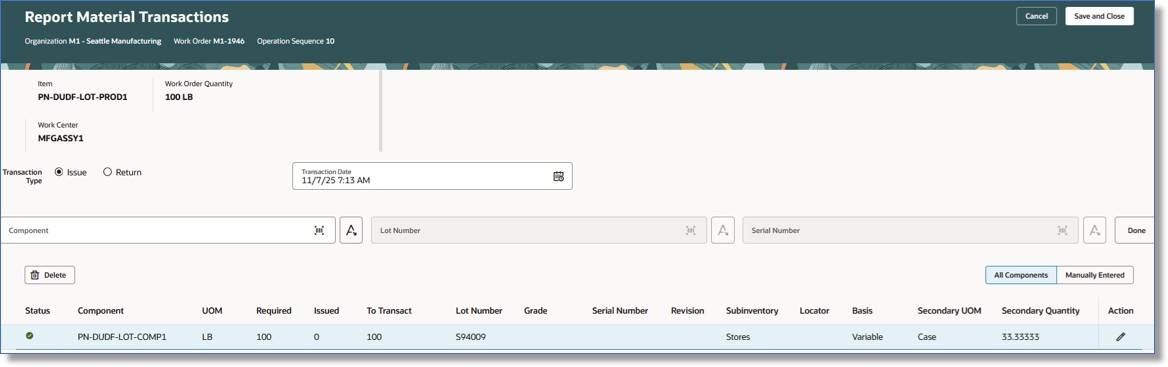
Report Material Transactions Page
Costing Changes
In Cost Accounting, the Create Cost Accounting Distributions process uses quantities from transactions and their associated documents to perform costing and to generate accounting distributions. When the costing unit of measure differs from the transaction’s primary or secondary unit of measure, the process converts the relevant transaction quantities into the costing UOM to ensure accurate costing. With this enhancement, if lot-specific unit of measure conversions are defined for the items and lots on the transactions, Cost Accounting will now use the lot-specific conversion to convert transaction quantities for costing. If no lot-specific unit of measure conversion is defined, the process will continue to function as it does currently.
This ensures compliance with industry regulations, improves inventory accuracy, and supports efficient order fulfillment when dealing with items that require different conversion rates across lots.
Steps to enable and configure
Use the Opt In UI to enable this feature. For instructions, refer to the Optional Uptake of New Features section of this document.
Offering: Manufacturing and Supply Chain Materials Management
Functional Area: Inventory Management
Feature: Redwood: Manage Lot Expiration Actions Using a Redwood Page
To enable lot-specific unit of measure conversions for an inventory organization:
- Navigate to the Inventory Organization Parameters page.
- Select the Lot, Serial Number, and Packing Unit tab.
- Review and set the following options:
- Enable lot-specific conversions
- Auto-create UOM conversions for new lots
- If this option is selected, UOM conversions are automatically created when a lot is first received.
- If this option isn't selected, you must manually create the lot UOM conversions.
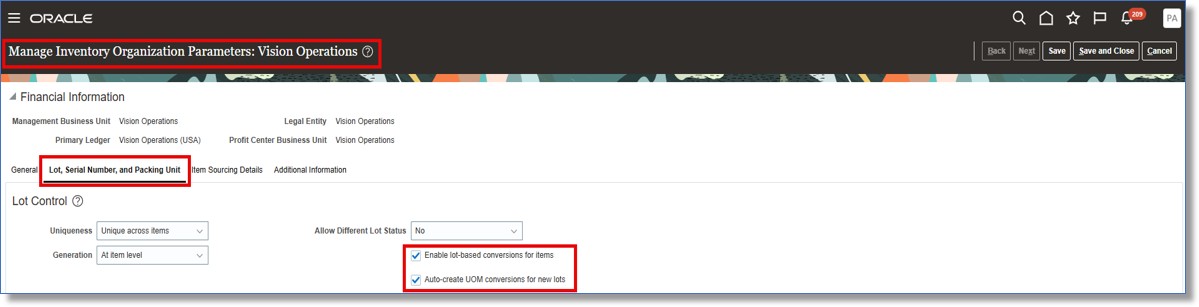
Inventory Organization Parameters
Tips and considerations
Manufacturing
- If Enforce Integer is enabled for the item, then during transactions involving lot-specific dual unit of measure, secondary-to-primary quantity conversion won't occur if the Defaulting Control options are set to either Fixed or Default with deviations.
- For Flow manufacturing orderless transactions, if the secondary quantity is entered, the primary quantity is defaulted and read-only; it won't be calculated based on the secondary quantity.
Order Management
- This feature isn't available in the inventory transaction flow or when capturing returns in Oracle Fusion Cloud Order Management.
Key resources
- Oracle Fusion Cloud SCM: Using Inventory Management guide, available on the Oracle Help Center.
- Oracle Fusion Cloud SCM: Using Shipping guide, available on the Oracle Help Center.
- Oracle Fusion Cloud SCM: Using Manufacturing guide, available on the Oracle Help Center.
- Oracle Fusion Cloud SCM: Implementing Manufacturing and Supply Chain Materials Management guide, available on the Oracle Help Center.
- Oracle Fusion Cloud SCM: Using Supply Chain Cost Management guide, available on the Oracle Help Center.
Access requirements
Costing
Users who are assigned a configured job role that contains these privileges can access this feature:
- Create Cost Distributions (CST_CREATE_COST_DISTRIBUTIONS)
- Create Cost Distributions by Web Service (CST_CREATE_COST_DISTRIBUTIONS_WEB_SERVICE)
- Review Cost Distribution (CST_REVIEW_COST_DISTRIBUTIONS)
- Review Cost Distribution by Web Service (CST_REVIEW_COST_DISTRIBUTIONS_WEB_SERVICE_PRIV)
These privileges were available prior to this update.
Manufacturing
Users who are assigned a configured job role that contains these privileges can access this feature:
- View Unit of Measure Conversion List of Values by Web Service (RCS_VIEW_UNITS_OF_MEASURE_CONVERSION_LOV_WEB_SERVICE_PRIV)
- Report Material Transactions (WIP_REPORT_MATERIAL_TRANSACTIONS_PRIV)
These privileges were available prior to this update.
Inventory Management
Users who are assigned to the Inventory Transaction Management duty role (ORA_INV_INVENTORY_TRANSACTION_MANAGEMENT_DUTY) can access the following functionalities of this feature:
- Quick Actions on Inventory Management Landing Page to manage Lot UOM Conversions
- Manage Lot Unit of Measure Conversions
- Update on-hand quantities
- View history of conversion rate changes
Users who are assigned to the Warehouse Transaction Maintenance duty role (ORA_INV_WAREHOUSE_TRANSACTION_MAINTENANCE_DUTY) can access the following functionalities of this feature:
- Quick Actions on Inventory Management Landing Page to view Lot UOM Conversions
Users who are assigned to the Unit of Measure Management duty role (ORA_INV_UNIT_OF_MEASURE_MANAGEMENT_DUTY) can access the following functionalities of this feature:
- Manage Lot Unit of Measure Conversions
- View history of conversion rate changes
These duty roles were available prior to this update.
Receiving
Users who are assigned to the Receiving Transaction Maintenance duty role (ORA_RCV_RECEIVING_TRANSACTION_MAINTENANCE_DUTY) can access the following functionalities of this feature:
- Quick Actions on Inventory Management Landing Page to view Lot UOM Conversions
This duty role was available prior to this update.
Shipping
Users who are assigned to the Shipping Management duty role (ORA_WSH_DELIVERY_MANAGEMENT_DUTY) can access the following functionalities of this feature:
- Quick Actions on Inventory Management Landing Page to manage Lot UOM Conversions
Users who are assigned to the Shipping Agent duty role (ORA_WSH_DELIVERY_PROCESSING_DUTY) can access the following functionalities of this feature:
- Quick Actions on Inventory Management Landing Page to view Lot UOM Conversions
These duty roles were available prior to this update.