AI Agent: Fulfillment Processing Assistant - Use Additional Picking and Shipping Logic
The Fulfillment Processing Assistant AI agent has been enhanced to provide you more control over what material is picked and shipped. With this update, you can now express pick orders without detailed reservations. The agent suggests a subinventory based on defaults or item availability, and you can confirm or specify one directly. Serial and lot-controlled items are supported for both express pick and stage (Quick Ship) actions. You can also perform pick release using a pick wave release rule and specify the subinventory and locator to pick from.
The Fulfillment Processing Assistant can assist you with these tasks:
| Task | Details |
|---|---|
| Shipment and Order Information | Provides key shipment and order details including shipment line status, ship-to customer and location, shipping method, scheduled or initial ship date, requested or planned delivery date, weight, volume, waybill, tracking number, shipping cost, shipping priority, freight terms, actual ship date, transportation shipment details, and exceptions. |
| Pick Release an Order | Pick releases an order using the order number. You can specify a pick wave release rule and the pick-from subinventory and locator. If a line or item is backordered, it displays the unreserved demand quantity for the next two weeks that may require supply. |
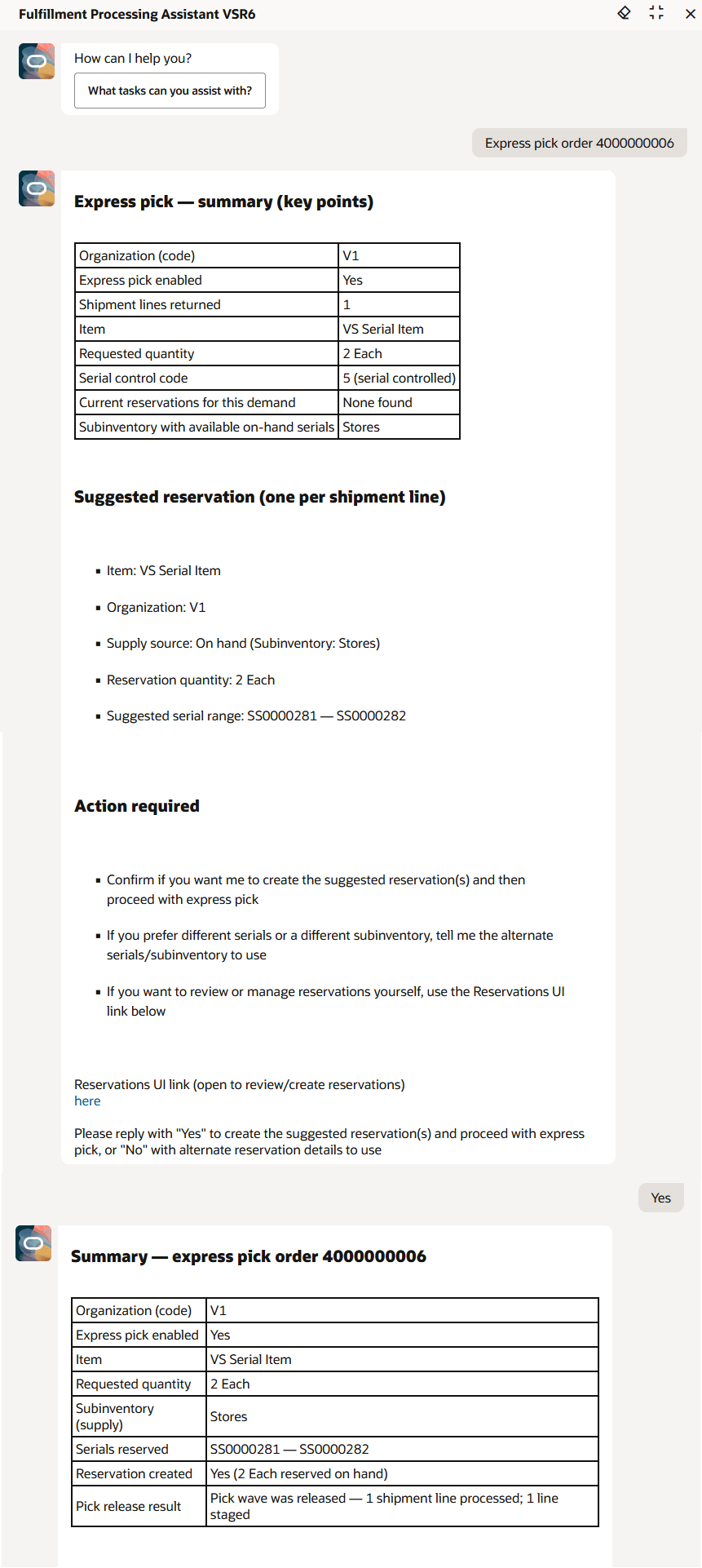
| Express Pick an Order | Performs express pick for orders with detailed reservations. If no reservation exists, the system suggests subinventory, locator, lot, and serial details based on item transaction defaults and current availability. A deep link to the Reservations page is provided for manual reservation creation. |
| Stage (Quick Ship) an Order | Stages an order by skipping pick release and pick confirmation for quick ship enabled organizations. Derives inventory details from the source subinventory on the shipment line, reservation details, quick ship parameters, item transaction defaults, or item subinventory/locator associations. Lot and serial numbers are automatically selected. |
| Suggest LPN Type for Packing an Order | Recommends the appropriate LPN type (packing unit or container item) based on default item LPN configuration and the last used LPN for the item. |
| Provide Packing Guidelines | Uses packing policy documents to determine whether items in an order can be grouped into a single LPN. |
| Pack an Order | Supports autopacking using the default item LPN configuration or manual packing by specifying the desired LPN type. |
| Ship confirm a shipment or order |
Ship confirms an order or shipment using the default ship confirm rule. |
| Generate Shipping Documents | Generates packing slip, bill of lading, commercial invoice, and mailing label reports, and allows you to download them to your local machine. |
Sample Prompts
- Express pick order VS000001
Follow up prompts:
- Proceed with express pick
- Create reservations and proceed with express pick
- Update the reservation with subinventory Stores and proceed with express pick
- Quick ship stage order VS000002
Follow up prompts:
- Proceed with quick ship stage
- Proceed with serials and perform quick ship stage
- Proceed with serials from subinventory Stores
- Pick release the order VS000003 using release rule VS Auto Pick
- Pick release the order VS000004 with pick-from subinventory Stores and pick-from locator 1.2.1
Fulfillment Processing Assistant
The Fulfillment Processing Assistant uses these worker agents:
Worker Agents
| Agent | Agent Description |
|---|---|
|
Shipment Line Transactions Assistant |
Performs actions such as pack, autopack, and quick ship stage an order. |
|
Shipping Documents Generator |
Fetches shipment details and uses these details to run shipping reports based on user requests. |
|
Pick Release Assistant |
Performs pick release or express pick for a given order. If the pick release process results in backordered lines or items, it provides information about the open or future demand for those backordered items. |
|
Default Packing Units or LPNs Advisor |
Retrieves the default packing unit or LPN configuration and suggests how many containers are required for packing. Additionally, it suggests the last used container item number for the item. |
|
Packing Policy Advisor |
Determines whether the items in an order can be grouped into a single LPN based on policy guidelines. |
|
Shipment Transactions Assistant |
Performs shipment transactions and provides a link for viewing the shipment details. |
|
Shipping Exceptions Assistant |
Provides details about shipment exceptions. |
With this feature, you can have greater oversight of the materials utilized for order fulfillment when working with the Fulfillment Processing Assistant AI agent.
Steps to enable and configure
To enable permission groups for roles, take these steps:
- In the Setup and Maintenance work area, search for the Manage Administrator Profile Values task using the search link in the Tasks panel tab.
- Search for the Enable Security Console External Application Integration (ORA_ASE_SAS_INTEGRATION_ENABLED) profile option and set the Site profile level to Yes.
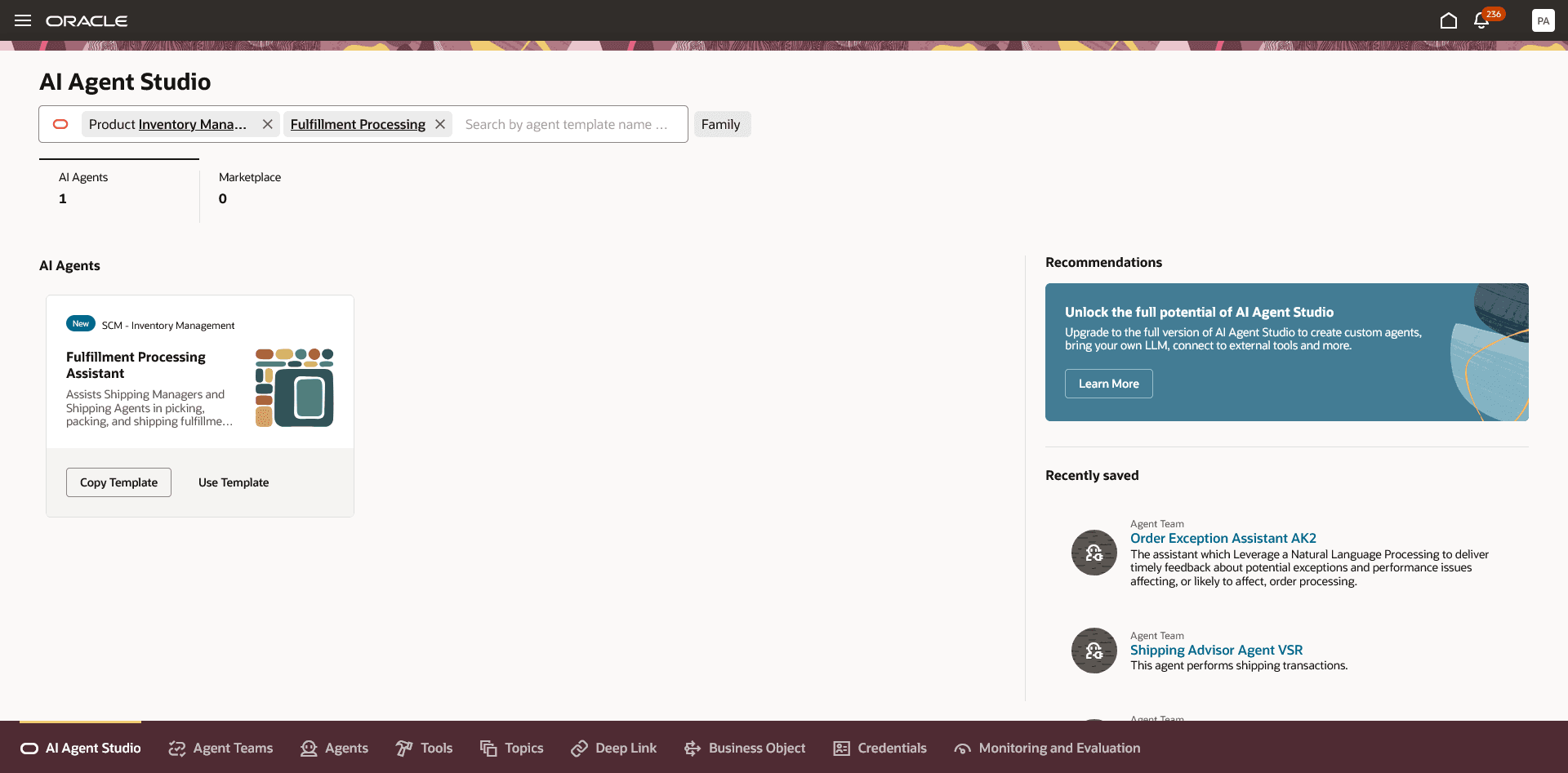
You can use AI Agent Studio to use or copy a preconfigured agent template to create agents for your business processes. To automatically add a suffix to all artifacts in your agent team, you can Copy Template instead of Use Template. When you copy a template, you're directly taken to the agent team canvas where you can edit the agent team settings, agents, tools, and topics. The Use Template option takes you through a step-by-step process for configuring each artifact in the agent team.
Agent Template: Fulfillment Processing Assistant
Fulfillment Processing Assistant Template
For information on using AI Agent Studio, see How do I use AI Agent Studio?
If you want the agent to use a policy document for providing packing guidelines, update the Packing Policy Document in the document tool by adding a file that contains the detailed packing policy information. Set the document status to Ready to Publish, then run the Process Agent Documents scheduled process to publish it.
Tips and considerations
After publishing your agent, you can add it to a page by including it in the guided journey of that page. To do this, create an Agent task of type Workflow Agent, and add it to the guided journey.
Key resources
- Oracle Fusion Cloud SCM: Using Inventory Management guide, available on the Oracle Help Center.
- Oracle Fusion Cloud SCM: Using Shipping guide, available on the Oracle Help Center.
- Access Requirements for AI Agent Studio
- How can I give users access to AI agents?
- Create AI Agents
Access requirements
To access the Oracle AI Agent Studio for Fusion Applications and manage SCM AI agents, users must be assigned a configured job role that contains these duty roles:
- SCM Intelligent Agent Management Duty (ORA_RCS_SCM_AI_AGENT_MANAGEMENT_DUTY)
- SCM Intelligent Agent Management Duty (ORA_RCS_SCM_AI_AGENT_MANAGEMENT_DUTY_HCM)
- Fai Genai Agent SCM Administrator Duty (ORA_DR_FAI_GENERATIVE_AI_AGENT_SCM_ADMINISTRATOR_DUTY)
To interact with AI agents in product pages, users must be assigned a configured job role that contains this duty role:
- Fai Genai Agent Runtime Duty (ORA_DR_FAI_GENERATIVE_AI_AGENT_RUNTIME_DUTY)
To allow users to interact with agents, you must also enable permission groups in the Security Console on those users' configured job roles that contain the Fai Genai Agent Runtime Duty role. You can enable permission groups when you manage the basic information of your configured job roles.
See Access Requirements for AI Agent Studio (for administrators) and How can I give users access to AI agents (for end-users) for more information.
To interact with the Fulfillment Processing Assistant agent, users must be assigned a configured job role that contains these privileges:
- Manage Shipment Web Service (WSH_MANAGE_SHIPMENT_WEB_SERVICE_PRIV).
- Manage Pick Wave Web Service (WSH_MANAGE_PICK_WAVE_WEB_SERVICE_PRIV)
- Manage Packing Unit Web Service (INV_MANAGE_PACKING_UNIT_WEB_SERVICE_PRIV)
- Manage Shipping Organization Parameter (WSH_MANAGE_SHIPPING_ORGANIZATION_PARAMETER_PRIV)
- Manage Packing Unit Item Assignment (WSH_MANAGE_CONTAINER_ITEM_ASSIGNMENT_PRIV)
- Manage Shipments and Shipment Lines (WSH_MANAGE_SHIPMENT_AND_SHIPMENT_LINE_PRIV)
- Manage Inventory Reservation Using Responsive Inventory (INV_MANAGE_INVENTORY_RESERVATION_PWA_PRIV)
- Manage Item Transaction Defaults (INV_MANAGE_ITEM_TRANSACTION_DEFAULTS_PRIV)
- View On-Hand Quantity Using Responsive Inventory (INV_VIEW_ONHAND_QUANTITY_USING_RESPONSIVE_INVENTORY_PWA_PRIV)
- View Item Lot and Item Serial List of Values by Web Service (INV_VIEW_LOT_SERIAL_LOV_WEB_SERVICE_PRIV)
- Get Item Rest (EGP_GET_ITEM_REST_PRIV)
Users’ configured job roles must also contain privileges that allow access to the pages where AI agents are enabled.