AI Agent: Maintenance Work Order Cost Estimation Advisor
You can use the Maintenance Work Order Cost Estimation AI agent to instantly estimate the cost of a maintenance work order before work order execution or cost processing.
By entering a work order number, you can view an estimated breakdown of material, labor, and equipment costs within seconds.
The agent also supports simulations, allowing you to test different what-if scenarios, such as:
- Replacing a material or part
- Adjusting labor hours or resource rates
The updated estimate is instantly displayed, helping you make informed planning decisions.
Business Benefits
- Plan smarter: Get cost visibility early in the maintenance lifecycle before the work begins.
- Simulate instantly: Try different cost scenarios (material or labor changes) and view the impact in real time.
- Improve accuracy: Avoid manual spreadsheets or waiting for downstream cost runs.
- Better decision making: Help maintenance planners and cost accountants make data-driven choices for budgeting and scheduling.
Steps to enable and configure
To enable permission groups for roles, take these steps:
- In the Setup and Maintenance work area, search for the Manage Administrator Profile Values task using the search link in the Tasks panel tab.
- Search for the Enable Security Console External Application Integration (ORA_ASE_SAS_INTEGRATION_ENABLED) profile option and set the Site profile level to Yes.
You can use AI Agent Studio to use or copy a preconfigured agent template to create agents for your business processes. To automatically add a suffix to all artifacts in your agent team, you can use the Copy Template instead of Use Template button. When you copy a template, you're taken directly to the agent team canvas where you can edit the agent team settings, agents, tools, and topics. The Use Template option takes you through a step-by-step process for configuring each artifact in the agent team.
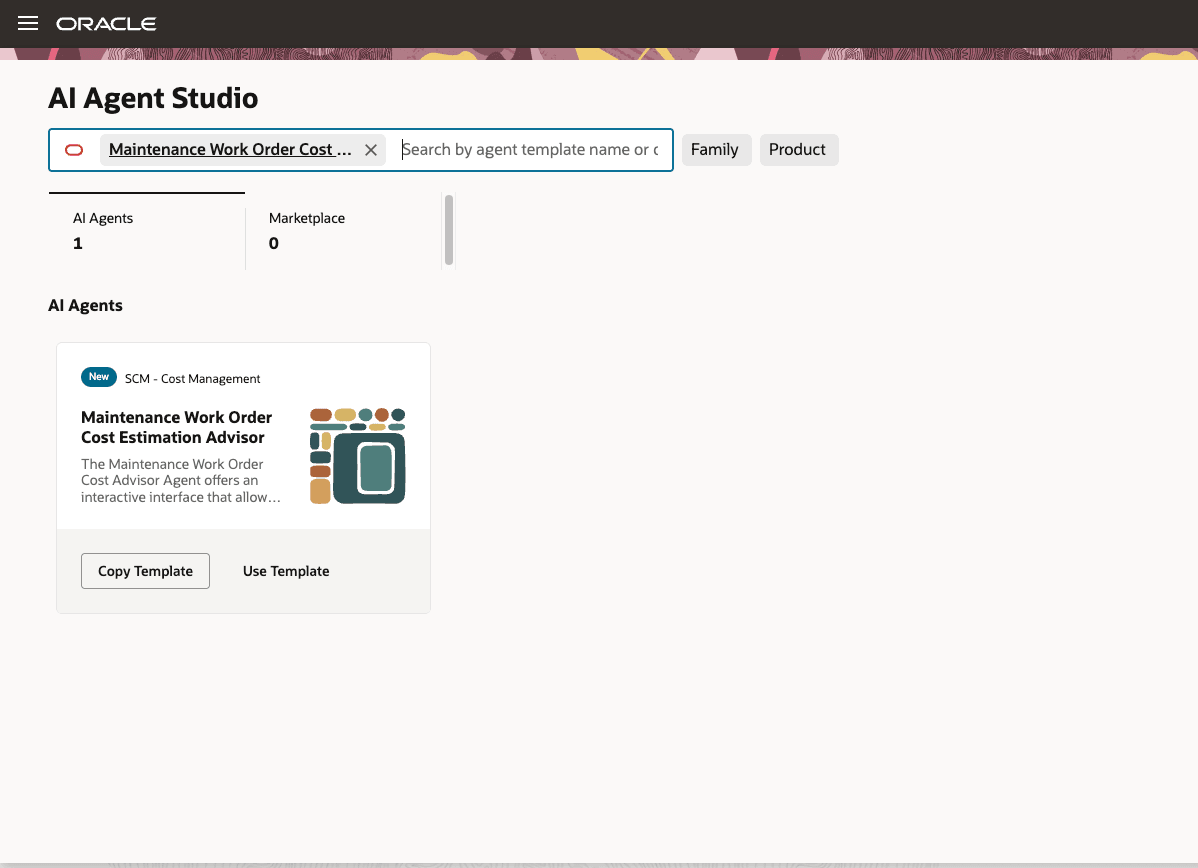
Maintenance Work Order Cost Estimation Advisor template
For information on using AI Agent Studio, see How do I use AI Agent Studio?
Tips and considerations
- You can add your published agent to the Maintenance Work Order Costs page by including the agent in the guided journey of the page.
You can do this by creating an agent task of the Workflow Agent type and adding it to the guided journey. - The agent currently supports only maintenance work orders.
- Estimates are based on data from the primary cost book and available cost elements.
- Outside processing operations aren't included in the estimate.
- Simulation options currently include:
- Material substitutions
- Labor rate changes
- Labor hour adjustments
- This is an estimation-tool and doesn't update or modify work orders.
Key resources
- Oracle Fusion Cloud SCM: Using Supply Chain Cost Management guide, available on the Oracle Help Center.
- Oracle Fusion Cloud SCM: Implementing Manufacturing and Supply Chain Materials Management guide, available on the Oracle Help Center.
- Oracle Fusion Cloud SCM: Security Reference for Manufacturing and Supply Chain Materials Management guide, available on the Oracle Help Center.
- Access Requirements for AI Agent Studio
- How can I give users access to AI agents?
- Create AI Agents
Access requirements
To access the Oracle AI Agent Studio for Fusion Applications and manage SCM AI agents, users must be assigned a configured job role that contains these duty roles:
- SCM Intelligent Agent Management Duty (ORA_RCS_SCM_AI_AGENT_MANAGEMENT_DUTY)
- SCM Intelligent Agent Management Duty (ORA_RCS_SCM_AI_AGENT_MANAGEMENT_DUTY_HCM)
- Fai Genai Agent SCM Administrator Duty (ORA_DR_FAI_GENERATIVE_AI_AGENT_SCM_ADMINISTRATOR_DUTY)
To interact with AI agents in product pages, users must be assigned a configured job role that contains this duty role:
- Fai Genai Agent Runtime Duty (ORA_DR_FAI_GENERATIVE_AI_AGENT_RUNTIME_DUTY)
To allow users to interact with agents, you must also enable permission groups in the Security Console on those users' configured job roles that contain the Fai Genai Agent Runtime Duty role. You can enable permission groups when you manage the basic information of your configured job roles.
Users' configured job roles must also contain privileges that allow access to the pages where AI agents are enabled.
See Access Requirements for AI Agent Studio (for administrators) and How can I give users access to AI agents (for end-users) for more information.