Redwood: Review Work Order Status History in Maintenance Supervision
The Maintenance Supervision Work Order Details page now features a Status History section that shows a detailed, chronological record of all the status changes of work orders. Supervisors can review every status transition—along with timestamps, user information, and entered reasons—directly within Maintenance Supervision, eliminating the need to navigate to legacy pages.
Status History on the Redwood Work Order Details Page
The new Status History section appears at the bottom of the Work Order Details page, beneath Additional Information.
It provides a clear, chronological record of:
- All the status transitions of a work order across its lifecycle
- The date and time of each status change
- The user who made the update
- Any hold, release, or cancellation reason entered
- Key lifecycle dates such as released, completed, closed, or canceled
Here's a screenshot of the Work Order Details Tab with Work Order Status table highlighed.
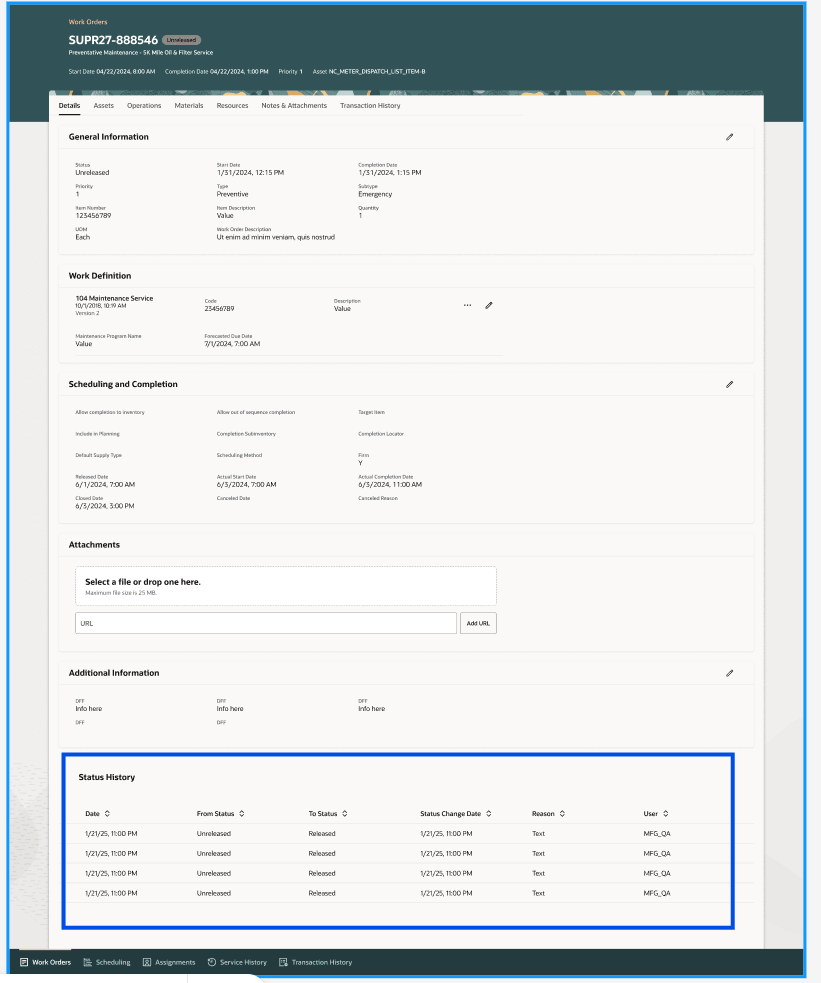
Work Order Details
This consolidated view gives supervisors a complete, audit-ready timeline of work order activity within a single Redwood page.
Improve visibility into every work order status transitions with clear, chronological history.
Steps to enable and configure
Nothing is required to do to enable.