 Determine the Product Lot Expiry Date Based on the Earliest Expiring Material
In industries where shelf life management is critical, such as pharmaceuticals, food, and chemicals, manufacturers need to ensure that the expiry date of finished goods accurately reflects the life expectancy of their ingredients.
With this feature, users can now configure rules to calculate the expiry date of product lots based on material attributes, ensuring product validity and compliance with quality standards.
You can use one of these options to configure the expiration rule:
- Earliest Input Material Expiration
- Product Completion Date
The system automatically applies the selected rule at the time of product completion and records the calculation details for audit and traceability.
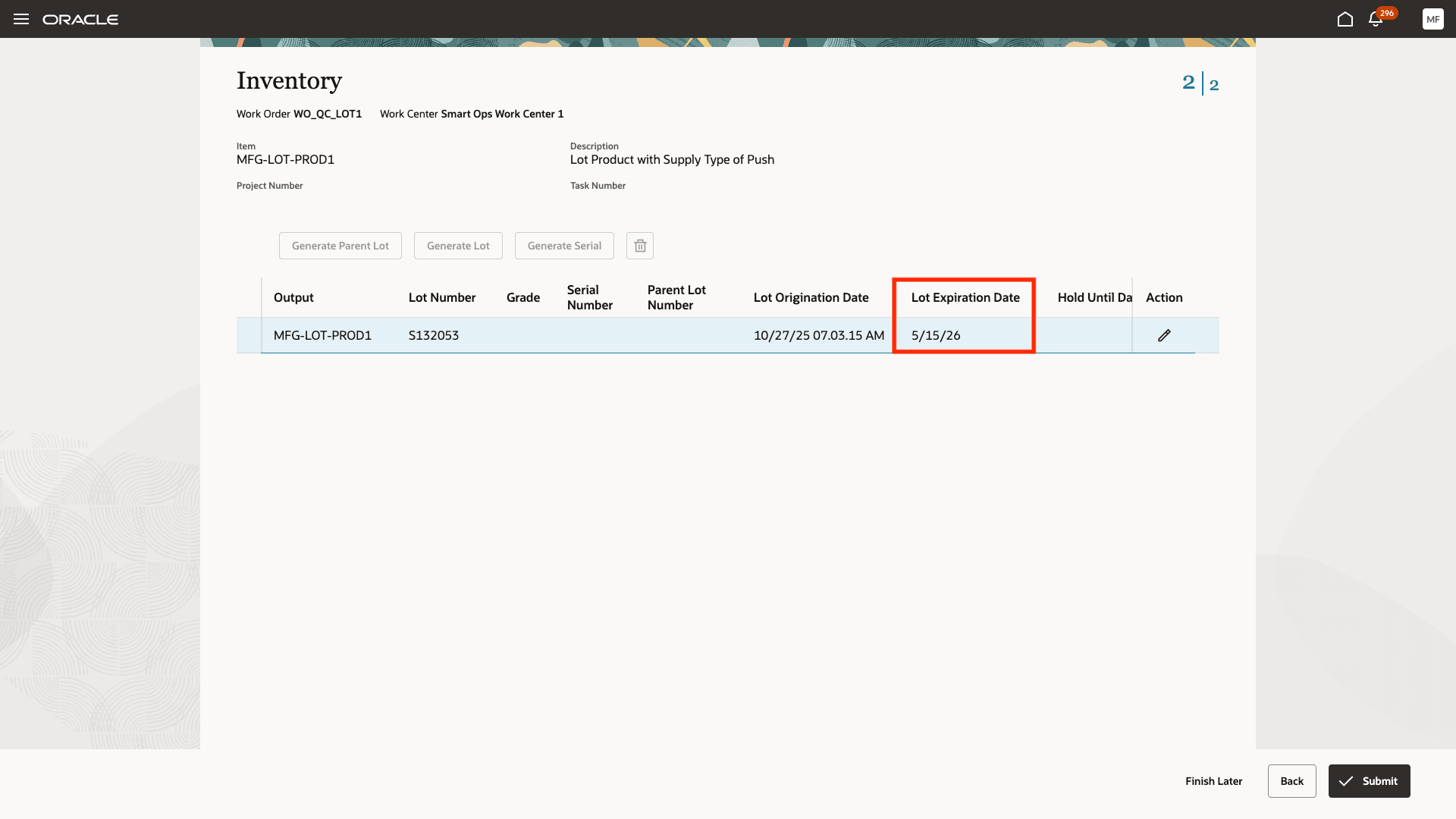
Expiration Date Calculated Based on the Earliest Material Expiration Date
Business Benefits
- Improved Product Quality and Compliance: Ensures that finished goods are assigned accurate expiry dates aligned with regulatory norms, such as FDA and GMP requirements.
- Automated and Consistent Lot Management: Reduces manual entry and human error by automating expiration logic during lot generation and product completion.
- Flexibility Across Manufacturing Models: Supports both process and discrete work orders, allowing manufacturers to apply consistent shelf-life logic across product lines.
- Reduced Customization Effort: Eliminates the need for external extensions or manual expiration management scripts.
Steps to Enable and Configure
- In the Setup and Maintenance work area, search for and select the Manage Profile Options task.
- On the Manage Profile Options page, click New to add a new profile option.
- Enter following Profile Option Code:
"WIE_LOT_EXPIRATION_DATE_CALCULATION_BASIS"
- For the Profile Display Name, enter "Lot Expiration Calculation Options".
- For Application, select Common Work Execution.
- For Module, select Common Work Execution.
- Enter a Start Date.
- Click Save and Close.
Once you have created the profile, select the appropriate value to determine the logic to be used for calculating the product expiration date.
- In the Setup and Maintenance work area, search for and select the Manage Administrator Profile Values task.
- On the Manage Administrator Profile Values page, search for the newly created profile code "WIE_LOT_EXPIRATION_DATE_CALCULATION_BASIS".
- In the Profile Values section, set the Site level to one of the two options.
- EIE = If you want to use the earliest expiration date of input material as the expiration date of product.
- PCD = If you want to set the lot origination date as the product completion date.
Click Save and Close. Changes in the profile value will affect users the next time they sign in.
Tips And Considerations
- These options are applicable only for product completion transactions of lot controlled items that have lot expiration control set to "Item shelf life days" done through the Redwood UIs, FBDI, or REST API.
- If you have chosen to use the earliest expiring input material's expiration date and there is no such data, the shelf life days value set in the item definition is used to calculate the expiry date of the product.
- If you associate a shelf life controlled item to a work order using the preassigned lots feature, it uses the default shelf life days option to initially stamp an expiration date on the lot. This value gets overridden during product completion if you have chosen either of the two additional options.
Key Resources
- Oracle Fusion Cloud SCM: Refer to the Using Manufacturing guide, available on the Oracle Help Center.
- Oracle Fusion Cloud SCM: Refer to the Implementing Manufacturing and Supply Chain Materials Management guide, available on the Oracle Help Center.
Access Requirements
Users who are assigned a configured job role that contains these privileges can access this feature:
- Report Operation Transactions (WIP_REPORT_OPERATION_TRANSACTIONS_PRIV)
- Report Material Transactions (WIP_REPORT_MATERIAL_TRANSACTIONS_PRIV)
- Report Postproduction Transactions (WIE_REPORT_POSTPRODUCTION_TRANSACTIONS)
These privileges were available prior to this update.