Enforce Integer Quantities for Materials in Orderless Transactions and Flow Schedule Execution
In a prior release, enforce integer requirements for materials applied to discrete and process manufacturing work definitions, work orders, and production transactions to handle rounded quantities required to be reported. Now you can also enforce integer requirements for materials in flow manufacturing work definitions, flow schedules, and orderless transactions. You can report the adjusted, rounded quantities for materials through backflush using the Redwood user experience and an industrial handheld device, or through REST API and File-Based Data Import.
The screenshot shows details of a sample item structure in Product Information Management. The Enforce Integer Requirement is set to Round up for the item, Battery.
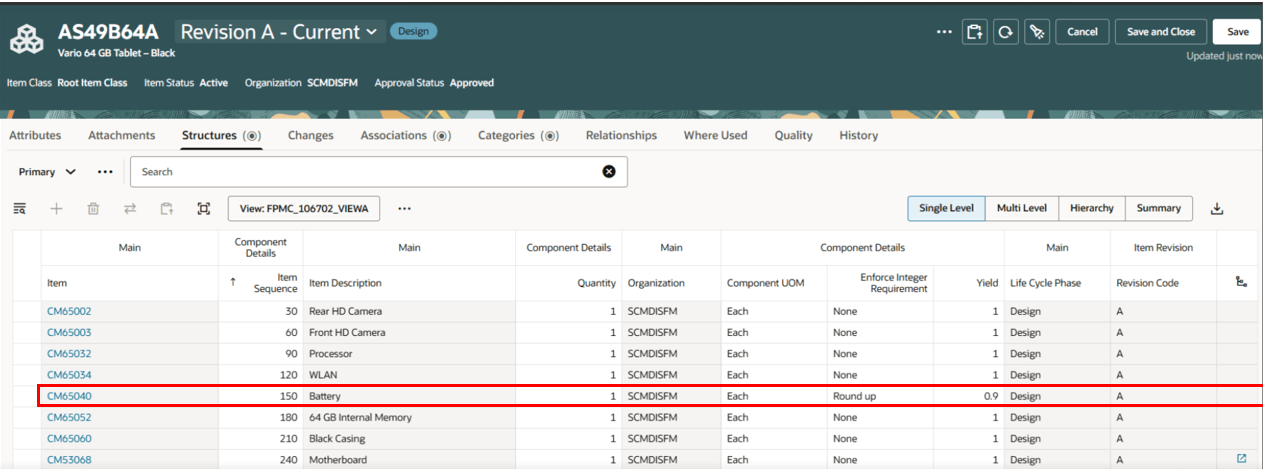
Enforce Integer Requirement Setup for an Item Structure Component in Product Information Management
The transaction quantity is rounded to an integer to honor the Enforce Integer Requirement policy setup for the work order material in flow schedules execution.
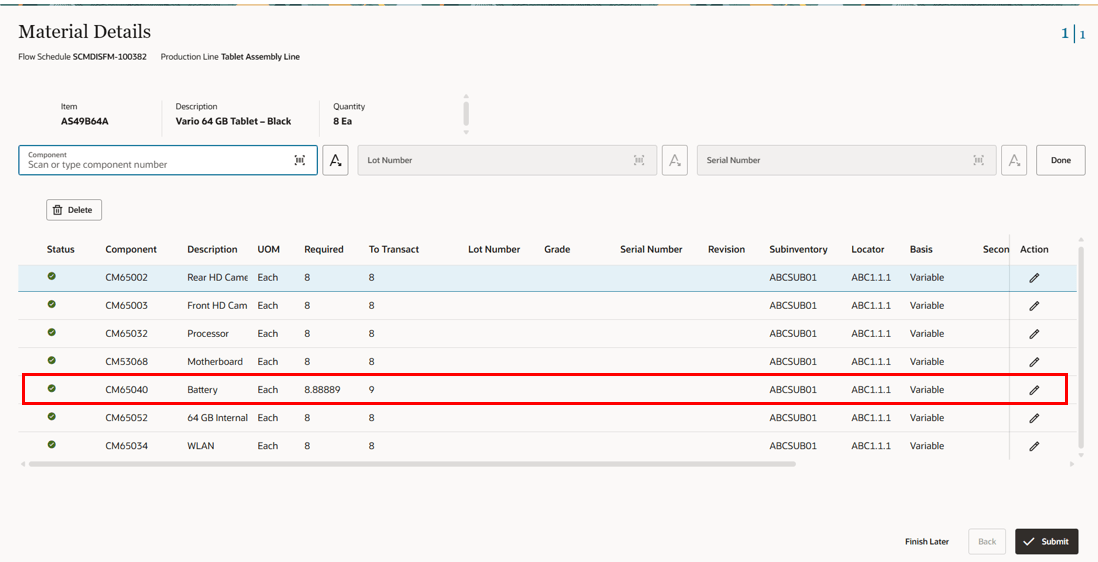
Enforce Integer Requirement for the Material in the Material Transaction
Enforcing integer quantities across all production execution and reporting activities eliminates inventory discrepancies in material consumption, improving alignment between the physical and the system inventory.
Here's the demo of these capabilities:
Steps to Enable and Configure
Use the Opt In UI to enable this feature. For instructions, refer to the Optional Uptake of New Features section of this document.
Offering: Manufacturing and Supply Chain Materials Management No Longer Optional From: Update 26B
When the Opt In is enabled for the parent feature, Enforce Integer Quantities for Materials in Work Orders and Production Transactions, this feature will automatically be enabled.
Tips And Considerations
-
Refer to the 25D feature Enforce Integer Quantities for Materials in Work Orders and Production Transactions for more information about tips and considerations.
-
Backflushing materials for flow schedules can be done at an intermediate operation or at the end of the production line.
-
Refer to the related 26A features Report Flow Schedule Completion Efficiently Using Industrial Handheld Devices and Report Orderless Transactions and Returns Using Industrial Handheld Devices for more information about mobile production reporting.
-
In the current update, enforcing integer quantities is not supported for the Material Availability page.
- For Manufacturing work order components, the current logic for open quantity remains the same, and is calculated as:
- Open quantity = Required quantity – Issued quantity.
- In addition, the open quantity is set to zero if it becomes negative.
- Note that existing customers who have already set the round up or round down policy for item structure components will automatically see the enforce integer changes in new work definitions for flow schedules when their work definitions are synchronized with item structures.
- Partial material completions will inflate or deflate the transacted quantities when enforce integer is enabled. Hence, as a best practice full quantity completion is recommended for material transactions in flow schedules and orderless completions.
Key Resources
- Watch the Enforce Integer Quantities for Materials in Work Orders and Production Transactions demo.
- Watch the Manage Flow Schedules for Manufacturing Execution on a Production Line demo.
- Watch the Execute Flow Schedules on a Production Line demo.
- Watch the Report Orderless Transactions Using a New User Experience demo.
- Oracle Fusion Cloud SCM: Refer to the Using Manufacturing guide, available on the Oracle Help Center.
- Oracle Fusion Cloud SCM: Refer to the Implementing Manufacturing and Supply Chain Materials Management guide, available on the Oracle Help Center.
Access Requirements
Users who are assigned a configured job role that contains these privileges and codes can access this feature:
Work Definition Privileges:
- Manage Work Definitions (WIS_MANAGE_WORK_DEFINITIONS_PRIV)
- View Work Definitions (WIS_VIEW_WORK_DEFINITIONS_PRIV)
- Get Work Definitions by Service (WIS_GET_WORK_DEFINITIONS_SERVICE_PRIV)
- Manage Work Definitions by Service (WIS_MANAGE_WORK_DEFINITIONS_SERVICE_PRIV)
- Get Manufacturing Plant Set Up Data by Service (WIS_GET_MFG_PLANT_SETUP_SERVICE_PRIV)
Flow Schedules Privileges:
- Manage Flow Schedules (WIP_MANAGE_FLOW_SCHEDULES)
- Manage Flow Schedules by Service (WIP_MANAGE_FLOW_SCHEDULES_SERVICE)
- View Flow Schedules (WIP_VIEW_FLOW_SCHEDULES)
- Get Flow Schedules by Service (WIP_GET_FLOW_SCHEDULES_SERVICE)
- Execute Flow Schedules (WIP_EXECUTE_FLOW_SCHEDULES_PRIV)
Orderless Privileges:
- Report Orderless Transactions (WIP_REPORT_ORDERLESS_TRANSACTIONS_PRIV) allows review and reporting of orderless transactions.
- Report Scrap Transactions (WIP_REPORT_SCRAP_TRANSACTIONS_PRIV) allows review and reporting of work order scrap transactions.
These privileges were available prior to this update.