 Sync Work Definition Changes with Unreleased and Released Work Orders
Manufacturers facing frequent product or process changes and long lead times require an efficient way to apply the latest changes to planned or open work orders, as manual updates are error prone and time consuming.
With the new Sync Work Definition Changes with Unreleased and Released Work Orders feature, manufacturing engineers can automatically synchronize work definition updates, including changes to materials, operations, resources, outputs, work order instructions, and operational parameters, for both unreleased and released work orders that haven’t started execution yet. You can now automatically synchronize work definition changes to impacted discrete and process manufacturing work orders in both unreleased and released statuses using a scheduled process.
- Collect work definition changes from all sources: Changes can be made using the classic and Redwood user experiences, REST API, File-Based Data Import, and the ADFdi spreadsheet.
- Apply multiple work definition changes: Changes based on the work definition name, as of date, or date range can include adding, updating, or disabling operations and their items, outputs, resources, operational parameters, and operation instructions.
- Identify work orders for mass update: You can specify the scheduled process parameters, including item category, work order number or range, and system and user-defined work order statuses for unreleased and released work orders.
- Mass update impacted work orders: Automate changes and maintain an audit log using the scheduled process output file.
- Unreleased work orders - Update work order details by re-exploding the work definition as of the specified date.
- Released work orders - Update work order operations that haven't started execution activities as of the specified date and maintain the integrity of operations with execution data.
Sync Work Definition Changes with Existing Work Orders Schedule Process
This new scheduled process includes parameters that define the scope of synchronization. You can specify a From Date and To Date to identify work definition updates for a given period along with the Work Definition Name and Item Category to narrow down the selection. Optionally, filter by From Item and To Item to control the items that are considered. The Work Definition As-of Date determines which version is used for propagation. You can choose to Sync All Work Orders or restrict the process to a specific From Work Order and To Work Order range. The Work Order Status parameter allows filtering by released or unreleased orders, and the Exclude Firm Work Orders option omits firm work orders from the synchronization.
When you run the Sync Work Definition Changes with Existing Work Orders scheduled process for unreleased work orders, the system automatically re-explodes the work definition and replaces all operations, components, and resources with the latest work definition. Since no execution or transactional activity has begun, the entire work order is refreshed using the current version of the work definition. For released work orders, the system first checks which operations in each work order have already started. Any operation that has begun execution or has recorded material, resource, output, or supplier operation transactions is skipped. This ensures that no changes are made to work that’s already in progress or completed.
The system then automatically creates an anchor point at the last executed operation. This anchor point identifies where updates will begin. Starting from this point, each subsequent operation in the latest work definition is mapped to its corresponding operation in the work order, and only those with differences are deleted, updated, or added.
During this update, the process automatically handles phantom item explosions. It also excludes contract manufacturing work orders and ATO model work orders, which aren’t eligible for propagation.
This approach ensures that only pending or yet to start operations are updated, while completed or in-progress work stays untouched.
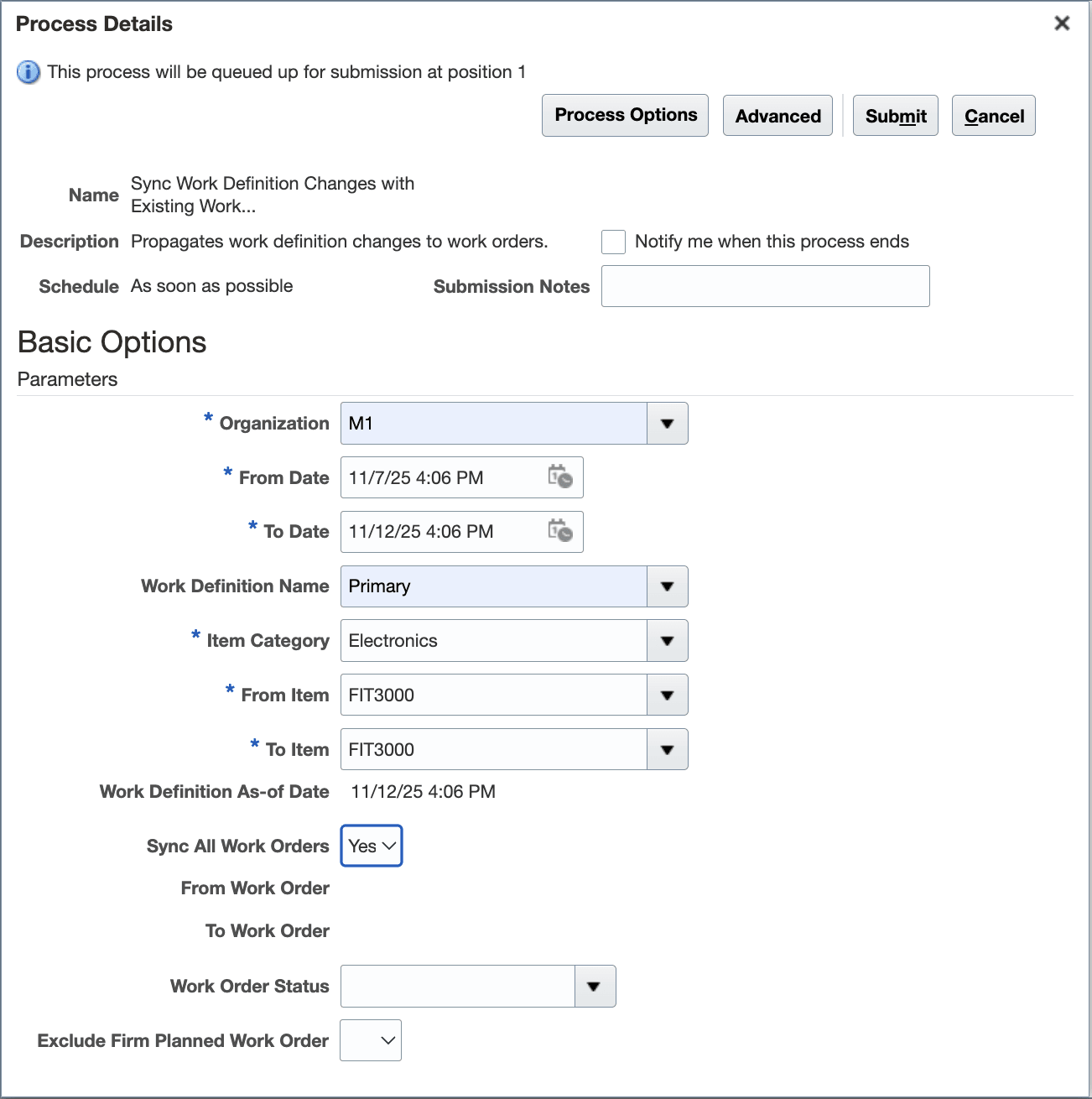
Parameters for Running the Sync Work Definition Changes with Existing Work Orders Scheduled Process
When a work order is impacted by updates to its associated work definition, a notification message appears on the Details tab of the work order header.
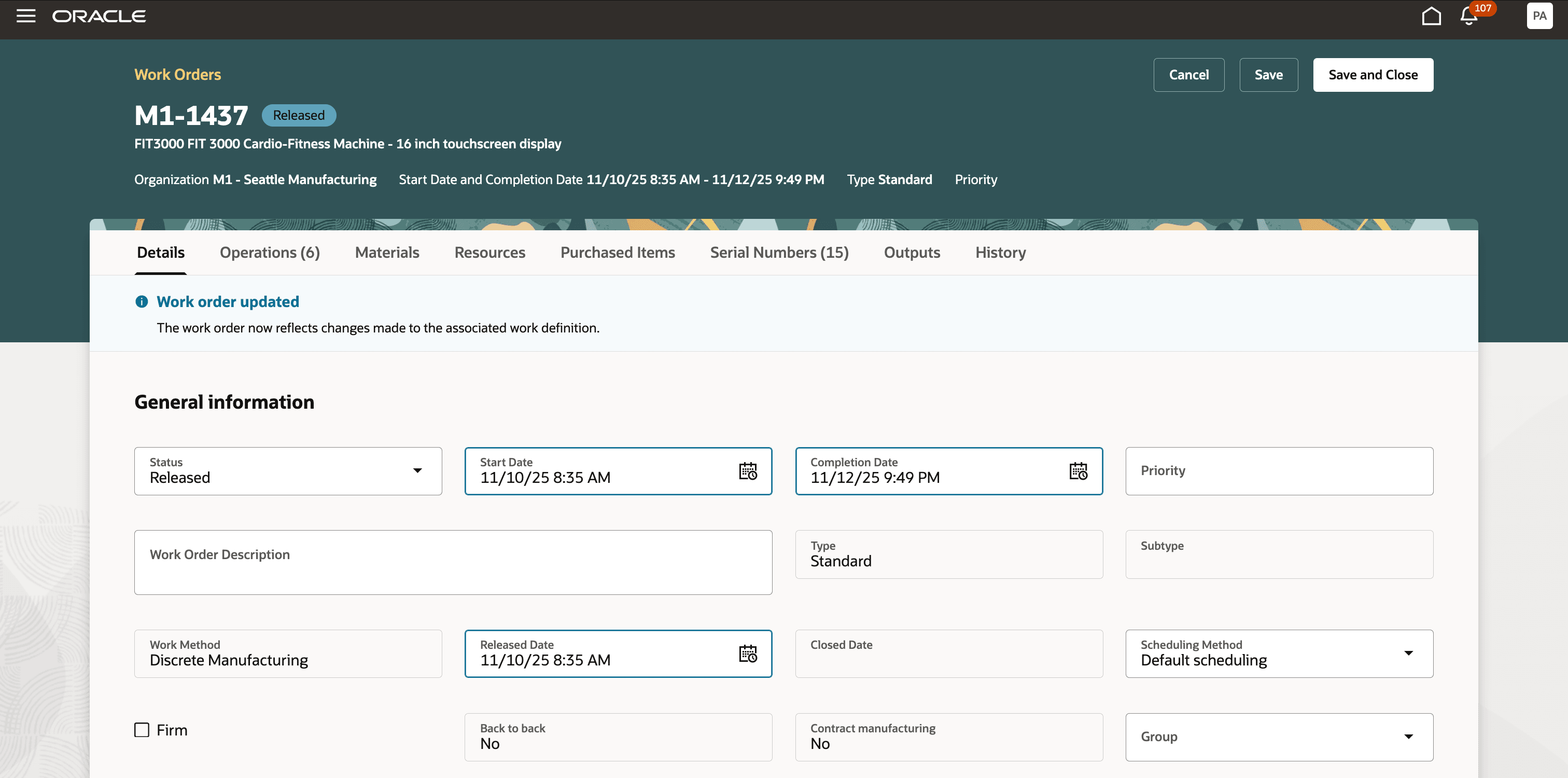
Work Order Update Message on the Details Tab
Automatic synchronization of product and process changes to production ensures that the most accurate requirements are used for manufacturing execution, streamlining change management and improving responsiveness to engineering or customer updates.
Here's the demo of these capabilities:
Steps to Enable and Configure
Use the Opt In UI to enable this feature. For instructions, refer to the Optional Uptake of New Features section of this document.
Offering: Manufacturing and Supply Chain Materials Management No Longer Optional From: Update 26C
Tips And Considerations
- This synchronization process applies to discrete and process manufacturing work definitions and work orders regardless of whether item structures or formulas are referenced. Flow schedules, orderless execution, Assemble to Order model item work definitions and configured item work orders, and contract manufacturing work orders are excluded.
- Running the scheduled process automatically re-explodes the work definition as of the specified date and overrides the work order details. The system identifies an anchor point at the last executed operation. Starting from this point, each subsequent operation in the latest work definition is mapped to its counterpart in the work order, and only those with changes are updated or deleted.
- For a work order with a supplier operation, the operations preceding the supplier operation stay intact, while the remaining operations following it are updated.
Key Resources
- Watch the Sync Work Definition Changes with Unreleased and Released Work Orders demo.
- Oracle Fusion Cloud SCM: Refer to the Using Manufacturing guide, available on the Oracle Help Center.
- Oracle Fusion Cloud SCM: Refer to the Implementing Manufacturing and Supply Chain Materials Management guide, available on the Oracle Help Center.
Access Requirements
Work Definition
- Manage Work Definitions (WIS_MANAGE_WORK_DEFINITIONS_PRIV)
- Manage Work Definitions by Service (WIS_MANAGE_WORK_DEFINITIONS_SERVICE_PRIV)
Work Order
- Manage Work Order Headers (WIP_MANAGE_WORK_ORDER_HEADERS_PRIV)
- Manage Work Order Operations (WIP_MANAGE_WORK_ORDER_OPERATIONS_PRIV)
- View Work Orders (WIP_VIEW_WORK_ORDERS_PRIV)
Scheduled Process
- Manage Scheduled Job Definition (FND_MANAGE_SCHEDULED_JOB_DEFINITION_PRIV)