 Prevent Issue of Expired Lots to Work Orders
In regulated and quality-critical manufacturing environments, inadvertent issuing of expired material lots to work orders can compromise compliance, product safety, and audit readiness. With this update, you can configure the application to block the issue of expired lots during material issue or backflush in a process or discrete manufacturing work order.
When the Prevent Issue of Expired Lots parameter is enabled, expired lots are automatically filtered from selection in the following pages:
- Report Materials and Backflush Materials pages under the Production Execution action when using Smart Operations work execution.
- Report Material Transactions page in the Redwood user experience.
- Orderless Transactions page in the Redwood user experience.
- Issue Material page in Mobile Manufacturing when using industrial handheld devices.
- Post Production Reporting page in the Redwood user experience.
Automatic filtering of expired lots ensures that operators can only consume valid lots during production, eliminating the risk of using expired materials while maintaining traceability and regulatory compliance.
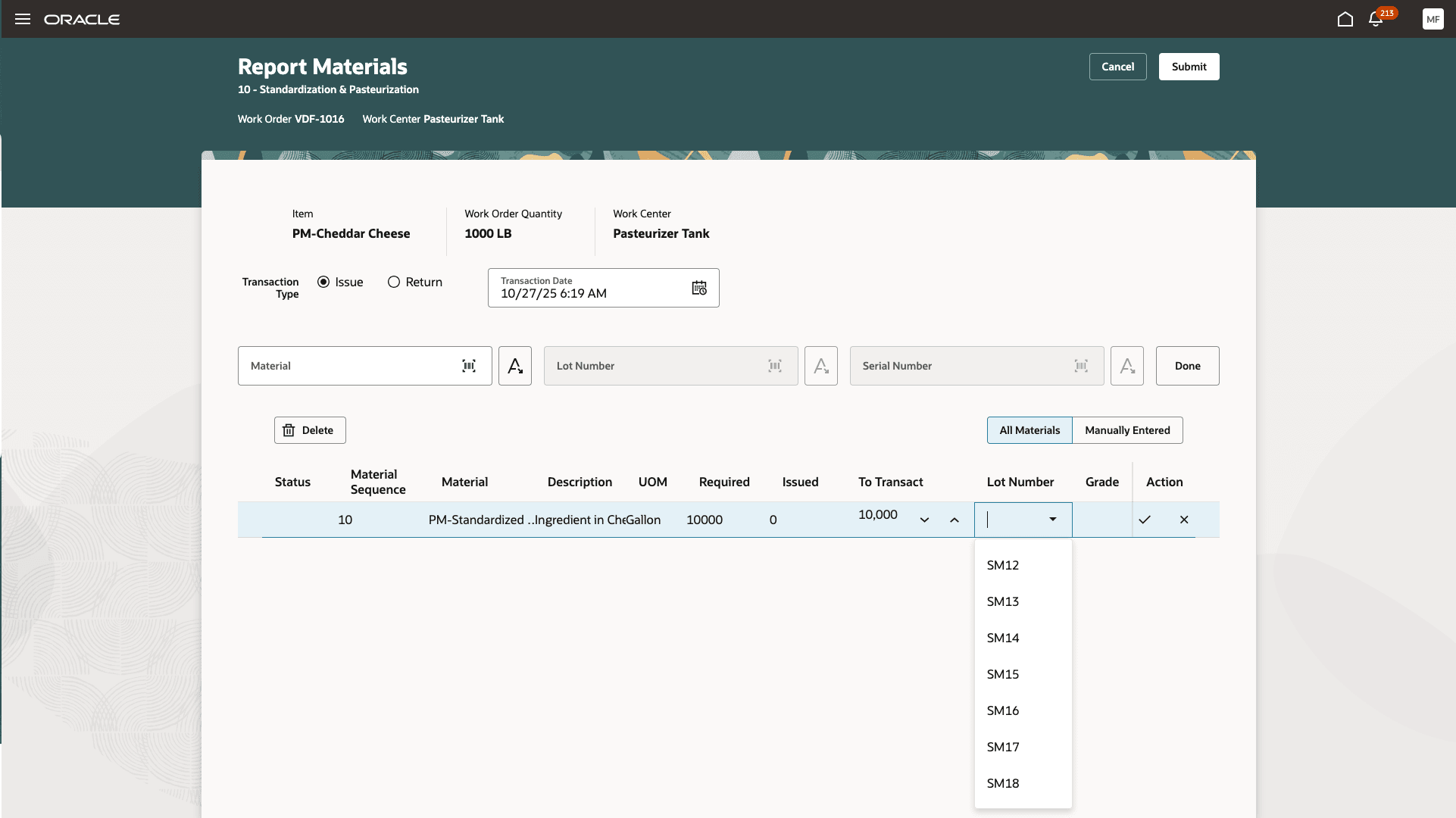
Only Unexpired Lots Are Available for Selection
Business Benefits
- Improved Compliance and Quality Assurance: Enforces expiration controls to ensure that only valid materials are used in production, reducing regulatory and audit risks.
- Reduced Rework and Scrap: Prevents the use of expired lots, reducing downstream product defects, scrap, and rework costs.
- Enhanced Traceability: Automatically records lot validity and enforces expiration validation at the transaction level, improving data reliability.
- Streamlined User Experience: Operators only see valid lots available for selection in Production Execution, reducing manual checks and transaction errors.
- Configuration Flexibility: Supervisors can enable or disable this control per plant to meet their changing compliance and operational needs.
Steps to Enable and Configure
Set up the plant parameters to enable this feature:
- In the Setup and Maintenance work area, search for, and select the Manage Plant Parameters task.
- On the Manage Plant Parameters page, select the required inventory organization.
- In the Work Execution tab, under Execute Production, enable the Prevent issue of expired lots in work orders checkbox.
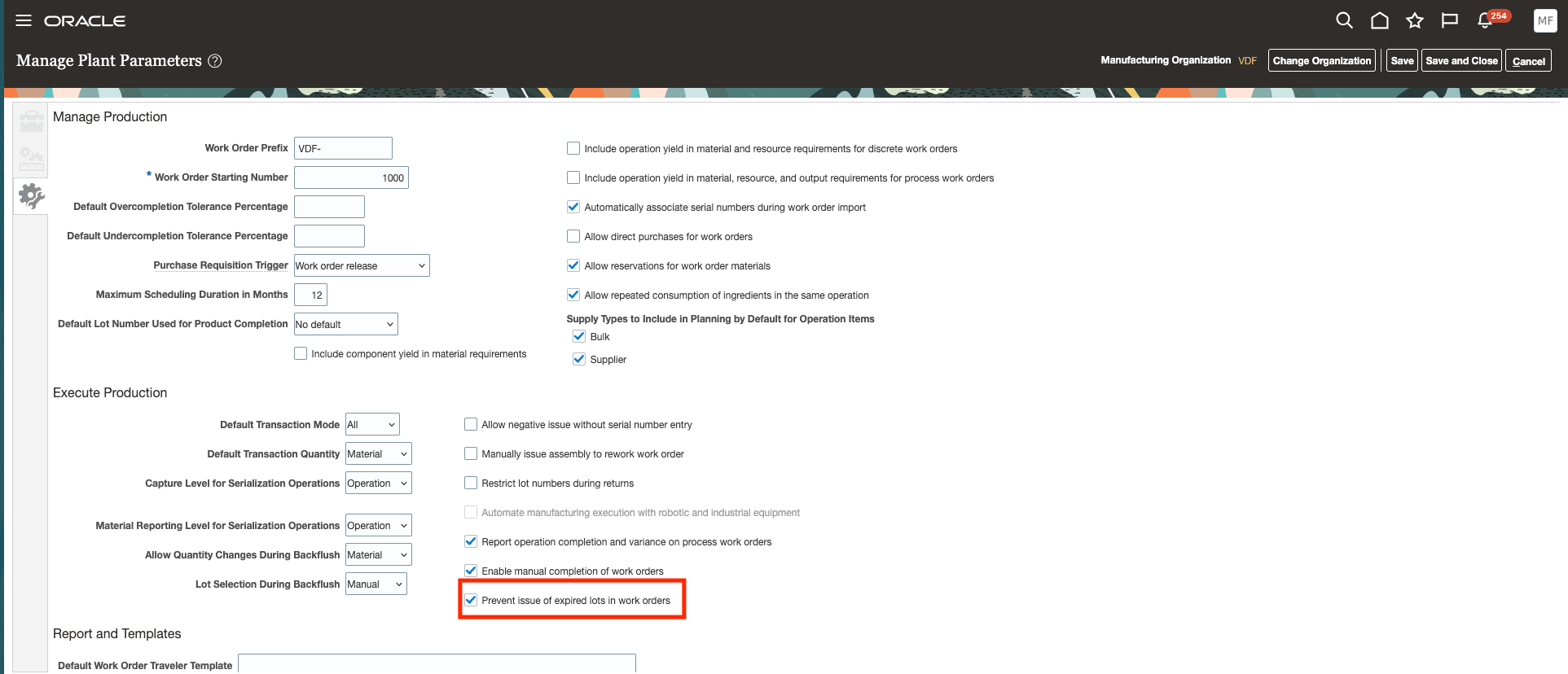
Prevent Issue of Expired Lots Option
Tips And Considerations
- You can prevent material issue and material backflush of expired lots against discrete and process manufacturing work orders, and orderless execution, using the Redwood UIs, FBDI, or REST API. You can't prevent an expired lot from consumption during flow schedule execution.
- As a recommended practice, you can combine this feature with the following Inventory Management features for inventory management of time-sensitive materials.
Key Resources
- Watch the Prevent Issue of Expired Lots to Work Orders demo.
- Oracle Fusion Cloud SCM: Refer to the Using Manufacturing guide, available on the Oracle Help Center. Also refer to the Using Inventory Management guide, specifically on the topic related to "What happens when a lot expires?".
- Oracle Fusion Cloud SCM: Refer to the Implementing Manufacturing and Supply Chain Materials Management guide, available on the Oracle Help Center.
Access Requirements
Users who are assigned a configured job role that contains these privileges can access this feature:
- Report Operation Transactions (WIP_REPORT_OPERATION_TRANSACTIONS_PRIV)
- Report Material Transactions (WIP_REPORT_MATERIAL_TRANSACTIONS_PRIV)
- Report Postproduction Transactions (WIE_REPORT_POSTPRODUCTION_TRANSACTIONS)
These privileges were available prior to this update.