 Issue or Complete a Lot with a Specific Grade in Work Orders and Flow Schedules
Manufacturers use grade to track lot-to-lot variations in material or product characteristics without changing the item number. For instance, different combinations of color, size, and concentration can be defined in a range of grades to classify lot-controlled items. Grade management factors into material usage and product classification decisions to drive further processing and order fulfillment.
Previously, lots were selected or assigned based on the item’s default grade in Manufacturing. With this update, you can now capture the actual grade of lots consumed and produced through material, operation, output, flow schedule completion, and orderless transactions using a Redwood user experience.
You can perform the following grade-related actions with discrete or process manufacturing work orders, flow schedules, and orderless transactions:
- Select a lot with a specific grade for material issue or backflush -- Use the Production Execution action, Orderless Transactions page, Material Transactions, Flow Schedule Completions, and transaction actions under the Production Reporting work area using an industrial handheld device, or the Post Production Reporting page.
- Specify the grade for a new lot completed into inventory -- Use the Production Execution action, Orderless Transactions page, Flow Schedule Completions, and transaction actions under the Production Reporting work area using an industrial handheld device, or the Post Production Reporting page.
- View the lot grade for production transactions -- Use the Production Transaction History page, Transaction History tab on the Work Order page under Production Supervision, or the Transaction History tab under Product Genealogy.
View and choose the grade for an item lot issued to an operation. You can also specify the grade when completing a grade-controlled item in orderless transactions, discrete and process manufacturing work orders, and flow schedules.
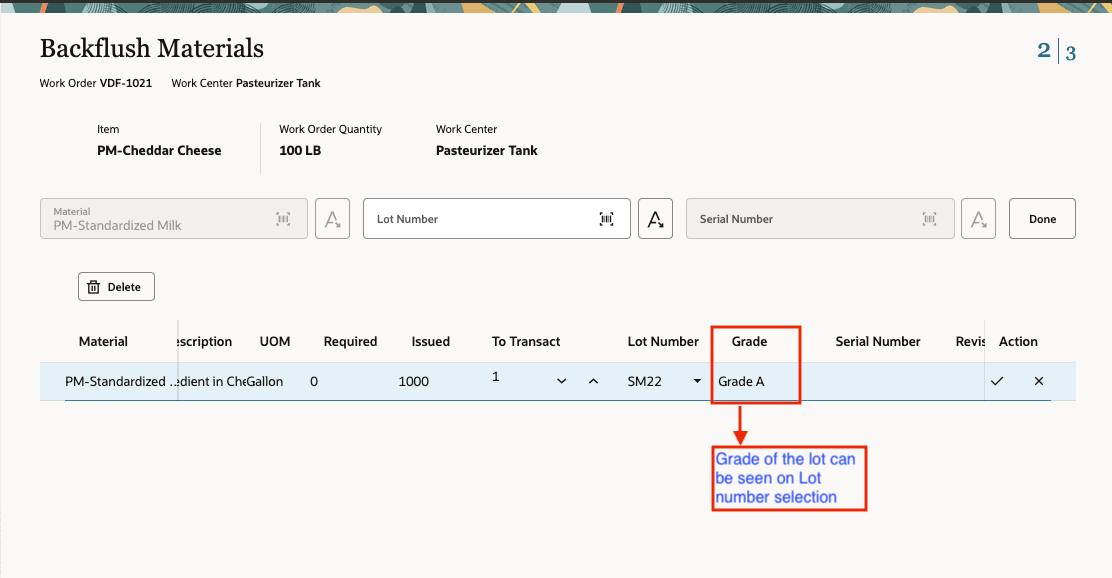
Backflush Material Page Includes the Grade of Items Being Issued
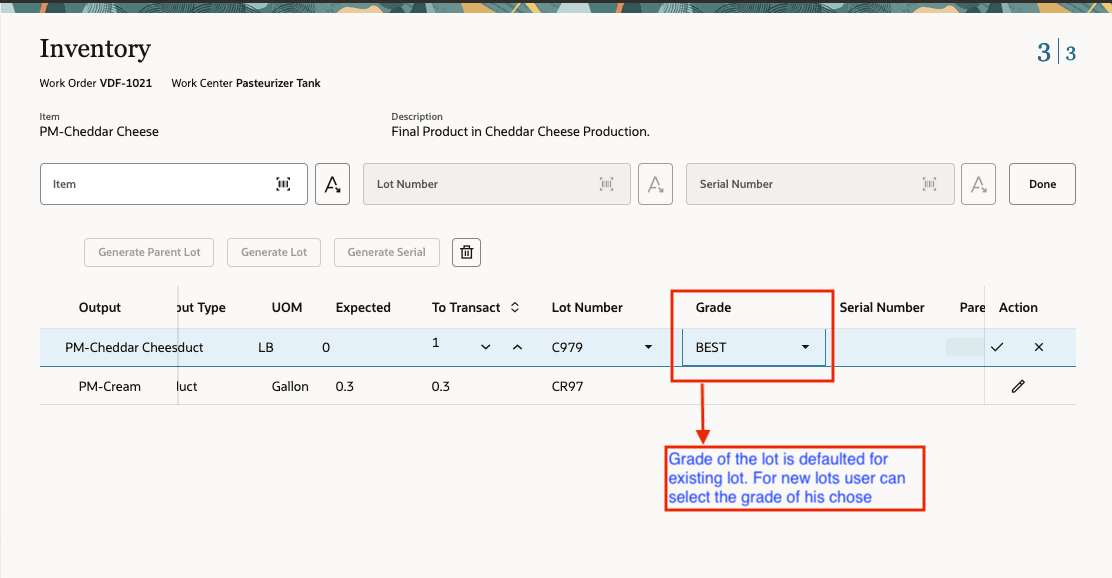
Product Completion Inventory Page with Item Grade Selection
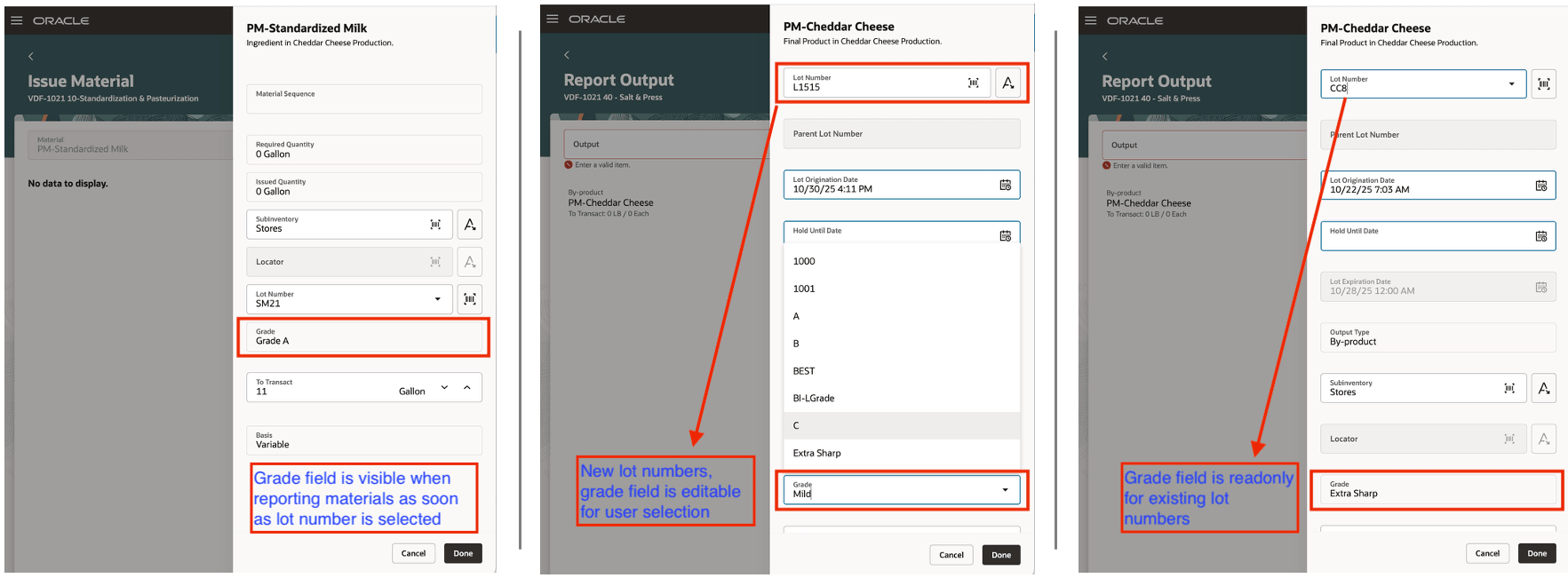
Mobile Manufacturing Pages for Reporting Materials and Outputs
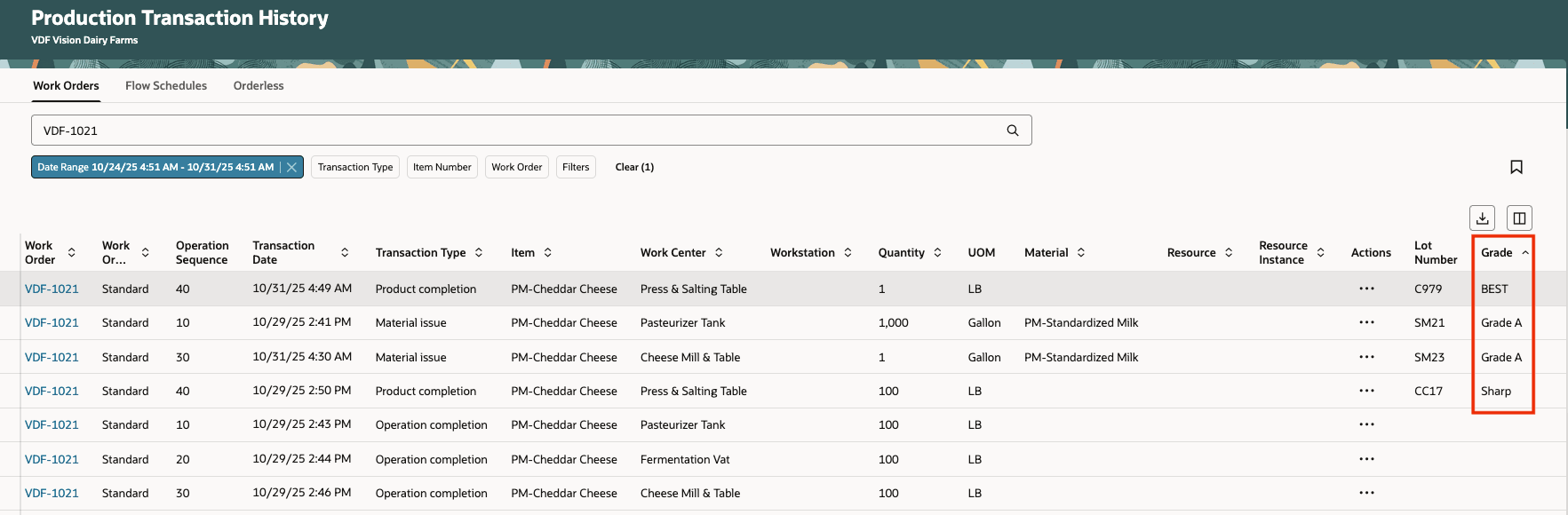
Product Transaction History Page with Details of the Item Grade
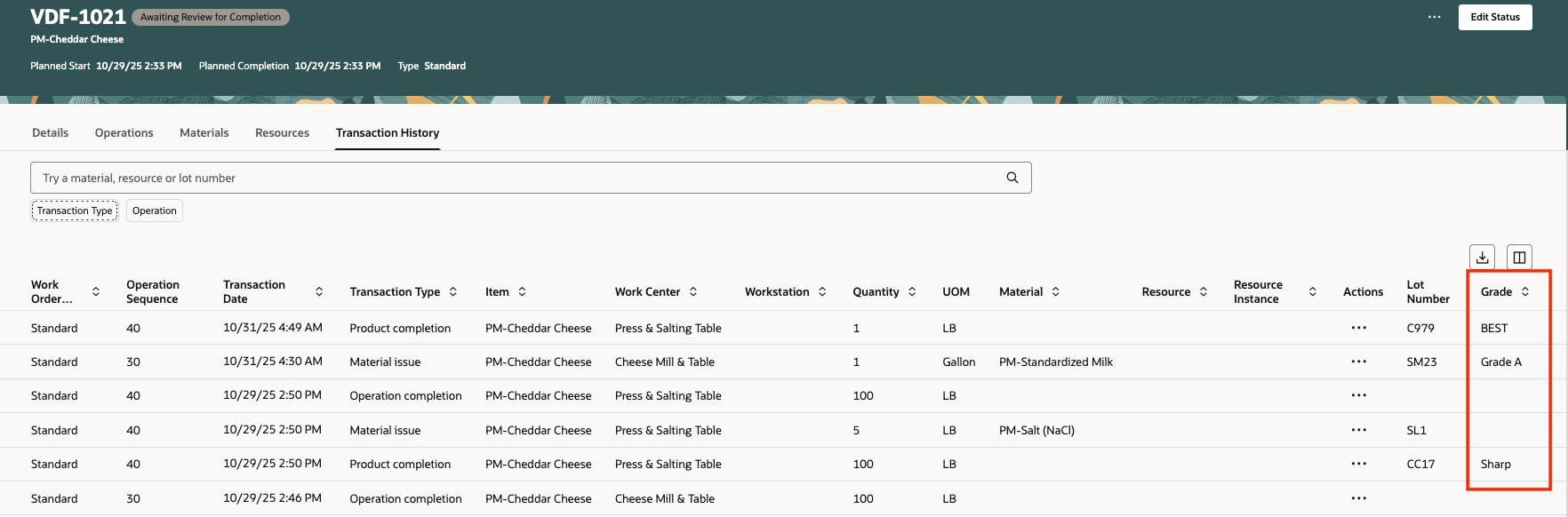
Work Order Transaction History Page with Details of the Item Grade
File-Based Data Import (FBDI) Changes:
The FBDI process manufacturing templates for Process Work Order Import, Work Order Import, Process Work Order Material Transaction Import, Work Order Material Transactions Import and Work Order Operation Transaction Import have been enhanced to enable passing the grade along with the lot when reporting transactions. New column Grade has been added next to the lot number in the worksheet. Use the latest template after upgrade to 26A.
REST API Changes:
You can now review and record your product completions and material issues for manufacturing with grade using the Process Work Orders, Discrete Work Orders, Work Order Material Transactions, and Work Order Operation Transactions REST APIs.
ADF Desktop Integration (ADFdi) Changes:
The Work Orders and Transactions Entity is enhanced to support Grade as a new column to review and update if the grade used when importing the data from FBDI is incorrect.
Tracking lot grades during manufacturing ensures the proper identification and traceability of materials and products for differentiated uses.
Steps to Enable and Configure
Use the Opt In UI to enable this feature. For instructions, refer to the Optional Uptake of New Features section of this document.
Offering: Manufacturing and Supply Chain Materials Management
Tips And Considerations
- Grade management applies to discrete manufacturing, process manufacturing, flow manufacturing, and orderless execution.
- Grade control is enabled in conjunction with lot control for items but isn't specific to a lot location. Refer to How You Set Up Lot Control in the Using Inventory Management documentation and Lot Grade in the Implementing Manufacturing and Supply Chain Materials Management documentation.
- When assigning preassigned lots to a work order, for grade-controlled output items you can choose the grade only for newly generated lot numbers.
- For existing lot numbers, the lot’s current inventory grade is shown as read-only and cannot be updated.
- You can't use grade in material availability, reservations, picking, planning, quality inspection, or order management at this time.
- Starting in 26A, use the updated FBDI template to report work order transactions, regardless of whether you’ve opted in to the feature.
- The Grade field is optional in the FBDI template and is used for reporting only if you’ve opted in to the feature.
Key Resources
- Oracle Fusion Cloud SCM: Refer to the Using Manufacturing guide, available on the Oracle Help Center.
- Oracle Fusion Cloud SCM: Refer to the Implementing Manufacturing and Supply Chain Materials Management guide, available on the Oracle Help Center.
Access Requirements
Users who are assigned a configured job role that contains these privileges can access this feature:
- Report Operation Transactions (WIP_REPORT_OPERATION_TRANSACTIONS_PRIV)
- Report Material Transactions (WIP_REPORT_MATERIAL_TRANSACTIONS_PRIV)
- Report Postproduction Transactions (WIE_REPORT_POSTPRODUCTION_TRANSACTIONS)
- Report Orderless Transactions (WIP_REPORT_ORDERLESS_TRANSACTIONS_PRIV)
- Execute Flow Schedules (WIP_EXECUTE_FLOW_SCHEDULES_PRIV)
- Import Material Transactions (WIP_IMPORT_MATERIAL_TRANSACTIONS_PRIV)
- Import Work Orders (WIP_IMPORT_WORK_ORDERS_PRIV)
This privilege was available prior to this update.