 Import Pull Sequences and Kanban Cards with Predefined Numbers Using REST APIs and the Visual Builder Add-in for Excel
Kanban is typically used as a just-in-time inventory replenishment method to manage material supply based on actual consumption. For items replenished using Kanbans, you can define replenishment chains as the series of pull sequences that pull materials between the point of supply and point of use. For example, you can replenish materials from another Kanban location in the organization or in another organization, or supplier, or from the shop floor to the supply subinventory for an operation in a flow production line.
To speed up the adoption of lean practices with Kanban replenishment processes, inventory managers want to leverage existing replenishment chains that pull materials between the point of supply and the point of use and Kanban cards already in circulation. You can now bulk create pull sequences and corresponding Kanban cards with customer-defined numbers, using REST APIs and the Visual Builder Add-in for Excel. 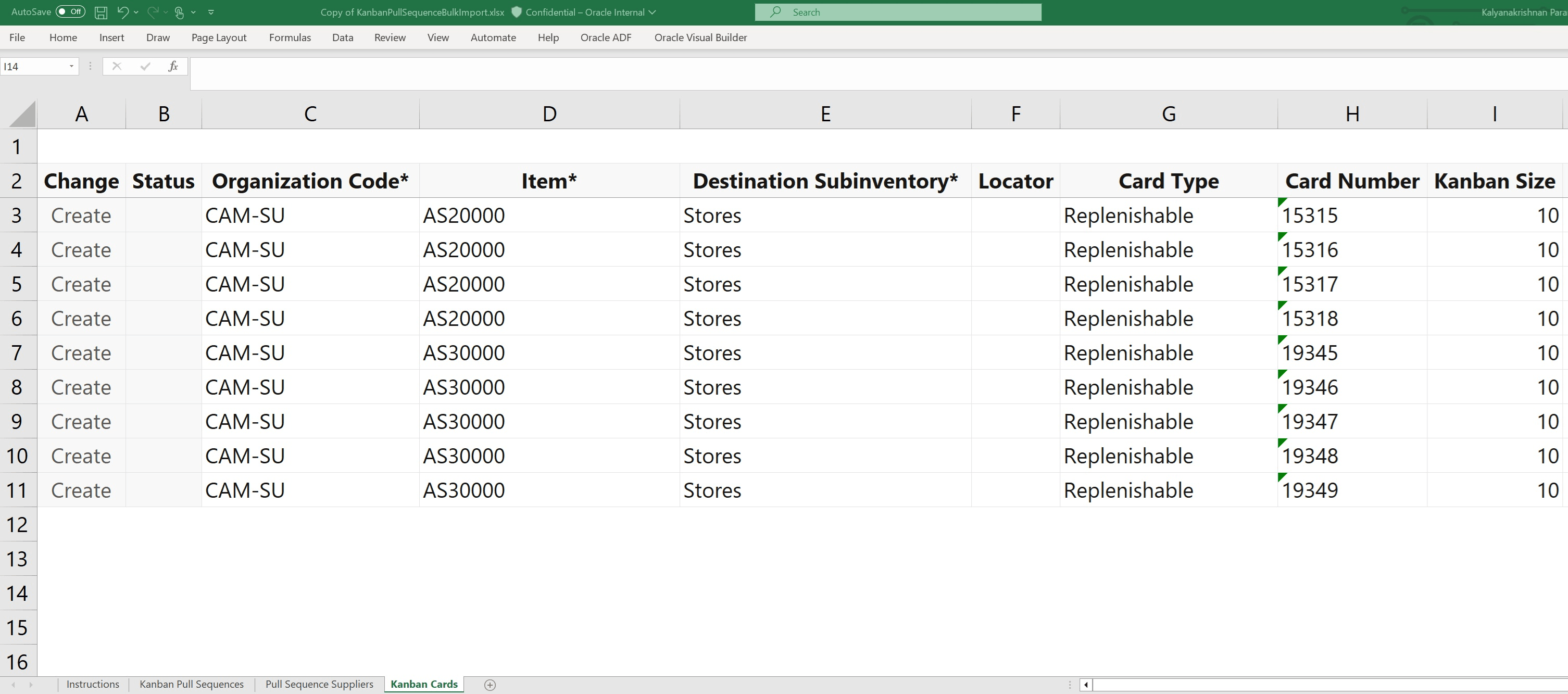
Spreadsheet to Import Kanban Cards
This approach associates preloaded pull sequences to imported cards, bypassing the need to generate new Kanban card numbers or print new Kanban cards.
Reusing existing pull sequences and Kanban card numbers accelerates the rollout of Kanban replenishment to maintain business continuity and eliminate manual or redundant setups.
Here's the demo of these capabilities:
Steps to Enable and Configure
You don't need to do anything to enable this feature.
Tips And Considerations
- All supply source types for pull sequences and Kanban cards are supported for bulk import: Supplier, Interorganization, Intraorganization, and Production.
- Pull sequences must exist before creating Kanban cards.
- A pull sequence is unique to an item and point of use such as the destination organization, subinventory, and locator.
- Refer to Using the Oracle Visual Builder Add-in for Excel for more information.
Key Resources
- Refer to Redwood: Import Pull Sequences and Kanban Cards with Predefined Numbers Using REST APIs and the Visual Builder Add-in for Excel demo.
- Oracle Fusion Cloud SCM: Refer to the Using Manufacturing guide, available on the Oracle Help Center.
- Oracle Fusion Cloud SCM: Refer to the Implementing Manufacturing and Supply Chain Materials Management guide, available on the Oracle Help Center.
Access Requirements
Users who are assigned a configured job role that contains these privileges and codes can access this feature:
- Privileges :
- Manage Pull Sequences (WIS_MANAGE_PULL_SEQUENCES _PRIV)
-
Manage Kanban Cards (WIS_MANAGE_KANBAN_CARDS_PRIV)
These privileges were available prior to this release.