Redwood: Use Electronic Records and Electronic Signatures to Close Exceptions When Supervising Production
In regulated environments, clear management, documentation, and traceability of production issues that affect the manufacturing of a product is important for ensuring regulatory compliance. Production exceptions are reported in Production Execution, Production Supervision, or automated through a connected equipment event. Exceptions can be associated with the impacted work order operations.
With this update, you can approve the closure of a production exception by reviewing its electronic record and capturing electronic signatures through a deferred e-signature approval workflow using the Redwood user experience. Like in previous releases, you can view and close production exceptions using the Production Supervision pages. Monitor exceptions on the Exceptions tab or use the Work Orders tab to look at exceptions for specific work orders, operations, materials, and resources. Use the Monitoring tab to look at the exceptions for the work center, workstations, and production lines.
When you submit a production exception or any of its work order operation exceptions for closure, the exception status automatically updates to Pending Approval for Closure. Notifications are sent to the approvers to review the electronic record and capture the electronic signatures. The exception status changes to Approved upon obtaining electronic signatures approvals or reverts to Open upon rejection.
The following screenshot shows a production exception in pending approval for closure status:
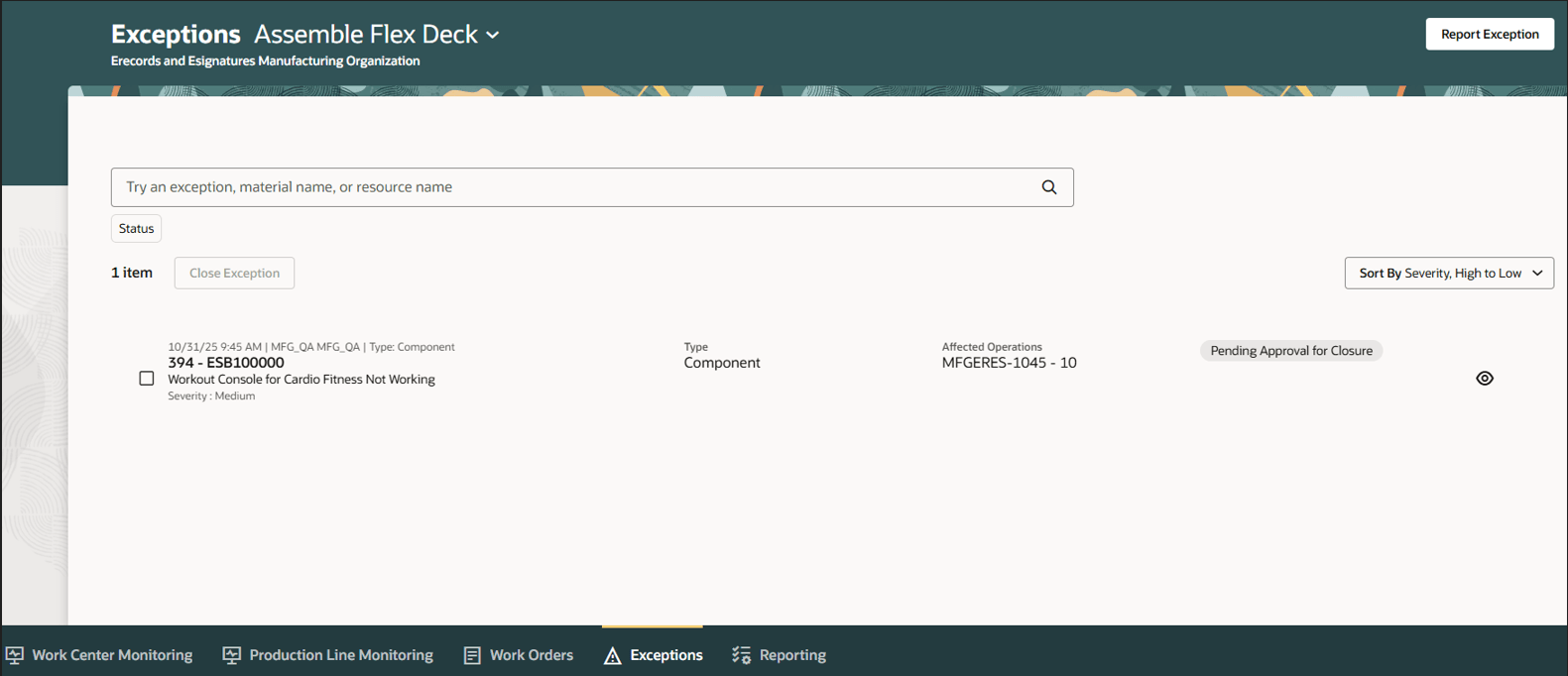
Production Exception Pending Approval for Closure
Review and approve the electronic record in the deferred approval window, as shown below:
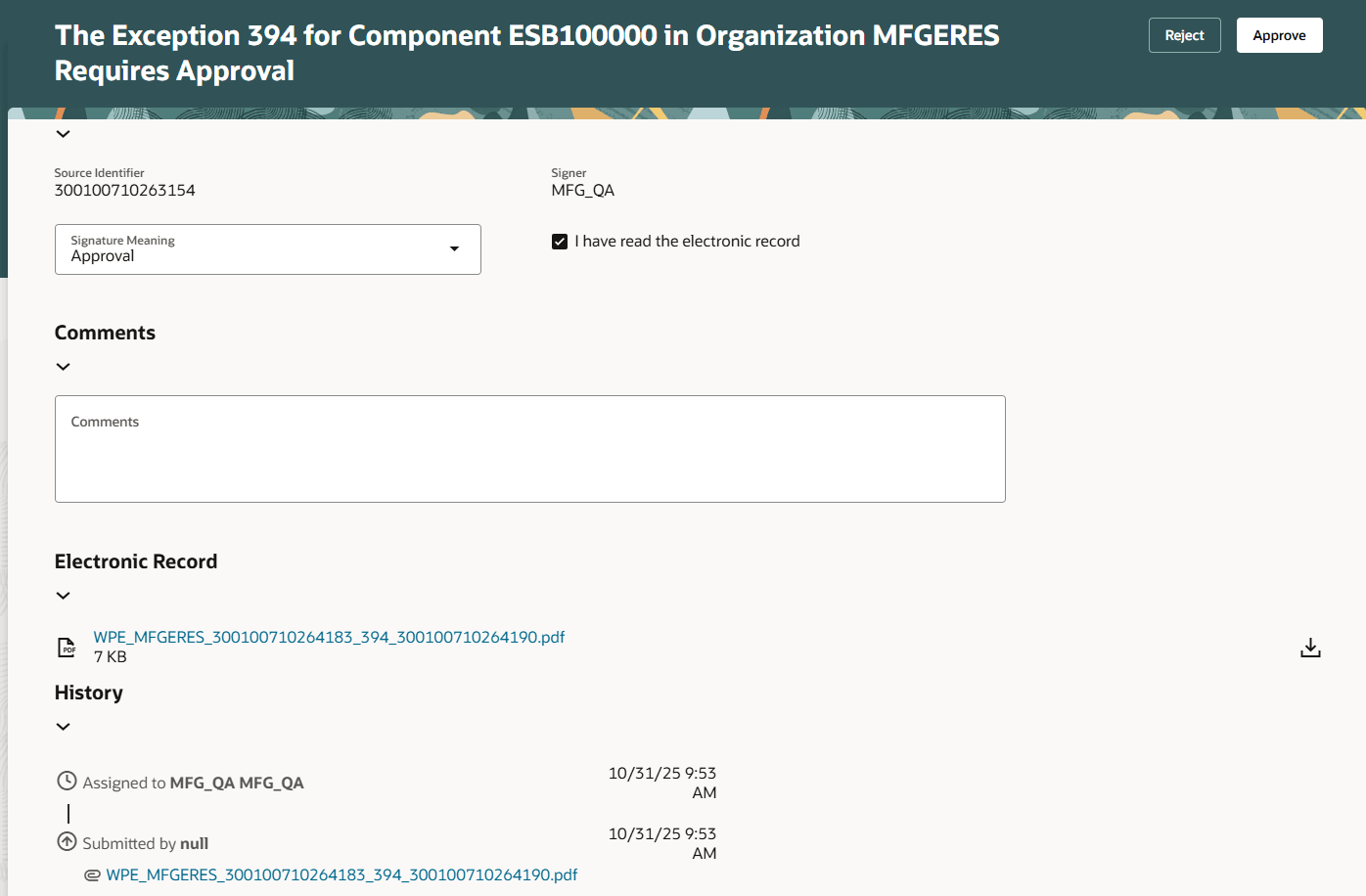
Exception Approval Window
For regulated industries that require compliance documentation in the manufacture of products, e-record and e-signature approval of production exceptions ensures validation and evidence for audit purposes.
Here's the demo of these capabilities:
Steps to Enable and Configure
- Enable the Opt In for the "Capture Electronic Records and Electronic Signatures for Supply Chain Management Transactions" feature.
- Configure e-signature preferences by enabling Manufacturing Production Exceptions for deferred electronic signature approval for an organization under the task Configure Electronic Signature Preferences. Refer to Configure E-Signature Preferences.
- After you enable electronic signatures for a transaction, you should also define configurable business process rules in Oracle Business Process Management using the Manage Task Configurations for Supply Chain Management task. Use the Manage Approval Groups task in the Setup and Maintenance work area to determine the approvers for each transaction.
Tips And Considerations
- Supervisors can create exceptions for other work centers to communicate issues that span work centers. However, each supervisor can only view the impacted work order operations within the work center they manage.
- When a production exception is in Pending Approval for Closure status, the exception becomes view only during the approval process.
- You can't mass approve the closure of multiple production exceptions using the e-records and e-signatures process at this time.
- You can't approve production exception closure using FBDI, a REST API, or ADFdi at this time.
Key Resources
- Watch the Redwood: Use Electronic Records and Electronic Signatures to Close Exceptions When Supervising Production demo.
- Refer to the 24D feature Manage and Resolve Exceptions from the Production Supervisor Workbench and 25C feature Redwood: Send Redwood-Style Notifications for Production Exceptions for more information about production exception management using the Redwood user experience.
- Refer to the Overview of Production Exceptions, Overview of Electronic Signatures and Electronic Records for Production Exception Closure, and How You Capture E-Signatures and Generate E-Records for Production Exception Closure documentation for more information about production exception management using e-signatures and e-records.
- Refer to Using E-Signatures and E-Records and Implementing E-Signatures and E-Records documentation for more information about e-signatures and e-records.
Access Requirements
Users who are assigned a configured job role that contains these privileges can access this feature.
Manufacturing Privileges:
- Supervise Production (WIP_SUPERVISE_PRODUCTION_PRIV)
- View Production Shift Details(WIP_GET_PROD_SHIFT_DETAILS_PRIV)
- View Production Exceptions (WIP_VIEW_PRODUCTION_EXCEPTIONS_PRIV)
- Manage Production Exceptions (WIP_MANAGE_PRODUCTION_EXCEPTIONS_PRIV)
Electronic Signature Approval Privileges:
- Electronic Signatures (EDR_ADD_ESIGNATURES_TRANSACTIONS_PRIV)
- View Electronic Records and Signatures (EDR_VIEW_RECORDS_ESIGNATURES_PRIV)
Other Privileges:
- Manage Quality Issue (ENQ_MANAGE_QUALITY_ISSUE_PRIV)
HCM Privileges:
- Use REST Service - Guided Journey Responses (ORA_PER_REST_SERVICE_ACCESS_GUIDED_JOURNEY_RESPONSES)
- Use REST Service - Guided Journeys Read Only (ORA_PER_REST_SERVICE_ACCESS_GUIDED_JOURNEYS_RO)
These privileges were available prior to this update.