 Supply the Materials of Phantom Components from the Subinventory Defined for the Phantom in the Work Definition
Before this update, the supply subinventory specified for a phantom in the parent assembly work definition doesn’t default as the supply subinventory for the components of the phantom in the work order. The supply subinventory for the component is inherited from the phantom work definition if a work definition exists, else it is inherited from the item organization definition or the plant parameter.
With this update, the supply subinventory specified for a phantom in the parent assembly work definition now defaults as the supply subinventory for the components of that phantom in the work order. If a supply subinventory isn't specified in the parent assembly work definition, then the supply subinventory for the component is inherited from the phantom work definition if a work definition exists, else it is inherited from the item organization definition or the plant parameter.
To summarize:
- The default supply subinventory for phantom components before this update is determined using the following order of priority:
- Phantom work definition
- Item organization definition
- Plant parameter
- The default supply subinventory for phantom components after this update is determined using the following order of priority:
- Parent assembly work definition
- Phantom work definition
- Item organization definition
- Plant parameter
The following screenshot of the Work Definition Operation Items page for parent assembly FIT3000 shows a supply subinventory specified for phantom EPX100000 but missing for phantom EPX100001:
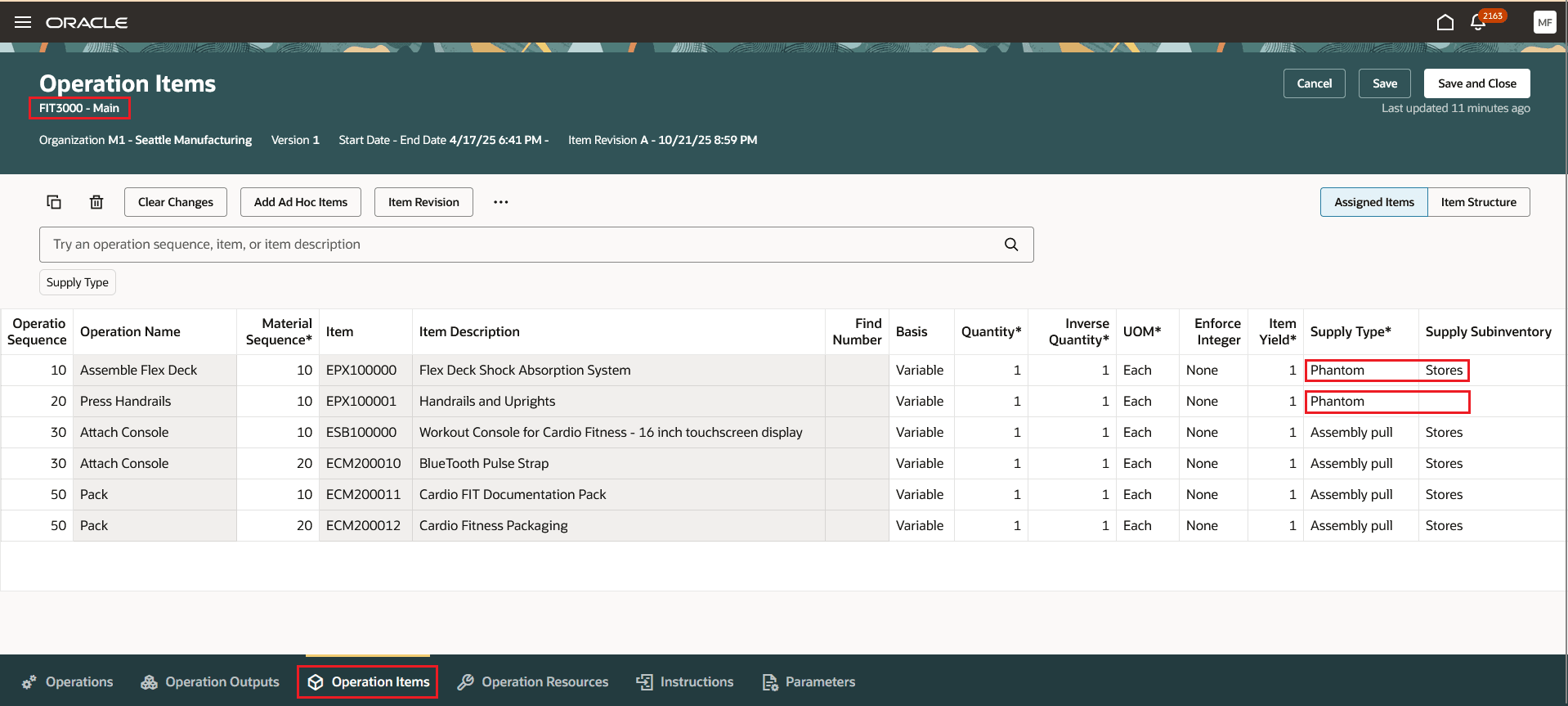
Supply Subinventory for Work Definition Operation Items
Using the supply subinventory defined for a phantom in the parent assembly work definition as the default for phantom components keeps the supply subinventory grouping for components under the phantom intact on the parent assembly work order. This provides the flexibility to designate a supply subinventory for phantom components.
Here's the demo of these capabilities:
Steps to Enable and Configure
Use the Opt In UI to enable this feature. For instructions, refer to the Optional Uptake of New Features section of this document.
Offering: Manufacturing and Supply Chain Materials Management
Tips And Considerations
- This feature is enabled using a permanent Opt In. Enable the Opt In only if you want the new supply subinventory defaulting logic to apply.
- The new default supply subinventory logic applies to standard items and ATO models for discrete manufacturing, process manufacturing and flow manufacturing work methods.
- If you want the work center supply subinventory to be used as the default value, specify this work center supply subinventory for the phantom in the parent assembly work definition.
Key Resources
- Watch the Supply the Materials of Phantom Components from the Subinventory Defined for the Phantom in the Work Definition demo.
- Oracle Fusion Cloud SCM: Refer to the Using Manufacturing guide, available on the Oracle Help Center.
- Oracle Fusion Cloud SCM: Refer to the Implementing Manufacturing and Supply Chain Materials Management guide, available on the Oracle Help Center.
Access Requirements
Users who are assigned a configured job role that contains this privilege can access this feature:
- Manage Work Definitions (WIS_MANAGE_WORK_DEFINITIONS_PRIV)
This privilege was available prior to this update.