 Review and Approve a Completed Work Order for Closure
Currently, manufacturing work orders that have finished production execution and reporting activities can be periodically closed using the Close Work Orders program. When the work order close process requires more stringent review for costing accuracy, there needs to be a way to control the final submission of work order production records and authorized changes to it.
Using the Redwood user experience, you can now review completed discrete or process manufacturing work order details before submitting for closure with approval.
- Search and filter work orders based on statuses: Use the filter for work order statuses to find a discrete or process manufacturing work order that has finished production execution and reporting activities and is ready to be finalized for costing period close. This can be done from either the Work Orders (New) page or the Production Supervision page.
- Completed - The work order has completed, and the work order is awaiting review before submission for closure.
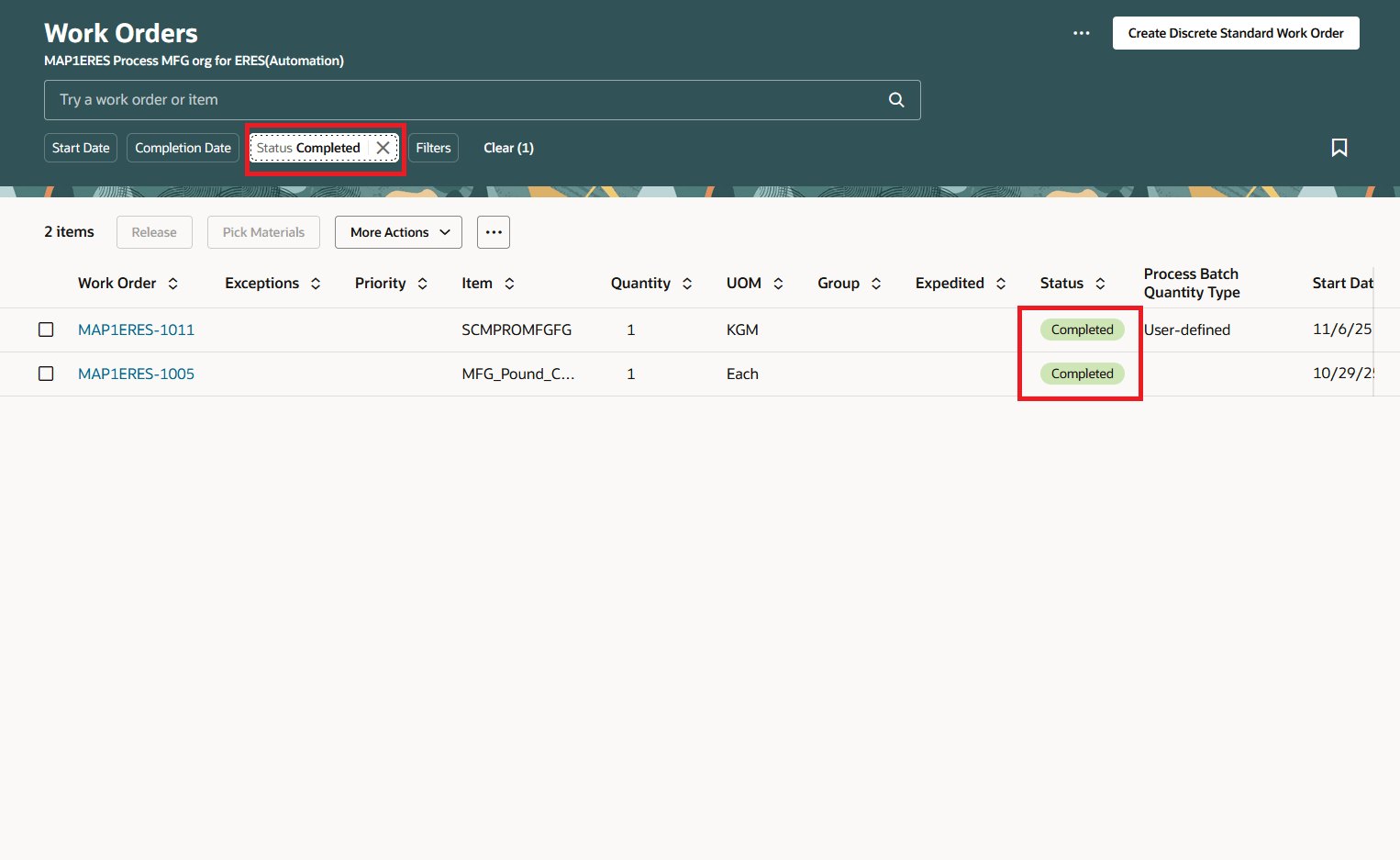
Completed Work Orders Waiting for Closure
- Pending Closure Approval status - The work order has been submitted for closure approval and is awaiting the outcome of the approval process.
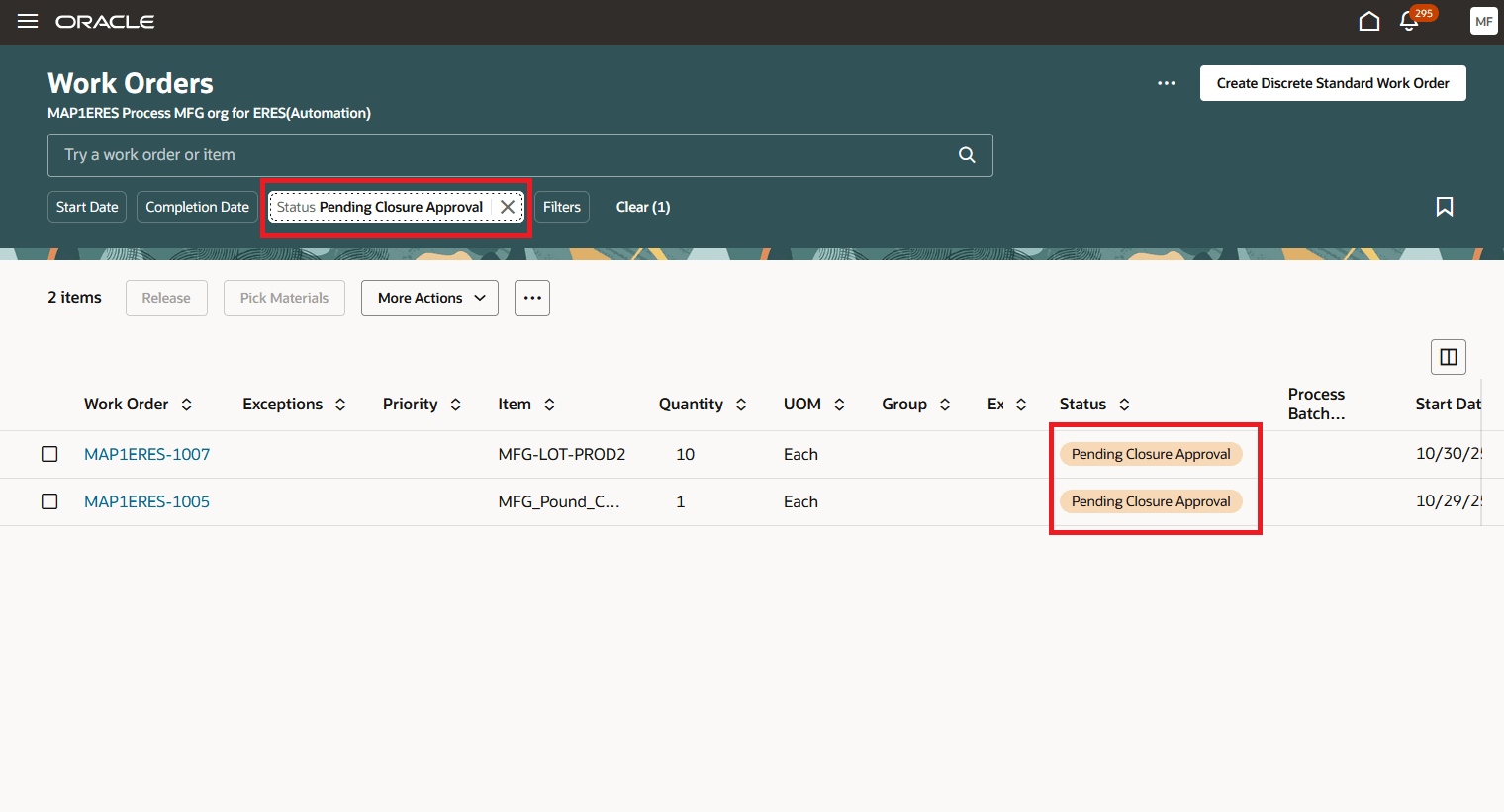
Work Orders Pending Closure Approval
- Take action on a work order awaiting review for closure:
- Review production and quality inspection data for a completed work order using the Production Transaction History page under Production Supervision.
- Resolve production exceptions using the Exceptions page under Production Supervision.
- Record, return, and reverse production transactions using the Post Production Reporting page.
- Submit a work order for closure approval:
- Review and update the close date for the work order as appropriate. The work order can be accessed from either the Work Orders (New) page or the Production Supervision page.
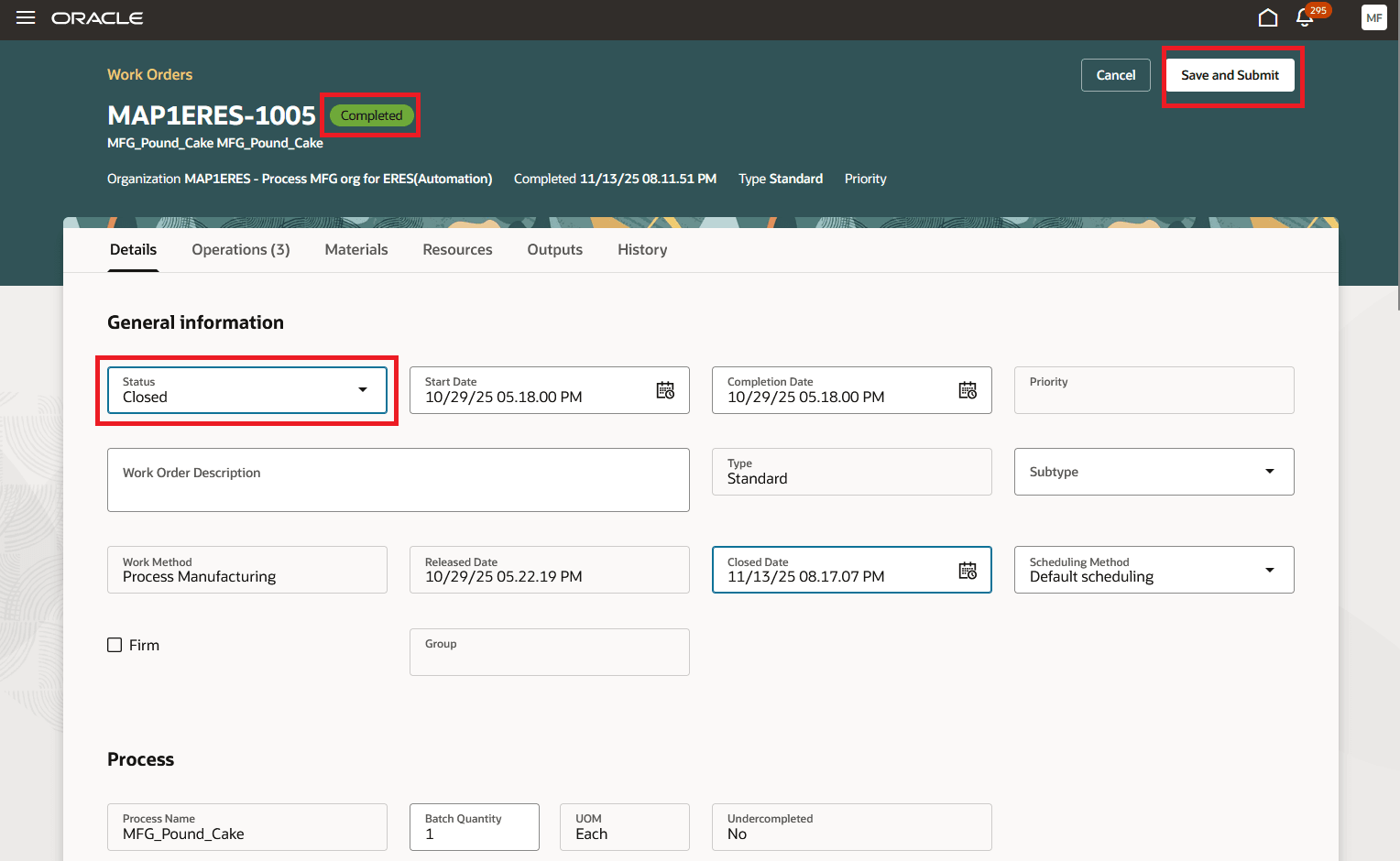
Submit Work Order for Closure Approval
- Submit the selected work order for closure approval using an e-record and e-signature workflow process to ensure formal controls for authorized changes. A new deferred process for viewing the generated e-record and capturing e-signatures for work order closure is initiated, changing the work order status to Pending Closure Approval and setting the work order to view only mode.
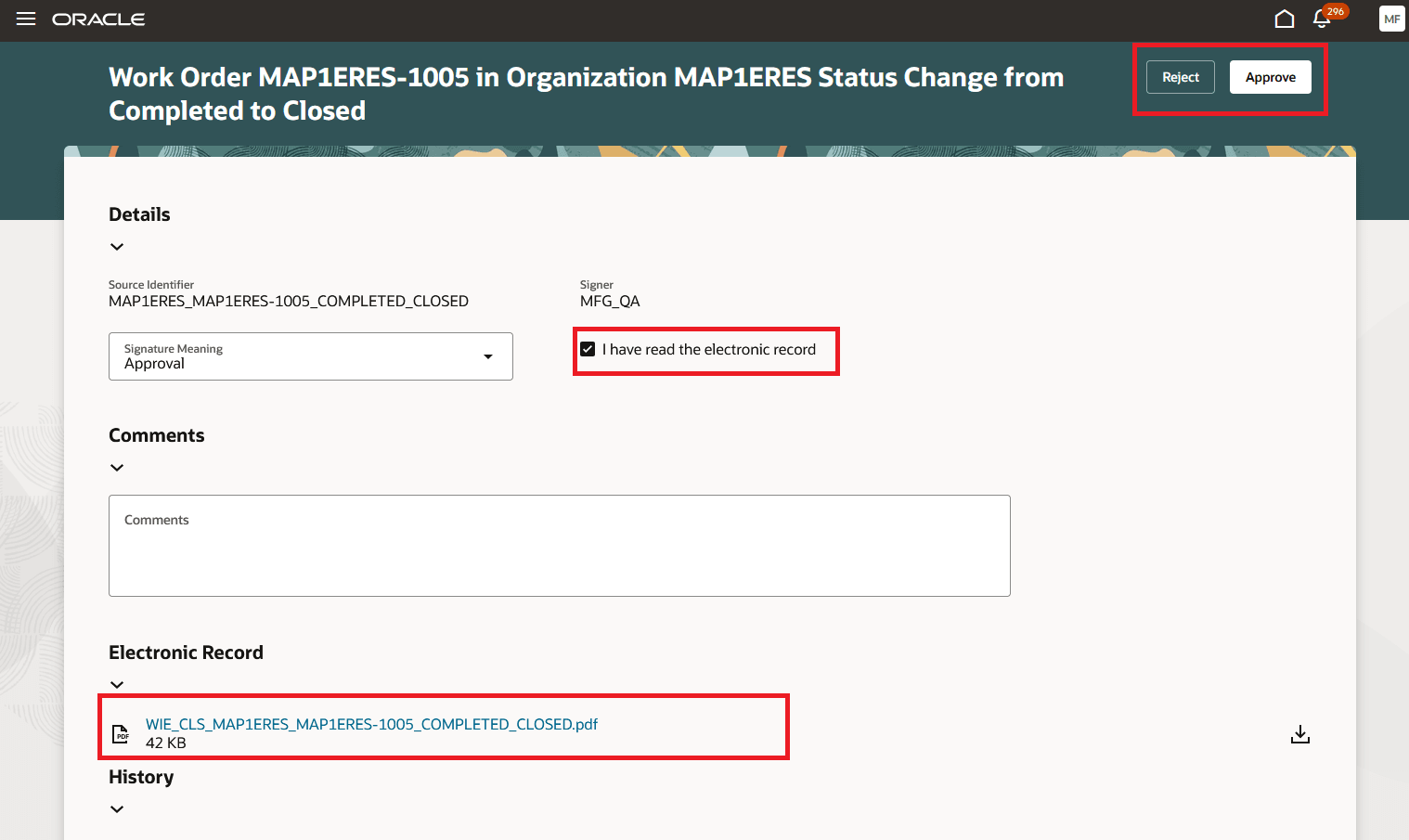
Closure Approval Notification
- Review the automatically generated electronic production record during the e-signature approval process.
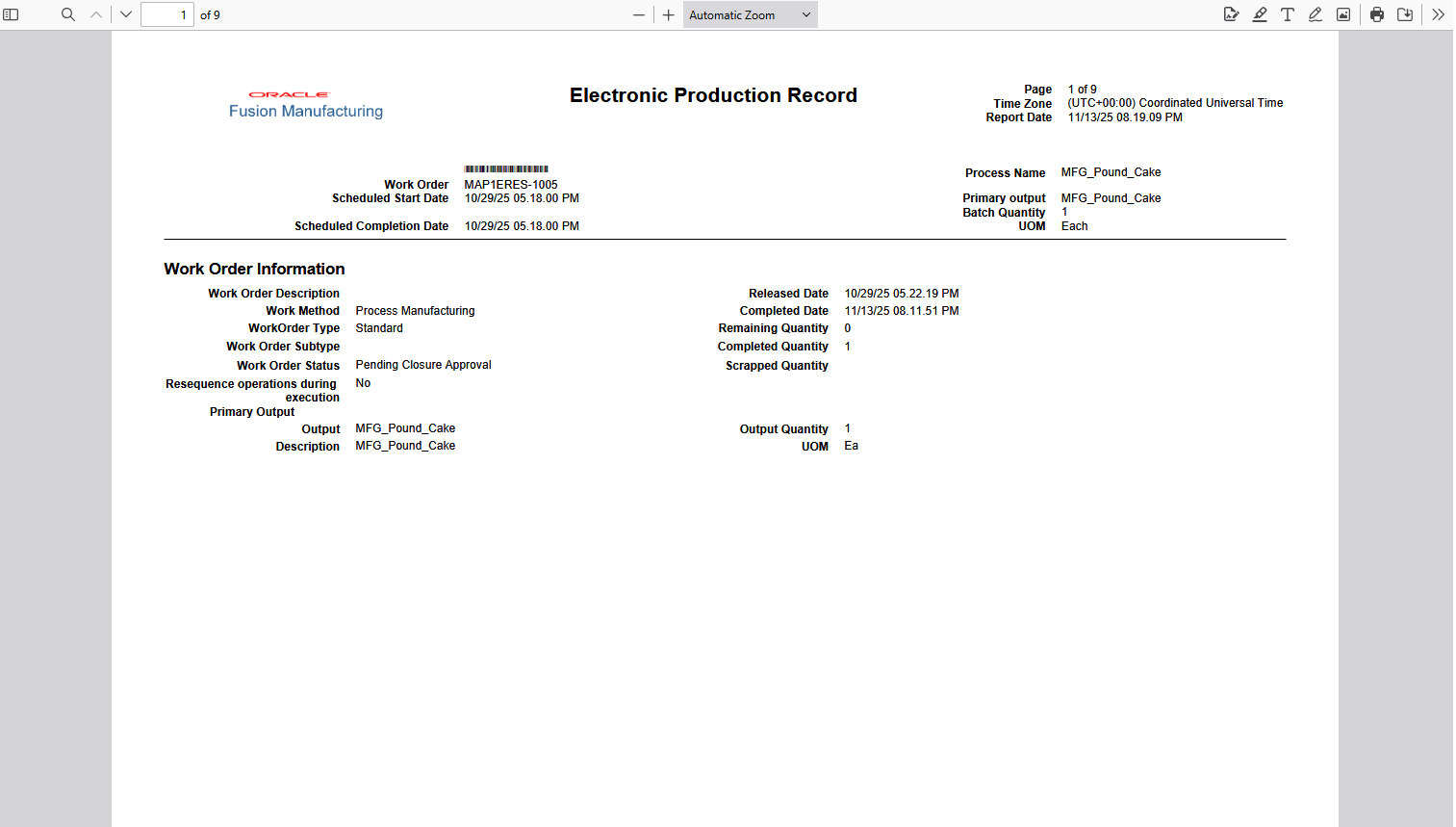
Electronic Production Record for Closure
- Obtain approvals for work order closure or reject to roll back to the previous status and make changes for resubmission.
Implementing a rigorous work order closure review and approval process ensures costing accuracy, which streamlines and simplifies the period close process.
Steps to Enable and Configure
- Configure e-signature preferences by enabling "Manufacturing Work Order Closure Approval" deferred electronic signature approval for an organization under the task "Configure Electronic Signature Preferences". Refer to Configure E-Signature Preferences.
- After you enable electronic signatures for a transaction, you should also define configurable business process rules in Oracle Business Process Management using the Manage Task Configurations for Supply Chain Management task, and the Manage Approval Groups task in the Setup and Maintenance work area to determine the approvers for each transaction. The task name is WorkOrderDeferredApproval.
- Enable the 24A feature Generate an Electronic Production Record for a Product to view the Electronic Production Record as part of the electronic record.
Tips And Considerations
- You can enable e-records and e-signatures for work order close depending on the approval requirements using the Redwood user experience only.
- This is applicable only for Process and Discrete Manufacturing work orders. You can't approve maintenance work orders using e-signatures and e-records at this time.
- You can't mass approve work order close using the e-records and e-signatures process at this time.
- You can't approve work order close using FBDI or a REST API at this time.
- You can leverage the scheduled process as an alternate method for generating the electronic production record without e-signature approval.
- For enhanced flexibility and control in manufacturing work order execution and approval, you can also enable the corresponding features:
- Redwood: View Enhanced Production Transaction History Details When Managing Work Orders and Supervising Production in 26A
- Redwood: Validate Production Transaction Data for Work Orders Post Production in 26A
- Review Work Order Before Manual Completion and Submission for Approval in 26A
- Redwood: View Electronic Records Using a Redwood Page in 25B
Key Resources
- Refer to Redwood: Create and Edit Work Orders Using a New User Experience for information about managing work orders in the Redwood experience
- Refer to Using E-Signatures and E-Records and Implementing E-Signatures and E-Records documentation for more information about e-signatures and e-records.
Access Requirements
Users who are assigned a configured job role that contains this privilege can access this feature:
Manufacturing Privileges:
- Supervise Production (WIP_SUPERVISE_PRODUCTION_PRIV)
- Manage Work Order Headers (WIP_MANAGE_WORK_ORDER_HEADERS_PRIV)
- Print Electronic Production Records (WIP_PRINT_ELECTRONIC_PRODUCTION_RECORDS_PRIV)
Electronic Signature Approval Privileges:
- Electronic Signatures (EDR_ADD_ESIGNATURES_TRANSACTIONS_PRIV)
- View Electronic Records and Signatures (EDR_VIEW_RECORDS_ESIGNATURES_PRIV)
These privileges were available prior to this update.