Redwood: Review and Correct Errors When Importing Work Orders and Production Transactions
When importing manufacturing work orders and production transactions from external systems or for bulk data processing needs, implementation consultants need an efficient and user-friendly way to identify, review, and resolve data import errors. You can now review and correct all the File-Based Data Import (FBDI) records and REST API records that resulted in errors using a Redwood experience.
Using the Imported Manufacturing Work Orders and Transactions Records in Error page, you can:
- Search for records that failed to import: You can use a combination of filters to narrow your search:
- Use the Import filter to filter the records by the specific type of import, such as work orders, work order material transactions, work order operation transactions, or work order resource transactions. The default filter value is set to work orders.
- Use the Batch Status filter to filter the records by batch status.
- Search by entering a batch code or request ID.
- Export these records to an ADFdi spreadsheet using the Manage in Spreadsheet action.
- Review and correct the errors in bulk using the spreadsheet.
- Upload the spreadsheet to resubmit the records for processing.
The following import transactions that failed import can be corrected:
- Work orders
- Work order operation transactions
- Work order material transactions
- Work order resource transactions
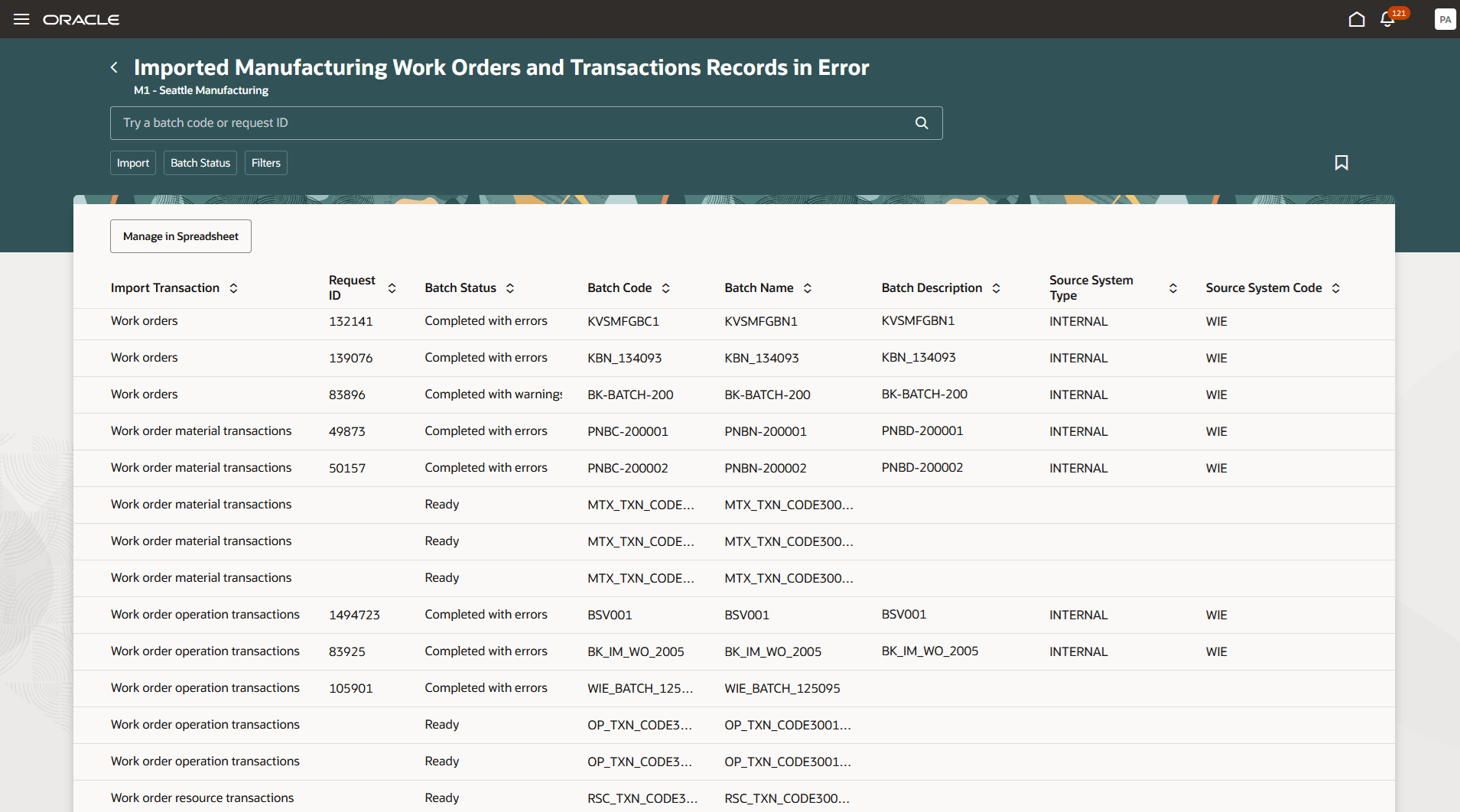
Correct Work Orders and Transactions for Import
The ability to fix import errors for work orders and production transactions using a Redwood page and ADFdi spreadsheet streamlines the error resolution process and improves data integrity.
Here's the demo of these capabilities:
Steps to Enable and Configure
Follow these steps to enable or disable this feature:
- In the Setup and Maintenance work area, search for and select the Manage Administrator Profile Values task.
- On the Manage Administrator Profile Values page, search for and select the ORA_WIE_CORRECT_WO_TXNS_FOR_IMPORT_REDWOOD_ENABLED profile option code.
- In the Profile Values section, set the Site level to Y or N. The default value of the profile option is N.
- Y = Enables the feature.
- N = Disables the feature.
- Click Save and Close. Changes in the profile value affect users the next time they sign in.
You have the option to enable or disable this feature from the 26A update.
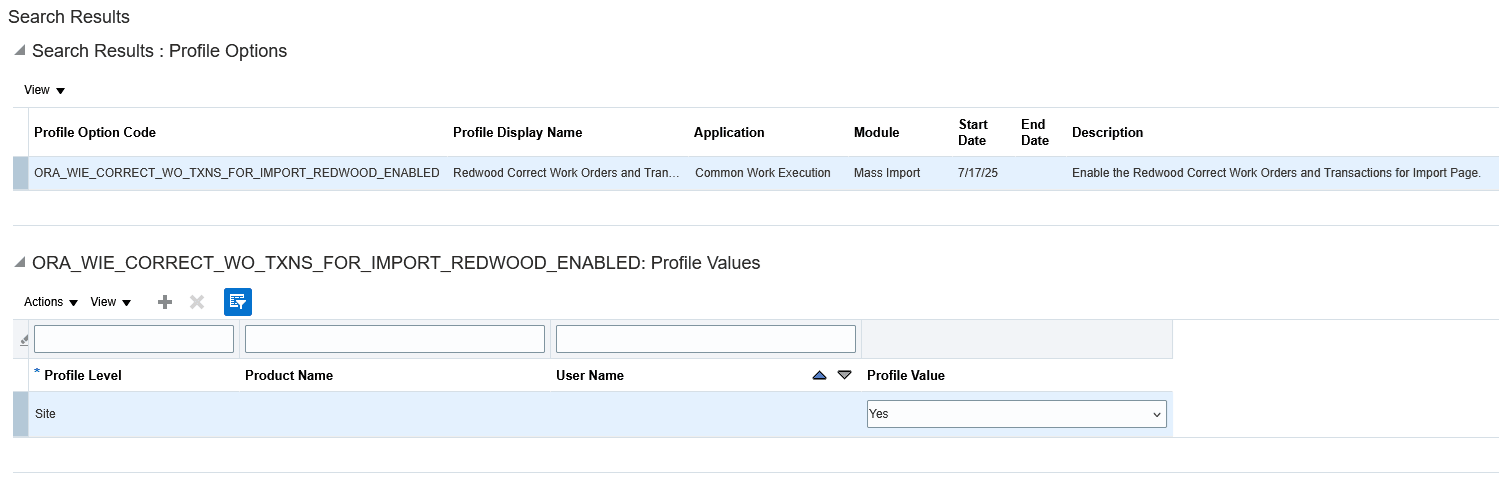
Profile Option to Enable the Redwood Correct Work Orders and Transactions for Import Page
Tips And Considerations
Refer to the How You Import Discrete Work Orders topic in the documentation.
Key Resources
- Watch the Review and Correct Errors When Importing Work Orders and Production Transactions Demo.
- Oracle Fusion Cloud SCM: Refer to the Using Manufacturing guide, available on the Oracle Help Center.
- Oracle Fusion Cloud SCM: Refer to the Implementing Manufacturing and Supply Chain Materials Management guide, available on the Oracle Help Center.
Access Requirements
Users who are assigned a configured job role that contains these privileges can use this feature:
- Import Work Orders (WIP_IMPORT_WORK_ORDERS_PRIV)
Guided Journeys : Role Codes
- Use REST Service - Guided Journeys Read Only (Role Code ORA_PER_REST_SERVICE_ACCESS_GUIDED_JOURNEYS_RO)
- Use REST Service - Guided Journey Responses (Role Code ORA_PER_REST_SERVICE_ACCESS_GUIDED_JOURNEY_RESPONSES)
These privileges were available prior to this update.