Redwood: Use Electronic Signatures and Electronic Records When Creating and Editing a Standard Operation
In a prior release, managing standard operations and their resources for quick reuse in Manufacturing work definitions and work orders launched in Redwood pages. For a regulated environment, changes to standard operations must be tracked and approved, since they can be referenced in work definitions and work orders.
With this update, you can approve new or updated standard operations by reviewing its electronic record and capturing electronic signatures through an inline e-signature approval workflow that uses the Redwood user experience.
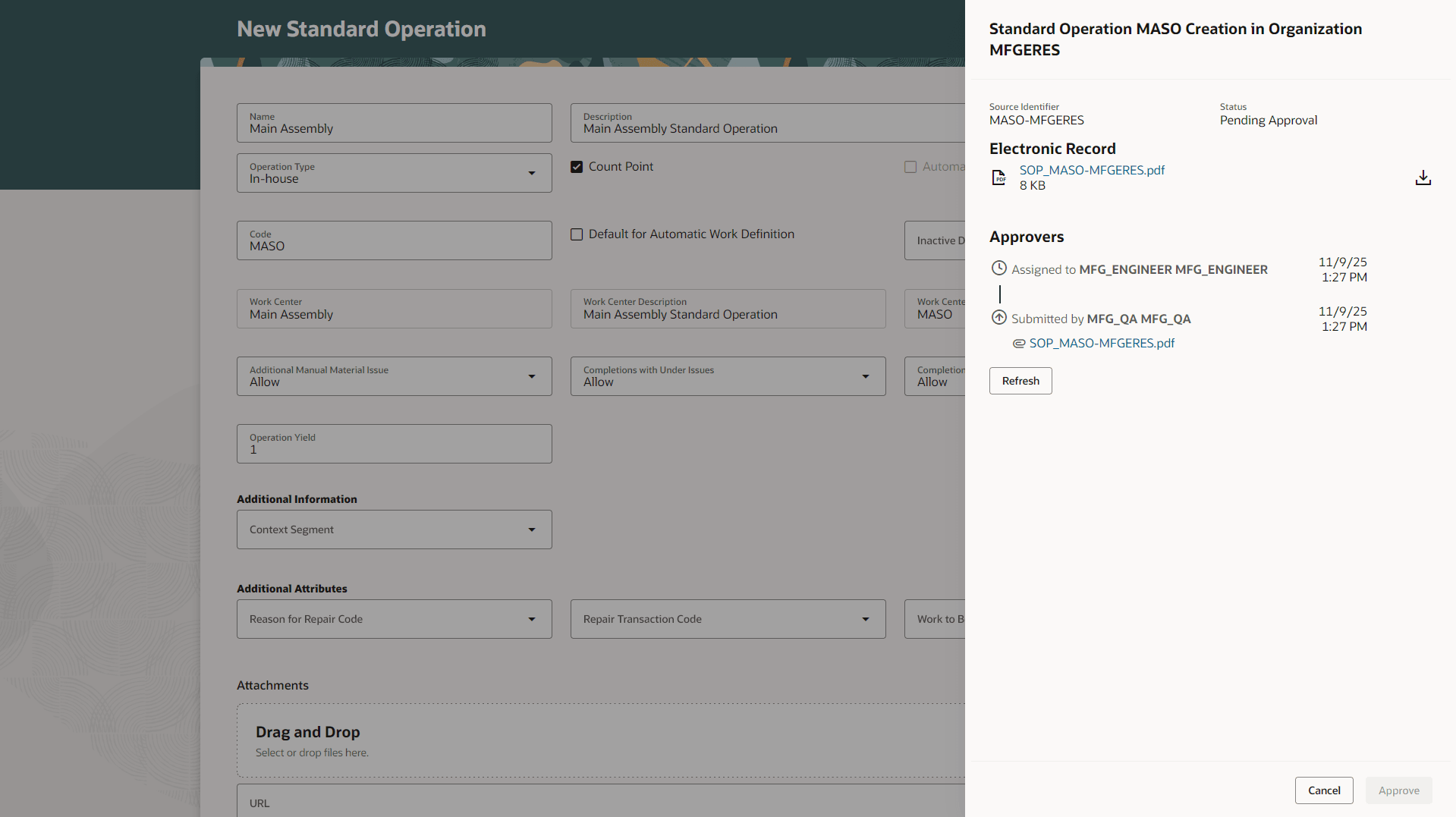
Submit Standard Operation for Electronic Signature Approval
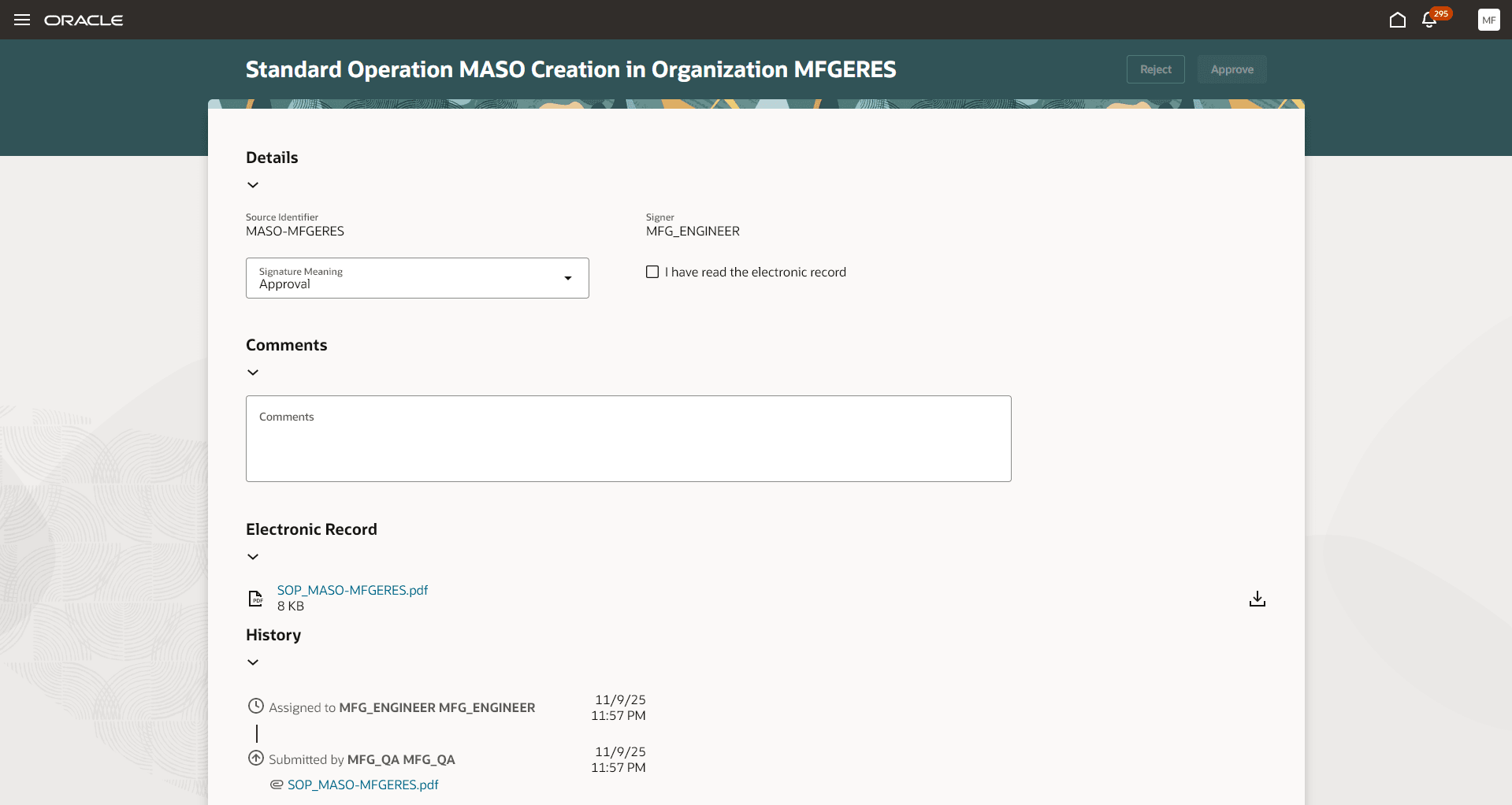
Electronic Signature Approval Notification Window
For regulated industries that require compliance documentation in the manufacture of products, e-record and e-signature approval of standard operations management ensures validation and evidence for audit purposes.
Here's the demo of these capabilities:
Steps to Enable and Configure
Follow these steps to use this feature:
- Set up the Profile to enable the Redwood experience for material transactions, as follows:
- In the Setup and Maintenance work area, search for and select the Manage Administrator Profile Values task.
- On the Manage Administrator Profile Values page, search for and select the ORA_WIS_STANDARD_OPERATIONS_REDWOOD_ENABLED profile option code.
- In the Profile Values section, set the Site level to Y or N. The default value of the profile option is Y.
- Y = Enables the feature.
- N = Disables the feature
- Click Save and Close. Changes in the profile value affect users the next time they sign in.
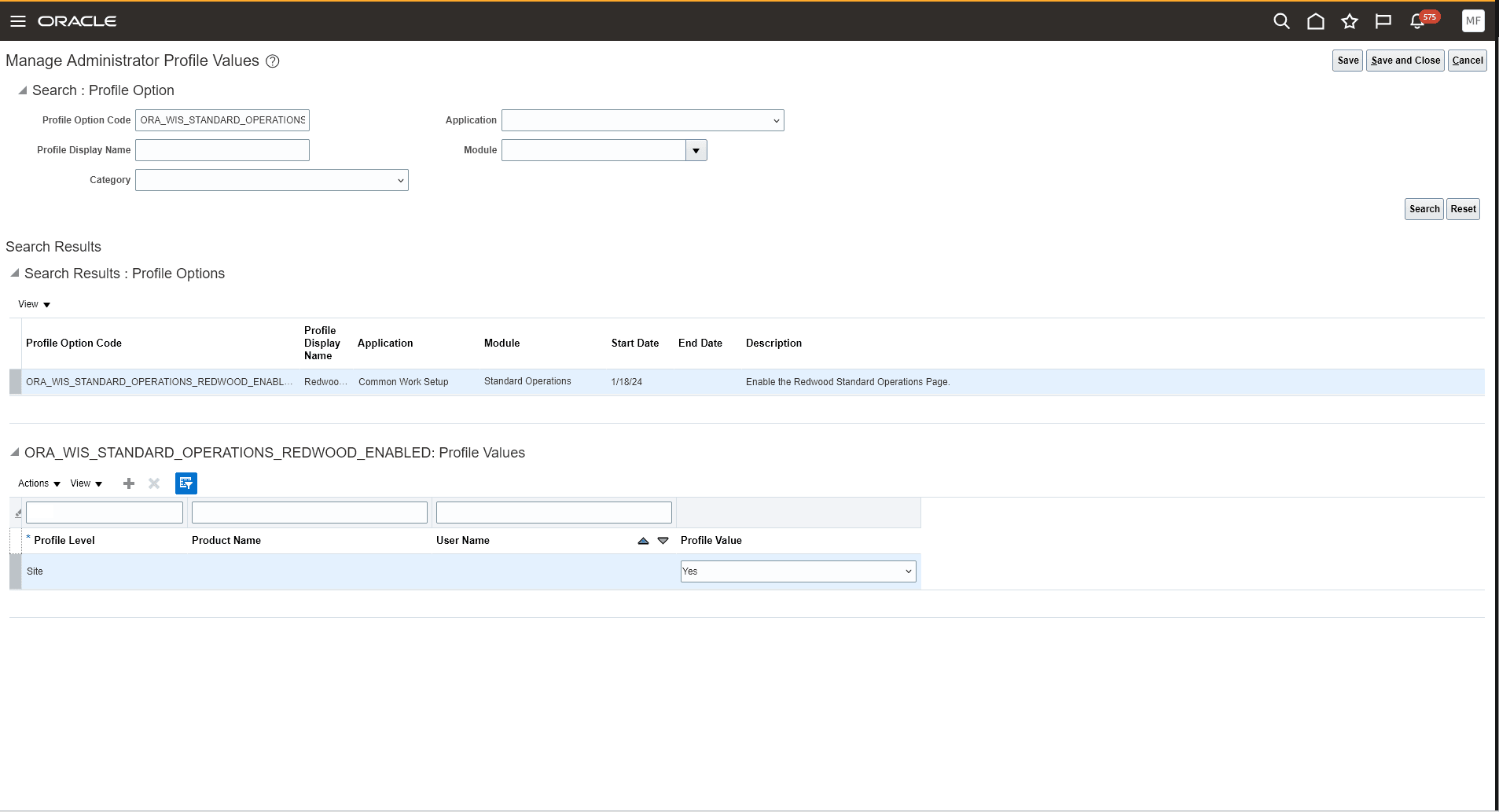
Profile Option for Accessing the Redwood Standard Operation UI
- Enable the Opt In for the "Capture Electronic Records and Electronic Signatures for Supply Chain Management Transactions" feature.
- Configure e-signature preferences by enabling Work Order Material Transaction for inline electronic signature approval for an organization under the task "Configure Electronic Signature Preferences". Refer to Configure E-Signature Preferences.
- After you enable electronic signatures for a transaction, you should also define configurable business process rules in Oracle Business Process Management using the Manage Task Configurations for Supply Chain Management task, and the Manage Approval Groups task in the Setup and Maintenance work area to determine the approvers for each transaction.
Tips And Considerations
- You can't approve standard operations using FBDI, REST APIs, or ADFdi at this time.
- For a consistent electronic recordkeeping compliance strategy using the Redwood user experience, you can also enable the corresponding features:
- Redwood: Enable Deferred Electronic Record and Electronic Signature for Manufacturing Work Definitions Using the Redwood User Experience in 25B
- Redwood: Use Electronic Signatures and Electronic Records When Creating and Editing a Standard Operation in 26A
- Redwood: Use Electronic Signatures and Electronic Records When Reporting Material Transactions for a Work Order Operations in 25C
- Redwood: Use Electronic Signatures and Electronic Records When Reporting Material Transactions During Production Execution in 26A
- Redwood: Use Electronic Signatures and Electronic Records When Completing Operations During Production Execution in 26A
- Redwood: Use Electronic Signatures and Electronic Records When Reporting Outputs During Production Execution in 26A
- Redwood: Use Electronic Signatures and Electronic Records When Reporting Outputs During Production Execution in 26A
- Review Work Order Before Manual Completion and Submission for Approval in 26A
- Review and Approve a Completed Work Order for Closure in 26A
- Redwood: View Electronic Records Using a Redwood Page in 25B
Key Resources
- Watch the Redwood: Use Electronic Signatures and Electronic Records When Creating and Editing a Standard Operation demo.
- Refer to the 24C feature Search for, Create, and Edit Standard Operations Using a Redwood User Experience for more information about creating and editing standard operations.
- Refer to the Overview of Electronic Signatures and Electronic Records for Standard Operation Management and How You Capture E-Signatures and Generate E-Records for Standard Operation Management documentation for more information about standard operation management using e-records and e-signatures.
- Refer to Using E-Signatures and E-Records and Implementing E-Signatures and E-Records documentation for more information about e-signatures and e-records.
- Refer to the Oracle Fusion Cloud SCM: Using Manufacturing guide, available on the Oracle Help Center.
Access Requirements
Users who are assigned a configured job role that contains these privileges and codes can access this feature:
Standard Operations Privilege:
- Manage Standard Operations (WIS_MANAGE_STANDARD_OPERATIONS_PRIV)
Electronic Signature Approval Privileges:
- Electronic Signatures (EDR_ADD_ESIGNATURES_TRANSACTIONS_PRIV)
- View Electronic Records and Signatures (EDR_VIEW_RECORDS_ESIGNATURES_PRIV)
These privileges were available prior to this update.