Redwood: Validate Production Transaction Data for Work Orders Post Production
The new Postproduction Reporting page provides a unified solution for reviewing, validating, correcting, and completing discrete and process manufacturing work order transactions after production. Business users, such as supervisors and data entry specialists, can efficiently filter, analyze, and rectify production data, ensuring data accuracy and compliance before work order closure.
With this new user experience, you can:
- Query work orders based on status, start date, completion date, material or resource variance, and past due criteria. You can readily identify work orders with outstanding issues or overdue statuses.
- Use dashboard metrics to access counts of completed work orders with materials under issued and counts of past-due workorders. This helps prioritize corrective actions.
- Review, edit, and reverse production transactions directly from the UI, ensuring that errors and variances are addressed before final completion.
- Mark work orders as “Completed and Reviewed” for tracking post-production validation and audit.
- Complete or reverse work order transactions individually or in a batch for operational flexibility.
- Use REST API and OTBI for automated reporting and data extraction.
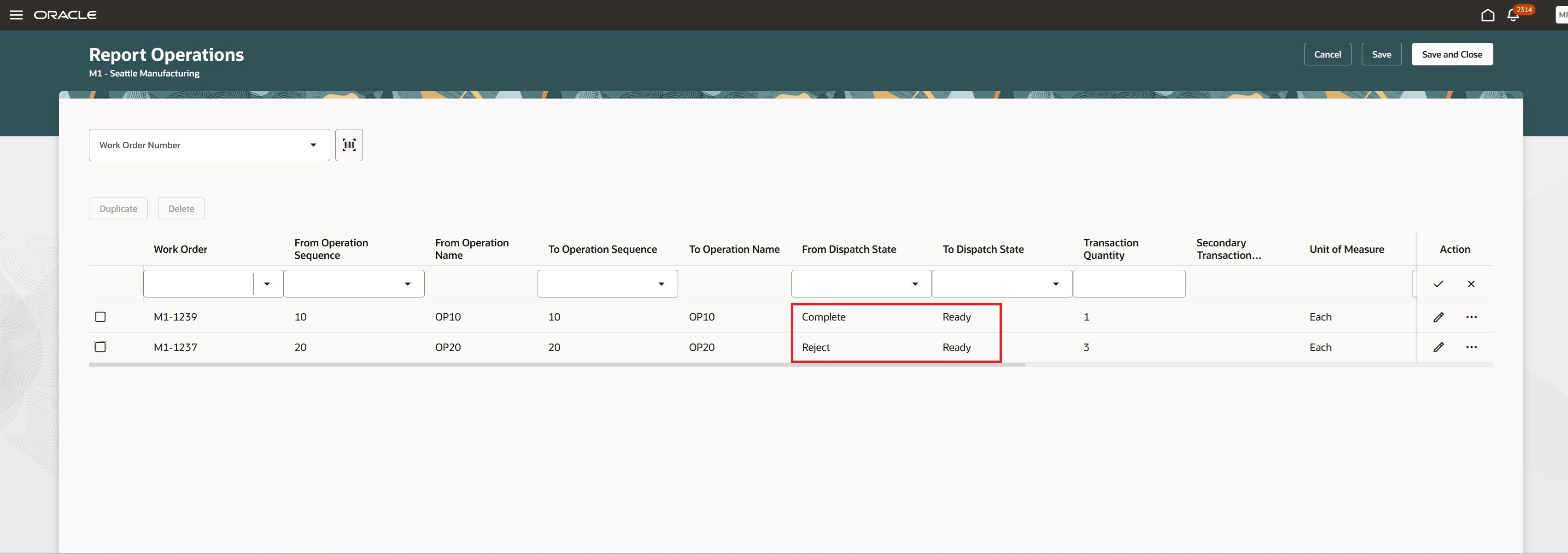
Reverse Quantity at an Operation
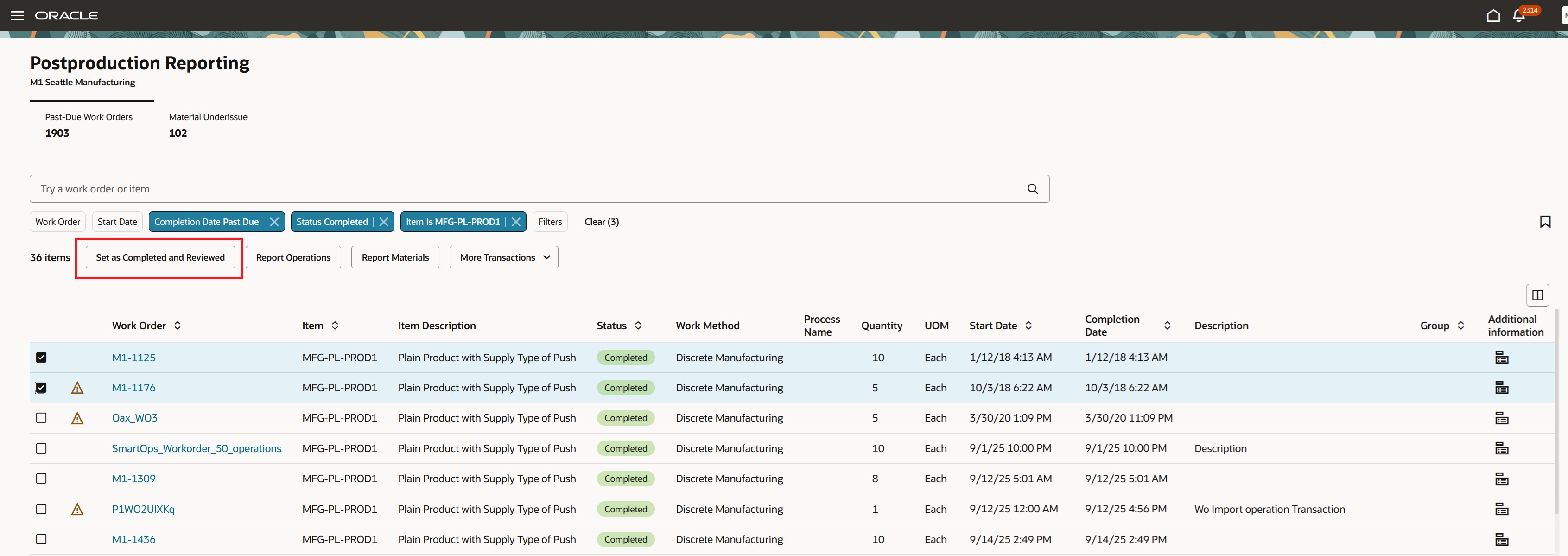
Production Supervisor Reviews and Marks a Work Order as Completed and Reviewed
Post production validation provides the following business benefits:
- Transaction Accuracy: Prevent incorrect or incomplete transactions from impacting costing, inventory, and analytics by reviewing and validating all production data before closing work orders.
- Risk Mitigation: Quickly identify and resolve material or resource variances, avoiding costly inventory discrepancies or compliance issues.
- Efficiency & Productivity: Supervisors and data specialists no longer need multiple tools or navigation paths—evaluate, correct, and complete work orders from a single, task oriented page.
- Operational Visibility: Use actionable metrics and smart filters to help your team focus on immediate tasks, such as overdue orders and production variances.
Here's the demo of these capabilities:
Steps to Enable and Configure
You don't need to do anything to enable this feature.
Tips And Considerations
- Once a work order is marked as Completed and Reviewed, you cannot enter new material or resource transactions without reverting the status to Completed.
- Only valid and fully populated lines are processed in batch actions. You must resolve errors on a per-row basis.
- Electronic Records and Electronic Signatures for material, operation, and output transactions are not supported in the Postproduction Reporting pages.
- You can use the Redwood Production Transaction History page to view and track successfully processed transactions and any related corrections.
- Refer to the 26A feature Redwood: Report Work Order Transactions Post Production Using a New User Experience for more information about the Postproduction Reporting page.
Key Resources
- Refer to Redwood: Validate Production Transaction Data for Work Orders Post Production demo.
- Oracle Fusion Cloud SCM: Refer to the Using Manufacturing guide, available on the Oracle Help Center.
- Oracle Fusion Cloud SCM: Refer to the Implementing Manufacturing and Supply Chain Materials Management guide, available on the Oracle Help Center.
Access Requirements
Users who are assigned a configured job role that contains the following privilege can access this feature:
- Manufacturing Privilege :
-
Report Postproduction Transactions (WIE_REPORT_POSTPRODUCTION_TRANSACTIONS)
-
This is a new privilege for post production reporting of work order transactions.
You can access the Postproduction Reporting page from the action "Postproduction Reporting" in the list of action from the "Overview" page.