Redwood: Review Product Genealogy
You can now review Product Genealogy using the new Redwood user experience. This redesigned page introduces a modern, intuitive layout that streamlines how you search, visualize, and navigate product relationships and trace trees.
With Redwood’s guided search and insights, you can quickly locate production histories, component usage, and traceability details across Manufacturing, Inventory, and other SCM events, all from a single view. Interactive trace trees and contextual links make it easier to identify affected lots or serials, trace upstream and downstream relationships, and take immediate action on time-sensitive investigations.
By adopting this Redwood experience, users gain faster access to critical genealogy data, reduce navigation time between related records, and can make better-informed decisions during production and quality reviews.
You can search and view the genealogy details of products on the Review Product Genealogy page.
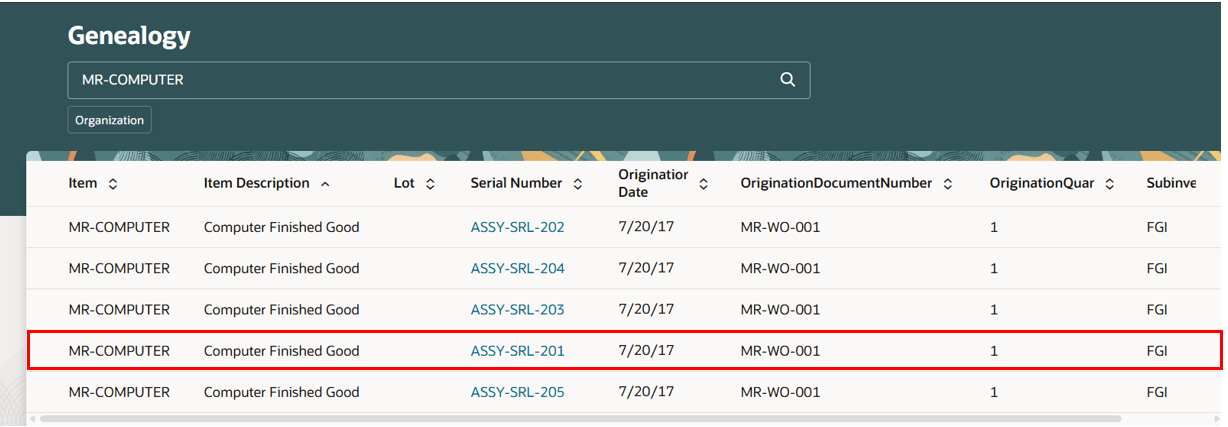
Review Product Genealogy Page
You can view lot number and serial number details.
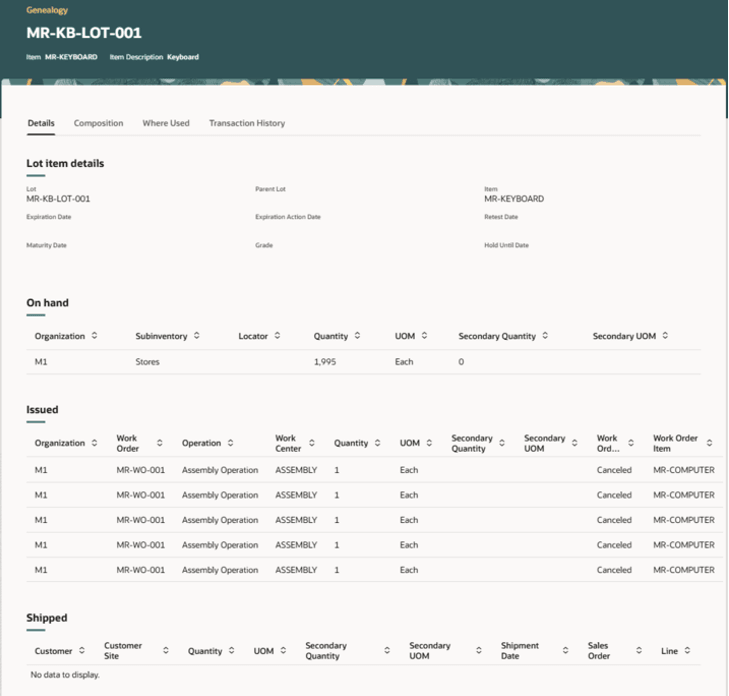
Genealogy Lot Details
The Composition tab shows the composition structure of a lot or serial number for a genealogy-enabled item.
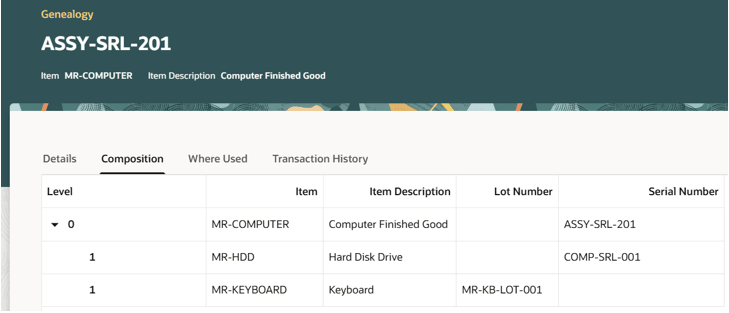
Genealogy Composition Tab for a Lot or Serial Number of an Item
The Where Used tab shows the usage of a lot or serial number for a genealogy-enabled item.
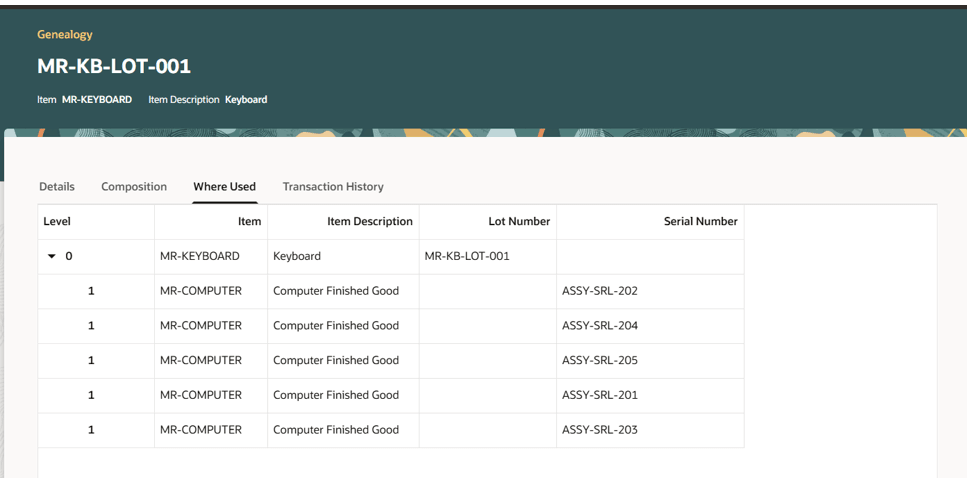
Genealogy Where Used Tab for a Lot or Serial Number of an Item
The Transaction History tab shows the transaction history of a lot or serial number for a genealogy-enabled item.
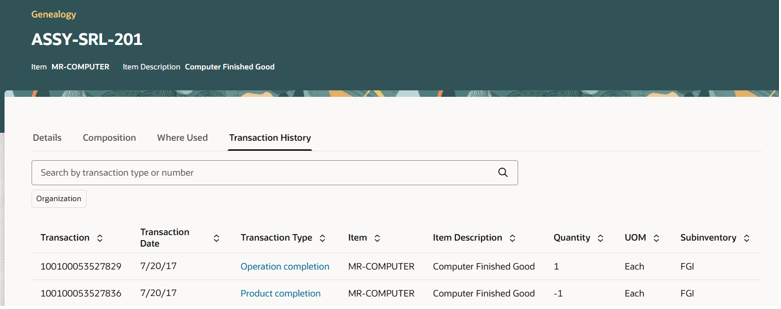
Transaction History of a Lot or Serial Number for a Genealogy-Enabled Item
- Reduced Investigation Time: Guided search and visual trace trees minimize time spent navigating between related records.
- Improved Decision Making: Contextual insights enable faster, more informed actions on time-sensitive quality and production issues.
- Enhanced User Experience: The modern Redwood interface simplifies navigation and reduces complexity in tracing product relationships.
Steps to Enable and Configure
Follow these steps to use this feature:
- Set up the Profile to enable the Redwood experience for genealogy, as follows:
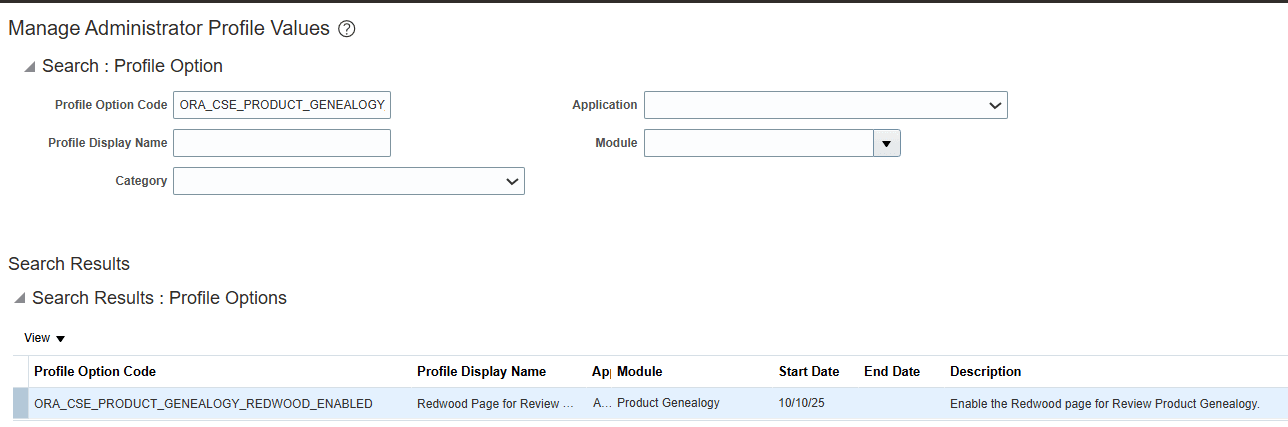
- In the Setup and Maintenance work area, search for and select the Manage Administrator Profile Values task.
- On the Manage Administrator Profile Values page, search for and select the ORA_CSE_PRODUCT_GENEALOGY_REDWOOD_ENABLED profile option code.
- In the Profile Values section, set the Site level to Y or N. The default value of the profile option is N.
- Y = Enables the feature.
- N = Disables the feature.
- Click Save and Close. Changes in the profile value affect users the next time they sign in.
Tips And Considerations
- For a product or component to be tracked in genealogy, you must set the Enable Genealogy Tracking item attribute to Yes.
- Product genealogy can be built online immediately, or be deferred to a later time based on the genealogy profile "Enable Genealogy Build Deferred During Execution".
Key Resources
- Watch the Redwood: Review Product Genealogy demo.
- Refer to the Product Genealogy section in the Supply Chain and Manufacturing guide.
Access Requirements
To use this feature, the following privileges or roles are required:
- Privilege Name and Code:
- Review Product Genealogy (CSE_REVIEW_PRODUCT_GENEALOGY_PRIV)
- Job Role Name and Code:
- Asset Administrator (ORA_CSE_ASSET_ADMINISTRATOR_JOB)
These privileges were available prior to this update.