Redwood: Reprice Sales Orders
Use Oracle Order Management's redesigned pages to reprice a sales order that's in draft status or that you're revising. Reprice without having to save or submit the order.
Realize these benefits:
- You can now reprice in the redesigned Redwood pages.
- Work more efficiently. You can reprice an existing sales order without having to cancel or recreate it.
- Reprice offline when it’s taking longer than usual.
Try it:
- Go to Home > Order Management > Order Management (New) > Sales Orders.
- Create a new sales order or open an existing one, then click More Actions > Reprice Order:
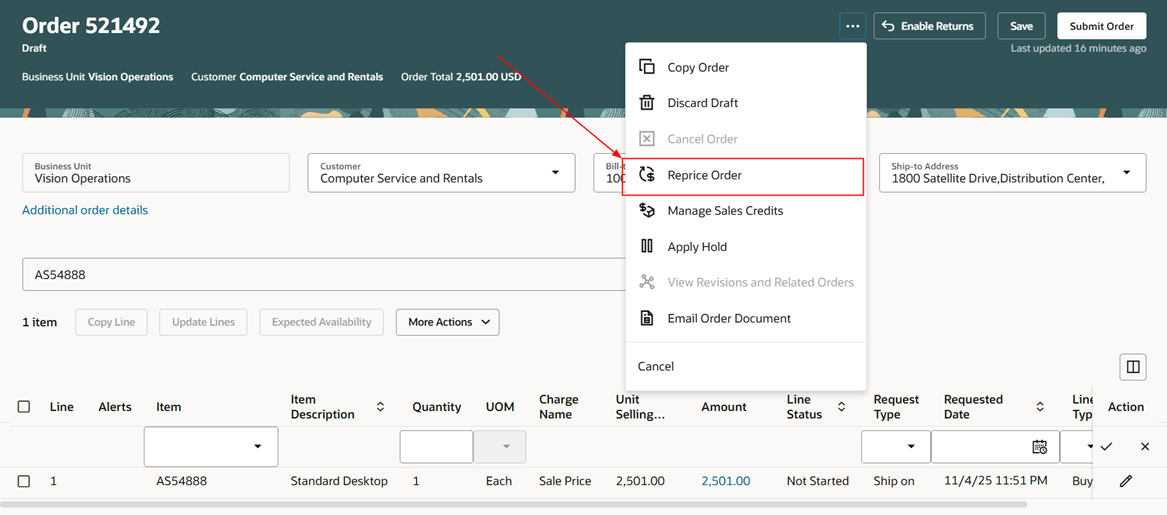
Order Management will reprice according to your current pricing rules, shipping charges, discounts, and promotions so you can get the most accurate pricing at any point in time.
Steps to enable and configure
You don't need to do anything to enable this feature.
Tips and considerations
- You can reprice an order that's in Draft status.
- To reprice an order that you already submitted, revise it first, and then reprice.
- You can reprice without making any changes on the order. For example, when you only want to apply the latest pricing set ups.
- Use the Response Time in Seconds for Save parameter to reprice offline. See Manage Order Management Parameters.
- Order Management implicitly saves the order each time you reprice.
You can't reprice when:
- Order isn't in edit mode.
- Order created from a transfer order.
- Order priced in a source system.
- You don't not have the privilege that you need to revise an order.
Key resources
Access requirements
Users who are assigned a configured job role that contains these privileges can access this feature:
- Revise Order (FOM_REVISE_ORDER_PRIV)