Redwood: Use Comparison Operators in Your Formula Rules
You can now use comparison operators in your formula rules, such as greater than, less than, or equals to. Use them to guide selections and make sure the configured item meets your requirements at run time.
Realize these benefits:
- Create more intelligent configuration logic. Compare quantities, attributes, or options directly in your rules.
- Handle more sophisticated products. Pair comparison operators with logic operators, such as implies and excludes. For example, to enforce size, power, or capacity requirements across complex equipment, electronics, or construction products.
- Prevent configurations that aren't valid. Enforce relationships, as you make selections, such as greater than or must match.
- Guide user to the correct choice. Automatically steer the user away from incompatible or invalid combinations.
- Reduce manual checks. Use rules that validate numeric, text, or Boolean conditions.
- Write cleaner, more maintainable rules. Use concise expressions that are easy to read and update as your product evolves.
Use these operators with the implies, excludes, and contributesTo operators in your formula rules:
- > (greater than)
- >= (greater than or equal to)
- < (less than)
- <= (less than or equal to)
- == (equal to)
- != (not equal to)
- && (and)
- || (or)
- ! (not)
For example:
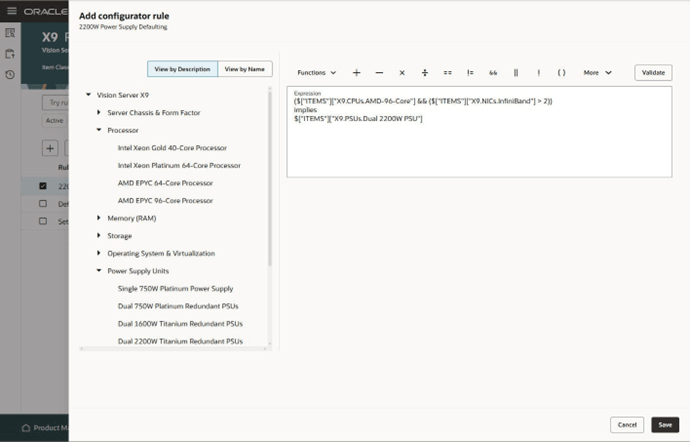
This rule states:
- If you select the AMD 96 Core Processor, and if the InfiniBand adapter's quantity is greater than 2, then automatically select the Dual 220W Titanium power supply.
Here's the demo of these capabilities:
Steps to enable and configure
To use the Redwood: Use Comparison Operators in Your Formula Rules feature, opt in to the Redwood: Author Configurator Rules in Product Management feature. If you've already opted in to this feature, no further action is required.
Tips and considerations
A comparison operator creates a logic statement that specifies a relationship or constraint between different options. It uses a condition, such as greater than or implies, to automatically enforce a requirement. The condition makes sure the options are compatible with each other and that your configuration is valid according to the values that you select. The comparison operator helps guide you when you configure the item, prevents you from making choices that aren't valid, and streamlines the configuration session.
Consider these examples:
|
Condition |
Rule |
|
If you select a computer that has a powerful CPU, then you must use a stronger fan. |
CPU > 3.0 GHz IMPLIES High Performance Cooling Fan |
|
If you select a vinyl frame, then you must use a smaller window size. |
Window Width > 24 EXCLUDES Vinyl Frames |
|
If you select a bicycle that has a larger frame, then you must use a larger wheel. |
Frame Size > 60 IMPLIES Wheel Size >= 29 |
Key resources
Access requirements
Users who are assigned a configured job role that contains these privileges can access this feature:
- Manage Configurator Rules (CZ_MANAGE_RULES_PRIV)