Redwood: View Real Time Pricing With Configured Items
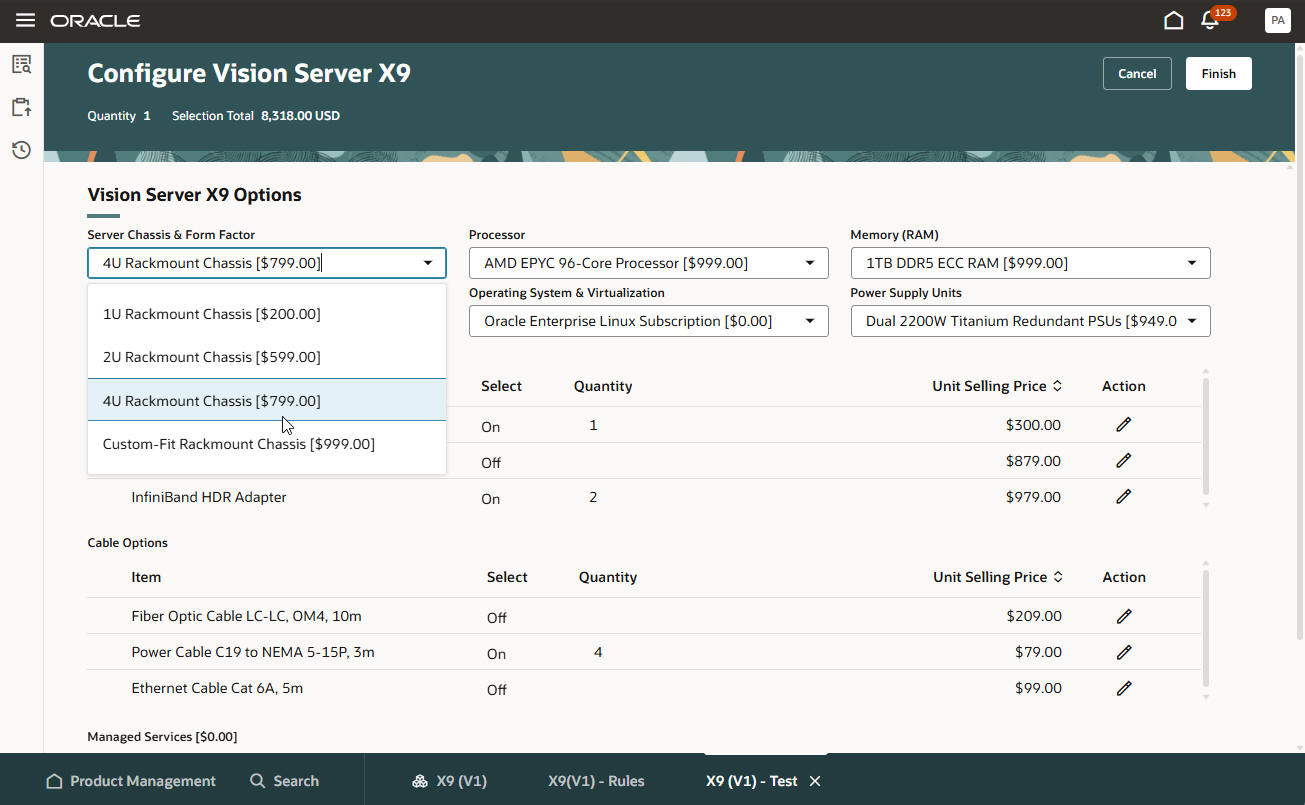
View real-time pricing while you configure an item at run time. Watch prices and discounts change when you select each configurable option according to the pricing strategy in Oracle Pricing.
Verify your pricing setup directly in the Product Management work area while you set up your configurator model.
Realize these benefits:
- View price instantly. View price changes while you select options so you can understand how each choice affects the total price on each sales order.
- Improve accuracy and reduce rework. Confirm that discounts and pricing strategies apply correctly while you configure the item and before you submit the sales order.
- Validate your pricing setup. Testing pricing behavior directly in Product Management without having to use the Order Management work area.
- Increase transparency. Allow your sales and customer service teams to view itemized totals and applied discounts while the configuration evolves.
- Protect sensitive price data. Use an order management parameter to control the pricing details that configurator displays at run time.
- Keep pricing consistent across channels. Use a single pricing strategy that determines pricing for all configuration sessions and sales orders.
Try it:
- Go to Home > Product Management > Show More > Product Management Overview > Search.
- Search for and open your item for editing, then click Structures > Configurator Rules > Actions > Test Configurator Model.
- Set the Pricing Strategy test parameter to the strategy that you want to test:
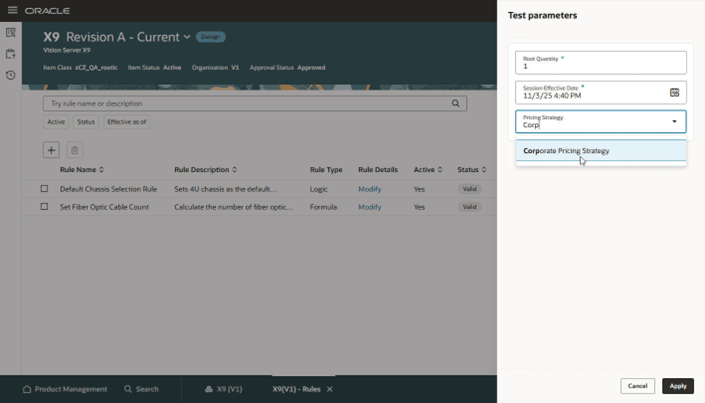
- Examine real-time pricing updates while you configure the item. You can do this while you test the model in the Product Management work area or while you configure it on a sales order in the Order Management work area. Configurator will automatically apply prices and discounts for each configurable option that you select according to the pricing strategy:
Here's the demo of these capabilities:
Steps to enable and configure
To use the Redwood: View Real Time Pricing With Configured Items feature, you must opt in to the following features:
- Redwood: Author Configurator Rules in Product Management (available in the Product Management offering)
- Redwood: Manage Configured Items on Sales Orders (available in the Order Management offering)
If you've already opted in to these features, no further action is required.
Tips and considerations
- You must assign a pricing strategy to each model's component in the Pricing Administration work area before you set up the configuration in the Product Management work area. If you don't, the work area will display Price Unavailable next to the component.
- You can price the entire model in Product Management even if you haven't assigned a pricing strategy to each component. You can't do this in the classic Configurator Models work area.
Key resources
Access requirements
Use these privileges to test pricing in the Product Management work area:
- Manage Configurator Rules (CZ_MANAGE_RULES_PRIV)
- Test Configurator Model (CZ_TEST_MODEL_PRIV)
- Access Configurator Runtime (CZ_CONFIGURATOR_RUNTIME_ACCESS_PRIV)
- Access HCM Common Components (HRC_ACCESS_HCM_COMMON_COMPONENTS_PRIV)
- Manage HCM Rules (HRC_MANAGE_HCM_RULES_PRIV)
Or use these duty roles:
- Redwood Configurator Manager (ORA_CZ_REDWOOD_MANAGER_DUTY)
- Redwood Configurator Manager (ORA_REDWOOD_MANAGER_DUTY_HCM) - For access to the Rule Builder details
- Redwood Configurator Reviewing (ORA_CZ_REDWOOD_REVIEWING_DUTY) - Optional for read-only access to the Configurator Rule details
- Redwood Configurator Reviewing (ORA_CZ_REDWOOD_REVIEWING_DUTY_HCM) - Optional for read-only access to the Rule Builder details
Users who are assigned a configured job role in Product Lifecycle Management that contains these functional privileges can access this feature:
To access the item on a Redwood page:
- View Item Redwood Items (EGP_VIEW_REDWOOD_ITEM_PRIV)
- Manage Item Redwood Items (EGP_MANAGE_REDWOOD_ITEM_PRIV)
To create, manage, or view the item structure on a Redwood page:
- Create Item Structure (EGP_CREATE_ITEM_STRUCTURE_PRIV)
- Manage Item Redwood Structures (EGP_MANAGE_REDWOOD_ITEM_STRUCTURE_PRIV)
- View Item Redwood Structures (EGP_VIEW_REDWOOD_ITEM_STRUCTURE_PRIV)
To search for items on Redwood pages:
- Product Search (ORA_EGI_PRODUCT_SEARCH_DUTY)
- Privileges with Redwood tags are new.
To use the Order Management work area, no new privileges were introduced to support this feature. For the existing privileges, see the Access Requirements that you need to create and manage sales orders.