Redwood: Configure Nested Models
Configure an item that has nested models. View all the required and optional models that are in the model's structure, then select the items that you need and set their quantities. You can also set up a configuration rule that automatically makes these selections and sets quantities for you.
Realize these benefits:
- Understand complex products. You can view each required and optional child model in one clear, structured view.
- Save time on repetitive choices. Create a rule that automatically picks the correct child model and that sets default quantities for you.
- Keep configurations accurate. Use model logic that prevents combinations that aren't valid across parent and child models.
- Give clearer visibility. Give your sales and customer service teams visibility into how each child model fits into the entire product, making complex configurations easier to explain and review.
- Support richer product offerings. This feature makes the configuration experience easier for the people who use it every day.
You can now view child models at run time, and you can select and set the quantity on each child model:
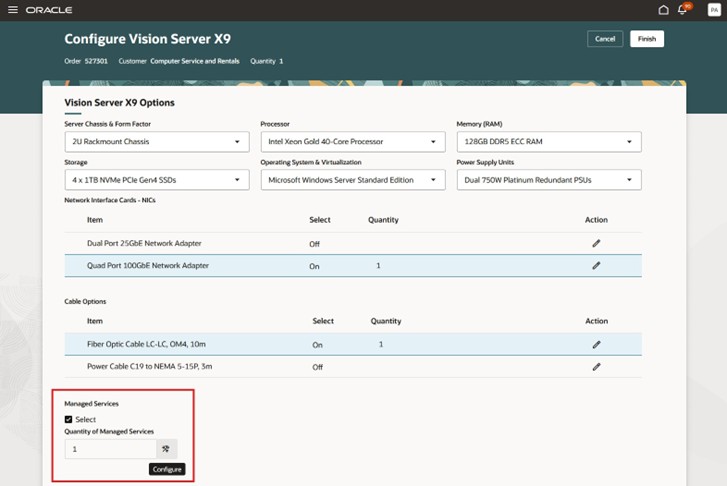
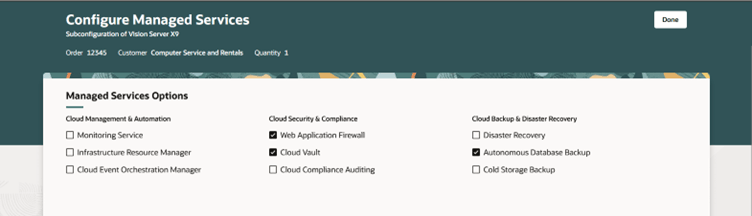
To configure the child model, click Configure, then view and make selections on the child model:
Here's the demo of these capabilities:
Steps to enable and configure
To use the Redwood: Configure Nested Models feature, opt in to the Redwood: Manage Configured Items on Sales Orders feature. If you've already opted in to this feature, no further action is required.
Tips and considerations
You will be able to use a nested model with instantiability set to Multiple Instances in a subsequent update.
Key resources
Access requirements
Users who are assigned a configured job role that contains these privileges can access this feature:
- Use these Configurator privileges:
- Test Configurator Model (CZ_TEST_MODEL_PRIV)
- Access Configurator Runtime (CZ_CONFIGURATOR_RUNTIME_ACCESS_PRIV)
Or use these duties:
- Redwood Configurator Manager (ORA_CZ_REDWOOD_MANAGER_DUTY)
- Redwood Configurator Manager (ORA_REDWOOD_MANAGER_DUTY_HCM) - For access to the Rule Builder details
- Redwood Configurator Reviewing (ORA_CZ_REDWOOD_REVIEWING_DUTY) - Optional for read-only access to the Configurator Rule details
- Redwood Configurator Reviewing (ORA_CZ_REDWOOD_REVIEWING_DUTY_HCM) - Optional for read-only access to the Rule Builder details
Users who are assigned a configured job role in Product Lifecycle Management that contains these functional privileges can access this feature:
- To access the item on Redwood page:
- View Item Redwood Items (EGP_VIEW_REDWOOD_ITEM_PRIV)
- Manage Item Redwood Items (EGP_MANAGE_REDWOOD_ITEM_PRIV)
For Sales Users in Order Management, no new privileges were introduced to support this feature. For the existing privileges, see these topics:
- Access Requirements to create and manage sales orders