AI Agent: Diagnose Configurator Rules
Use an AI agent to automate how you diagnose and troubleshoot configurator rules. The agent systematically tests every rule in your model, identifies rules and scenarios that might cause contradictory or conflicting behavior, then lets you know which ones need your attention. Use it to help make sure your configurations are accurate and consistent.
Realize these benefits:
- Catch rule conflicts early. The agent can scan your entire model and identify contradictory or circular logic before you release changes.
- Improve your model's quality. Validate how rules behave across use cases so configurations stay accurate and predictable when you create quotes or sales orders.
- Resolve issues faster. You can review, adjust, and retest rules directly in Product Management.
- Accelerate time to market. Remove blockers when you set up and test your model. Move new or updated products to production more confidently.
- Cut downstream errors. Your sales and customer service teams will encounter fewer configuration issues in Oracle Configure, Price and Quote and in Oracle Order Management.
Try it:
- Go to Home > Product Management > Show More > Product Management Overview > Search.
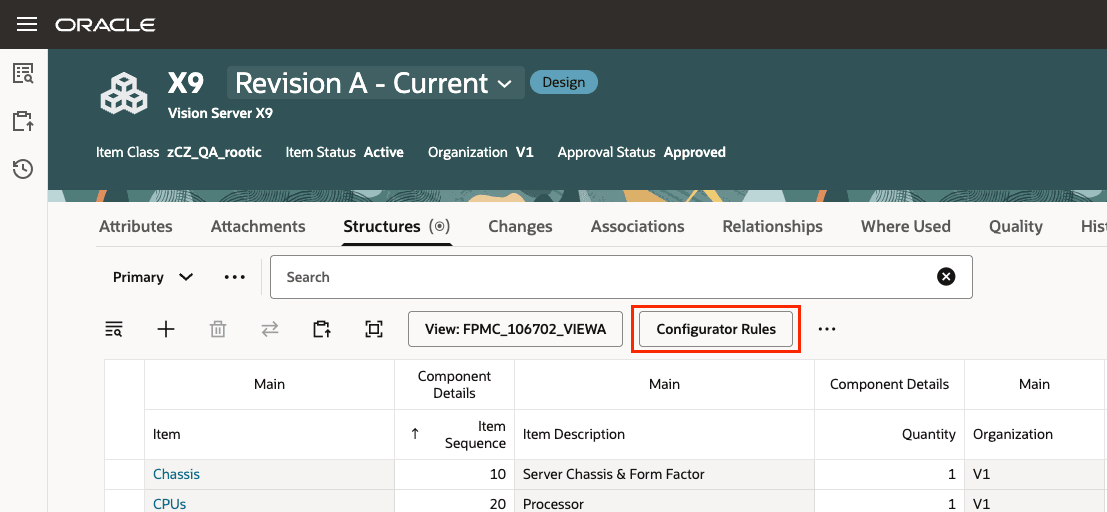
- Search for and open your item for editing, then click Structures > Configurator Rules:
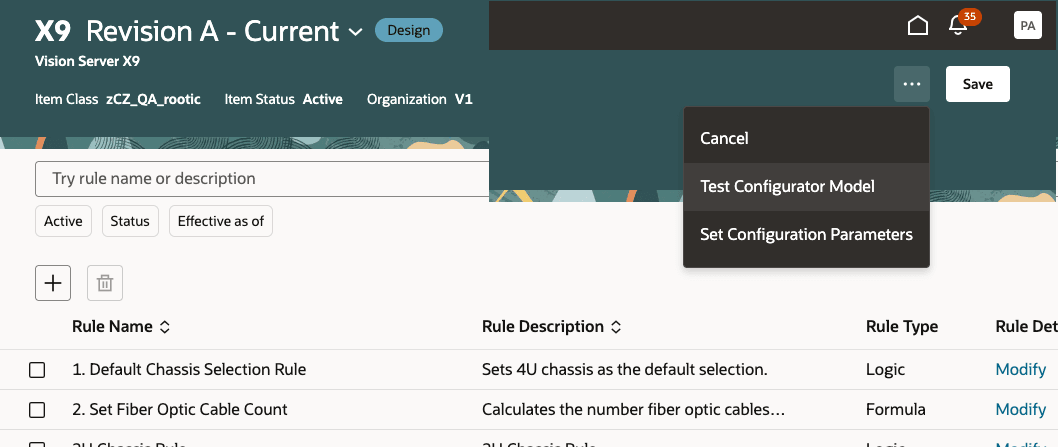
- Click Test Configurator Model:
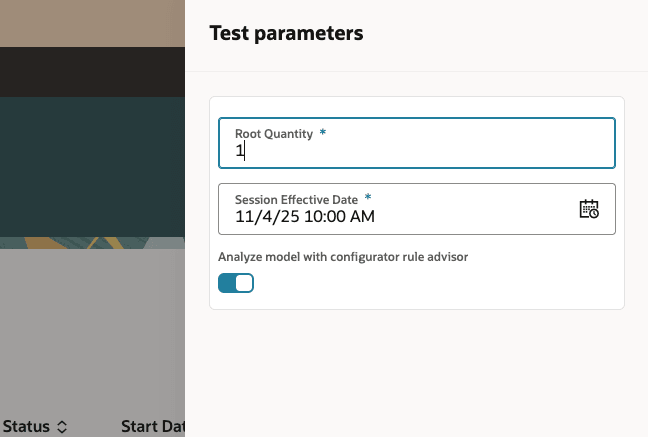
- Turn on the Analyze Model With Configurator Rule Advisor option, then click Apply:
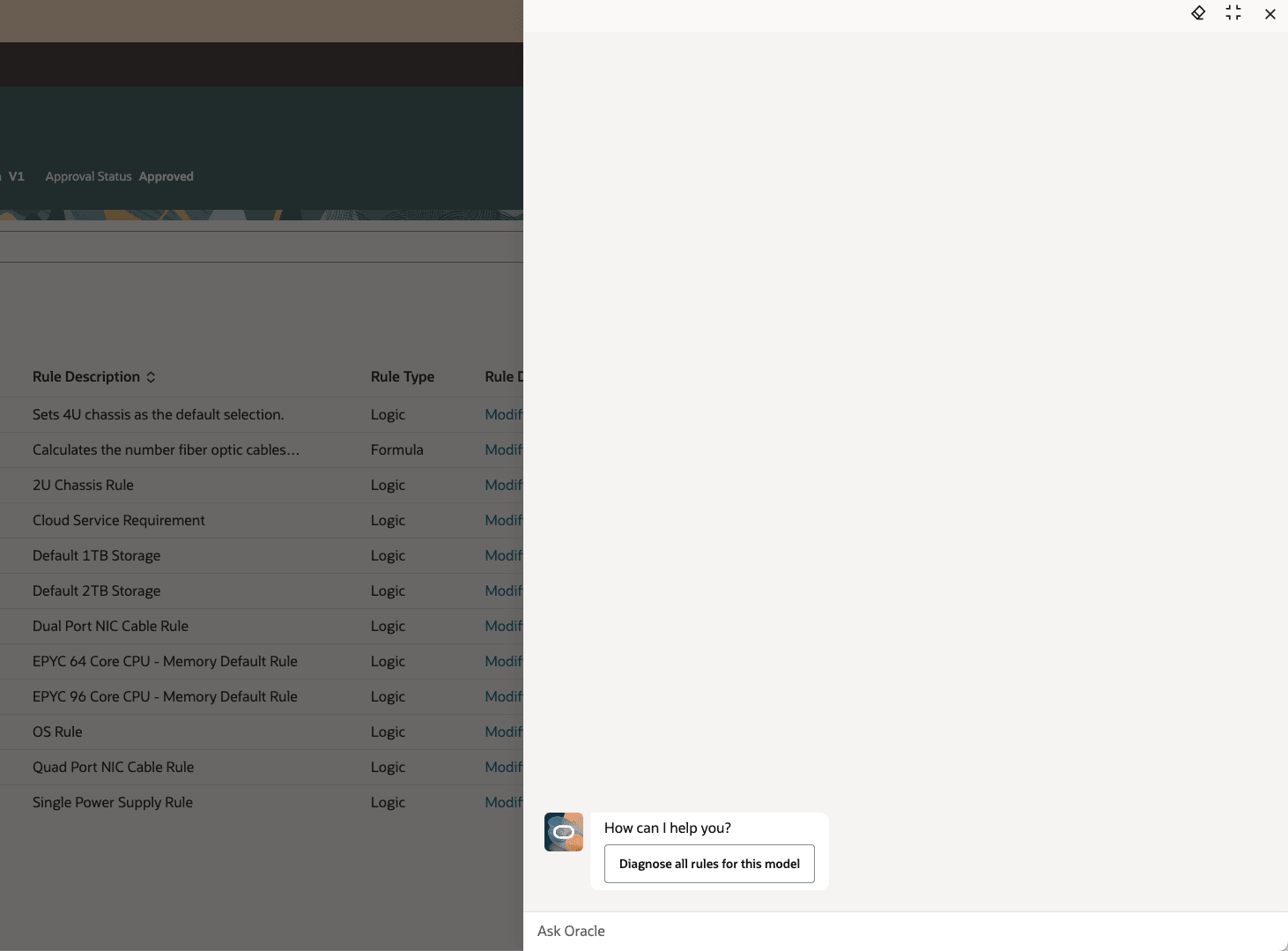
- Click Diagnose All Rules for This Model:
Note this:
- The agent will work through all of the model's nodes and try to select each one. It will gather up any conflicts it finds and display the results.
- The results will include items that you can't select and all the rules that that the item participates in.
- You can review the rules and turn off or change the ones that result in conflicting behavior.
- Make your changes, run the agent again, then verify that you don't see any conflicting behavior.
Here's the demo of these capabilities:
Steps to enable and configure
If you want to use the AI Agent: Diagnose Configurator Rules feature, then you must opt in to its parent features:
- Redwood: Author Configurator Rules in Product Management. It's in the Product Management offering.
- Redwood: Manage Configured Items on Sales Orders. It's in the Order Management offering.
If you already opted in to these parents, then you don't have to opt in again.
Tips and considerations
You can use the agent's predefined tools:
- Diagnose Rules
- Get Rules by Participant
Key resources
Access requirements
Users who are assigned a job role that contains these duty roles and privileges can access this feature.
Use these Configurator privileges:
- Manage Configurator Rules (CZ_MANAGE_RULES_PRIV)
- Test Configurator Model (CZ_TEST_MODEL_PRIV)
- Access Configurator Runtime (CZ_CONFIGURATOR_RUNTIME_ACCESS_PRIV)
- Access HCM Common Components (HRC_ACCESS_HCM_COMMON_COMPONENTS_PRIV)
- Manage HCM Rules (HRC_MANAGE_HCM_RULES_PRIV)
Or use these duties:
- Redwood Configurator Manager (ORA_CZ_REDWOOD_MANAGER_DUTY)
- Redwood Configurator Manager (ORA_REDWOOD_MANAGER_DUTY_HCM) - For access to the Rule Builder details
- Redwood Configurator Reviewing (ORA_CZ_REDWOOD_REVIEWING_DUTY) - Optional for read-only access to the Configurator Rule details
- Redwood Configurator Reviewing (ORA_CZ_REDWOOD_REVIEWING_DUTY_HCM) - Optional for read-only access to the Rule Builder details
Users who are assigned a configured job role in Product Lifecycle Management that contains these functional privileges can access this feature:
To access the item on Redwood page:
- View Item Redwood Items (EGP_VIEW_REDWOOD_ITEM_PRIV)
- Manage Item Redwood Items (EGP_MANAGE_REDWOOD_ITEM_PRIV)
To create, manage, or view the item structure on the Redwood page:
- Create Item Structure (EGP_CREATE_ITEM_STRUCTURE_PRIV)
- Manage Item Redwood Structures (EGP_MANAGE_REDWOOD_ITEM_STRUCTURE_PRIV)
- View Item Redwood Structures (EGP_VIEW_REDWOOD_ITEM_STRUCTURE_PRIV)
To search for items on Redwood pages:
- Product Search (ORA_EGI_PRODUCT_SEARCH_DUTY)
- Privileges with Redwood tags are new.