Redwood: Record Item History
You can now capture the item history using the new Redwood User Interface for the following entities:
- Item Attributes
- Item Extensible Flexfields
- Item Revisions
- Item Organization Associations
- Item Category Assignments
- Structures
- Structure Components
- Item Attachments
- Item Revision Attachments
- Structure Attachments
To view the history of an item, on the Product Management page, click the View all actions link in the Actions section as shown in the following screenshot.
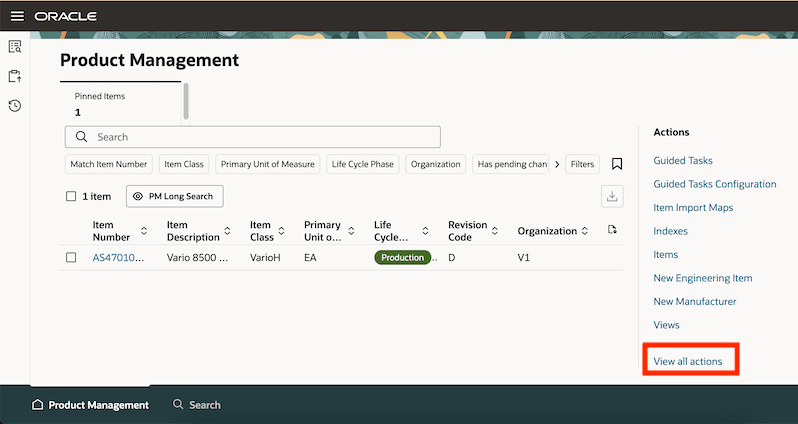
Actions Drawer – View All Actions Link
The Actions drawer is displayed. Search for and select History as shown in the following screenshot.
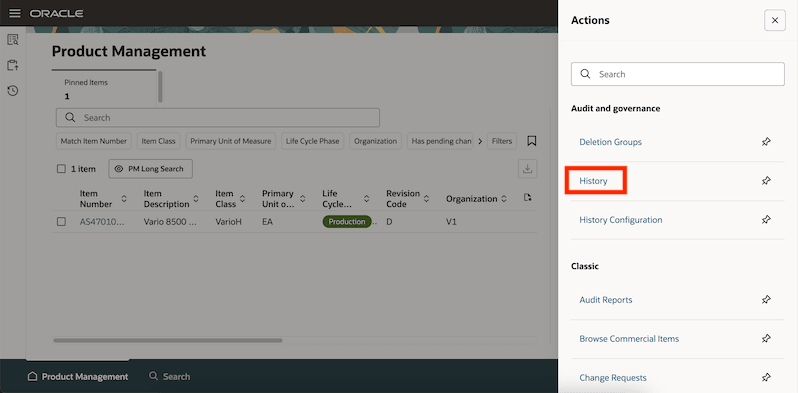
Actions Drawer - History
The Product Management History page displays the history of the items. Changes made to all the items are displayed on this page. You can see when a change was made, who made the change, and the changes that were made.
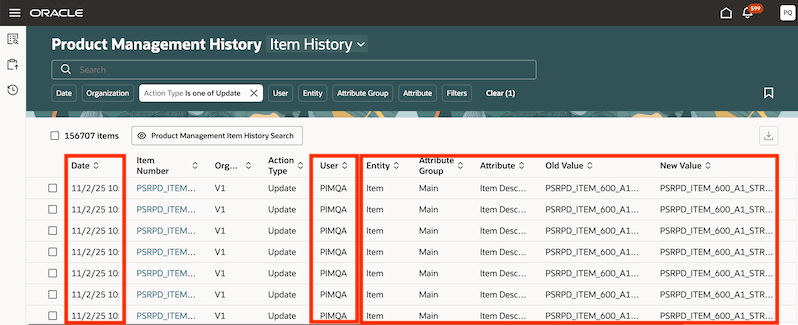
Product Management Item History Records
You can also perform the following actions on this page:
- Search for history records based on item number, attribute name, or user
- Use the suggested filters beneath the Search box to narrow down the history search results
- Select a predefined View to quickly change the layout of the history table
- Export the history records
- Save your searches to use them again later
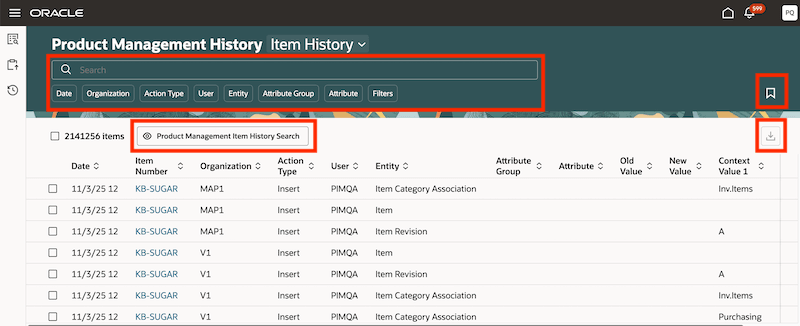
Product Management Item History Actions
You can also view the history of an item on the item’s History tab as shown in the following screenshot.
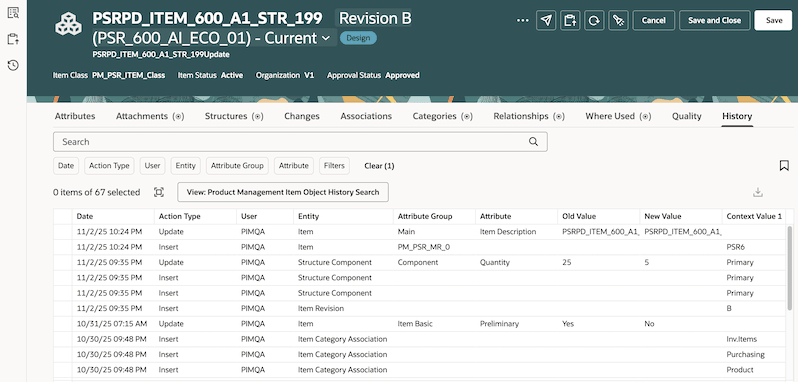
Item History Tab
You can configure the attributes for which you want to record history using the Product Management History Configuration page. On this page, you can also do the following from the Item History > Settings tab:
- Disable autocomplete on the Product Management Item History page.
- Enable grid table on the Product Management Item History page.
- Turn off real-time indexing of the recorded item history.
This feature strengthens compliance and accountability by maintaining a time-stamped audit trail of every item change, who did what and when. This reduces risk, simplifies audits, and accelerates root-cause analysis to improve data integrity and governance.
Here's the demo of these capabilities:
Steps to enable and configure
Use the Opt In UI to enable this feature. For instructions, refer to the Optional Uptake of New Features section of this document.
Offering: Product Management
After you opt into the features, perform the following:
- Assign privileges to the users who need to access Product Management History Configuration page for setting up the item attributes for which history must be captured.
- Assign privileges to the users who need to view the item history.
- Enable the Item History object:
- Go to the Product Management work area.
The Product Management page is displayed. - In the Actions section, search for and select History Configuration.
The Product Management History Configuration page is displayed. - On the Item History card, click Enable.
- Go to the Product Management work area.
- Set up the item attributes for which you want the history to be captured:
- On the Product Management History Configuration page, click the Item History card.
The Item History page is displayed. - Click Add.
The Select and add attributes drawer is displayed. - Select and add the attributes for which you want to capture the history and click Add.
- Click Save.
Tips and considerations
- Item history is captured in the base language for all attributes, except translatable text attributes, such as description and long description. For these attributes, history is captured in the session language in which the change was made.
- It’s highly recommended to disable the classic Audit for the item entities supported in Redwood Item History.
- Use the Upgrade Product Management Data scheduled process to:
- Migrate classic Audit setup to Redwood Item History Configuration: Set the Feature option to Migrate classic audit setup to Redwood.
- Migrate classic item Audit data to Redwood Item History: Set the Feature option to Migrate classic item audit data to Redwood.
- Classic Audit setup data for a particular item entity isn’t migrated to Redwood Item History Configuration even if one attribute of that item entity is added to Product Management History Configuration.
- After migrating classic item Audit data to Redwood Item History, you must rebuild the item history index from the Product Management History Configuration page. Alternatively, after enabling item history from the Product Management History Configuration page for the first time, the index rebuild process is submitted automatically.
- If you disable real-time indexing for item history from the Product Management History Configuration page, you’ve to schedule the Process Product Management History Data scheduled process to run on a periodic basis for converting attribute IDs to values and ingest the item history records into the index.
- If you’ve enabled both classic Audit and Redwood Item History, and later migrate classic item Audit data to Redwood Item History, duplicate rows are created in Redwood Item History.
- It’s recommended to assign the history roles or privileges to a super user who has access to all item data since item data security won’t apply on the history records.
- For insert action type history rows, only one history row is captured for the item entity creation. Similarly, when migrating classic item Audit data to Redwood Item History, only one insert action type history row is created in Redwood Item History. The Attribute Group, Attribute, Old Value, and New Value columns are blank for these history rows.
- Changes done to master organization-controlled attributes or entities are seen in the history report for the master organization item. Changes done to child organization-controlled attributes or entities are displayed only in the history report of the child organization item. Also, master organization-controlled operational attribute data for child organization items won’t be migrated from classic item Audit to Redwood Item History.
- History for the 4 attachments actions—Check-In, Checkout, Cancel Checkout, and Download aren’t captured if they're performed from the classic Edit Item UI.
- Similar to classic item Audit, attributes of the core item entities are force-audited when an item is deleted using a delete group.
- History isn’t recorded for the following:
- Attachments copied from one revision to another when a new revision is created from Product Development.
- Attachments that are deleted when deleting an item using a Delete Group.
- CLOB attributes and global descriptive flexfields.
- When importing items with EGP_CONVERSION_MODE profile option set to Yes even if the Redwood: Record History option is enabled.
Key resources
- Oracle Fusion Cloud SCM: Using Product Master Data Management Guide, available on the Oracle Help Center.
- Oracle Fusion Cloud SCM: Implementing Product Management Guide, available on the Oracle Help Center.
- Watch the Record Item History video.
Access requirements
Users who are assigned a configured job role that contains these duty roles and privileges can access this feature.
- Duty role and privileges to access item history records:
- Manage Product Management History Reports (ORA_EGP_AUDIT_REPORTS_DUTY)
- View Product Management History Reports (EGP_VIEW_AUDIT_REPORTS_PRIV)
- GET Product Management Index REST (EGP_GET_PM_INDEX_REST_PRIV)
- Manage Search View REST (EGP_MANAGE_SEARCH_VIEW_REST_PRIV)
- Get Redwood Settings REST (EGP_GET_REDWOOD_SETTINGS_REST_PRIV)
- Manage System Searches (HRC_MANAGE_SYSTEM_SEARCHES_PRIV)
- Access HCM Common Components (HRC_ACCESS_HCM_COMMON_COMPONENTS_PRIV)
- Use REST Service - Saved Searches (HRC_REST_SERVICE_ACCESS_SAVED_SEARCHES_PRIV)
- Duty role and privileges to set up item history:
- Manage Product Management History Configuration (ORA_EGP_AUDIT_CONFIGURATION_DUTY)
- Manage Product Management History Configuration (EGP_MANAGE_AUDIT_CONFIGURATION_PRIV)
- Manage Product Management Index REST (EGP_MANAGE_PM_INDEX_REST_PRIV)
- GET Product Management Index REST (EGP_GET_PM_INDEX_REST_PRIV)
- Rebuild Product Management Indexes (EGO_REBUILD_PRODUCT_MGT_INDEXES_PRIV)
- Manage Scheduled Job Definition (FND_MANAGE_SCHEDULED_JOB_DEFINITION_PRIV)
- Grant Search Framework Manager Permissions (FND_SEARCH_FWK_MGR_PRIV)
- Get Redwood Settings REST (EGP_GET_REDWOOD_SETTINGS_REST_PRIV)
- Manage Redwood Product Management Settings (EGP_MANAGE_REDWOOD_PM_SETTINGS_PRIV)
- Manage Redwood Settings REST (EGP_MANAGE_REDWOOD_SETTINGS_REST_PRIV)
A few of these privileges were available prior to this update.